Mailspring: View source of message
I expected to be able to view the source of my email messages.
It seems that the per-message dropdown menu would be a good place to put a View Source command.
Are there any related issues?
I could not find any issues or documentation mentioning this.
What operating system are you using?
PureOS 3
What version of Mailspring are you using?
1.0.10
Does this feature exist in another mail client or tool you use?
Yes, Apple Mail, Gmail on the web, MailMate, and every single other email client I've ever used on the desktop.
 replaid
All 14 comments
You can technically do this by clicking in the blank space to the left of the dropdown:
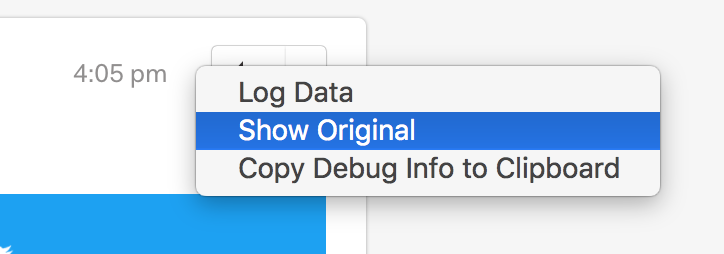
We'll definitely make this easier to find soon, it's just blocked on a bit of cleanup and making the items in the message list selectable. (So it could go in the application menu.)
 bengotow
on 19 Dec 2017
bengotow
on 19 Dec 2017
_Small bump_
I use the 1.2.1 version and i don't have this button, i would love to see this feature because i use it alot for the spam emails in gmail 🎉
 MarcHagen
on 9 Apr 2018
MarcHagen
on 9 Apr 2018
It took me a bit of time to figure out where the "blank space" was located. Found it between "reply-all" and the date/time of the message. Talk about "hidden". You guys did a good job hiding it for some unknown reason? Not totally convinced MailSpring is a viable email client but will keep an open mind. No pun intended....
 sdpper
on 6 May 2018
sdpper
on 6 May 2018
@sdpper thx for pointing out where that button is. Indeed well hidden.
MarcHagen
on 6 May 2018
@TakeMeNL your welcome! I just uninstalled as MailSpring is not really ready for me. They do have a wonderful head start however and if worked would have gladly paid. Another issue is I could not find anywhere the ability to set a delete retention period on mail folders which is important. Manually cleaning would be difficult for me. So will stay with Thunderbird and maybe check them in a year or two. Also their limit on 4 accounts was another show stopper. Those kind of games are no fun. They should provide a fully functional 30 day versus doing a limit as I'm not sure it could handle more than 4 accounts anyway. Seem to take forever to sync.
sdpper
on 6 May 2018
Hello, any update on that feature ? Thanks
 KaKi87
on 2 Oct 2018
KaKi87
on 2 Oct 2018
I'm using Ubuntu 18.04, with Mailspring 1.4.2, and right-clicking in the white space between the reply button and date/time in an individual message does not show any kind of popup for looking at the message source.
 dinoboy197
on 3 Oct 2018
dinoboy197
on 3 Oct 2018
@dinoboy197 it's a left-click
 d3v2a
on 11 Oct 2018
d3v2a
on 11 Oct 2018
Thank you @icfr ! That solves my issue. I do see the hidden menu now.
dinoboy197
on 12 Oct 2018
Just another request from me about having a button to save an email to source format, for example, a .eml file. I am using an external antispam filter, sometimes spam went through, and I need to train the system with new spam sample.
In Mail app, it's straightforward to save any email to .eml format. It would be great if Mailspring has that feature too.
 phamhung77
on 18 Oct 2018
phamhung77
on 18 Oct 2018
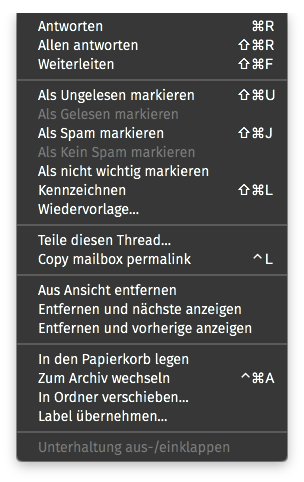
A menu item in "Thread" or a shortcut key would be nice too. - Think of the developers!
 CodeBrauer
on 1 Jul 2019
CodeBrauer
on 1 Jul 2019
This GitHub issue will rack up thousands of unnecessary views unless the 'view source' option is made visible somewhere. I don't see any reason for it to be concealed like this -- there is no risk to the user in viewing the source of their own emails.
 samtuke
on 3 Aug 2019
samtuke
on 3 Aug 2019
I agree this is something that "should" be available and easy to find, it took me Google to find this thread and being able to find out how to view messages source while using MailSpring.
I'm sure many would appreciate it.
Besides that awesome work, MailSpring is the best client in Linux!
 RealAct
on 27 Aug 2019
RealAct
on 27 Aug 2019
I also don't understand why this 'essential' feature needs to be hidden in that way. It would be easy to solve it with a menu entry.
 bluepangolin55
on 21 Jan 2020
bluepangolin55
on 21 Jan 2020
Related issues
 imbrn
·
3Comments
imbrn
·
3Comments
 enoversum
·
3Comments
enoversum
·
3Comments
 vsanchez
·
3Comments
vsanchez
·
3Comments
 tuxmachine
·
3Comments
tuxmachine
·
3Comments
 scooby
·
3Comments
scooby
·
3Comments
Most helpful comment
You can technically do this by clicking in the blank space to the left of the dropdown:
We'll definitely make this easier to find soon, it's just blocked on a bit of cleanup and making the items in the message list selectable. (So it could go in the application menu.)