Mailspring: [Feature Request] Ability to move IMAP folders from the left sidebar
What operating system are you using?
Windows 10
What version of Mailspring are you using?
1.0.7
Bug?
Do you have any third-party plugins installed? If so, which ones?
No.
Is the issue related to a specific email provider (Gmail, Exchange, etc.)?
No.
Is the issue reproducible with a particular attachment, message, signature, etc?
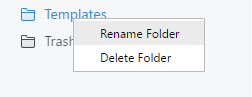
Hi, the move folders option in Mailspring is missing. Neither in right click (shown in image below) or in drag and drop.
--
 abdonmosqueira
All 9 comments
Hey! Ahh yeah - we really need to get the sidebar rebuilt so you can A) hide things and B) drag and drop to move / re-order items. In the meantime, you can nest folders by renaming them with a path-style syntax. So in your picture, to move Templates inside of Trash, you could rename it to Trash/Templates.
 bengotow
on 12 Nov 2017
bengotow
on 12 Nov 2017
Hey, just wanted to jump on this thread. Being able to move and organise folders is extremely important for a professional email program. I think this hole in functionality that needs to be addressed. It's actually making it difficult to just use mailspring without feeling the need to jump back into Gmail or Apple Mail to organise folders, and move things around. I don't mean for this message to be negative, but I just wanted to voice that this is a major issue for me, and is something that I think should be near the top of the todo list. It's a standard function that I think almost everyone expects in a mail client. Cheers, Ned
 neddy
on 7 May 2018
neddy
on 7 May 2018
January 2nd 2019, still cant drag and drop folders.
Renaming with path syntax is fine, but it's not obvious without looking it up that that's what you have to do.
 RedactedProfile
on 2 Jan 2019
RedactedProfile
on 2 Jan 2019
Downloaded and installed Mailspring about two days ago. After a day, I thought it was the best mail client I've ever used... Until I found out it was impossible to drag'n'drop folders..
I find it mandatory to be able to drag'n'drop folders for a mail client to be really useful. Otherwise, it's impossible to archive or even work properly.
I will not be using Mailspring if this isn't fix anytime soon.
Also, renaming with path syntax isn't working for me on Ubuntu 18.04... Nothing works when it comes to nesting folders into others.
 hexangel616
on 30 Jan 2019
hexangel616
on 30 Jan 2019
@hexangel616
Also, renaming with path syntax isn't working for me on Ubuntu 18.04... Nothing works when it comes to nesting folders into others.
check with your mailserver's admin, im on 18.04 as well and the renaming thing is fine
RedactedProfile
on 10 Feb 2019
Maybe this is just my workflow but just to top it on this "issue". Once a year I archive my mails by adding a year Folder to the Archive and moving the whole folder structure of the last year to that new folder. This is not possible in Mailspring "right now".
Additionally IMHO it is not possible to move existing folders correctly via renaming. Let's face that example:
1) Add a Folder "Current"
2) Add a Folder "Current.Test", which in my configuration adds Test under Current
3) Add a Folder "Current.Test.Test2", Subfolder Test2 under Test under Current
4) Change Name of Test2 -> it is not possible to move Test2 out of Test, as during name change you do not see the whole path but just the last segment. Changing this to the whole path starts the nesting not in root but relatively to the place where I currently am (which makes in that case totally sense as if I would forget to add the whole path during editing the folder would just vanish to somewhere in root :-D).
Hopefully this is understandable...
 tjschneider
on 21 Oct 2019
tjschneider
on 21 Oct 2019
As to this day, still not possible to drag folders.
Renaming with / or . won't do the trick here (Win10).
Renaming it back is impossible, even after restarting the program.
Oh well.
 Fanchig
on 5 Feb 2020
Fanchig
on 5 Feb 2020
@Foundry376 Your mail client is not complete. You are losing users over this. Why should I pay 8$ / month for a mail client that does not offer me a decent folder structure to work with?
 Deichscheich
on 31 Aug 2020
Deichscheich
on 31 Aug 2020
2 years later and this issue is still not fixed ... renaming folders with a / doesn't work.
sigh
 yenzminnaert
on 20 Sep 2020
yenzminnaert
on 20 Sep 2020
Related issues
 enoversum
·
3Comments
enoversum
·
3Comments
 3v1n0
·
3Comments
3v1n0
·
3Comments
 vsanchez
·
3Comments
vsanchez
·
3Comments
 DylanC
·
3Comments
DylanC
·
3Comments
 scooby
·
3Comments
scooby
·
3Comments
Most helpful comment
Hey! Ahh yeah - we really need to get the sidebar rebuilt so you can A) hide things and B) drag and drop to move / re-order items. In the meantime, you can nest folders by renaming them with a path-style syntax. So in your picture, to move Templates inside of Trash, you could rename it to
Trash/Templates.