Mailspring: [Feature Request] Replace the OS native titlebar on Linux
Please provide your own titlebar if you're going to fully theme an app. I know this is a fork of Nylas and so not necessarily an oversight on your part, but it would still be great if this could be addressed. At the moment it looks like you're loading a web page into a window wrapper, which is effectively what is happening but could we at least pretend it's not? ;)
 Naatan
All 11 comments
(This only applies to Windows, where the thin white bar is always used, and Linux, where we gave up on trying to find a style everyone could agree on.) PRs welcome!
 bengotow
on 12 Oct 2017
bengotow
on 12 Oct 2017
I'm confused on "find a style everyone could agree on", the style should be that of the theme Mailspring uses. The whole point is that it matches the theme.
I don't know why almost all Electron apps seem to treat anything that isn't macOS as some sort of bastard OS. There's really no reason they should be treated differently when it comes down to simple stuff like this. Atom itself is a great example of this, Windows and Linux still don't have custom titlebars (tabs in titlebar). Why? I've played around with Electron and far as I could tell from my experiments there is no real challenge in implementing this on other platforms.
Naatan
on 12 Oct 2017
Hey! Lemme see if I can find the thread - basically there's no consistent style / positioning of the close / minimize / maximize controls on Linux and if irc folks thought the HTML+CSS one looked a bit off. Also I think the menu bar no longer appeared under the bar (since it was in HTML / CSS). We should definitely try it again because the theme-ability is a huge win!
bengotow
on 12 Oct 2017
Well, I guess having the position of the window controls matching the rest of the system is a requirement all Linux user can agree on. But if completely client-side decorated windows should be achieved on Windows and Mac, themes will have to handle window controls on the right and the left anyway. So this is not much of an additional burden—apart from detecting where the controls should go—, is it?
 jGleitz
on 12 Oct 2017
jGleitz
on 12 Oct 2017
You could always make it a pref: Use custom titlebar or not. For those who don't like your implementation they can just use the native titlebar or open a ticket which can then be handled case by case.
Naatan
on 12 Oct 2017
Fwiw, the UI is a bit crude but this is how we do it with Komodo:
Naatan
on 12 Oct 2017
god I fucking hate softwares who do this, it is absolutely disgusting. Definitely needs to be a setting. Also damn I've never seen someone so hellbent on this software feature, this is a first to me.
 oxysoft
on 13 Oct 2017
oxysoft
on 13 Oct 2017
Haha whoa there @oxysoft it's just a menu bar it'll be ok. We can always make it a setting if there are two (roughly evenly split) schools of thought here.
Been thinking about this more, and it'd definitely be nice if we could find a nice set of options / styles and do the HTML+CSS window frame on Linux. Right now we have some flags we pass to the window constructor differently based on the platform, and it's hard to get them right and make sure we don't break them refactoring things: https://github.com/Foundry376/Mailspring/blame/master/app/src/browser/window-launcher.es6#L29
bengotow
on 13 Oct 2017
This has landed in the PR above.
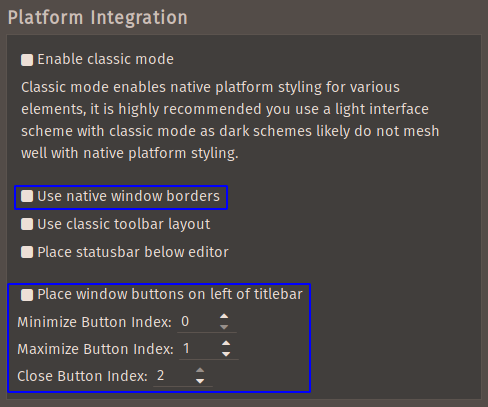
In the next release I'm adding a preference for this, as well as a new option to use the "right corner hamburger menu" and completely custom window controls. I think this will improve things a lot, especially on distros like Elementary where the standard window frame is very tall.
New options:

"Right corner hamburger" option - note the system window frame is not used at all, so it'll look like this (or your selected theme) on all Linux distros:

bengotow
on 1 Jan 2018
Hey folks—thanks for reporting this! Version 1.1.0 shipped today which fixes this issue and includes an overhauled composer with support for RTL text, font colors, sizes and styles, improved markdown shortcuts and a lot of other small improvements. You can grab the latest version from https://getmailspring.com/download.
bengotow
on 23 Jan 2018
Can this also be added to Windows?
 ahmadnassri
on 31 Oct 2019
ahmadnassri
on 31 Oct 2019
Related issues
 DanielRios549
·
3Comments
DanielRios549
·
3Comments
 3v1n0
·
3Comments
3v1n0
·
3Comments
 ghost
·
3Comments
ghost
·
3Comments
 jerry79
·
3Comments
jerry79
·
3Comments
 enoversum
·
3Comments
enoversum
·
3Comments