Mailspring: Error: Identity is missing required fields
As we already started discussing in #13 an error occurs when connecting to ~IMAP/SMTP~ accounts. I see it in the welcome wizard, but others seem to experience it with already set up accounts, too.
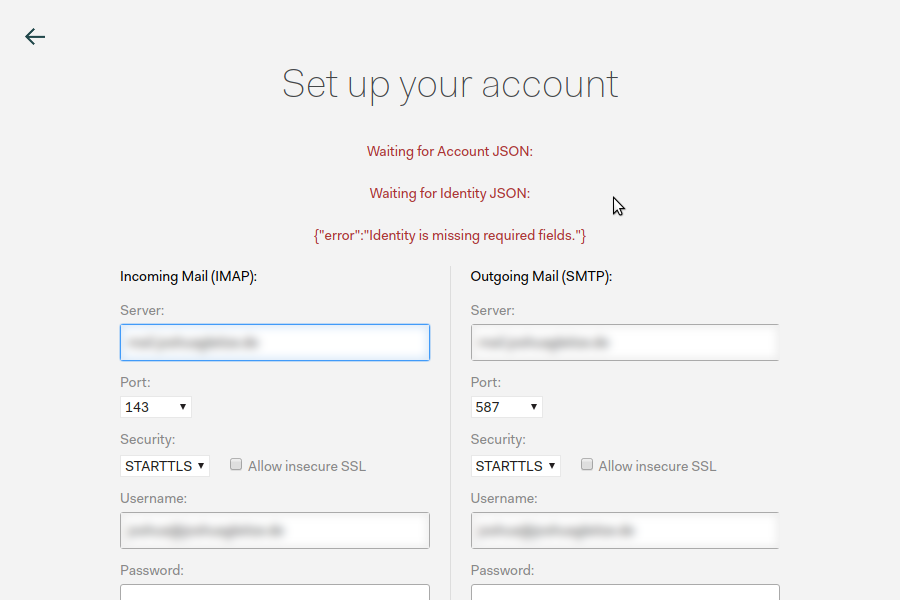
the error message is:
Waiting for Account JSON:

Waiting for Identity JSON:

{"error":"Identity is missing required fields."}
I am sure that the entered data is correct.
Are there any related issues?
We started discussing it in #13
What operating system are you using?
Ubuntu 17.04
What version of Mailspring are you using?
1.0.3
Bug?
Do you have any third-party plugins installed? If so, which ones?
no
Is the issue related to a specific email provider (Gmail, Exchange, etc.)?
~IMAP/SMTP~ also happens with Gmail: #125
Is the issue reproducible with a particular attachment, message, signature, etc?
no
 jGleitz
All 26 comments
Thanks for opening this issue.
Same here.
 JunnanZ
on 11 Oct 2017
JunnanZ
on 11 Oct 2017
I have the same issue on Ubuntu 16.04
 InfopactMLoos
on 11 Oct 2017
InfopactMLoos
on 11 Oct 2017
I also got it once (wasn't able to reproduce the bug). Here my backtrace:
{ Error:
Waiting for Account JSON:

Waiting for Identity JSON:

{"error":"Identity is missing required fields."}
    at ChildProcess._proc.on.code (/src/mailsync-process.es6:114:18)
    at emitTwo (events.js:106:13)
    at ChildProcess.emit (events.js:194:7)
    at maybeClose (internal/child_process.js:899:16)
    at Socket.<anonymous> (internal/child_process.js:342:11)
    at emitOne (events.js:96:13)
    at Socket.emit (events.js:191:7)
    at Pipe._handle.close [as _onclose] (net.js:510:12)
  message: '\nWaiting for Account JSON:\n\nWaiting for Identity JSON:\n\n{"error":"Identity is missing required fields."}' } { pluginIds: [] }`
 Bouska
on 11 Oct 2017
Bouska
on 11 Oct 2017
After retrying and restarting the application a couple times I seem to get a step further. Now it fails on the SMTP step. This is my error log, redacted some stuff for obvious reasons:
* OK The Microsoft Exchange IMAP4 service is ready.
1 CAPABILITY
* CAPABILITY IMAP4 IMAP4rev1 AUTH=NTLM AUTH=GSSAPI AUTH=PLAIN UIDPLUS CHILDREN IDLE NAMESPACE LITERAL+
1 OK CAPABILITY completed.
2 LOGIN "MYUSERNAME" *********
2 OK LOGIN completed.
3 CAPABILITY
* CAPABILITY IMAP4 IMAP4rev1 AUTH=NTLM AUTH=GSSAPI AUTH=PLAIN UIDPLUS CHILDREN IDLE NAMESPACE LITERAL+
3 OK CAPABILITY completed.
4 NAMESPACE
* NAMESPACE (("" "/")) NIL NIL
4 OK NAMESPACE completed.
5 LIST "" "*"
* LIST (\HasNoChildren) "/" Agenda
* LIST (\HasNoChildren) "/" Concepten
* LIST (\HasChildren) "/" Contactpersonen
* LIST (\Marked \HasNoChildren) "/" "Contactpersonen/Lync Contacts"
* LIST (\HasNoChildren) "/" "Conversation History"
* LIST (\HasNoChildren) "/" Drafts
* LIST (\HasNoChildren) "/" "Infected Items"
* LIST (\HasNoChildren) "/" Journaal
* LIST (\HasNoChildren) "/" Junk
* LIST (\HasNoChildren) "/" Notities
* LIST (\HasNoChildren) "/" "Ongewenste e-mail"
* LIST (\Marked \HasChildren) "/" INBOX
5 OK LIST completed.


----------SMTP----------
220 SERVERDOMAIN Microsoft ESMTP MAIL Service ready at Wed, 11 Oct 2017 15:15:07 +0200
EHLO MYPC
250-SERVERDOMAIN Hello [SERVERIP]
250-SIZE 104857600
250-PIPELINING
250-DSN
250-ENHANCEDSTATUSCODES
250-STARTTLS
250-AUTH GSSAPI NTLM
250-8BITMIME
250-BINARYMIME
250 CHUNKING
STARTTLS
220 2.0.0 SMTP server ready
EHLO MYPC
250-SERVERDOMAIN Hello [SERVERIP]
250-SIZE 104857600
250-PIPELINING
250-DSN
250-ENHANCEDSTATUSCODES
250-AUTH GSSAPI NTLM LOGIN
250-8BITMIME
250-BINARYMIME
250 CHUNKING

SMTP Last Response Code: 250

SMTP Last Response: SERVERDOMAIN Hello [SERVERIP]
SIZE 104857600
PIPELINING
DSN
ENHANCEDSTATUSCODES
AUTH GSSAPI NTLM LOGIN
8BITMIME
BINARYMIME
CHUNKING


mailsmtp Last Error Code: 17

mailsmtp Last Error Location: 10
Not sure if this is still related to this issue now, I can create a new issue if needed.
InfopactMLoos
on 11 Oct 2017
Hi guys, I somehow made it work and I don't know why. These are what I've done:
- I deleted
~/.config/Mailspring/but same issue persisted. - I deleted
~/.config/Mailspring/Cache/and~/.config/Mailspring/config.jsonand it worked!
Please tell me whether this works for you.
JunnanZ
on 11 Oct 2017
Neither of these worked for me
 ZakharyH
on 11 Oct 2017
ZakharyH
on 11 Oct 2017
@JunnanZ tyvm. i have deleted ~/.config/Mailspring/Cache/ and ~/.config/Mailspring/config.json. it works for me.
 ruslansin
on 11 Oct 2017
ruslansin
on 11 Oct 2017
Hey folks—when you originally installed Mailspring and signed in, did you see a "Password Management Error" dialog box? I think this is happening because Mailspring didn't actually save your password / API auth token anywhere, and now it's unable to connect an account. In the next version we'll add some checks to make sure your password was saved properly, and take you back to sign in otherwise.
In the meantime, deleting those folders that @JunnanZ noted and signing in using 1.0.3 should do the trick.
 bengotow
on 11 Oct 2017
bengotow
on 11 Oct 2017
@bengotow Yes, I saw the password management error. But I solved this problem by installing gnome-keyring. I think the aur package should change its dependency of libgnome-keyring to gnome-keyring.
JunnanZ
on 11 Oct 2017
I don't remember getting a "Password Management Error" dialog box, but I remember getting 404 errors on http://id.getmailspring.com/auth/gmail/token?key=xxxx; I don't know if it can be related.
Bouska
on 11 Oct 2017
I'm also having this issue after installing on Windows 10
 deanpcmad
on 11 Oct 2017
deanpcmad
on 11 Oct 2017
I did not see such a dialogue box (but I also never successfully set up an email account, as I had this error in the welcome wizard). Removing the folders like @JunnanZ did nevertheless solve this specific issue for me. I can now use the app, although syncing still doesn’t work. I will try to file extra issues for that.
jGleitz
on 11 Oct 2017
@jGleitz Have you tried "reset email cache" in settings? I had some issue with syncing before and that fixed it.
JunnanZ
on 11 Oct 2017
Same error here in ArchLinux. I have deleted ~/.config/Mailspring/Cache/ and ~/.config/Mailspring/config.json. is not works for me.
 elav
on 12 Oct 2017
elav
on 12 Oct 2017
Sorry it took so long for me to report back with results
Tried deleting ~/.config/Mailspring/Cache/ and ~/.config/Mailsping/config.json and it didn't work.
However, everytime I started the app, I always got a password management error. Tried installing gnome-keyring and then deleting the same folders and it worked. Arch/KDE if that helps
ZakharyH
on 12 Oct 2017
@ZakharH 's solution worked for me on Arch/XFCE.
 justindoran
on 12 Oct 2017
justindoran
on 12 Oct 2017
ZakharH's solution worked for me about password storage error, but, same problem about Setup my account with Gmail.
elav
on 12 Oct 2017
Hmmm. Rare. I used my Outlook account and I had no problems. Then, with the mail client open, I added a couple of Gmail accounts and it worked.
elav
on 12 Oct 2017
Gmail or G Suite.
Waiting for Account JSON:
Waiting for Identity JSON:
{"error":"Identity is missing required fields."}
Windows 10!
 fernandolguevara
on 12 Oct 2017
fernandolguevara
on 12 Oct 2017
Hey folks! Sorry for the hassle—I'm investigating what could cause this on Windows. On Linux, the solution @ZakharH mentioned should work. You may also want to try installing libsecret or making it a dependency of the package.
bengotow
on 13 Oct 2017
Same problem for me on Windows 10 👍
But I've just got this :
Waiting for Account JSON:
Waiting for Identity JSON:
 Toinane
on 19 Oct 2017
Toinane
on 19 Oct 2017
Similar problem here.
SMTP security is set for none and it is asking me for a username and password anyway.
 jmcboots
on 1 Nov 2017
jmcboots
on 1 Nov 2017
However, everytime I started the app, I always got a password management error. Tried installing gnome-keyring and then deleting the same folders and it worked. Arch/KDE if that helps
Worked for me as well on Arch/KDE. Should be promoted more popular to reduce debugging and frustration times for new Arch users @bengotow
 pat-s
on 30 Nov 2017
pat-s
on 30 Nov 2017
Hey folks - thanks for the updates. In 1.0.9, we're making the "password management error" dialog fatal (it quits the app now instead of saving your ID and continuing into authentication, which then fails over and over.) I'll also put the info about gnome-keyring in the knowledge base article at https://foundry376.zendesk.com/hc/en-us/articles/115001875571.
I'm still trying to figure out what can cause this on Windows other than using a Guest account. Hoping to have that narrowed down soon.
bengotow
on 2 Dec 2017
Hi all,
Good evening, I need know works with database or local storage in mailspring pro.
Thanks
Juan José
 cliente-ibsaco
on 13 Dec 2017
cliente-ibsaco
on 13 Dec 2017
Hey folks—the knowledge base entry and error message for this scenario was improved in a release a while back and this should no longer appear. Gonna go ahead and close this - thanks to everyone who helped triage!
bengotow
on 6 Feb 2018
Related issues
 DanielRios549
·
3Comments
DanielRios549
·
3Comments
 psivesely
·
3Comments
psivesely
·
3Comments
 DylanC
·
3Comments
DylanC
·
3Comments
 3v1n0
·
3Comments
3v1n0
·
3Comments
 scooby
·
3Comments
scooby
·
3Comments
Most helpful comment
Sorry it took so long for me to report back with results
Tried deleting ~/.config/Mailspring/Cache/ and ~/.config/Mailsping/config.json and it didn't work.
However, everytime I started the app, I always got a password management error. Tried installing
gnome-keyringand then deleting the same folders and it worked. Arch/KDE if that helps