Mailspring: [Win10] [1.0.3] "We encountered a problem with your local email database. Error" on install

On new installation of 1.0.3 on Windows 10, this error is encountered. A slight amount of progress may be made in the installer, but it gets stuck when adding accounts.
Rebuild does not work.
Running as Administrator does not fix the problem.
Are there any related issues?
14 et al.
What operating system are you using?
Windows 10
What version of Mailspring are you using?
1.0.3
 remingtonc
All 23 comments
This has been resolved in the latest version.
remingtonc
on 13 Oct 2017
No it hasn't, I'm getting this problem on a fresh installation of Windows 10, with Mailspring 1.0.4
 oxysoft
on 13 Oct 2017
oxysoft
on 13 Oct 2017
@oxysoft
Yeah, same for me. Clean install 1.0.4
 ofarukaydin
on 14 Oct 2017
ofarukaydin
on 14 Oct 2017
@oxysoft @hayspat reopened per report.
remingtonc
on 14 Oct 2017
The installation process for Mailspring has been a nightmare so far, however I tried to install again yesterday night for at least the 15th time and out of where it just worked. Very weird bug. Google login even worked whereas it didn't before, even in Nylas.
oxysoft
on 14 Oct 2017
Hey folks—I've been trying to reproduce this today but it seems to work for me every time, even if I delete all the settings and do a full uninstall between runs. Could you provide a bit more info?
Do you have any antivirus software installed, like McAffee or Avast (which caused all sorts of issues in #82)?
Do you have a very fast solid state hard drive / really slow old hard drive? (maybe you're doing something crazy and running your entire OS off a thumbdrive, for example?)
Can you open a cmd prompt, run this command and paste all of the output here? This is what Mailspring is trying to do when it displays that "Rebuild" error above.
set IDENTITY_SERVER=https://id.getmailspring.com
set CONFIG_DIR_PATH=C:\Users\<YOUR_USERNAME>\AppData\Roaming\Mailspring
C:\Users\<YOUR_USERNAME>\AppData\Local\Mailspring\app-1.0.4\resources\app.asar.unpacked\mailsync.exe --mode=migrate
If it works it should display "error: null". If it displays "couldn't find the path specified" make sure you replaced both YOUR_USERNAME placeholders :-)
 bengotow
on 15 Oct 2017
bengotow
on 15 Oct 2017
Since it works for me now, I can't do any kind of testing anymore on this. However I am not running any kind of crazy setup, this is just my laptop on a fresh install on a SATA SSD. There's a 1TB HDD for storage but everything was installed on the SSD so it shouldn't matter.
oxysoft
on 15 Oct 2017
@bengotow
It gives me this error "The code execution cannot proceed because MSVCR120.dll was not found. Reinstalling may fix this problem."
ofarukaydin
on 16 Oct 2017
@bengotow
I received the same error as @hayspat when I ran your test; was able to resolve by installing Visual C++ 2010 and 2013 redistributables.
 ihatetonyy
on 16 Oct 2017
ihatetonyy
on 16 Oct 2017
Hey folks—awesome, thanks for the info! I reset one of my test VMs and was able to reproduce this when the VS C++ redistributables weren't installed.
I've fixed this on master by packaging the C++ mailsync code with copies of the redistributable dlls. If you download this build, it should install and run fine without the separate install: https://mailspring-builds.s3.amazonaws.com/client/6bc722b5/win-ia32/MailspringSetup.exe.
bengotow
on 16 Oct 2017
ahhh that would explain why it only happened on my fresh install of Windows 10 since I probably didn't have that installed yet.
oxysoft
on 16 Oct 2017
@bengotow I tried your "fixed" link, but get the same result.
I wanted to install in my Dads computer (Window 10) with no luck.
I also installed VS & C++ and tried again also with no luck...
So no mailspring for my Dad....
If you lot want to get this software out there you really need to fix this.
 cowboycamilo
on 29 Oct 2017
cowboycamilo
on 29 Oct 2017
Hey @cowboycamilo — can you try downloading the latest release (https://updates.getmailspring.com/download?platform=win32), and post the message that you see in the error dialog? We haven't seen this popping up for the last several releases so it might be something different.
bengotow
on 29 Oct 2017
Hi @bengotow I tried both links (https://updates.getmailspring.com/download?platform=win32) & (https://mailspring-builds.s3.amazonaws.com/client/6bc722b5/win-ia32/MailspringSetup.exe) in both cases I get the same result which is the same as the screenshot at the beggining of this thread. I also (in both cases) removed the /user/appdata folders so I could start from scratch. No luck.
cowboycamilo
on 31 Oct 2017
Hmm thanks for the update — that's really odd. If you launch the Mailspring sync exe directly, it should log a more detailed message explaining what's going wrong. Would be really interesting to see if we're missing other dependencies. I have a couple Windows 10 test machines and haven't been able to reproduce on them yet:
set IDENTITY_SERVER=https://id.getmailspring.com
set CONFIG_DIR_PATH=C:\Users\<YOUR_USERNAME>\AppData\Roaming\Mailspring
C:\Users\<YOUR_USERNAME>\AppData\Local\Mailspring\app-1.0.7\resources\app.asar.unpacked\mailsync.exe --mode=migrate
Hi @bengotow, Today I faced the same error with version 1.0.10 on Windows 10 Home.
After running a script similar to yours I had an output:
{"error":"unable to open database file"}
In administrator mode same thing. Which file is this?
 pszerszen
on 12 Dec 2017
pszerszen
on 12 Dec 2017
I have exactly the same error than @pszerszen with the 1.0.12 on Windows 10 Pro fresh install
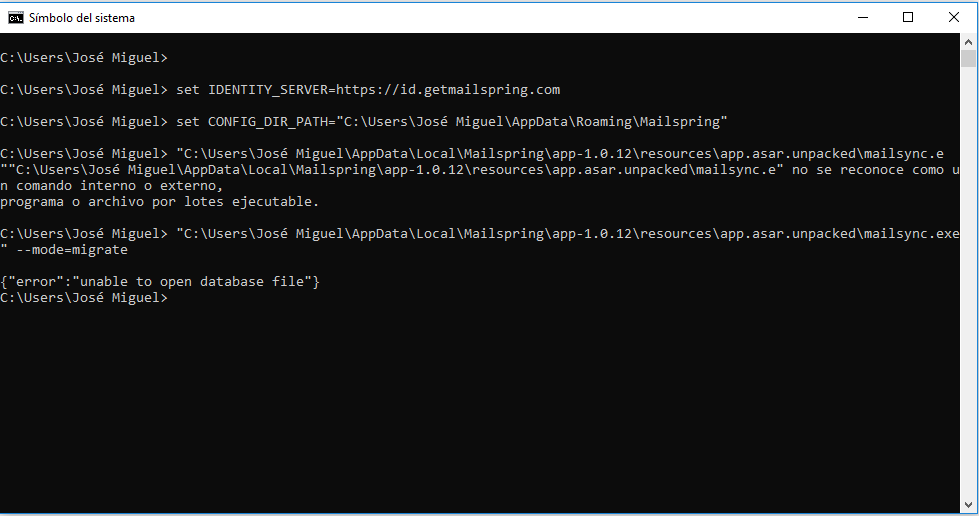
 jmrio
on 29 Dec 2017
jmrio
on 29 Dec 2017
Hey! Ahh this is super interesting @jmrio — can you try setting CONFIG_DIR_PATH to a location that doesn't include the é character? Maybe try connecting a thumdrive or something and setting it to D:\ (offhand I'm not sure where else on your system Mailspring would be able to write to). I wonder if this is actually a problem with the path not being ASCII.
bengotow
on 29 Dec 2017
Hey folks—I've reproduced this locally. This works:
set CONFIG_DIR_PATH=C:\Users\IEUser\Documents\Test Test
This does not work:
set CONFIG_DIR_PATH=C:\Users\IEUser\Documents\Tést Test
I think it's taken a while to track down because it seems to be fine on macOS and Linux. My guess is that the SQLite wrapper we're using isn't supporting windows paths very well. Will see if we can get this fixed in the next release!
bengotow
on 29 Dec 2017
Nice, meanwhile I tried installing mailspring in a new user (C:\Users\jmrio\AppData\Roaming\Mailspring) and installed perfectly
jmrio
on 29 Dec 2017
This will be fixed in the next release. If anyone stumbles on this issue, it turns out that getenv returns strings, but those strings are not UTF8-encoded (the characters appear correctly, but it's some other encoding...), so passing them into SQLite mangled them when trying to read from disk.
Here's the function I wrote to read UTF8 strings from the environment on both Windows and linux/macOS:
string MailUtils::getEnvUTF8(string key) {
#if defined(_MSC_VER)
    // convert the `key` to a wstring
    size_t wKeyLength = MultiByteToWideChar( CP_UTF8, 0, key.c_str(), (int)key.length(), 0, 0 );
    std::wstring wKey( wKeyLength, L'\0' );
    MultiByteToWideChar( CP_UTF8, 0, key.c_str(), (int)key.length(), &wKey[0], (int)wKey.length());

    // read the environment var as a wide string and then explicitly convert to UTF8
    wchar_t wstr[MAX_PATH];
    size_t len = _countof(wstr);
    _wgetenv_s(&len, wstr, wKey);
    wstring_convert<codecvt_utf8<wchar_t>, wchar_t> convert;
    string out = convert.to_bytes(wstr);
    return out;
#else
    char * val = getenv(key.c_str());
    if (val == nullptr) {
        return "";
    }
    return string(val);
#endif
}
Will ship in ~6 days in the next release. Stay tuned!
bengotow
on 29 Dec 2017
I continue with these errors even with the latest version: (
 Devilnorko
on 11 Jan 2018
Devilnorko
on 11 Jan 2018
This error continue in 1.0.12 with Windows 10 Pro
 jbaenaxd
on 20 Jan 2018
jbaenaxd
on 20 Jan 2018
Related issues
 enoversum
·
3Comments
enoversum
·
3Comments
 justindoran
·
3Comments
justindoran
·
3Comments
 k4rli
·
3Comments
k4rli
·
3Comments
 LeandroStanger
·
3Comments
LeandroStanger
·
3Comments
 imbrn
·
3Comments
imbrn
·
3Comments