Mailspring is not bundling libsasl2.so.2, some Linux systems have a different version
Are there any related issues?
No
What operating system are you using?
Arch linux
What version of Mailspring are you using?
1.0.2
Do you have any third-party plugins installed? If so, which ones?
No
Is the issue related to a specific email provider (Gmail, Exchange, etc.)?
No
Is the issue reproducible with a particular attachment, message, signature, etc?
Basically the mailspring.bin file was built against a libsasl2.so.2 file which doesn't exist in Archlinux which made me ln -s the file to the correct libsasl2.so.3 file. But then it complain about it not having version info so I have to rebuild it everytime it updates.
PKGBUILD here: https://aur.archlinux.org/cgit/aur.git/tree/PKGBUILD?h=mailspring
 jnylen
All 25 comments
Hey! Thanks for filing this - I think the libsasl2 library should be
included in the same directory as mailsync.bin. (Maybe not? If not we
should definitely be shipping it along with the other .so files in that
folder) Why do you need to replace it with a different version?
Ben
On Fri, Oct 6, 2017 at 7:29 PM Joakim Nylén notifications@github.com
wrote:
Are there any related issues?
No
What operating system are you using?Arch linux
What version of Mailspring are you using?1.0.2
Do you have any third-party plugins installed? If so, which ones?No
Is the issue related to a specific email provider (Gmail, Exchange, etc.)?No
Is the issue reproducible with a particular attachment, message,
signature, etc?Basically the mailspring.bin file was built against a libsasl2.so.2 file
which doesn't exist in Archlinux which made me ln -s the file to the
correct libsasl2.so.3 file. But then it complain about it not having
version info so I have to rebuild it everytime it updates.PKGBUILD here:
https://aur.archlinux.org/cgit/aur.git/tree/PKGBUILD?h=mailspring—
You are receiving this because you are subscribed to this thread.
Reply to this email directly, view it on GitHub
https://github.com/Foundry376/Mailspring/issues/63, or mute the thread
https://github.com/notifications/unsubscribe-auth/AA_TnMHs7Zv7EmJbsDJYS-9VByF0MA68ks5spuH9gaJpZM4PxNCg
.
 bengotow
on 7 Oct 2017
bengotow
on 7 Oct 2017
Hi @bengotow,
It does not come shipped with libsasl2 lib.
If the ln -s hasn't been executed it complains:
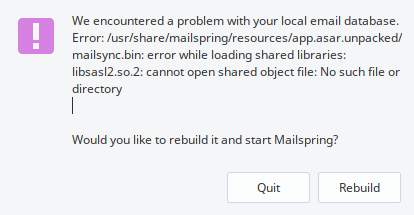
libsasl2.so.3 is the one that comes with archlinux if you install libsasl2. Maybe use /usr/lib/libsasl2.so instead? It forwards on arch to libsasl2.so.3.0.0
The current version on arch is 2.1.26-11
jnylen
on 7 Oct 2017
I can confirm this on OpenSUSE 42.3 as well.
The same issue of libsasl2.so.2 not found.
 faasie
on 7 Oct 2017
faasie
on 7 Oct 2017
Hey folks—thanks, I'll get this fixed in the next release. To maximize portability, we've been shipping the library files we can't link against statically, but libsasl2.so.2 got omitted somehow. Stay tuned! 1.0.3 should ship Monday or Tuesday.
bengotow
on 8 Oct 2017
Hey folks—I just did a fresh install of the latest .deb package and libsasl2.so.2 seems to be present alongside mailsync.bin:
bengotow@bengotow-virtual-machine:/usr/share/mailspring/resources/app.asar.unpacked$ ls -l
total 45808
-rwxr-xr-x  1 root root  1857312 Oct  6 12:59 libc.so.6
-rw-r--r--  1 root root    14664 Oct  6 12:59 libdl.so.2
-rw-r--r--  1 root root  1078368 Oct  6 12:59 libglib-2.0.so.0
-rw-r--r--  1 root root  1071552 Oct  6 12:59 libm.so.6
-rw-r--r--  1 root root   252032 Oct  6 12:59 libpcre.so.3
-rwxr-xr-x  1 root root   141574 Oct  6 12:59 libpthread.so.0
-rw-r--r--  1 root root   109296 Oct  6 12:59 libsasl2.so.2
-rwxr-xr-x  1 root root      107 Oct  6 12:59 mailsync
-rwxr-xr-x  1 root root 42357599 Oct  6 12:59 mailsync.bin
drwxr-xr-x 12 root root     4096 Oct  7 17:02 node_modules
Is there any chance the packaging process for the AUR is omitting these files? If you put them in that folder alongside mailsync.bin it should work fine.
bengotow
on 8 Oct 2017
This library is present in my Arch installation. It's just it isn't found by Mailspring in runtime.
12:54:01 dev@maddening resources la -la /usr/share/mailspring/resources/app.asar.unpacked/
total 45M
drwxr-xr-x  3 root root 4,0K 10-07 10:07 .
drwxr-xr-x  3 root root 4,0K 10-07 10:07 ..
-rwxr-xr-x  1 root root 1,8M 10-06 21:59 libc.so.6
-rw-r--r--  1 root root  15K 10-06 21:59 libdl.so.2
-rw-r--r--  1 root root 1,1M 10-06 21:59 libglib-2.0.so.0
-rw-r--r--  1 root root 1,1M 10-06 21:59 libm.so.6
-rw-r--r--  1 root root 247K 10-06 21:59 libpcre.so.3
-rwxr-xr-x  1 root root 139K 10-06 21:59 libpthread.so.0
-rw-r--r--  1 root root 107K 10-06 21:59 libsasl2.so.2
-rwxr-xr-x  1 root root  107 10-06 21:59 mailsync
-rwxr-xr-x  1 root root  41M 10-06 21:59 mailsync.bin
drwxr-xr-x 12 root root 4,0K 10-06 17:03 node_modules
 MateuszKubuszok
on 8 Oct 2017
MateuszKubuszok
on 8 Oct 2017
@bengotow,
Apparently it is included. So it just seems it's not being used.
jnylen
on 8 Oct 2017
Thanks for checking—that's really interesting. I was hoping to ship a copy of libsasl2 to everyone because it can be compiled with lots of different options and having the wrong version can break things like SSL and certificate checking for SMTP. Since the leading number of the version isn't the same, I don't think libsasl2.so.3.0.0 and libsasl2.so.2 are compatible.
bengotow
on 8 Oct 2017
Same problem with Fedora 26. The file is shipped but not used so I get the same error.
 Bouska
on 8 Oct 2017
Bouska
on 8 Oct 2017
Okay... so it looks like this may not have been working properly on any systems, and just coincidentally working for a bunch of people.
Can you try running this from the app.asar.unpacked directory?
LD_LIBRARY_PATH="$(dirname $0);$LD_LIBRARY_PATH" "$(dirname $0)/mailsync.bin"
Odds are it will crash and you won't see the mailsync help statement. If it crashes, run these commands and try again:
sudo mv libc.so.6 unused-libc.so.6
sudo mv libm.so.6 unused-libm.so.6
sudo mv libpthread.so.0 unused-libpthread.so.0
Now if you run it again, I think it /should/ work. If it works, run it again with the LD_DEBUG flag - can you send me all the output? It should be resolving against the ./libsasl2 file and not the system version.
LD_DEBUG=all LD_LIBRARY_PATH="$(dirname $0);$LD_LIBRARY_PATH" "$(dirname $0)/mailsync.bin"
Buried in all the mess, you should see lines referencing the files at their local paths:
    122210: symbol=_dl_get_tls_static_info;  lookup in file=./libsasl2.so.2 [0]
    122210: symbol=_dl_get_tls_static_info;  lookup in file=./libdl.so.2 [0]
@bengotow Seems to work fine. (no ln -s on libsasl2.so.2 in /usr/lib)
symbol=__cxa_finalize; lookup in file=libsasl2.so.2 [0]
Hmm interesting it's missing the ./ though—just to be sure, could you scroll up in the output a bit more and see if this block ends with trying file=./libsasl2.so.2?
    122429:
    122429: file=libsasl2.so.2 [0];  needed by ./mailsync.bin [0]
    122429: find library=libsasl2.so.2 [0]; searching
    122429:  search path=./tls/x86_64:./tls:./x86_64:.:tls/x86_64:tls:x86_64:       (LD_LIBRARY_PATH)
    122429:   trying file=./tls/x86_64/libsasl2.so.2
    122429:   trying file=./tls/libsasl2.so.2
    122429:   trying file=./x86_64/libsasl2.so.2
    122429:   trying file=./libsasl2.so.2
    122429:
    122429: file=libsasl2.so.2 [0];  generating link map
    122429:   dynamic: 0x00007f28c20d0b78  base: 0x00007f28c1eb7000   size: 0x000000000021a3d0
    122429:     entry: 0x00007f28c1eb9b60  phdr: 0x00007f28c1eb7040  phnum:                  7
Then a dozen lines down or so it should say:
122429: checking for version `SASL2' in file ./libsasl2.so.2 [0] required by file ./mailsync.bin [0]
Nope, no ./
     24648: file=libsasl2.so.2 [0];  needed by /usr/share/mailspring/resources/app.asar.unpacked/mailsync.bin [0]
     24648: find library=libsasl2.so.2 [0]; searching
     24648:  search path=/usr/bin:tls/haswell/x86_64:tls/haswell:tls/x86_64:tls:haswell/x86_64:haswell:x86_64:      (LD_LIBRARY_PATH)
     24648:   trying file=/usr/bin/libsasl2.so.2
     24648:   trying file=tls/haswell/x86_64/libsasl2.so.2
     24648:   trying file=tls/haswell/libsasl2.so.2
     24648:   trying file=tls/x86_64/libsasl2.so.2
     24648:   trying file=tls/libsasl2.so.2
     24648:   trying file=haswell/x86_64/libsasl2.so.2
     24648:   trying file=haswell/libsasl2.so.2
     24648:   trying file=x86_64/libsasl2.so.2
     24648:   trying file=libsasl2.so.2
24648: checking for version `SASL2' in file libsasl2.so.2 [0] required by file /usr/share/mailspring/resources/app.asar.unpacked/mailsync.bin [0]
Okay, so I pulled a temporary fix...
Initially I got:
[root@beta app.asar.unpacked]# ldd mailsync.bin
linux-vdso.so.1 (0x00007ffee43f4000)
libglib-2.0.so.0 => /lib64/libglib-2.0.so.0 (0x00007f15059ec000)
libpthread.so.0 => /lib64/libpthread.so.0 (0x00007f15057cd000)
libsasl2.so.2 => not found
libdl.so.2 => /lib64/libdl.so.2 (0x00007f15055c9000)
libm.so.6 => /lib64/libm.so.6 (0x00007f15052b3000)
libc.so.6 => /lib64/libc.so.6 (0x00007f1504ee2000)
/lib64/ld-linux-x86-64.so.2 (0x00007f1505cff000)
libpcre.so.1 => /lib64/libpcre.so.1 (0x00007f1504c6f000)
So let's do a dirty hack:
[root@beta app.asar.unpacked]# ln -s /usr/share/mailspring/resources/app.asar.unpacked/libsasl2.so.2 /lib64
Restart and youhou:
[root@beta app.asar.unpacked]# ldd mailsync.bin
linux-vdso.so.1 (0x00007ffe12103000)
libglib-2.0.so.0 => /lib64/libglib-2.0.so.0 (0x00007f6fa1266000)
libpthread.so.0 => /lib64/libpthread.so.0 (0x00007f6fa1047000)
libsasl2.so.2 => /lib64/libsasl2.so.2 (0x00007f6fa0e2c000)
libdl.so.2 => /lib64/libdl.so.2 (0x00007f6fa0c28000)
libm.so.6 => /lib64/libm.so.6 (0x00007f6fa0912000)
libc.so.6 => /lib64/libc.so.6 (0x00007f6fa0541000)
/lib64/ld-linux-x86-64.so.2 (0x00007f6fa1579000)
libpcre.so.1 => /lib64/libpcre.so.1 (0x00007f6fa02ce000)
The issue #55 is the duplicate of this one by the way.
Bouska
on 8 Oct 2017
@bengotow the dirname thing on LD_LIBRARY_PATH didn't work apparently. specified the folder and it works decently. trying file=/usr/share/mailspring/resources/app.asar.unpacked/libsasl2.so.2
jnylen
on 8 Oct 2017
Ahh that's great—it looks like $(dirname $0) can resolve to . sometimes, which doesn't work for the linker. I swapped that out for $(dirname $(realpath $0)) and that seems to give absolute paths all the time.
bengotow
on 8 Oct 2017
Okay folks—here are the changes I think we want to make:
Stop shipping fixed versions of
libc.so.6,libm.so.6, andlibpthread.so. For me, the app segfaulted immediately when I tried to use the versions we'd shipped on my Ubuntu 16 box. They're pretty much core libraries so it makes sense we'd need to use the version on the user's system. That said, I'm not 100% sure version 6 is present everywhere.Update the
mailsyncscript that wrapsmailsync.binto set the LD_LIBRARY_PATH correctly. Our current version adds.to the LD_LIBRARY_PATH rather than a full path, so the libraries are all being ignored.
If you could test 1) above on ArchLinux / Fedora 26 and verify that the app still works when you delete / move those files, I'd appreciate it!
bengotow
on 8 Oct 2017
This would close #62 too probably.
As i'm already running the AUR it should work fine.
jnylen
on 8 Oct 2017
Ok, so I deleted the files you mentionned and I changed the _mailspring_ file as below:
!/bin/bash
set -e
set -o pipefail
LD_LIBRARY_PATH="$(dirname $0):$LD_LIBRARY_PATH" "$(dirname $0)/mailsync.bin" "$@"
So I can run MailSpring, but if I try to add an Gmail account, apparently I'm doing an illegal instruction...
message: '\nWaiting for Account JSON:\n\nWaiting for Identity JSON:\n\n \n * An illegal instruction error occurred during program execution.\n This typically happens when you have corrupted your program\'s memory.\n *\n/usr/share/mailspring/resources/app.asar.unpacked/mailsync: line 4: 14486 Illegal instruction (core dumped) LD_LIBRARY_PATH="$(dirname $0):$LD_LIBRARY_PATH" "$(dirname $0)/mailsync.bin" "$@"\n' }
Bouska
on 8 Oct 2017
Hey @Bouska — thanks for following up! I'm downloading a Fedora VM but it's taking forever.
Could you try moving/removing the following two libraries from the app.asar.unpacked directory as well? It looks like the following are available just about everywhere, and packaging them with the app may actually be a mistake:
sudo mv libglib-2.0.so.0 unused-libglib-2.0.so.0
sudo mv libdl.so.2 unused-libdl.so.2
After removing those, all that would be left are libsasl2.so.2 and libpcre.so.3 alongside mailsync.bin. It'd be nice if you could try removing the pcre one as well - hopefully it's just libsasl2 that we need.
bengotow
on 8 Oct 2017
Ok, so I removed libglib-2.0.so.0 and libdl.so.2 and I get a slightly different error:
{ Error:
Waiting for Account JSON:

Waiting for Identity JSON:
24574 [2017-10-09 11:10:53.406] [main] [critical]
 ***
 *** Mailspring GenericException occurred during program execution:
 *** {"debuginfo":"/auth/token/refresh","key":"Problem with the SSL CA cert (path? access rights?)","retryable":false,"what":"std::exception"}
 ***

24574 [2017-10-09 11:10:53.406] [main] [critical]  *** Stack trace (line numbers are approximate):
 *** ??:?  ValidateRequestResp(CURLcode, void*, string)
 *** ??:?  MakeRequest(string, string, string, string, string, nlohmann::basic_json const&)
 *** ??:?  MakeIdentityRequest(string, string, nlohmann::basic_json const&)
 *** ??:?  XOAuth2TokenManager::partsForAccount(shared_ptr)
 *** ??:?  MailUtils::configureSessionForAccount(mailcore::IMAPSession&, shared_ptr)
 *** ??:?  runTestAuth(shared_ptr)
 *** ??:?  main
 ***

/usr/share/mailspring/resources/app.asar.unpacked/mailsync: line 4: 24574 Aborted                 (core dumped) LD_LIBRARY_PATH="$(dirname $0):$LD_LIBRARY_PATH" "$(dirname $0)/mailsync.bin" "$@"

    at ChildProcess._proc.on.code (/src/mailsync-process.es6:114:18)
    at emitTwo (events.js:106:13)
    at ChildProcess.emit (events.js:194:7)
    at maybeClose (internal/child_process.js:899:16)
    at Socket.<anonymous> (internal/child_process.js:342:11)
    at emitOne (events.js:96:13)
    at Socket.emit (events.js:191:7)
    at Pipe._handle.close [as _onclose] (net.js:510:12)
  message: '\nWaiting for Account JSON:\n\nWaiting for Identity JSON:\n24574 [2017-10-09 11:10:53.406] [main] [critical] \n ***\n *** Mailspring GenericException occurred during program execution: \n *** {"debuginfo":"/auth/token/refresh","key":"Problem with the SSL CA cert (path? access rights?)","retryable":false,"what":"std::exception"}\n ***\n\n24574 [2017-10-09 11:10:53.406] [main] [critical]  *** Stack trace (line numbers are approximate):\n *** ??:?  ValidateRequestResp(CURLcode, void*, string)\n *** ??:?  MakeRequest(string, string, string, string, string, nlohmann::basic_json const&)\n *** ??:?  MakeIdentityRequest(string, string, nlohmann::basic_json const&)\n *** ??:?  XOAuth2TokenManager::partsForAccount(shared_ptr)\n *** ??:?  MailUtils::configureSessionForAccount(mailcore::IMAPSession&, shared_ptr)\n *** ??:?  runTestAuth(shared_ptr)\n *** ??:?  main\n ***\n\n/usr/share/mailspring/resources/app.asar.unpacked/mailsync: line 4: 24574 Aborted                 (core dumped) LD_LIBRARY_PATH="$(dirname $0):$LD_LIBRARY_PATH" "$(dirname $0)/mailsync.bin" "$@"\n' } { pluginIds: [] }
Same problem if I also remove libpcre.so.3.
Bouska
on 9 Oct 2017
Hey thanks @Bouska — I'm actually looking into that right now. Should be able to get this fixed but it seems to be upset with the certificate chain installed on the machine.
bengotow
on 9 Oct 2017
I was running into the same issue in Fedora 24 with Mailspring 1.0.2. Just downloaded and installed Mailspring 1.0.3 after the build passed/completed and the issue appears to be resolved! I have successfully added my Office 365 account and mail is syncing fine.
 aw3stin1
on 11 Oct 2017
aw3stin1
on 11 Oct 2017
I installed the new 1.0.3 RPM and launched MailSpring, seems that this issue is fixed! Thanks @bengotow
Bouska
on 11 Oct 2017
Seems fixed by 1.0.3
jnylen
on 11 Oct 2017
Related issues
 justindoran
·
3Comments
justindoran
·
3Comments
 purefan
·
3Comments
purefan
·
3Comments
 tuxmachine
·
3Comments
tuxmachine
·
3Comments
 imbrn
·
3Comments
imbrn
·
3Comments
 psivesely
·
3Comments
psivesely
·
3Comments