MailKit.Security.AuthenticationException: 334
I'm using MailKit with Gmail's OAuth2 implementation for server to server communication ("2 legged OAuth").
I've followed Google's instructions for Oath2 for Server to Server applications by setting up a "Service Account" in Google Cloud Console:
https://developers.google.com/identity/protocols/OAuth2ServiceAccount
https://cloud.google.com/iam/docs/creating-managing-service-accounts
Per Google's documentation, I'm seeing a new naming scheme for the user email of service accounts (https://cloud.google.com/iam/docs/service-accounts) in the format below:

This is somewhat different format than the instructions for MailKit I'm able to find online, for example https://stackoverflow.com/questions/33496290/how-to-send-email-by-using-mailkit#answer-33501052
While debugging, I had to use the new format of user email to get my code to work, all the way down to the last line in the code I've written that is reached before the exception is thrown:
client.Authenticate(oauth2);
My code snippet from SendAlerts.cs is below:
string path = StockTracker.Helpers.Utilities.contentRootPath + "\\Keys\\stockTracker-XXXXX.p12";

var certificate = new X509Certificate2(path, "passwordProvidedByGoogleCloudConsleWhenSetupNewKeyForServiceAccount", X509KeyStorageFlags.Exportable);
var credential = new ServiceAccountCredential(new ServiceAccountCredential
    .Initializer("SERVICE_ACCOUNT_NAME@PROJECT_ID.iam.gserviceaccount.com")
{
    Scopes = new[] { "https://mail.google.com/" },
    User = "SERVICE_ACCOUNT_NAME@PROJECT_ID.iam.gserviceaccount.com"
}.FromCertificate(certificate));

bool result = credential.RequestAccessTokenAsync(CancellationToken.None).Result;

// Note: result will be true if the access token was received successfully

using (var client = new SmtpClient())
{
    client.Connect("smtp.gmail.com", 587, SecureSocketOptions.StartTls);

    var oauth2 = new SaslMechanismOAuth2("SERVICE_ACCOUNT_NAME@PROJECT_ID.iam.gserviceaccount.com", credential.Token.AccessToken);
    client.Authenticate(oauth2);  //LAST LINE RUN BEFORE ERROR THROWN

    client.MessageSent += (sender, e) => RecordSingleEmailSent(template.UserId, template.CompanySymbol, template.BatchId);
    client.Send(message);
    client.Disconnect(true);
    client.Dispose();
}
The exact exception is:
Exception Unhandled
MailKit.Security.AuthenticationException: '334: eyJzdGF0dXMiOiI0MDAiLCJzY2hlbWVzIjoiQmVhcmVyIiwic2NvcGUiOiJodHRwczovL21haWwuZ29vZ2xlLmNvbS8ifQ=='
Details:
MailKit.Security.AuthenticationException
HResult=0x80131500
Message=334: eyJzdGF0dXMiOiI0MDAiLCJzY2hlbWVzIjoiQmVhcmVyIiwic2NvcGUiOiJodHRwczovL21haWwuZ29vZ2xlLmNvbS8ifQ==
Source=MailKit
StackTrace:
at MailKit.Net.Smtp.SmtpClient.
at System.Runtime.ExceptionServices.ExceptionDispatchInfo.Throw() in E:\A_work\572\s\src\mscorlib\src\System\Runtime\ExceptionServices\ExceptionDispatchInfo.cs:line 132
at System.Runtime.CompilerServices.TaskAwaiter.HandleNonSuccessAndDebuggerNotification(Task task) in E:\A_work\572\s\src\mscorlib\src\System\Runtime\CompilerServices\TaskAwaiter.cs:line 155
at MailKit.Net.Smtp.SmtpClient.Authenticate(SaslMechanism mechanism, CancellationToken cancellationToken)
at StockTracker.Models.SendAlerts.SendSingleEmail(MessageTemplate template) in C:\Users\MyUsername\Desktop\StockTracker files\StockTracker\StockTracker\Models\SendAlerts.cs:line 165
at StockTracker.Models.SendAlerts.SendEmails(List`1 templates) in C:\Users\MyUsername\Desktop\StockTracker files\StockTracker\StockTracker\Models\SendAlerts.cs:line 215
at StockTracker.Models.InitStockWatch.
at System.Runtime.ExceptionServices.ExceptionDispatchInfo.Throw() in E:\A_work\572\s\src\mscorlib\src\System\Runtime\ExceptionServices\ExceptionDispatchInfo.cs:line 132
at System.Threading.ExecutionContext.RunInternal(ExecutionContext executionContext, ContextCallback callback, Object state) in E:\A_work\572\s\src\mscorlib\shared\System\Threading\ExecutionContext.cs:line 167
at System.Runtime.ExceptionServices.ExceptionDispatchInfo.Throw() in E:\A_work\572\s\src\mscorlib\src\System\Runtime\ExceptionServices\ExceptionDispatchInfo.cs:line 132
at System.Threading.ThreadPoolWorkQueue.Dispatch() in E:\A_work\572\s\src\mscorlib\src\System\Threading\ThreadPool.cs:line 588
While debugging, I can see that a token is being created successfully, and I can see the username I've provided in the output:
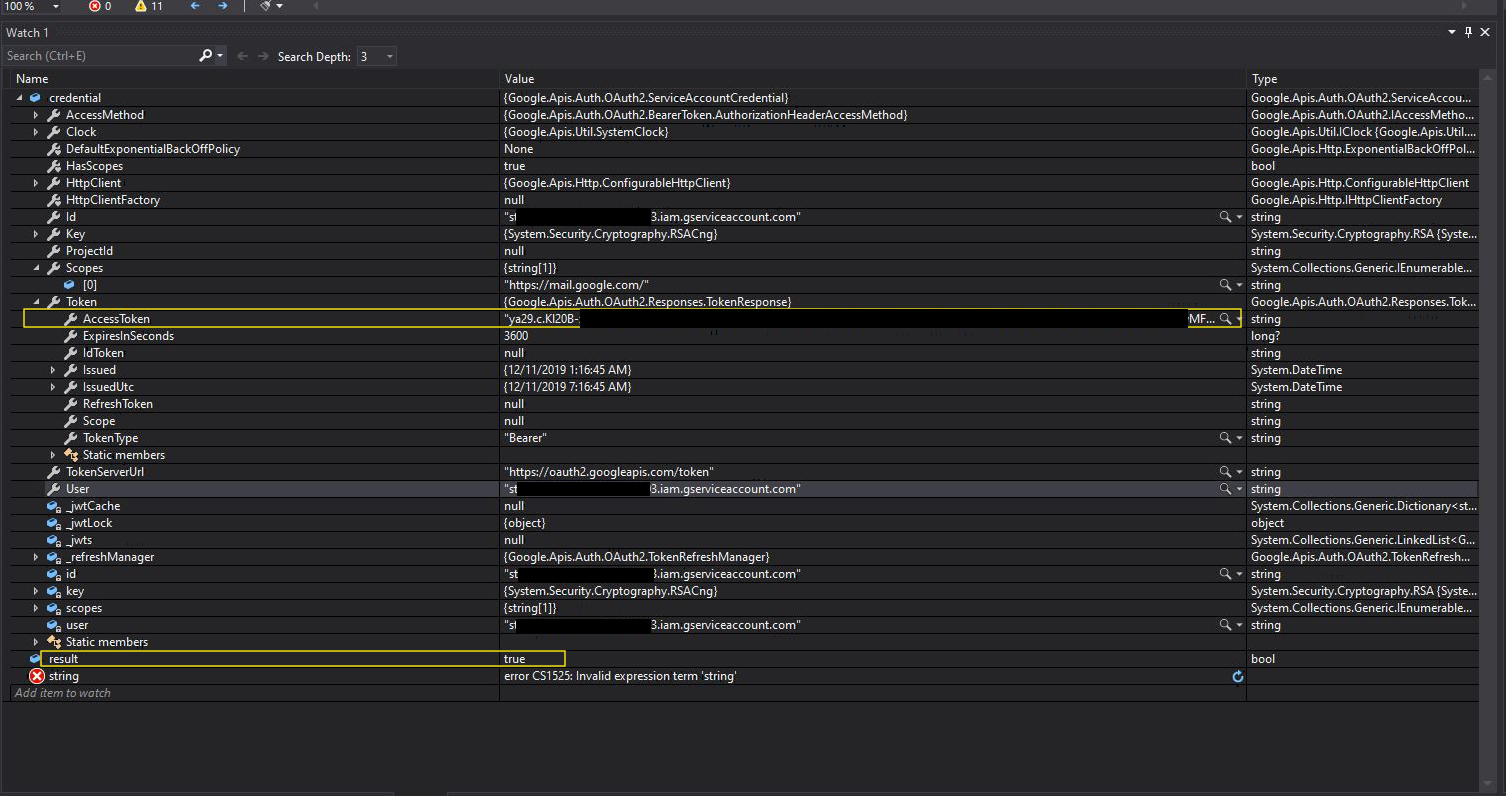
So it appears the .p12 key file is being loaded correctly. I've tried every permutation of a username that I can think of, including the user email I was logged into google as when I first setup the service account, which has owner rights. I'm not sure what the problem is, but any guidance would be greatly appreciated.
 spchaplin
All 3 comments
You need to base64 decode the server response:
{"status":"400","schemes":"Bearer","scope":"https://mail.google.com/"}
Pretty sure User needs to be set to the user's gmail account name, not "SERVICE_ACCOUNT_NAME@PROJECT_ID.iam.gserviceaccount.com".
Also, when you create the SaslMechanismOAuth2, the username argument definitely needs to be the user's gmail account name, not "SERVICE_ACCOUNT_NAME@PROJECT_ID.iam.gserviceaccount.com".
 jstedfast
on 11 Dec 2019
jstedfast
on 11 Dec 2019
I wanted to follow up with some help for those who might find this thread searching for answers. To send emails using a Service Account and OAuth2 through Google, _you must sign up for "G Suite"_. G Suite is Google's paid service that allows you (among many other things) to delegate "domain-wide" authority to a service account, and thus send emails through your service account that contain your domain name that you have verified with Google. Below are links about this:
https://developers.google.com/cloud-search/docs/guides/delegation
You will need to verify your domain with Google to use Oauth2. For a portfolio project, it was not worth it for me to pay a monthly subscription for G Suite, and it also took me a very long time to find the answers I needed with Google's documentation, and configure everything correctly. The problem I kept running into was caused by my not having G Suite with domain-wide delegation set up for a verified domain. I ended up using Mailgun. The documentation was easier for me to follow, and they provide the same service for free. With Mailgun you'll also need to verify that you own a domain that's part of the email address you're sending from.
spchaplin
on 19 Dec 2019
please check the scope you are supplying, if you're sending the email add https://mail.google.com in the scope
 kbpr
on 5 Oct 2020
kbpr
on 5 Oct 2020
Related issues
 rgmills
·
6Comments
rgmills
·
6Comments
 shayazm
·
3Comments
shayazm
·
3Comments
 wayneguow
·
5Comments
wayneguow
·
5Comments
 ghost
·
3Comments
ghost
·
3Comments
 MaximKiselev
·
7Comments
MaximKiselev
·
7Comments
Most helpful comment
I wanted to follow up with some help for those who might find this thread searching for answers. To send emails using a Service Account and OAuth2 through Google, _you must sign up for "G Suite"_. G Suite is Google's paid service that allows you (among many other things) to delegate "domain-wide" authority to a service account, and thus send emails through your service account that contain your domain name that you have verified with Google. Below are links about this:
https://stackoverflow.com/questions/42784640/client-is-unauthorized-to-retrieve-access-tokens-using-this-method-gmail-api-c-s/42785468
https://developers.google.com/cloud-search/docs/guides/delegation
You will need to verify your domain with Google to use Oauth2. For a portfolio project, it was not worth it for me to pay a monthly subscription for G Suite, and it also took me a very long time to find the answers I needed with Google's documentation, and configure everything correctly. The problem I kept running into was caused by my not having G Suite with domain-wide delegation set up for a verified domain. I ended up using Mailgun. The documentation was easier for me to follow, and they provide the same service for free. With Mailgun you'll also need to verify that you own a domain that's part of the email address you're sending from.