Mailinabox: v0.28 Certbot exited unexpectedly
Hi, I ran
curl -s https://mailinabox.email/setup.sh | sudo bash
When Certbot was about to ask me to confirm the ToS it exited unexpectedly before I was able to type anything.
Click to see full log
```bash
Primary Hostname:
Public IP Address:
Mail-in-a-Box Version: v0.28
Updating system packages...
Installing system packages...
Initializing system random number generator...
Firewall is active and enabled on system startup
Installing nsd (DNS server)...
Installing Postfix (SMTP server)...
Installing Dovecot (IMAP server)...
Installing OpenDKIM/OpenDMARC...
Installing SpamAssassin...
bayes: synced databases from journal in 1 seconds: 333 unique entries (600 total entries)
Installing Nginx (web server)...
Installing Roundcube (webmail)...
Installing Nextcloud (contacts/calendar)...
Nextcloud is already latest version
Installing Z-Push (Exchange/ActiveSync server)...
Installing Mail-in-a-Box system management daemon...
The directory '/home/
Uninstalling acme-0.19.0:
Successfully uninstalled acme-0.19.0
The directory '/home/
You are using pip version 9.0.1, however version 18.0 is available.
You should consider upgrading via the 'pip install --upgrade pip' command.
Installing Munin (system monitoring)...
updated DNS: OpenDKIM configuration
web updated
Mail-in-a-Box uses Let's Encrypt to provision free certificates
to enable HTTPS connections to your box. You'll now be asked to agree
to Let's Encrypt's terms of service.
Saving debug log to /var/log/letsencrypt/letsencrypt.log
Registering without email!
Please read the Terms of Service at
https://letsencrypt.org/documents/LE-SA-v1.2-November-15-2017.pdf. You must
agree in order to register with the ACME server at
https://acme-v02.api.letsencrypt.org/directory
(A)gree/(C)ancel: (A)gree/(C)ancel: An unexpected error occurred:
Traceback (most recent call last):
File "/usr/bin/certbot", line 11, in
load_entry_point('certbot==0.26.1', 'console_scripts', 'certbot')()
File "/usr/lib/python3/dist-packages/certbot/main.py", line 1364, in main
return config.func(config, plugins)
File "/usr/lib/python3/dist-packages/certbot/main.py", line 721, in register
_determine_account(config)
File "/usr/lib/python3/dist-packages/certbot/main.py", line 520, in _determine_account
config, account_storage, tos_cb=_tos_cb)
File "/usr/lib/python3/dist-packages/certbot/client.py", line 182, in register
regr = perform_registration(acme, config, tos_cb)
File "/usr/lib/python3/dist-packages/certbot/client.py", line 207, in perform_registration
tos_cb)
File "/usr/lib/python3/dist-packages/acme/client.py", line 777, in new_account_and_tos
_assess_tos(self.client.directory.meta.terms_of_service)
File "/usr/lib/python3/dist-packages/acme/client.py", line 768, in _assess_tos
check_tos_cb(tos)
File "/usr/lib/python3/dist-packages/certbot/main.py", line 498, in _tos_cb
cli_flag="--agree-tos", force_interactive=True)
File "/usr/lib/python3/dist-packages/certbot/display/util.py", line 223, in yesno
no=_parens_around_char(no_label)))
File "/usr/lib/python3/dist-packages/certbot/display/util.py", line 90, in input_with_timeout
raise EOFError
EOFError
Please see the logfiles in /var/log/letsencrypt for more details.
Your Mail-in-a-Box is running.
Please log in to the control panel for further instructions at:
https://
If you have a DNS problem put the box's IP address in the URL
(https://
```
I fixed this by running just sudo mailinabox, I was then able to successfully answer the Certbot setup. Not sure what caused this. 💭
 nilsnh
All 18 comments
I also ran into this (and fixed it via sudo mailinabox -- thanks @nilsnh!).
 jtobin
on 30 Jul 2018
jtobin
on 30 Jul 2018
I did some more research. Piping curl to bash seems to confuse python (Stackoverflow issue). One possible fix is to download the setup script before running it like so:
curl -s https://mailinabox.email/setup.sh > /tmp/setup.sh && sudo bash /tmp/setup.sh.
nilsnh
on 30 Jul 2018
Alternatively, create a yes/no prompt in bash for certbot which can trigger certbot --auto-agree. 💭
nilsnh
on 30 Jul 2018
Thanks @nilsnh. The first command worked for me.
 shawnbarton
on 31 Jul 2018
shawnbarton
on 31 Jul 2018
Despite what I said in #1399, we should probably just add --auto-agree for now.
 JoshData
on 31 Jul 2018
JoshData
on 31 Jul 2018
adding a link to https://discourse.mailinabox.email/t/v0-28-update-log-error/3516/3
JoshData
on 31 Jul 2018
Also had success using sudo mailinabox and then manually accepting Certbot setup.
 pohutukawanz
on 31 Jul 2018
pohutukawanz
on 31 Jul 2018
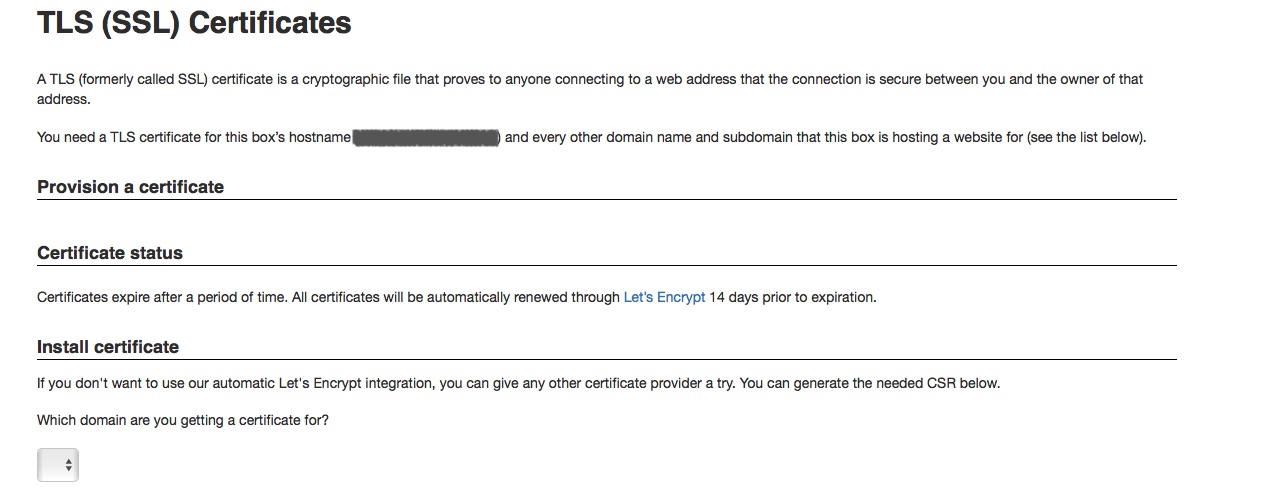
running sudo mailinabox also fixed the issue accepting terms however domains no longer appear on the certificate so any newly added domains cannot have certificates requested for them. See screenshot.
 willcurtis
on 2 Aug 2018
willcurtis
on 2 Aug 2018
My existing domains are all listed under Certificate Status but I added a domain and there appears to be no way to provision a certificate for it via Certbot.
pohutukawanz
on 3 Aug 2018
None of the solutions provided here worked for me; I ended up having to manually edit /root/mailinabox/management/ssl_certificates.py and add "--agree-tos", "--email", "[email protected]" to the certbot argv array to get a working certificate.
Notably, sudo mailinabox didn't ask me anything about certbot or accepting a tos.
 hraban
on 26 Oct 2018
hraban
on 26 Oct 2018
I ended up having to manually edit
/root/mailinabox/management/ssl_certificates.pyand add"--agree-tos", "--email", "[email protected]"to thecertbotargv array to get a working certificate.
Are you able to show a snippet of where you added that? I don't know any Python, but attempted throwing them in at around line ~320 to no avail.
sudo mailinabox isn't prompting me for the ToS either, nor is saving the setup.sh locally before running it.
 finitenamespace
on 30 Oct 2018
finitenamespace
on 30 Oct 2018
I’m on my phone atm but that looks like the right place , yes.
You need to run hat script manually ; it doesn’t change anything about sudo mailinabox. Just enter the full path in the shell prompt and hit enter.
Good luck!
On 30 Oct 2018, at 11:13, finitenamespace notifications@github.com wrote:
I ended up having to manually edit /root/mailinabox/management/ssl_certificates.py and add "--agree-tos", "--email", "[email protected]" to the certbot argv array to get a working certificate.
Are you able to show a snippet of where you added that? I don't know any Python, but attempted throwing them in at around line ~320 to no avail.
sudo mailinabox isn't prompting me for the ToS either, nor is saving the setup.sh locally before running it.—
You are receiving this because you commented.
Reply to this email directly, view it on GitHub, or mute the thread.
hraban
on 30 Oct 2018
sudo mailinabox didn't let me accept the tos either so I need to change the file manually, too:
~/mailinabox/management/ssl_certificates.py (Line 333)
                        "--config-dir", account_path,
                        #"--staging",
+                       "--agree-tos",
+                       "-m <your email>"
                    ], stderr=subprocess.STDOUT).decode("utf8")
                    install_cert_copy_file(cert_file, env)
 patlux
on 17 Nov 2018
patlux
on 17 Nov 2018
@patlux This is how I fixed this issue too as re-running the installer didn't ask me to accept the TOS. Shouldn't this be the default configuration anyway ?
 Coriou
on 19 Nov 2018
Coriou
on 19 Nov 2018
"-m <your email>"
I assume you mean "-m", "<your email>"?
hraban
on 19 Nov 2018
"-m <your email>"I assume you mean
"-m", "<your email>"?
Sorry for the late response. No, I didn't. I'm specifing here the email address for registration and recovery contact.
The output of certbot --helpgives me the following:

patlux
on 17 Apr 2019
sudo mailinaboxdidn't let me accept the tos either so I need to change the file manually, too:
~/mailinabox/management/ssl_certificates.py(Line 333)"--config-dir", account_path, #"--staging", + "--agree-tos", + "-m <your email>" ], stderr=subprocess.STDOUT).decode("utf8") install_cert_copy_file(cert_file, env)
Same issue. For some reason rerunning mailinabox does not ask for agree-tos and email address. Added those manually to python script.
 eduartua
on 26 Oct 2019
eduartua
on 26 Oct 2019
Sorry for the late response. No, I didn't. I'm specifing here the email address for registration and recovery contact.
Interesting. Normally, Bash's argument parsing would cause an execve call with "-m" and the actual e-mail to be separate arguments. Argv parsing by libraries is context aware in this sense, and pairs those two separate arguments back together to reflect the user's intention. However, passing '-m <email>' as one argument would be akin to wrapping it in quotes on the command line; I'm surprised ssl_certificates.py understands this format and somehow manages to parse it.
hraban
on 27 Oct 2019
Related issues
 webknjaz
·
8Comments
webknjaz
·
8Comments
 yodax
·
4Comments
yodax
·
4Comments
 timkofu
·
3Comments
timkofu
·
3Comments
 frank-dspeed
·
3Comments
frank-dspeed
·
3Comments
 ad-si
·
6Comments
ad-si
·
6Comments
Most helpful comment
I did some more research. Piping curl to bash seems to confuse python (Stackoverflow issue). One possible fix is to download the setup script before running it like so:
curl -s https://mailinabox.email/setup.sh > /tmp/setup.sh && sudo bash /tmp/setup.sh.