Mailinabox: Tor hidden service deployment
I'd like to expose the web interface as a Tor hidden service in stealth mode with HidServAuth on the clients.
Why would I want to do such a thing?
- Reduce the attack surface. I don't really have a use for general public internet access to the web console. I'm the only one who uses it. mailinabox only really needs a public internet IP, DNS name and inbound ports for email protocols.
- I'm uneasy about how easy it is to identify mailinabox installations by scanning.
- Increased privacy. Regular network traffic to a personal email server, especially email clients that poll, is very personally-identifying.
- Network agility. I'd like to host my mailinabox at home (that part about physical security...), but my local ISP blocks email ports aggressively. Taking this a step further, I can forward all the necessary ports mailinabox needs from an ingress cloud instance over Tor to my home server. Ingress gets a public IP, DNS name, and the TLS certificate is established there -- but the backend is the hidden service. The neat part about this: I can move my home server across networks, it could be on LTE in a camper, I don't have to change a thing, and my cloud provider never stores data-at-rest.
I've added an entry for the hidden service server_name to /etc/nginx/conf.d/local.conf as a PoC. The web interface is quite lightweight, and works well in TorBrowser!
Would you accept a patch adding support for this kind of configuration, perhaps as an option for advanced users?
 cmars
cmars
All 6 comments
Hi @cmars. This is very interesting but would probably not be a good fit for a novice-friendly project like this. What's the fewest number of changes you'd need to make to Mail-in-a-Box to make it possible?
 JoshData
on 18 Nov 2017
JoshData
on 18 Nov 2017
IMHO it's very good that Mail-in-a-Box is novice-friendly. On the other side, many users, who initially started with MIAB as novices, learned a lot about how it works & would like to gradually upgrade their system according to their desire. But that part is harder if we keep MIAB "novice-only". Realistically speaking, it's actually "novice & expert only". No professional or intermediate.
Would be great to have some mechanism for switching Pro features on. And this issue is a Pro feature for sure. I'd love to have this implemented btw :smile:
 jirislav
on 25 Nov 2017
jirislav
on 25 Nov 2017
How about this prompt while installing?
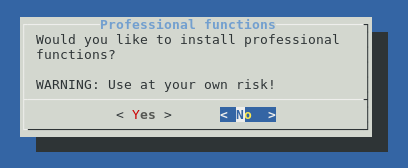
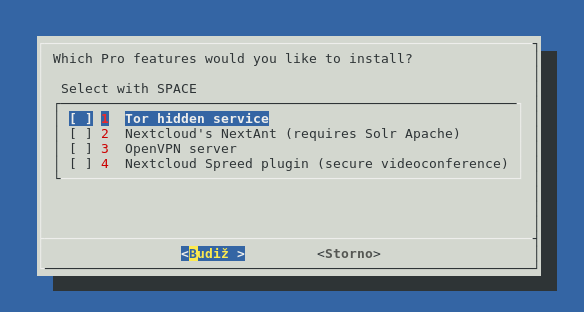
If user selected "Yes", then it would be shown this:
jirislav
on 25 Nov 2017
Bump
 gg2001
on 28 Apr 2018
gg2001
on 28 Apr 2018
Unrelated to the title of this issue, I guess. But it would also be nice to have "pro features" in this system. E.g. using Mailgun as a relay (but maybe not advertised directly to be novice friendly).
 chris13524
on 19 May 2018
chris13524
on 19 May 2018
Closing... because no one answered my question.
JoshData
on 22 Jul 2018
Related issues
 steadfasterX
·
6Comments
steadfasterX
·
6Comments
 Korni22
·
6Comments
Korni22
·
6Comments
 hachre
·
5Comments
hachre
·
5Comments
 timkofu
·
3Comments
timkofu
·
3Comments
 jalogisch
·
5Comments
jalogisch
·
5Comments
Most helpful comment
How about this prompt while installing?
If user selected "Yes", then it would be shown this:
