Mailcow-dockerized: FIDO2 Issues (mostly with Firefox)
Prior to placing the issue, please check following: (fill out each checkbox with an X once done)
- [X] I understand that not following or deleting the below instructions will result in immediate closure and/or deletion of my issue.
- [X] I have understood that this bug report is dedicated for bugs, and not for support-related inquiries.
- [X] I have understood that answers are voluntary and community-driven, and not commercial support.
- [X] I have verified that my issue has not been already answered in the past. I also checked previous issues.
Summary
First of all: Thanks a lot for this great feature!
But I have got several issues with the new FIDO2 Implementation:
- Registering a key with Firefox did not work for me at all
- Registering a key in Chrome worked, but I needed some retries cause of the short timeout period.
- A login with firefox ended with the error message: "An attempt was made to use an object that is not, or is no longer, usable". (Chrome was fine.)
Logs
Reproduction
System information
| Question | Answer |
| --- | --- |
| My operating system | macOS Catalina |
| Is Apparmor, SELinux or similar active? | no |
| Virtualization technlogy (KVM, VMware, Xen, etc - LXC and OpenVZ are not supported | no |
| Server/VM specifications (Memory, CPU Cores) | - |
| Docker Version (docker version) | 19.03.13 |
| Docker-Compose Version (docker-compose version) | 1.27.4 |
| Reverse proxy (custom solution) | Traefik |- Output of
git diff origin/master, any other changes to the code? If so, please post them. - All third-party firewalls and custom iptables rules are unsupported. Please check the Docker docs about how to use Docker with your own ruleset. Nevertheless, iptabels output can help us to help you:
iptables -L -vn,ip6tables -L -vn,iptables -L -vn -t natandip6tables -L -vn -t nat. - DNS problems? Please run
docker exec -it $(docker ps -qf name=acme-mailcow) dig +short stackoverflow.com @172.22.1.254(set the IP accordingly, if you changed the internal mailcow network) and post the output.
- Output of
 cl445
cl445
All 26 comments
Hi,
I am able to login via Firefox 82.0.3 and to register via Firefox 82.0.3 using a YubiKey 5 NFC on Windows.
 andryyy
on 16 Nov 2020
andryyy
on 16 Nov 2020
Firefox 82.0.3 with Nitrokey FIDO2 doesn't work at all.
Chromium 86.0.4240.75 with Nitrokey fails with message stating that maybe a different or newer FIDO2 Key is necessary.
 K14D
on 17 Nov 2020
K14D
on 17 Nov 2020
Okay, I have got the same key and the same Firefox version. So the only difference seems to be the OS.
I just gave it a try with Linux, but got the same result. Unfortunatly I have no access to a Windows machine.
@andryyy Could you maybe try to reproduce it under Linux (or MacOs)?
cl445
on 18 Nov 2020
I could test a Yubi with Linux, but not a Nitro. I don't have a Nitrokey.
andryyy
on 18 Nov 2020
I've the same problem with Firefox 82.0.3 and a Yubi 5C under Linux. Chrome works.
 mburgholte
on 18 Nov 2020
mburgholte
on 18 Nov 2020
Perhaps check this with Mozilla then. :)
andryyy
on 18 Nov 2020
In principle, it works fine with Firefox! This problem is somehow related to the Mailcow implementation.
cl445
on 18 Nov 2020
It works fine for me with Firefox.
You need a PIN on your device (!), FIDO2 support and need to be able to store the credentials on the key.
There is no "works otherwhere" when there are so many different kind of implementations with FIDO2. You can also use it as 2FA without client side credentials.
I don't have a Nitro key and as long as I don't get one, I cannot test it.
andryyy
on 18 Nov 2020
I tried it several time with firefox. Registering a yubikey inside firefox is not like I do in chrome. First of all, I have set a PIN/PUK and changed my management key.
When I start to register a key the following message appear:
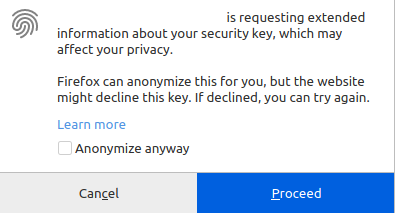
Proceeding ..
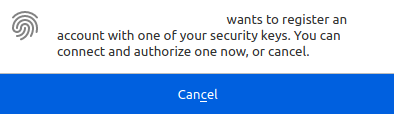
I insert my Yubikey and touch it.


I think, it is a permission problem inside firefox. After the second image, there has to be anything other....
After a succesful registration with chrome, it is not possible to access in firefox...

mburgholte
on 19 Nov 2020
Hm, that's strange. I use Yubi with Firefox without problems.
andryyy
on 19 Nov 2020
Hi,
I just tried fido2 on android with chrome. Registration is sucessfull - I can see registration under "Known IDs".
But when I tried log in via "Key login/FIDO2/WebAuthn" than popup is shown: "Validation failed: Use of an empty allowCredentials list is not supported on this device.". Is android not supported yet? I know fido2 is a new beta feature, only asking :)
 ShiroDN
on 19 Nov 2020
ShiroDN
on 19 Nov 2020
It's possible that the authenticator cannot store the credentials, but that's needed. We don't support it as TFA but SFA.
andryyy
on 19 Nov 2020
For me, it is exactly the same as @mburgholte reported.
@andryyy: Is it possible to enhance the error-messages to tackle down this error? Or if you give me a helping hand I could try to debug it my self.
cl445
on 20 Nov 2020
I can register a key in Firefox, I cannot debug anything without a key.
I would give it a try if I had a key, that is problematic.
Touching the key is no UV. This will not work. Or is this a very new fingerprint Yubi? Is it even a FIDO2-able key? Or an older Yubi?
Even Yubico themselves validated the implementation. :/
Also works with Edge and even Windows Hello.
andryyy
on 20 Nov 2020
Can you tell me the exact model of that key you use?
andryyy
on 20 Nov 2020
Yubi 5C
mburgholte
on 20 Nov 2020
I have got a _YubiKey 5 NFC_ and a _YubiKey 5C Nano_.
@andryyy Sure, if you haven't got the problem, you can not debug it. If you like, I would like to help you with my faulty machines. I've no experience with the code of Mailcow, so maybe you could help me a bit? We could do a Zoom-call or something else that offers screen sharing.
cl445
on 20 Nov 2020
That's really out of scope, sorry.
andryyy
on 20 Nov 2020
Cammon, help me to help you! What could we do?
Is the only option that I have to dig through the code alone? It will take me hours even to understand where to look.
cl445
on 20 Nov 2020
I have a YubiKey 5 NFC and can use it in Firefox, Edge, Chrome etc. - the very same key. You can try to reset your key.
andryyy
on 20 Nov 2020
Yes, there is maybe a chance that @K14D, @ShiroDN, @mburgholte and I were wrong and we all misconfigured our sticks. But do you really think it is likely? Especially if you consider that it works fine with other programs.
It is okay, this is an open source project and I am not expecting to fix everything right away. But it would be nice if this were taken seriously and not just discussing it away.
(I know this behaviour is life-saving in a commercial project, so no offence! ;) )
cl445
on 20 Nov 2020
Perhaps. There are several methods for FIDO2 implementations which all require different prerequisites (!!!). You can use it with and without client-side credentials, with and without UV, with and without user presence etc.
So... when Yubico confirms it works as described and I can test it with the very same key as you (I don't know if the other guys also use this same stick, but I don't think they do, iirc) and it works fine, what do you expect me to do? :/
I am not disussing it away. It is just that this is FREE and OPEN SOURCE. You can contribute and find the bug, if any. :) I cannot replicate it and I actually tried.
That's as much as I can do in my FREE TIME. ;) Don't forget this, please.
andryyy
on 20 Nov 2020
If you want me to test it with a different stick: send me a stick, that's not working. I cannot buy 100 sticks to test it for everyone, I'm afraid. :(
andryyy
on 20 Nov 2020
Just for the record, it seems to be a bug in Firefox under Linux. Under Windows it runs as expected in Firefox.
mburgholte
on 27 Nov 2020
Trying to check Firefox/Linux this weekend. :)
andryyy
on 28 Nov 2020
Exactly the same issue with Firefox 83.0 under Mint 20 (Ubuntu 20.04) and Yubikey 5 NFC. Were you able to discover anything, or are there any logs that we can submit while trying it out?
 berkaycagir
on 1 Dec 2020
berkaycagir
on 1 Dec 2020
Related issues
 lgleim
·
3Comments
lgleim
·
3Comments
 Braintelligence
·
3Comments
Braintelligence
·
3Comments
 mritzmann
·
3Comments
mritzmann
·
3Comments
 starcraft0429
·
3Comments
starcraft0429
·
3Comments
 Adorfer
·
3Comments
Adorfer
·
3Comments
Most helpful comment
I tried it several time with firefox. Registering a yubikey inside firefox is not like I do in chrome. First of all, I have set a PIN/PUK and changed my management key.




When I start to register a key the following message appear:
Proceeding ..
I insert my Yubikey and touch it.
I think, it is a permission problem inside firefox. After the second image, there has to be anything other....
After a succesful registration with chrome, it is not possible to access in firefox...
