Mailcow-dockerized: Sogo Memory leak
Please try to answer all questions. If you cannot, don't just delete it. If you completely ignore or remove the whole template, your issue will be closed with a label "missing information".
Many awesome mailcow supporters don't bother to reply to an issue, when crucial information is missing. Especially when it could have been answered by using this issue template. We need as much information as possible. Please post all logs, do not copy that one line you think may be interesting. Copy the whole bunch and remove sensible information. Thank you!
Prior to placing the issue, please check following: (fill out each checkbox with a X once done)
- [ X] I understand that not following below instructions might result in immediate closing and deletion of my issue.
- [ X] I have understood that answers are voluntary and community-driven, and not commercial support.
- [ X] I have verified that my issue has not been already answered in the past. I also checked previous issues.
Description of the bug: What kind of issue have you exactly come across?
Hello, our Sogo approves the complete Ram of the VM since today.
I have already rebuilt all the containers by docker-compose down and up -d, but there was no improvement.
I also added an update of today's "./updade.sh --ours".
In order not to affect the whole email traffic, I have limited the RAM to 18Gb with "memory_limit" in the docker-compose.yml.
The web interface is accessible, mail writing also works
Unfortunately exchange does not work.
Our server has about 40 users, of which about 30 use active sync
i can't find any noticeable errors in the sogo logs
i already tried a little bit of so called workers and SxVMemLimit, but it didn't work out better.
My last settings:
WOWorkersCount = "80";
SxVMemLimit = 1024;
SOGoMaximumPingInterval = 3540;
SOGoInternalSyncInterval = 30;
SOGoMaximumSyncInterval = 3540;
System information
Further information (where applicable):
| Question | Answer |
| --- | --- |
| My operating system | ubuntu server 18.04 |
| Is Apparmor, SELinux or similar active? | ubuntu default |
| Virtualization technlogy (KVM, VMware, Xen, etc) | virtual box |
| Server/VM specifications (Memory, CPU Cores) | 24gb Ram, 12core |
| Docker Version (docker version) | Docker version 18.09.7, build 2d0083d |
| Docker-Compose Version (docker-compose version) | docker-compose version 1.25.4, build 8d51620a |
| Reverse proxy (custom solution) | nginx |
some screenshots:
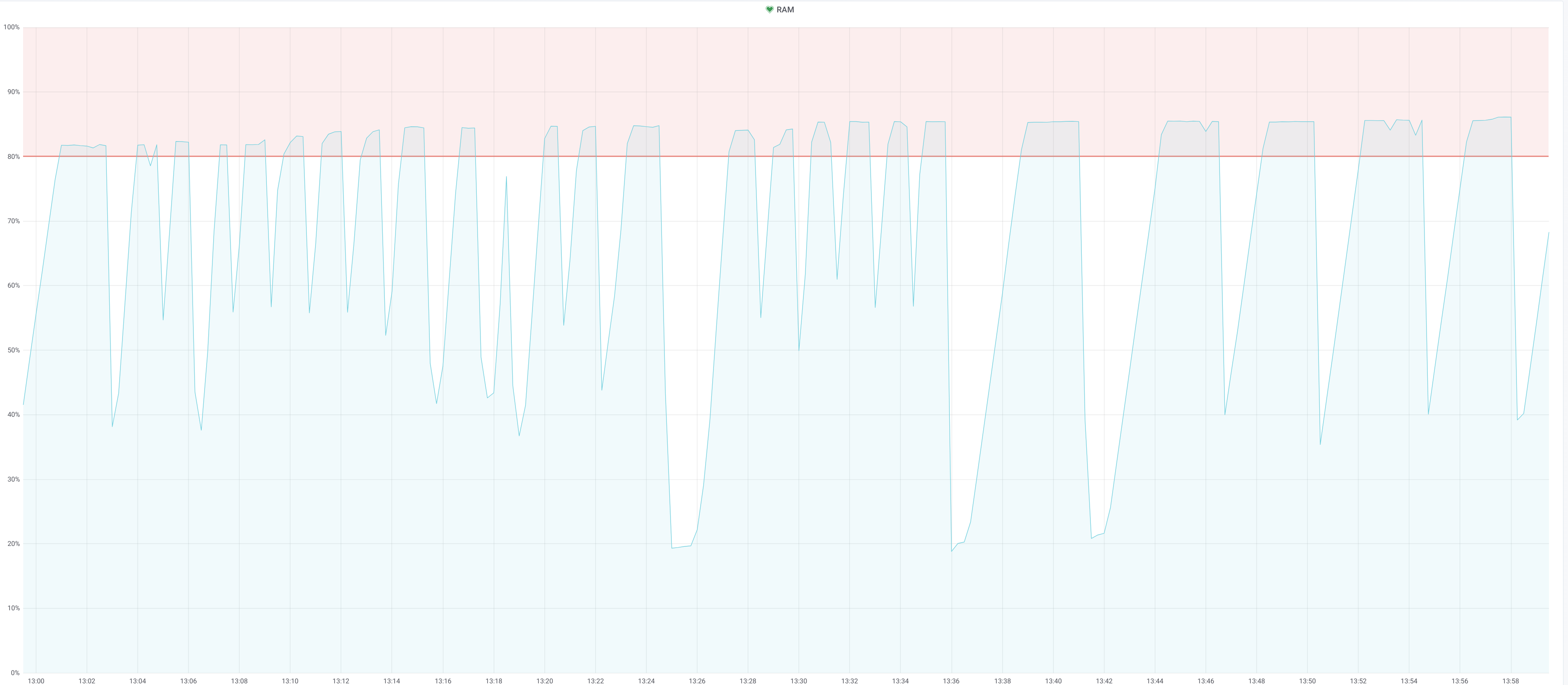

edit:
i have now blocked the connection to the "/Microsoft-Server-ActiveSync;" entpunkt via my proxy.
So Sogo works as it should, ram load is stable, exchange does not work of course.
 badsmoke
All 15 comments
Use less workers or less vmem per worker.
We are A not SOGo (inverse) and B:
WOWorkersCount = "80";
SxVMemLimit = 1024;
Your RAM is not enough, when all workers are used. Reduce it.
You may want to checkout the official support for this. :)
 andryyy
on 17 Feb 2020
andryyy
on 17 Feb 2020
thanks for the answer.
i was experimenting with different values.
I've now restored it to default.
20 workers
mem 384
unfortunately no change, the ram gets full again
badsmoke
on 17 Feb 2020
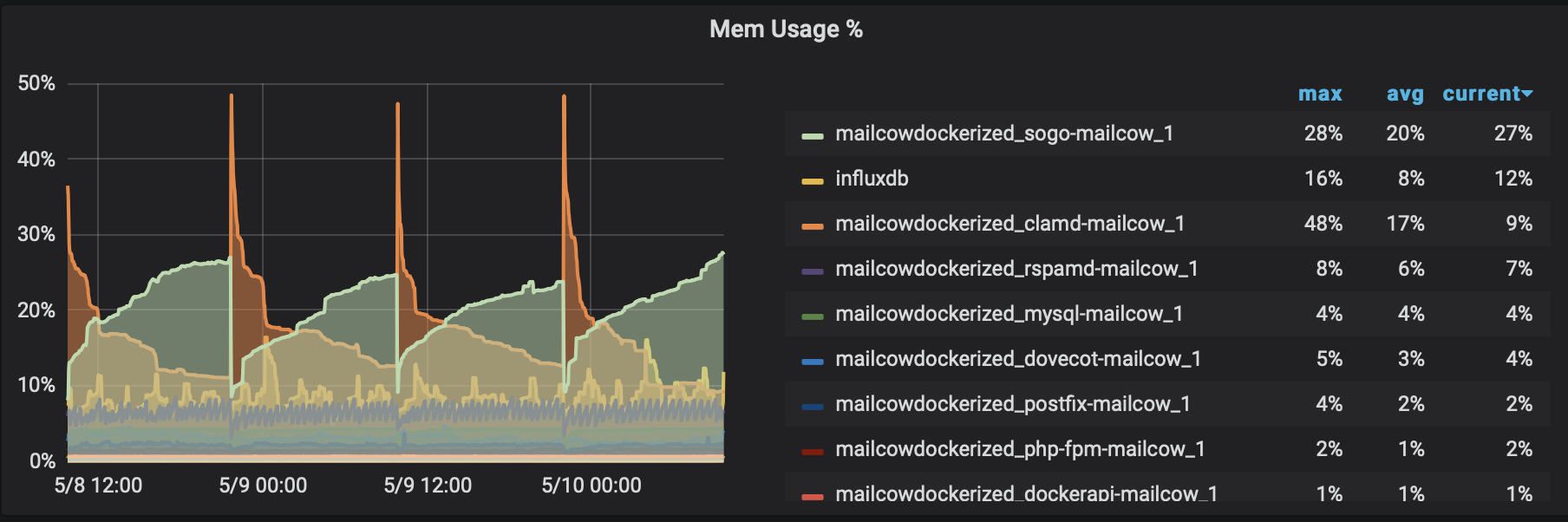
@badsmoke I am having a similar issue. I will try these configuration changes.
Specs of my machine (yes I know it is low on RAM but I tried to size as small as possible):
EC2 instance running default Amazon Linux 2 AMI. 4.14.177-139.253.amzn2.x86_64 t3a.small, which is 2 CPU 2GB RAM and 8GB swap.
 Clete2
on 10 May 2020
Clete2
on 10 May 2020
If you want SOGo with EAS, you are not experiencing a memory leak but memory USAGE. It will not work on 2 GB.
Reduce workers to something like 7 workers.
With 20 workers and a limit of 384M, SOGo cannot eat more RAM than ~8 GB. It will not allow more.
If it still fails, your setup is broken somewhere. You need to monitor and debug which process is actually eating the RAM (the container overview does not help at all, even less when it is from a time the machine is not OOM).
Ask SOGo for support or get a support subscription with mailcow to let someone check it. That's all I can suggest. It is not happening on any machine we support, maintain or monitor.
andryyy
on 10 May 2020
Makes sense @andryyy , thanks for your reply. I didn’t even consider EAS. I’ll upgrade my instance to give it more memory.
Clete2
on 10 May 2020
I have just manually restarted the SOGo container on a Mailcow server as it was swapping so much that it was becoming unresponsive due to SOGo using 27G of RAM…

I guess all we can do about this is manually restart it every now and then or perhaps add a cron job to do that nightly?
 chriscroome
on 11 May 2020
chriscroome
on 11 May 2020
@chriscroome How many workers?
andryyy
on 11 May 2020
@andryyy how would I count them, where are they set?
chriscroome
on 11 May 2020
data/conf/sogo/sogo.conf :)
Those graphs do not really help, you should track processes, can you do that?
andryyy
on 11 May 2020
grep -i workers data/conf/sogo/sogo.conf
    WOWorkersCount = "240";
ps -lA | grep -i sogo | wc -l
241
Do you have a suggestion for a method to track processes?
The restart does appear to have reduced the memory usage and the server is responsive again:

chriscroome
on 11 May 2020
240 workers with a max memory of 384M results in a max of ~92 GB. :)
You probably want to reduce that.
andryyy
on 11 May 2020
Thanks, I have reduced it to 50 and will do another restart of the container this evening.
chriscroome
on 11 May 2020
As long as you have enough swap, you can go with ~120.
Can you also check ll /var/lib/docker/volumes/mailcowdockerized_sogo-userdata-backup-vol-1/_data/ -h and see the biggest profile file? How large is it?
andryyy
on 11 May 2020
How much swap would you suggest, at the moment there is only a 2G disk.
Which packages does the ll command come from, I haven't come across that before.
These are the biggest dozen:
ls -lah | awk '{ print $5 }' | grep K | uniq | sort -n | tail -n 12
121K
127K
152K
153K
194K
224K
249K
308K
342K
457K
748K
777K
Oh, sorry, it is a local alias here for "ls -la --color" :)
The profiles look fine, I was worried a profile blew up.
andryyy
on 11 May 2020
Related issues
 schoebelh
·
3Comments
schoebelh
·
3Comments
 thannaske
·
3Comments
thannaske
·
3Comments
 constin
·
3Comments
constin
·
3Comments
 patrick7
·
3Comments
patrick7
·
3Comments
 Adorfer
·
3Comments
Adorfer
·
3Comments
Most helpful comment
If you want SOGo with EAS, you are not experiencing a memory leak but memory USAGE. It will not work on 2 GB.
Reduce workers to something like 7 workers.
With 20 workers and a limit of 384M, SOGo cannot eat more RAM than ~8 GB. It will not allow more.
If it still fails, your setup is broken somewhere. You need to monitor and debug which process is actually eating the RAM (the container overview does not help at all, even less when it is from a time the machine is not OOM).
Ask SOGo for support or get a support subscription with mailcow to let someone check it. That's all I can suggest. It is not happening on any machine we support, maintain or monitor.