Mailcow-dockerized: 2002: Connection refused?
Hello,
The second time within a month I had a problem with the database connection (2002 - Connection refused).
After restarting the server, everything works again.
What could be the reason? How and where could I possibly see logs for it (Docker is unfortunately not my area of expertise).
Thanks in advance.
 omexlu
All 25 comments
Hello,
You will need to provide logs as stated in the issue template other wise we can't help you. Do you have any local modifications to the mailcow source code (you can check with git diff origin/master). When this happens again can you please post the output of the mysql logs by running docker-compose logs mysql-mailcow --tail=200. What kind of systems is your mailcow running on how much ram does it have?
 ntimo
on 18 Oct 2019
ntimo
on 18 Oct 2019
Hello,
No i don't have any modifations on mailcow, if it happends again i will look into the logs with your command, thx.
I have only a little cloud-server that only use mailcow as mail-server:
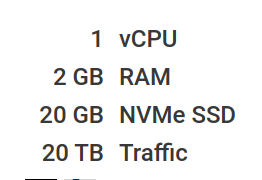
Maybe there is an outtake of RAM or CPU at some times (clam is already deactivated).
omexlu
on 18 Oct 2019
Try to also disable Solr, if it is running (it shouldn't). Reduce the SOGo workers.
 andryyy
on 18 Oct 2019
andryyy
on 18 Oct 2019
How can i disable Solr? What do you mean with SOGo workers?
I need SOGo :)
omexlu
on 18 Oct 2019
Add more ram. If you can't add more ram at least add more swap. And try to reduce sogo workers for a test.
what's the output of free -h ?
can you try to use ps_mem.py and paste the relevant part of the output here?
 marrco
on 19 Oct 2019
marrco
on 19 Oct 2019
Evening,
Clamav and Solr should be switched off, as soon as it happens again I will publish the logs and all other suggestions posted here.
docker-compose logs mysql-mailcow --tail=200
free -h
I assume because it's a very small cloud package it caused RAM / CPU weakening.
omexlu
on 19 Oct 2019
Hello,
It happened again tonight and I have now examined all the necessary proposals.
Here is a screenshot of the Cloud-vServer from my provider at this time:
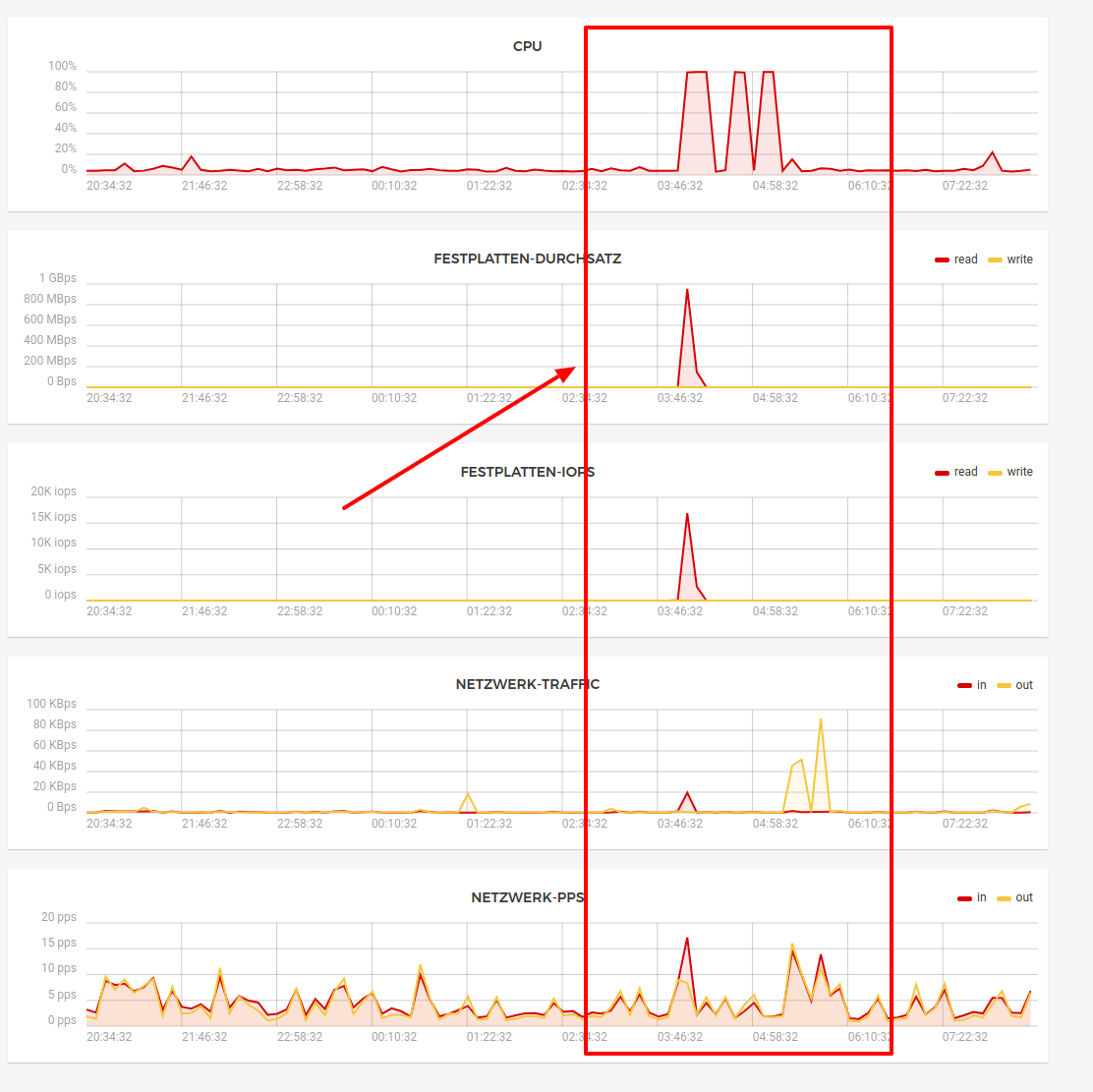
A screenshot of 'free -h' from just now:

And here the corresponding logs of mysql during this time:
mysql-mailcow_1      | 2019-11-02  4:08:15 0 [Note] mysqld (mysqld 10.3.18-MariaDB-1:10.3.18+maria~bionic) starting as process 1 ...
mysql-mailcow_1      | 2019-11-02  4:08:15 0 [Note] InnoDB: Using Linux native AIO
mysql-mailcow_1      | 2019-11-02  4:08:15 0 [Note] InnoDB: Mutexes and rw_locks use GCC atomic builtins
mysql-mailcow_1      | 2019-11-02  4:08:15 0 [Note] InnoDB: Uses event mutexes
mysql-mailcow_1      | 2019-11-02  4:08:15 0 [Note] InnoDB: Compressed tables use zlib 1.2.11
mysql-mailcow_1      | 2019-11-02  4:08:15 0 [Note] InnoDB: Number of pools: 1
mysql-mailcow_1      | 2019-11-02  4:08:15 0 [Note] InnoDB: Using SSE2 crc32 instructions
mysql-mailcow_1      | 2019-11-02  4:08:15 0 [Note] InnoDB: Initializing buffer pool, total size = 256M, instances = 1, chunk size = 128M
mysql-mailcow_1      | 2019-11-02  4:08:15 0 [ERROR] InnoDB: mmap(137297920 bytes) failed; errno 12
mysql-mailcow_1      | 2019-11-02  4:08:15 0 [ERROR] InnoDB: Cannot allocate memory for the buffer pool
mysql-mailcow_1      | 2019-11-02  4:08:15 0 [ERROR] InnoDB: Plugin initialization aborted with error Generic error
mysql-mailcow_1      | 2019-11-02  4:08:15 0 [Note] InnoDB: Starting shutdown...
mysql-mailcow_1      | double free or corruption (out)
mysql-mailcow_1      | 191102  4:08:15 [ERROR] mysqld got signal 6 ;
mysql-mailcow_1      | This could be because you hit a bug. It is also possible that this binary
mysql-mailcow_1      | or one of the libraries it was linked against is corrupt, improperly built,
mysql-mailcow_1      | or misconfigured. This error can also be caused by malfunctioning hardware.
mysql-mailcow_1      |
mysql-mailcow_1      | To report this bug, see https://mariadb.com/kb/en/reporting-bugs
mysql-mailcow_1      |
mysql-mailcow_1      | We will try our best to scrape up some info that will hopefully help
mysql-mailcow_1      | diagnose the problem, but since we have already crashed,
mysql-mailcow_1      | something is definitely wrong and this may fail.
mysql-mailcow_1      |
mysql-mailcow_1      | Server version: 10.3.18-MariaDB-1:10.3.18+maria~bionic
mysql-mailcow_1      | key_buffer_size=134217728
mysql-mailcow_1      | read_buffer_size=2097152
mysql-mailcow_1      | max_used_connections=0
mysql-mailcow_1      | max_threads=1502
mysql-mailcow_1      | thread_count=0
mysql-mailcow_1      | It is possible that mysqld could use up to
mysql-mailcow_1      | key_buffer_size + (read_buffer_size + sort_buffer_size)*max_threads = 9393155 K  bytes of memory
mysql-mailcow_1      | Hope that's ok; if not, decrease some variables in the equation.
mysql-mailcow_1      |
mysql-mailcow_1      | Thread pointer: 0x0
mysql-mailcow_1      | Attempting backtrace. You can use the following information to find out
mysql-mailcow_1      | where mysqld died. If you see no messages after this, something went
mysql-mailcow_1      | terribly wrong...
mysql-mailcow_1      | stack_bottom = 0x0 thread_stack 0x49000
mysql-mailcow_1      | 2019-11-02  5:20:57 0 [Note] mysqld (mysqld 10.3.18-MariaDB-1:10.3.18+maria~bionic) starting as process 1 ...
mysql-mailcow_1      | 2019-11-02  5:20:58 0 [Note] InnoDB: Using Linux native AIO
mysql-mailcow_1      | 2019-11-02  5:20:58 0 [Note] InnoDB: Mutexes and rw_locks use GCC atomic builtins
mysql-mailcow_1      | 2019-11-02  5:20:58 0 [Note] InnoDB: Uses event mutexes
mysql-mailcow_1      | 2019-11-02  5:20:58 0 [Note] InnoDB: Compressed tables use zlib 1.2.11
mysql-mailcow_1      | 2019-11-02  5:20:58 0 [Note] InnoDB: Number of pools: 1
mysql-mailcow_1      | 2019-11-02  5:20:58 0 [Note] InnoDB: Using SSE2 crc32 instructions
mysql-mailcow_1      | 2019-11-02  5:20:58 0 [Note] InnoDB: Initializing buffer pool, total size = 256M, instances = 1, chunk size = 128M
mysql-mailcow_1      | 2019-11-02  5:20:58 0 [Note] InnoDB: Completed initialization of buffer pool
mysql-mailcow_1      | 2019-11-02  5:20:58 0 [Note] InnoDB: If the mysqld execution user is authorized, page cleaner thread priority can be changed. See the man page of setpriority().
mysql-mailcow_1      | 2019-11-02  5:20:58 0 [Note] InnoDB: Starting crash recovery from checkpoint LSN=669440117
mysql-mailcow_1      | 2019-11-02  5:20:58 0 [Note] InnoDB: 128 out of 128 rollback segments are active.
mysql-mailcow_1      | 2019-11-02  5:20:58 0 [Note] InnoDB: Removed temporary tablespace data file: "ibtmp1"
mysql-mailcow_1      | 2019-11-02  5:20:58 0 [Note] InnoDB: Creating shared tablespace for temporary tables
mysql-mailcow_1      | 2019-11-02  5:20:58 0 [Note] InnoDB: Setting file './ibtmp1' size to 12 MB. Physically writing the file full; Please wait ...
mysql-mailcow_1      | 2019-11-02  5:20:58 0 [Note] InnoDB: File './ibtmp1' size is now 12 MB.
mysql-mailcow_1      | 2019-11-02  5:20:58 0 [Note] InnoDB: Waiting for purge to start
mysql-mailcow_1      | 2019-11-02  5:20:58 0 [Note] InnoDB: 10.3.18 started; log sequence number 669440126; transaction id 1163900
mysql-mailcow_1      | 2019-11-02  5:20:58 0 [Note] InnoDB: Loading buffer pool(s) from /var/lib/mysql/ib_buffer_pool
mysql-mailcow_1      | 2019-11-02  5:20:58 0 [Note] Recovering after a crash using tc.log
mysql-mailcow_1      | 2019-11-02  5:20:58 0 [Note] Starting crash recovery...
mysql-mailcow_1      | 2019-11-02  5:20:58 0 [Note] Crash recovery finished.
mysql-mailcow_1      | 2019-11-02  5:20:58 0 [Note] Server socket created on IP: '::'.
mysql-mailcow_1      | 2019-11-02  5:20:58 0 [Warning] 'proxies_priv' entry '@% root@d9d8b67422e4' ignored in --skip-name-resolve mode.
mysql-mailcow_1      | 2019-11-02  5:20:58 6 [Note] Event Scheduler: scheduler thread started with id 6
mysql-mailcow_1      | 2019-11-02  5:20:58 0 [Note] mysqld: ready for connections.
mysql-mailcow_1      | Version: '10.3.18-MariaDB-1:10.3.18+maria~bionic'  socket: '/var/run/mysqld/mysqld.sock'  port: 3306  mariadb.org binary distribution
mysql-mailcow_1      | 2019-11-02  5:20:58 0 [Note] InnoDB: Buffer pool(s) load completed at 191102  5:20:58
As I see it here a RAM problem and there are not enough resources available, SOLR and ClamAV are already deactivated.
What could that be, can i fix the problem somehow or are just more RAM / CPU needed?
Thanks in advance.
omexlu
on 2 Nov 2019
These graphs don't help you debug this. You need to find out which proc eats RAM.
It is quite possible MariaDB was killed in this oom situation. It does not mean it was the main reason for this high memory situation.
2 GB without swap is not supported anyway. You could try to reduce SOGo workers and try again.
Also run update.sh if you didn't in the past 24h.
andryyy
on 2 Nov 2019
The Image was provided by my provider (hetzner) in this programmation without swap.
What do you mean with SOGo workers?
I will do an update this evening.
omexlu
on 2 Nov 2019
data/conf/sogo/sogo.conf :) workercount. Reduce it if you don't need that many workers. But keep it above ~7. If you ever encounter "no child available to handle this request" in sogo-mailcow logs, increase it.
andryyy
on 2 Nov 2019
OK, i will give it a try this evening, i have only one redirect in SOGo :)
After change workercount, need to restart SOGo over interface?
Thanks anyway.
omexlu
on 2 Nov 2019
Yes, restart it afterwards. Or just change the config now and update this evening. It will recreate the containers then anyway.
andryyy
on 2 Nov 2019
I have now done the update and changed:
WOWorkersCount = "20";
to
WOWorkersCount = "8";
Lets see if it happends again in future :)
Thank you.
omexlu
on 2 Nov 2019
Hello,
In connection with this problem it might be useful to add a SWAP file to my Cloud-VPS?
As described here for example:
https://www.digitalocean.com/community/tutorials/how-to-add-swap-space-on-ubuntu-16-04
PS. If I have 2GB of RAM, the SWAP file should be 4GB, right?
Thanks in advance.
omexlu
on 3 Nov 2019
Hello @andryyy
It happened again, so to reduce the SOGO Worker have unfortunately brought nothing. Maybe the cloud is just not strong enough with 2 RAM and 1 vCPU.
Just can't explain the origin of this problem to me.
omexlu
on 15 Nov 2019
Hello @andryyy & others,
Now I had a little time to have a closer look, in the syslog I could see the following entry:
Nov 15 13:48:32 mx kernel: [1122631.811889] Out of memory: Kill process 9712 (mysqld) score 72 or sacrifice child
Nov 15 13:48:32 mx kernel: [1122631.819983] Killed process 9712 (mysqld) total-vm:1512916kB, anon-rss:144324kB, file-rss:0kB
So I was really just killed the mysql server because of OOM, so the problems are probable there.
This is my current my.cnf:
[mysqld]
character-set-client-handshake = FALSE
character-set-server           = utf8mb4
collation-server               = utf8mb4_unicode_ci
#innodb_file_per_table          = TRUE
#innodb_file_format             = barracuda
#innodb_large_prefix            = TRUE
#sql_mode=IGNORE_SPACE,NO_ZERO_IN_DATE,NO_ZERO_DATE,ERROR_FOR_DIVISION_BY_ZERO,NO_AUTO_CREATE_USER,NO_ENGINE_SUBSTITUTION
max_allowed_packet      = 192M
max-connections         = 500
performance_schema      = 0
innodb-strict-mode      = 0
skip-host-cache
skip-name-resolve
log-warnings            = 0
event_scheduler         = 1

[client]
default-character-set = utf8mb4

[mysql]
default-character-set = utf8mb4
I just see that it is not up to date with the current Mailcow version:
https://github.com/mailcow/mailcow-dockerized/blob/master/data/conf/mysql/my.cnf
After updating Mailcow, maybe I should adjust some values so that there are less problems on my weak system? And what attitudes do you advise me to adopt?
Thanks in advance.
omexlu
on 17 Nov 2019
Did you stop using SOLR as advised? Also did you read the docs where it says you should have at least 3GiB of RAM? https://mailcow.github.io/mailcow-dockerized-docs/prerequisite-system/
 Braintelligence
on 17 Nov 2019
Braintelligence
on 17 Nov 2019
Yes SOLR and ClamAV are deactivated.
Yes I have read and I am aware that the minimum requirements are not completely met, but until some time ago it went quite well, MailCow have been running for 1 year without problems.
Maybe the values in my.cfn don't fit for such a small server and can be corrected in my case.
omexlu
on 17 Nov 2019
Can you add more SWAP to your system? Maybe that will tip the scale enough.
Braintelligence
on 17 Nov 2019
With standard image from my provider there is no SWAP at all (see above) and the official support advised me not to create a SWAP-FILE because this could negatively affect the system for me and others on a cloud server.
I'm not sure if I should try this or not or should rather adjust your my.cfn settings.
omexlu
on 17 Nov 2019
Well I'm sorry but this eludes the purpose of GitHub issues here. Mailcow-Dockerized doesn't seem to officially support such setups (anymore?), thus the official answer should be "Your system doesn't meet the requirements for this software, we can't help you."
Maybe someone else has an idea or is willing to support your special case :/.
Braintelligence
on 17 Nov 2019
We are working on reducing resource usage, but it gets harder and harder. Especially with ClamAV, Solr and ActiveSync it gets more and more complicated.
3 GB and no swap will not work, I'm afraid. Try to update and check for new code you might be missing. :)
andryyy
on 17 Nov 2019
They should also not advise you to not create a swap device. I think it is always the better option to have a swap device/file to make room for more frequently accessed memory. The other crap can be - depending on the configured swapiness - placed into the slow swap. As long as you don't constantly hammer the swap device due to being out of memory, the overall performance should be better. Linux is great at managing memory.
andryyy
on 17 Nov 2019
Thank you @andryyy ,
I will update now my mailcow because there are few changes on my.cnf and if that don't help, i will create SWAPFILE and even that don't help i will upgrade to 4 GB RAM / 2vCPU :)
I will give feedback if anything changes.
omexlu
on 17 Nov 2019
This issue has been automatically marked as stale because it has not had recent activity. It will be closed if no further activity occurs. Thank you for your contributions.
![stale[bot] picture](https://avatars3.githubusercontent.com/in/1724?v=4&s=40) stale[bot]
on 16 Jan 2020
stale[bot]
on 16 Jan 2020
Related issues
 CrAazZyMaN21
·
3Comments
CrAazZyMaN21
·
3Comments
 schoebelh
·
3Comments
schoebelh
·
3Comments
 phipag
·
3Comments
phipag
·
3Comments
 RogerSik
·
3Comments
RogerSik
·
3Comments
 patrick7
·
3Comments
patrick7
·
3Comments