Mailcow-dockerized: Rspamd memory usage increased in recent versions
Prior to placing the issue, please check following: (fill out each checkbox with a X once done)
- [X] I understand that not following below instructions might result in immediate closing and deletion of my issue.
- [X] I have understood that answers are voluntary and community-driven, and not commercial support.
- [X] I have verified that my issue has not been already answered in the past. I also checked previous issues.
Description of the bug:
Memory usage has increased significantly after updating to the latest version. Here is the output from our monitoring...
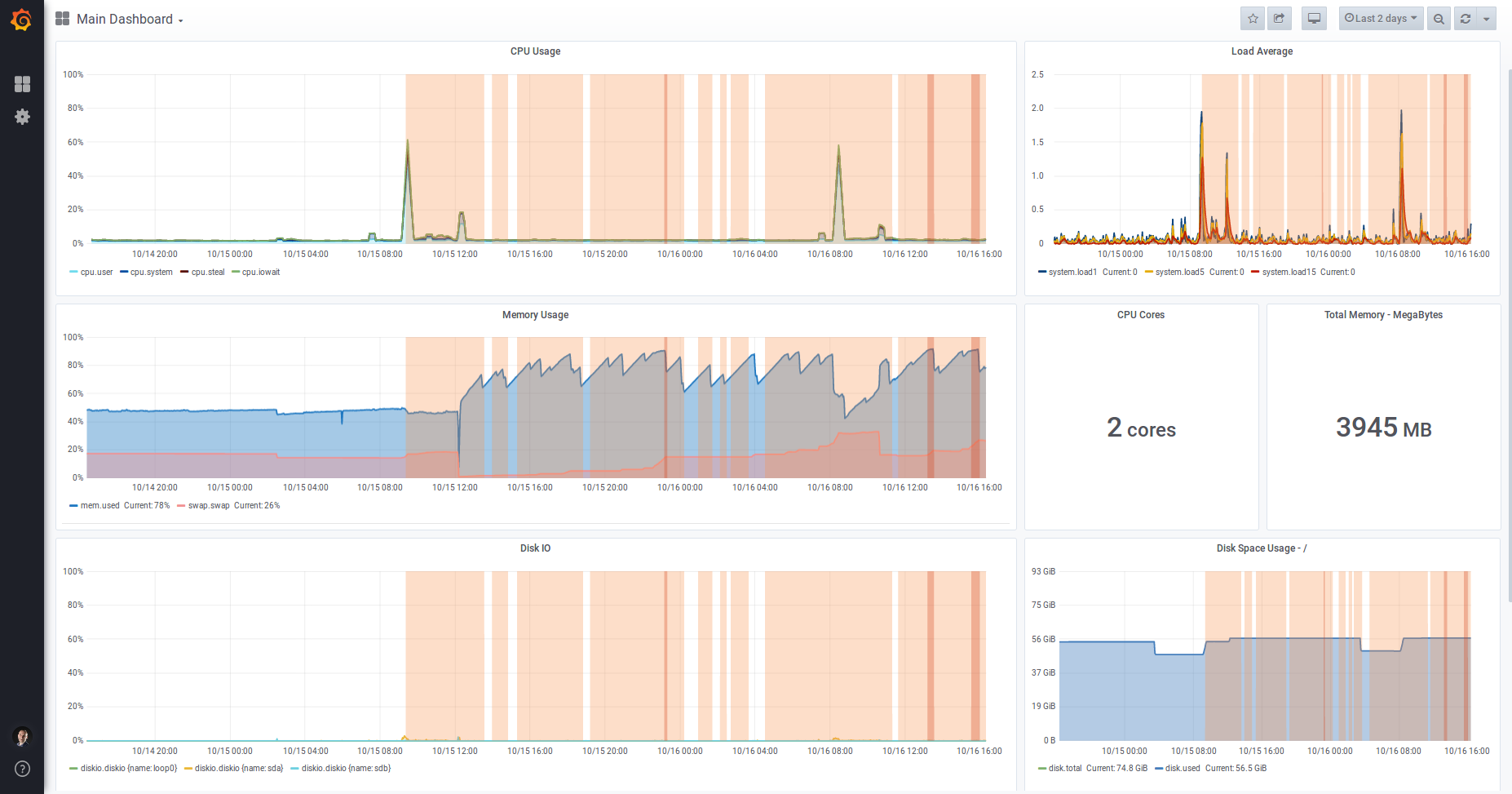
Mailcow was updated at around midday on 15 Oct 2019 to the latest commit (09d12c8f7ed592871f3a34595126ff5f257d1938).
| Question | Answer |
| --- | --- |
| My operating system | Ubuntu 18.04 |
| Is Apparmor, SELinux or similar active? | Stock Apparmor |
| Virtualization technology (KVM, VMware, Xen, etc) | A VPS server which I believe uses Xen |
| Server/VM specifications (Memory, CPU Cores) | 2 cores, 4GB RAM |
| Docker Version (docker version) | 19.03.3 |
| Docker-Compose Version (docker-compose version) | 1.24.0, build 0aa59064 |
| Reverse proxy (custom solution) | Nginx for web traffic |
Further notes:
- No changes to the code
- No custom firewall rules
- No changes to e-mail, it's a relatively quiet server
 dogsbody
All 41 comments
For me its actually quite consistent at around 4,5 GB.

 ntimo
on 16 Oct 2019
ntimo
on 16 Oct 2019
Same here, no change on any mailcow system.
You need to track the processes, graphs do not help, if you don't know what is eating your RAM.
 andryyy
on 16 Oct 2019
andryyy
on 16 Oct 2019
I can confirm, rspamd 2.0 uses a lot more memory than 1.9 …but I have no idea if thats expected or a problem
Edit:
rspamd on my setup uses about 1.2G of RAM after ~24h uptime; clamd is disabled
 HorayNarea
on 17 Oct 2019
HorayNarea
on 17 Oct 2019
I'm having a similar issue, mailcow was running great on a 2gb VM with 2gb swap for almost a year, but after the update got maxed on resources. I upgraded the VM to 4gb with 2gb swap and it is still maxed. Looking at the monitoring memory gets full after about 12-16 hours of uptime and io wait time takes all the CPU. I've disabled clammd for now and it seems to be ok, but I will report back with any more info I get or if there are any specific requests.
 ssm3e30
on 17 Oct 2019
ssm3e30
on 17 Oct 2019
2 GB is absolutely not recommended. With ClamAV it is not useable.
Rspamd indeed needs a little bit more RAM. But I barely feel or see it. Had to compare the procs with older systems to notice.
If you want to complain, talk to Vsevo at Rspamd. :)
andryyy
on 17 Oct 2019
@andryyy I'm not running 2GB (@ssm3e30 is), I'm running 4GB RAM.
It maybe worth pointing out that the Minimum System Resources page defines "2 GiB + Swap (better: 4 GiB and more + Swap)". If this has changed then I'm happy to update the documentation?
dogsbody
on 17 Oct 2019
Yes, sure. :) I think minimum should be 3 GiB + swap now.
andryyy
on 17 Oct 2019
Same here: while solr and clamd are inconspicuous and relatively resource-saving,
rspamd eats up to ~ 35% / 4GB Ram in the course of a day.
And that although there are just a few private mailboxes with very little data.
Also set data/conf/rspamd/override.d/logging.inc :: level to "info".
But didn't notice any errors/warnings. It seems like everythings going normal.
Even though I couldn't find any problems, I don't think that's normal.
I already asked around and without mailcow the memory consumption between rspamd1x and 2.0 has hardly changed.
Should I set up a swap file? (Yeah, I know it's recommended anyway.)
So far I didn't need it because I always had enough memory available.
 MatthisB
on 28 Oct 2019
MatthisB
on 28 Oct 2019
I also have the suspicion that rspamd has recently developed a memory leak. Could you try setting map_watch_interval = 3600s in data/conf/rspamd/local.d/options.inc? In my case, that seems to fix it. In my case, rspamd memory usage used to grow by a few hundred KB per minute, now it has stayed constant for three days. I have a couple other changes in my config for testing, but I suspect that that‘s the one that made the difference.
 mkuron
on 29 Oct 2019
mkuron
on 29 Oct 2019
Could also be related to an event loop. I will push a new image with a fix for this (Rspamd 2.1).
andryyy
on 29 Oct 2019
We should also add an Etag header to the maps (settings.php and forwardinghosts.php) so the map is not overwritten every time it is checked.
mkuron
on 29 Oct 2019
Yes, need to add a routing to fetch the last modification time.
andryyy
on 29 Oct 2019
Thanks for the quick answers!
I have just updated to the version with rspamd2.1!
I'll keep an eye on it and will report.
If the update doesn't help, I'll try to increase map_watch_interval.
MatthisB
on 29 Oct 2019
The memory consumption in comparison to 2.0 has dropped a bit, but still far above of 1.x.
Furthermore, it is very inconsistent and collapses again and again.
Take a look at the log of docker stats --no-stream | grep 'rspamd' every minute over the last ~8h:
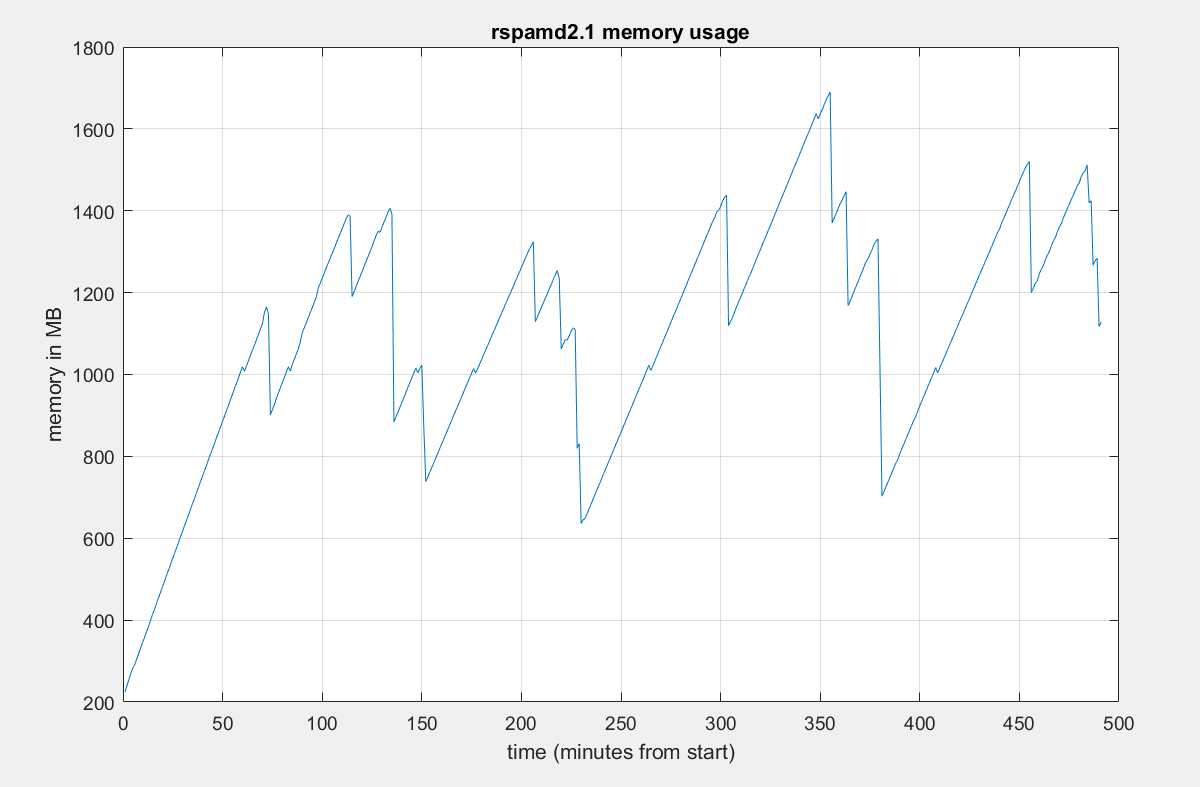
Edit: The slope looks conspicuously linear
MatthisB
on 29 Oct 2019
That's a normal graph.
andryyy
on 29 Oct 2019
It may be normal, but not ideal. I think we should be able to tune the Lua garbage collection to get it flatter. That would be highly advantageous on machines with less memory.
mkuron
on 29 Oct 2019
Hi,
I think the problem is related to what's happening on our server: 4Go RAM but no SWAP, sometimes Rspamd resources consumption ramp up and everything ends on fire.
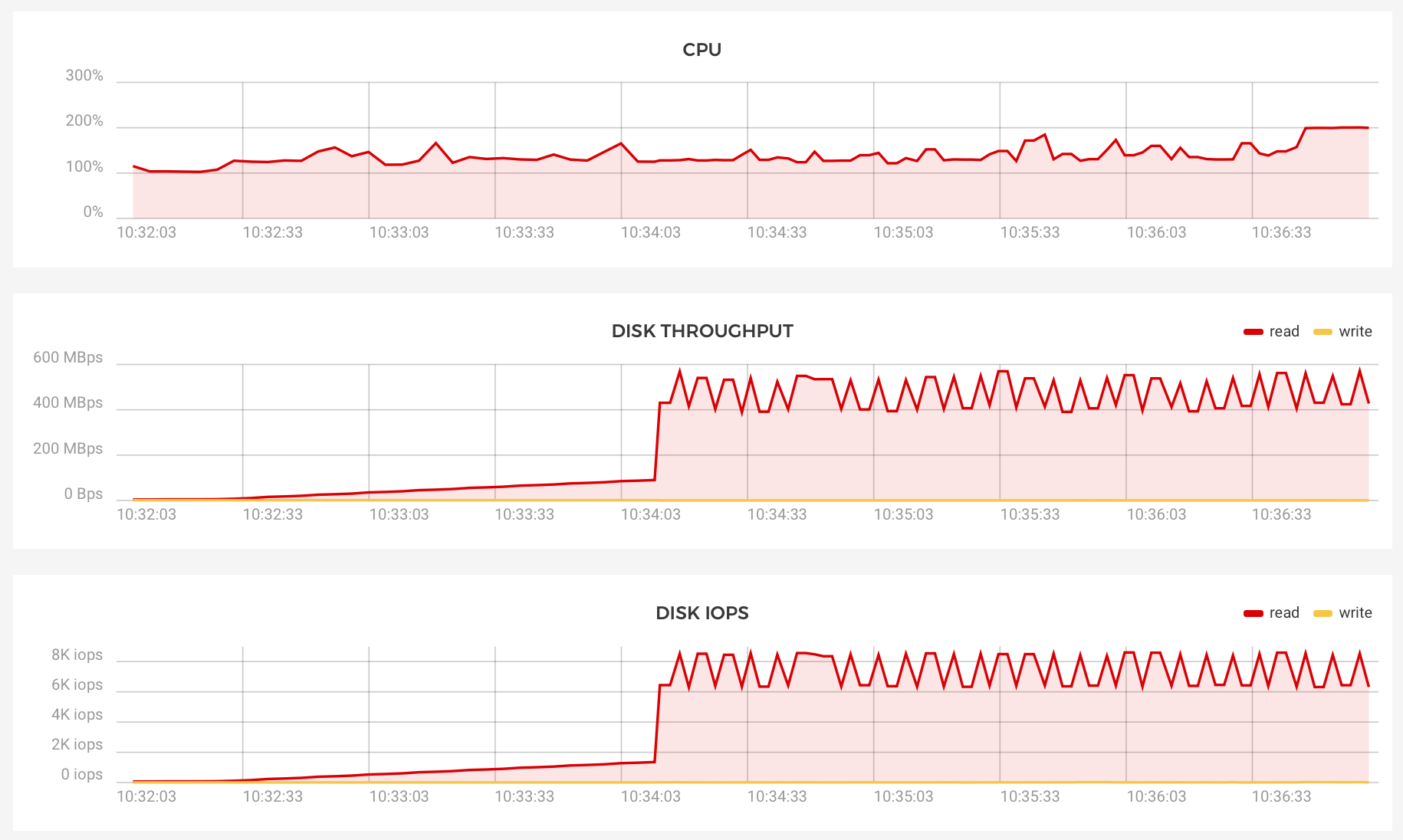
250 load average atm.
 mthld
on 30 Oct 2019
mthld
on 30 Oct 2019
Not really. It probably runs OOM and has kswapd increase the server load.
You posted disk graphs and CPU. This is about RAM.
4 GB is not enough with no swap and Clamd/Solr active.
Edit: All graphs are useless without a monitoring to show which proc is exactly using how much RAM. Can you post this right now @mthld?
Your CPU was also above 100% all the time, I think a proc is stuck and eats a single core all the time.
andryyy
on 30 Oct 2019
@mkuron How do you think we can fix LUA garbage purging?
andryyy
on 30 Oct 2019
Hi @andryyy,
Thanks for your answer.
Indeed it lacks RAM, as soon as I can access the server I'll add some swapfile. 👍🏻

Edit: I just saw you edited your message, here is the memory consumption per process
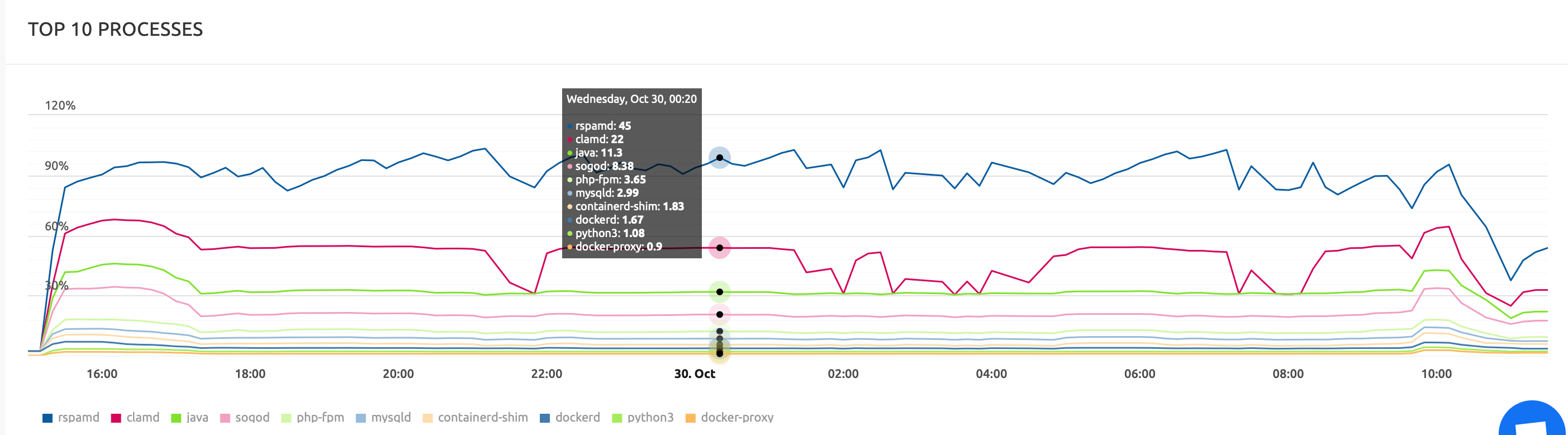
But FYI we just upgraded the server to 8Go RAM and everything looks fine now.
mthld
on 30 Oct 2019
How do you think we can fix LUA garbage purging?
In data/conf/rspamd/local.d/options.inc, we can set full_gc_iters. That‘s the number of messages processed after which the Lua interpreter collects garbage. I have no idea what the default is, but it must be rather high as before setting this parameter, I had never seen the resulting log message (2019-10-30 17:36:55 #25(normal) <97818f>; task; rspamd_task_free: perform full gc cycle; memory stats: 82.60MiB allocated, 84.25MiB active, 3.07MiB metadata, 87.50MiB resident, 90.44MiB mapped; lua memory: 17679 kb -> 12888 kb; 432.006111019291 ms for gc iter). I currently garbage collect after every task, which would be a bit much for a high-load server (as you can see, it takes 400ms, during which no tasks can be processed by this worker), but works well for me. Perhaps setting this to 10 or 100 would be reasonable for low- to medium-volume servers.
By the way, my current config uses the changes below and has been steadily running at around 220MB for rspamd for the past six days:
diff --git a/data/conf/rspamd/local.d/neural.conf b/data/conf/rspamd/local.d/neural.conf
index d1ec510b..29084c4d 100644
--- a/data/conf/rspamd/local.d/neural.conf
+++ b/data/conf/rspamd/local.d/neural.conf
@@ -1,3 +1,4 @@
+enabled = false;
 rules {
   "LONG" {
     train {
diff --git a/data/conf/rspamd/local.d/options.inc b/data/conf/rspamd/local.d/options.inc
index 4fbdfba7..06300053 100644
--- a/data/conf/rspamd/local.d/options.inc
+++ b/data/conf/rspamd/local.d/options.inc
@@ -1,9 +1,10 @@
 dns {
   enable_dnssec = true;
 }
-map_watch_interval = 30s;
+map_watch_interval = 3600s;
 dns {
   timeout = 4s;
   retransmits = 2;
 }
 disable_monitoring = true;
+full_gc_iters = 1;
diff --git a/data/conf/rspamd/override.d/worker-fuzzy.inc b/data/conf/rspamd/override.d/worker-fuzzy.inc
index 09b39c93..291e6150 100644
--- a/data/conf/rspamd/override.d/worker-fuzzy.inc
+++ b/data/conf/rspamd/override.d/worker-fuzzy.inc
@@ -2,7 +2,7 @@
 bind_socket = "*:11445";
 allow_update = ["127.0.0.1", "::1"];
 # Number of processes to serve this storage (useful for read scaling)
-count = 2;
+count = 1;
 # Backend ("sqlite" or "redis" - default "sqlite")
 backend = "redis";
 # Hashes storage time (3 months)
diff --git a/data/conf/rspamd/override.d/worker-normal.inc b/data/conf/rspamd/override.d/worker-normal.inc
index a7ab4baf..ad6c2b80 100644
--- a/data/conf/rspamd/override.d/worker-normal.inc
+++ b/data/conf/rspamd/override.d/worker-normal.inc
@@ -1,3 +1,4 @@
 bind_socket = "*:11333";
 task_timeout = 12s;
+count = 1;
 .include(try=true; priority=20) "$CONFDIR/override.d/worker-normal.custom.inc"
--- a/dev/null
+++ b/data/conf/rspamd/local.d/phishing.conf
+ phishtank_enabled = false;
--- a/dev/null
+++ b/ data/conf/rspamd/override.d/logging.custom.inc
+ debug_modules = ["task"]
Let's see. :) Thanks.
andryyy
on 30 Oct 2019
Update about the last changes
This is before the memory-improve-changes on the 30th:
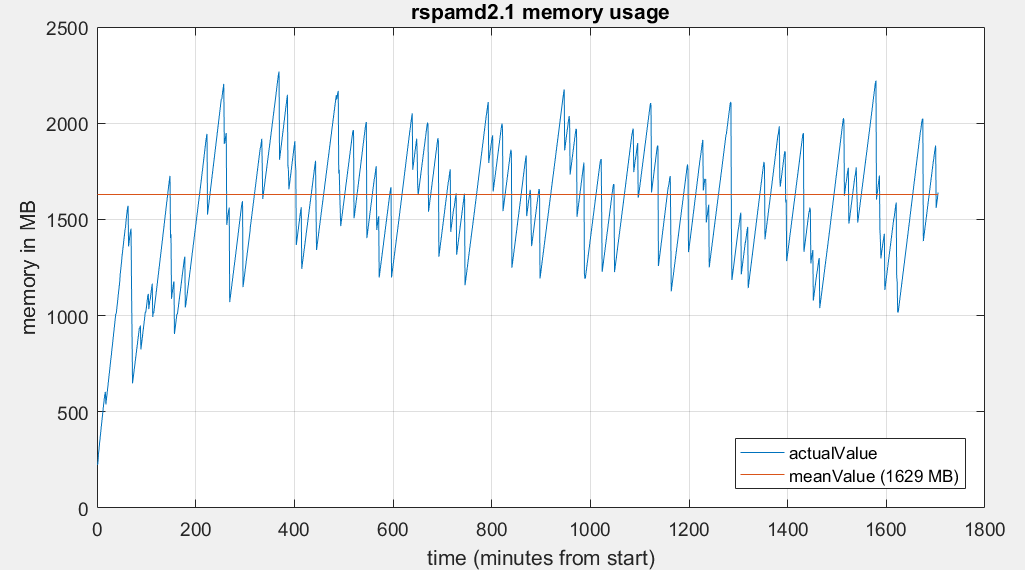
This is after (the last ~19h):
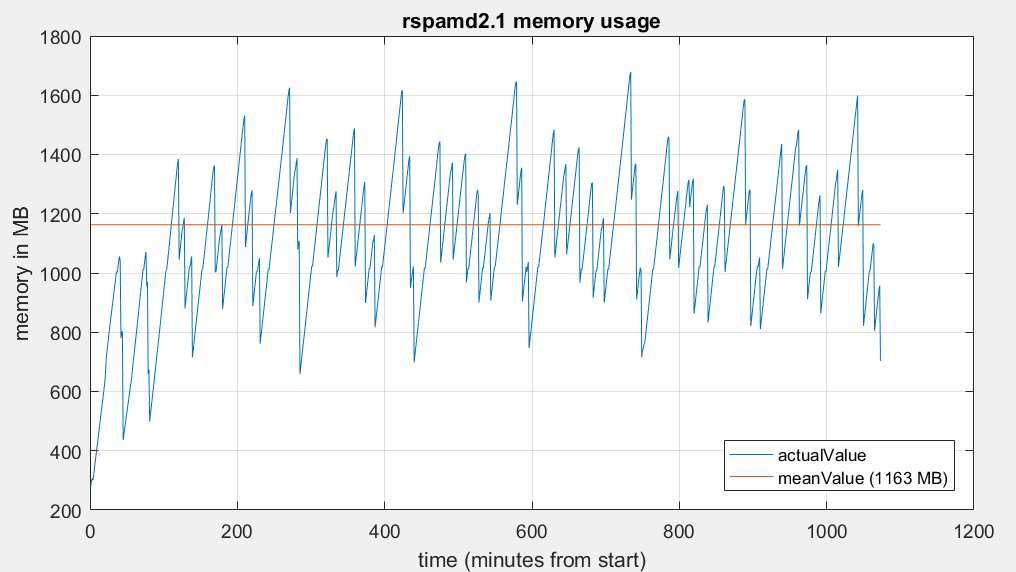
The memory consumption has decreased somewhat, but the fluctuations are still enormous.
Next Try:
Set map_watch_interval to (default?) 5min.
MatthisB
on 31 Oct 2019
Test it on your own machine, please, and report back.
I don't see this high memory usage on my systems.
Also open an issue at Rspamd, please.
Could be related to inotify watching.
andryyy
on 31 Oct 2019
rspamd updated yesterday;
Oct 31 07:54:04 mi0 kernel: [68327.433066] Out of memory: Kill process 23150 (rspamd) score 310 or sacrifice child
Oct 31 07:54:04 mi0 kernel: [68327.436471] Killed process 23150 (rspamd) total-vm:6541776kB, anon-rss:539704kB, file-rss:0kB, shmem-rss:0kB
Oct 31 07:54:04 mi0 kernel: [68327.887143] oom_reaper: reaped process 23150 (rspamd), now anon-rss:0kB, file-rss:0kB, shmem-rss:0kB
i see thare are multiple rispam process. So the 6GB+ seem to be a total:
Oct 31 07:54:04 mi0 kernel: [68327.432760] [ pid ] uid tgid total_vm rss nr_ptes nr_pmds swapents oom_score_adj name
Oct 31 07:54:04 mi0 kernel: [68327.432765] [ 346] 0 346 7409 11 18 3 51 0 cron
Oct 31 07:54:04 mi0 kernel: [68327.432768] [ 347] 105 347 11282 0 26 3 133 -900 dbus-daemon
Oct 31 07:54:04 mi0 kernel: [68327.432770] [ 360] 0 360 8950 20 22 3 75 0 irqbalance
Oct 31 07:54:04 mi0 kernel: [68327.432773] [ 362] 0 362 63582 24 31 4 253 0 rsyslogd
Oct 31 07:54:04 mi0 kernel: [68327.432775] [ 398] 0 398 3631 0 12 3 37 0 agetty
Oct 31 07:54:04 mi0 kernel: [68327.432777] [ 399] 0 399 3575 0 11 3 35 0 agetty
Oct 31 07:54:04 mi0 kernel: [68327.432780] [ 403] 0 403 280365 1717 88 5 4299 0 containerd
Oct 31 07:54:04 mi0 kernel: [68327.432782] [ 404] 0 404 275728 3589 142 5 8621 -500 dockerd
Oct 31 07:54:04 mi0 kernel: [68327.432785] [ 412] 107 412 25527 28 24 3 126 0 ntpd
Oct 31 07:54:04 mi0 kernel: [68327.432787] [ 414] 0 414 17489 7 37 3 186 -1000 sshd
Oct 31 07:54:04 mi0 kernel: [68327.432790] [ 7506] 0 7506 58287 0 21 4 376 -500 docker-proxy
Oct 31 07:54:04 mi0 kernel: [68327.432792] [ 7531] 0 7531 54189 0 20 5 372 -500 docker-proxy
Oct 31 07:54:04 mi0 kernel: [68327.432794] [ 7538] 0 7538 27275 148 11 4 158 -999 containerd-shim
Oct 31 07:54:04 mi0 kernel: [68327.432797] [ 7557] 0 7557 54189 0 19 5 362 -500 docker-proxy
Oct 31 07:54:04 mi0 kernel: [68327.432799] [ 7571] 0 7571 72622 0 21 4 394 -500 docker-proxy
Oct 31 07:54:04 mi0 kernel: [68327.432802] [ 7573] 100 7573 8031 1 21 3 6312 0 unbound
Oct 31 07:54:04 mi0 kernel: [68327.432804] [ 7596] 0 7596 27275 194 11 4 129 -999 containerd-shim
Oct 31 07:54:04 mi0 kernel: [68327.432807] [ 7619] 0 7619 1371 0 6 3 71 0 solr.sh
Oct 31 07:54:04 mi0 kernel: [68327.432809] [ 7644] 0 7644 27275 190 11 4 185 -999 containerd-shim
Oct 31 07:54:04 mi0 kernel: [68327.432812] [ 7674] 0 7674 6627 222 18 3 3069 0 supervisord
Oct 31 07:54:04 mi0 kernel: [68327.432814] [ 7713] 0 7713 27275 163 11 4 140 -999 containerd-shim
Oct 31 07:54:04 mi0 kernel: [68327.432816] [ 7724] 0 7724 26923 183 10 4 170 -999 containerd-shim
Oct 31 07:54:04 mi0 kernel: [68327.432819] [ 7789] 0 7789 14379 255 33 3 2854 0 supervisord
Oct 31 07:54:04 mi0 kernel: [68327.432821] [ 7790] 0 7790 8421 113 20 3 5978 0 python3
Oct 31 07:54:04 mi0 kernel: [68327.432824] [ 7832] 0 7832 27275 156 11 4 165 -999 containerd-shim
Oct 31 07:54:04 mi0 kernel: [68327.432826] [ 7870] 0 7870 27275 213 11 4 146 -999 containerd-shim
Oct 31 07:54:04 mi0 kernel: [68327.432828] [ 7897] 65534 7897 3952 1 10 3 2041 0 python3
Oct 31 07:54:04 mi0 kernel: [68327.432831] [ 7909] 999 7909 152250 880 142 4 45838 0 redis-server
Oct 31 07:54:04 mi0 kernel: [68327.432833] [ 7930] 0 7930 26923 178 11 4 144 -999 containerd-shim
Oct 31 07:54:04 mi0 kernel: [68327.432835] [ 7953] 0 7953 54189 0 20 4 366 -500 docker-proxy
Oct 31 07:54:04 mi0 kernel: [68327.432838] [ 7995] 11211 7995 1128 63 6 3 91 0 memcached
Oct 31 07:54:04 mi0 kernel: [68327.432840] [ 8026] 0 8026 56238 0 21 4 375 -500 docker-proxy
Oct 31 07:54:04 mi0 kernel: [68327.432842] [ 8145] 0 8145 1011 0 6 3 22 0 sleep
Oct 31 07:54:04 mi0 kernel: [68327.432845] [ 8161] 0 8161 27275 146 12 4 162 -999 containerd-shim
Oct 31 07:54:04 mi0 kernel: [68327.432847] [ 8197] 0 8197 555 1 5 3 59 0 watchdog.sh
Oct 31 07:54:04 mi0 kernel: [68327.432849] [ 8210] 0 8210 26923 146 10 4 147 -999 containerd-shim
Oct 31 07:54:04 mi0 kernel: [68327.432851] [ 8253] 0 8253 1043 5 8 3 13 0 tini
Oct 31 07:54:04 mi0 kernel: [68327.432854] [ 8261] 0 8261 74671 0 23 4 377 -500 docker-proxy
Oct 31 07:54:04 mi0 kernel: [68327.432856] [ 8460] 0 8460 35756 0 19 4 356 -500 docker-proxy
Oct 31 07:54:04 mi0 kernel: [68327.432859] [ 8488] 0 8488 54189 0 18 5 362 -500 docker-proxy
Oct 31 07:54:04 mi0 kernel: [68327.432861] [ 8521] 0 8521 54189 0 19 4 367 -500 docker-proxy
Oct 31 07:54:04 mi0 kernel: [68327.432863] [ 8537] 0 8537 27275 189 11 4 211 -999 containerd-shim
Oct 31 07:54:04 mi0 kernel: [68327.432866] [ 8557] 0 8557 4486 2 14 3 68 0 stop-supervisor
Oct 31 07:54:04 mi0 kernel: [68327.432868] [ 8558] 0 8558 95511 62 52 3 357 0 syslog-ng
Oct 31 07:54:04 mi0 kernel: [68327.432870] [ 8562] 0 8562 6998 24 20 3 45 0 cron
Oct 31 07:54:04 mi0 kernel: [68327.432872] [ 8565] 999 8565 70562 175 121 3 3259 0 sogod
Oct 31 07:54:04 mi0 kernel: [68327.432875] [ 8567] 999 8567 486395 521 177 5 29450 0 mysqld
Oct 31 07:54:04 mi0 kernel: [68327.432877] [ 8574] 0 8574 54189 0 19 4 362 -500 docker-proxy
Oct 31 07:54:04 mi0 kernel: [68327.432880] [ 8575] 0 8575 933 0 6 3 60 0 stop-supervisor
Oct 31 07:54:04 mi0 kernel: [68327.432882] [ 8576] 0 8576 933 1 6 3 73 0 postfix.sh
Oct 31 07:54:04 mi0 kernel: [68327.432884] [ 8577] 0 8577 97494 0 35 3 1236 0 syslog-ng
Oct 31 07:54:04 mi0 kernel: [68327.432887] [ 8637] 0 8637 27275 195 11 4 162 -999 containerd-shim
Oct 31 07:54:04 mi0 kernel: [68327.432889] [ 8678] 0 8678 6589 319 17 3 2919 0 supervisord
Oct 31 07:54:04 mi0 kernel: [68327.432891] [ 8829] 0 8829 27275 199 11 4 134 -999 containerd-shim
Oct 31 07:54:04 mi0 kernel: [68327.432893] [ 8855] 0 8855 59184 17 32 4 1417 0 php-fpm
Oct 31 07:54:04 mi0 kernel: [68327.432896] [ 8911] 0 8911 4490 0 14 3 75 0 clamd.sh
Oct 31 07:54:04 mi0 kernel: [68327.432898] [ 8912] 0 8912 1046 0 8 3 18 0 sleep
Oct 31 07:54:04 mi0 kernel: [68327.432901] [ 9122] 0 9122 27275 162 13 4 145 -999 containerd-shim
Oct 31 07:54:04 mi0 kernel: [68327.432903] [ 9139] 0 9139 6105 1019 17 3 1949 0 python3
Oct 31 07:54:04 mi0 kernel: [68327.432905] [ 9151] 0 9151 56238 0 21 5 366 -500 docker-proxy
Oct 31 07:54:04 mi0 kernel: [68327.432908] [ 9164] 0 9164 56238 0 20 4 366 -500 docker-proxy
Oct 31 07:54:04 mi0 kernel: [68327.432910] [ 9205] 0 9205 27275 158 12 4 176 -999 containerd-shim
Oct 31 07:54:04 mi0 kernel: [68327.432912] [ 9226] 0 9226 16946 0 10 3 319 0 nginx
Oct 31 07:54:04 mi0 kernel: [68327.432915] [ 9740] 999 9740 73024 183 121 3 3689 0 sogod
Oct 31 07:54:04 mi0 kernel: [68327.432917] [ 9741] 999 9741 73024 188 121 3 3684 0 sogod
Oct 31 07:54:04 mi0 kernel: [68327.432919] [ 9790] 0 9790 26923 222 11 4 148 -999 containerd-shim
Oct 31 07:54:04 mi0 kernel: [68327.432922] [ 9817] 0 9817 26923 181 10 4 141 -999 containerd-shim
Oct 31 07:54:04 mi0 kernel: [68327.432924] [ 9850] 0 9850 77805 84 103 5 29331 0 rspamd
Oct 31 07:54:04 mi0 kernel: [68327.432927] [ 9885] 0 9885 191 4 4 3 5 0 tini
Oct 31 07:54:04 mi0 kernel: [68327.432929] [ 9989] 82 9989 59167 0 25 4 1432 0 php-fpm
Oct 31 07:54:04 mi0 kernel: [68327.432931] [ 9990] 82 9990 59167 0 25 4 1432 0 php-fpm
Oct 31 07:54:04 mi0 kernel: [68327.432934] [ 9992] 82 9992 59291 0 31 4 1966 0 php-fpm
Oct 31 07:54:04 mi0 kernel: [68327.432936] [ 9993] 82 9993 60079 2 32 4 2405 0 php-fpm
Oct 31 07:54:04 mi0 kernel: [68327.432939] [ 9994] 82 9994 62779 0 40 4 3723 0 php-fpm
Oct 31 07:54:04 mi0 kernel: [68327.432941] [10146] 0 10146 583 1 5 3 86 0 acme.sh
Oct 31 07:54:04 mi0 kernel: [68327.432943] [10161] 0 10161 387 0 4 3 11 0 sleep
Oct 31 07:54:04 mi0 kernel: [68327.432945] [10182] 101 10182 17172 6 9 3 473 0 nginx
Oct 31 07:54:04 mi0 kernel: [68327.432948] [10183] 101 10183 17071 0 9 3 453 0 nginx
Oct 31 07:54:04 mi0 kernel: [68327.432950] [10184] 101 10184 17005 23 9 3 354 0 nginx
Oct 31 07:54:04 mi0 kernel: [68327.432952] [10221] 0 10221 26923 185 11 4 124 -999 containerd-shim
Oct 31 07:54:04 mi0 kernel: [68327.432955] [10243] 0 10243 28140 277 14 4 850 0 docker-ipv6nat
Oct 31 07:54:04 mi0 kernel: [68327.432957] [10505] 0 10505 573 0 5 3 20 0 sleep
Oct 31 07:54:04 mi0 kernel: [68327.432960] [10702] 0 10702 933 0 6 3 61 0 stop-supervisor
Oct 31 07:54:04 mi0 kernel: [68327.432962] [10703] 0 10703 1377 22 7 3 40 0 cron
Oct 31 07:54:04 mi0 kernel: [68327.432965] [10704] 0 10704 1078 44 8 3 42 0 dovecot
Oct 31 07:54:04 mi0 kernel: [68327.432967] [10705] 0 10705 78999 194 29 3 485 0 syslog-ng
Oct 31 07:54:04 mi0 kernel: [68327.432969] [10710] 402 10710 2046 0 7 3 174 0 managesieve-log
Oct 31 07:54:04 mi0 kernel: [68327.432972] [10711] 401 10711 1006 19 6 4 35 0 anvil
Oct 31 07:54:04 mi0 kernel: [68327.432974] [10712] 402 10712 1073 28 6 3 78 0 log
Oct 31 07:54:04 mi0 kernel: [68327.432976] [10713] 402 10713 2046 0 8 3 175 0 managesieve-log
Oct 31 07:54:04 mi0 kernel: [68327.432978] [10714] 0 10714 1654 183 8 3 317 0 config
Oct 31 07:54:04 mi0 kernel: [68327.432980] [10715] 401 10715 1985 25 8 3 140 0 stats
Oct 31 07:54:04 mi0 kernel: [68327.432983] [10717] 401 10717 5339 38 15 3 342 0 auth
Oct 31 07:54:04 mi0 kernel: [68327.432985] [10723] 0 10723 483 0 4 3 27 0 sleep
Oct 31 07:54:04 mi0 kernel: [68327.432987] [10725] 82 10725 59814 0 32 4 2478 0 php-fpm
Oct 31 07:54:04 mi0 kernel: [68327.432990] [10740] 101 10740 77805 147 95 5 28698 0 rspamd
Oct 31 07:54:04 mi0 kernel: [68327.432992] [10741] 101 10741 77805 152 95 5 28576 0 rspamd
Oct 31 07:54:04 mi0 kernel: [68327.432995] [10744] 101 10744 122873 1727 196 4 54100 0 rspamd
Oct 31 07:54:04 mi0 kernel: [68327.432997] [10745] 101 10745 77805 52 97 5 29366 0 rspamd
Oct 31 07:54:04 mi0 kernel: [68327.432999] [11050] 82 11050 59290 3 31 4 1904 0 php-fpm
Oct 31 07:54:04 mi0 kernel: [68327.433002] [30742] 82 30742 59291 10 31 4 1877 0 php-fpm
Oct 31 07:54:04 mi0 kernel: [68327.433004] [15279] 82 15279 59290 2 31 4 1619 0 php-fpm
Oct 31 07:54:04 mi0 kernel: [68327.433007] [17735] 0 17735 11282 13 22 3 88 -1000 systemd-udevd
Oct 31 07:54:04 mi0 kernel: [68327.433009] [18782] 101 18782 174480 1257 260 5 57797 0 rspamd
Oct 31 07:54:04 mi0 kernel: [68327.433012] [22306] 401 22306 4220 0 12 3 176 0 dict
Oct 31 07:54:04 mi0 kernel: [68327.433014] [22390] 0 22390 9495 22 22 3 103 0 systemd-logind
Oct 31 07:54:04 mi0 kernel: [68327.433016] [22976] 0 22976 10438 20 23 3 103 0 systemd-journal
Oct 31 07:54:04 mi0 kernel: [68327.433019] [23150] 101 23150 1635444 134926 1957 11 346445 0 rspamd
Oct 31 07:54:04 mi0 kernel: [68327.433021] [23467] 101 23467 816039 156844 938 8 180967 0 rspamd
Oct 31 07:54:04 mi0 kernel: [68327.433024] [23574] 101 23574 608752 205816 565 6 59112 0 rspamd
Oct 31 07:54:04 mi0 kernel: [68327.433026] [23614] 101 23614 815799 217584 950 8 189085 0 rspamd
Oct 31 07:54:04 mi0 kernel: [68327.433028] [23666] 402 23666 2080 152 9 3 63 0 imap-login
Oct 31 07:54:04 mi0 kernel: [68327.433031] [23669] 999 23669 152283 813 143 4 45963 0 redis-server
Oct 31 07:54:04 mi0 kernel: [68327.433033] [23671] 402 23671 2045 135 9 3 53 0 imap-login
Oct 31 07:54:04 mi0 kernel: [68327.433036] [23683] 0 23683 10682 56 27 3 35 0 cron
Oct 31 07:54:04 mi0 kernel: [68327.433038] [23684] 0 23684 10682 47 27 3 47 0 cron
Oct 31 07:54:04 mi0 kernel: [68327.433040] [23685] 0 23685 1489 49 7 3 19 0 cron
Oct 31 07:54:04 mi0 kernel: [68327.433043] [23686] 0 23686 1493 48 7 3 20 0 cron
Oct 31 07:54:04 mi0 kernel: [68327.433045] [23692] 0 23692 1889 20 6 3 0 0 pop3-login
Oct 31 07:54:04 mi0 kernel: [68327.433048] [23693] 999 23693 1069 11 8 3 5 0 sh
Oct 31 07:54:04 mi0 kernel: [68327.433050] [23694] 0 23694 1377 37 7 3 25 0 cron
Oct 31 07:54:04 mi0 kernel: [68327.433052] [23695] 0 23695 1377 36 7 3 26 0 cron
Oct 31 07:54:04 mi0 kernel: [68327.433055] [23696] 0 23696 6998 32 19 3 37 0 cron
Oct 31 07:54:04 mi0 kernel: [68327.433057] [23697] 0 23697 7542 49 21 3 22 0 cron
Oct 31 07:54:04 mi0 kernel: [68327.433059] [23698] 999 23698 2130 15 8 3 0 0 sogo-ealarms-no
Oct 31 07:54:04 mi0 kernel: [68327.433062] [23699] 0 23699 6998 34 19 3 35 0 cron
Oct 31 07:54:04 mi0 kernel: [68327.433064] [23700] 0 23700 6998 34 19 3 35 0 cron
I suggest reverting (is that possible) to latest 1.9x until fixed
 marrco
on 31 Oct 2019
marrco
on 31 Oct 2019
@andryyy Just to report my own experience. I was experiencing the same issue as other people in this thread, and after updating to commit 573e62f, the memory usage did not get much better:

(I could confirm from Portainer that it’s Rspamd’s container that’s spiking like this)
Then I changed two more lines in Rspamd’s configuration like @mkuron suggested, in the neural.conf and options.inc files, and this is how the server looks after one night:

Edit: and now I see there are more commits related to Rspamd’s configuration, so I’ll try reverting my manual changes and update Mailcow 😅
 Cellane
on 31 Oct 2019
Cellane
on 31 Oct 2019
Try again. I talked to Vsevo.
andryyy
on 31 Oct 2019
@Cellane
As you can see on mine, it helped a lot:
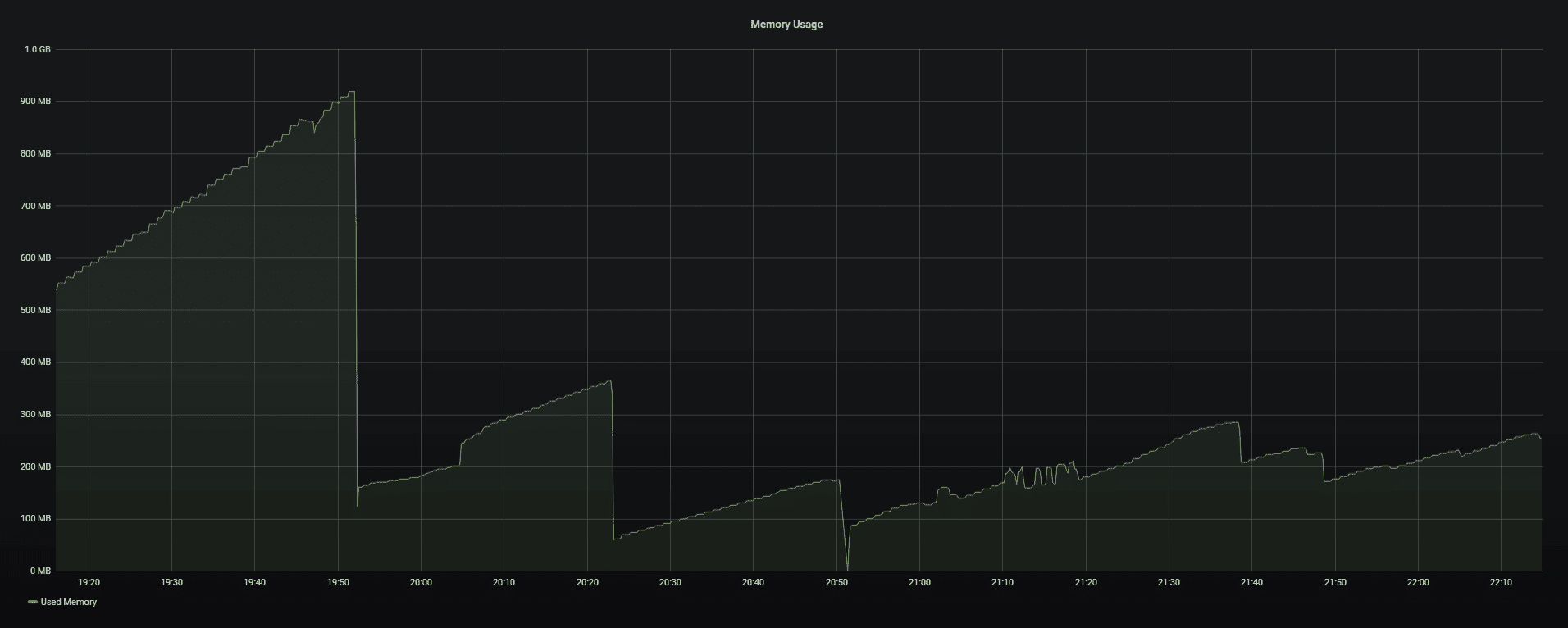
 MAGICCC
on 31 Oct 2019
MAGICCC
on 31 Oct 2019
@MAGICCC Ah, sorry, I should’ve worded my comment much better I think.
I think the first change (to commit 573e62f) might have had an effect, or rather, it might have made the behaviour less pronounced (memory spikes decreased in size), but it did not mitigate the behaviour completely (memory spikes still happened frequently). I don’t have enough data to see the full extent of the spike decrease, though. At any rate, only modifying Rspamd’s configuration files in the way I described helped eliminate the spikes fully.
I’m now trying the very latest commit at the moment and will try to report back soon if that’s fine.
Cellane
on 31 Oct 2019
No. It is related to SA maps.
These spikes are ok in Rspamd 2.x (they are less excessive now). Remove data/conf/rspamd/local/spamasassin.conf to disable SA rules if you don't like it... :)
andryyy
on 31 Oct 2019
Next Try:
Set map_watch_interval to (default?) 5min.
-> That really helped - the memory usage dropped a lot to <400MB:
Means the https://github.com/mailcow/mailcow-dockerized/commit/6655ada308ec0774d3428673659cf021d56b5012 commit is the key.
With your other changes, it's calmer again and these terrible alternations are much less now.
I think the result is pretty good like that.
Many thanks for your support @andryyy !
MatthisB
on 1 Nov 2019
Another solution will follow to reduce memory even more.
andryyy
on 1 Nov 2019
The latest update with the map_watch_interval value set to 5 min works really well. I too can confirm that the memory usage now is stable. Update was made 09:05 in below graph.
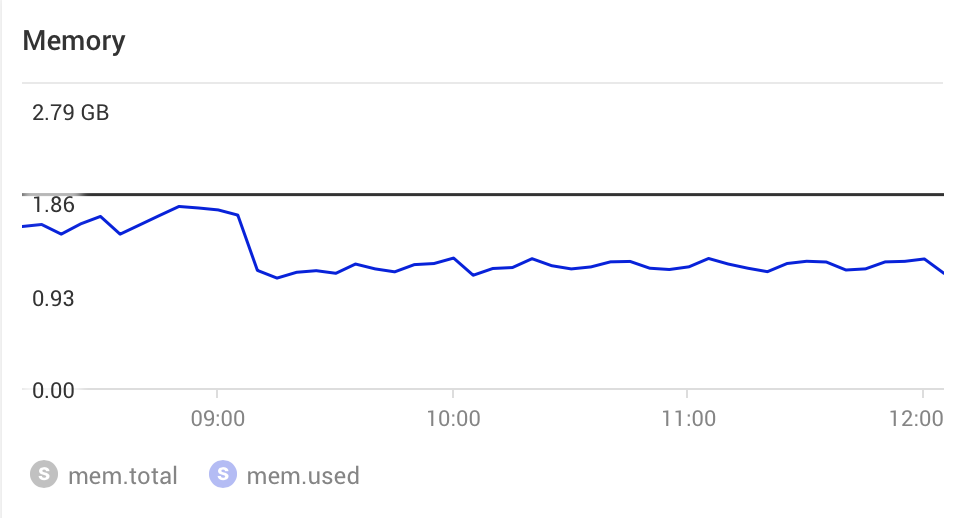
 jonaholsson
on 2 Nov 2019
jonaholsson
on 2 Nov 2019
This is not related to the 5 min interval. The huge regex map should not be loaded via lua but c. This will be fixed in the future. I removed the Schaal IT ruleset for now to relieve the lua processing a bit.
Vsevo from Rspamd already wrote a nice tool for us to convert the SA rules to a "real" regex map. :) This will further improve mem usage and speed a lot.
If you want to thank him, check this:

😄
andryyy
on 2 Nov 2019
Gotcha! 😊🙏🏼
jonaholsson
on 2 Nov 2019
Just on a side note, I am getting a high memory usage lately but I think I can handle it.
For others this might slightly help out:
cat <<EOF >> /etc/sysctl.conf
vm.swappiness=3
vm.vfs_cache_pressure=50
vm.oom-kill = 0
vm.overcommit_memory = 2
vm.overcommit_ratio = 120
EOF
as root then do sysctl -p or simply reboot your droplet
_you might want to change the swappiness value as my server doesn't need that much of SWAP_
please use responsibly
 Viktova
on 4 Nov 2019
Viktova
on 4 Nov 2019
The rspamd RAM usage keeps climbing for me as well. I'm at 1.36GiB now and I thought clamd was memory hungry (853 MiB atm).
 DatAres37
on 25 Nov 2019
DatAres37
on 25 Nov 2019
I don't know. I don't see this problem anymore, sorry.
andryyy
on 25 Nov 2019
@DatAres37, please switch on debug logging for task (see my diff above) and carefully watch memory consumption. Check whether it increases every time a certain message is logged etc. Try disabling modules one by one until the memory usage stops increasing to narrow down the culprit.
mkuron
on 25 Nov 2019
You can also try to delete data/conf/rspamd/local.d/spamassassin.conf and check if it is significantly better than before.
andryyy
on 25 Nov 2019
This issue has been automatically marked as stale because it has not had recent activity. It will be closed if no further activity occurs. Thank you for your contributions.
![stale[bot] picture](https://avatars3.githubusercontent.com/in/1724?v=4&s=40) stale[bot]
on 24 Jan 2020
stale[bot]
on 24 Jan 2020
Related issues
 constin
·
3Comments
constin
·
3Comments
 damdinsharav
·
3Comments
damdinsharav
·
3Comments
 thannaske
·
3Comments
thannaske
·
3Comments
 poldixd
·
3Comments
poldixd
·
3Comments
 mritzmann
·
3Comments
mritzmann
·
3Comments
Most helpful comment
This is not related to the 5 min interval. The huge regex map should not be loaded via lua but c. This will be fixed in the future. I removed the Schaal IT ruleset for now to relieve the lua processing a bit.
Vsevo from Rspamd already wrote a nice tool for us to convert the SA rules to a "real" regex map. :) This will further improve mem usage and speed a lot.
If you want to thank him, check this:
😄