Mailcow-dockerized: Clamd container eats up all available disk space
This has been repeatedly happening for a few weeks. I tend to upgrade Mailcow to the latest version every now and then and I'm currently on the latest version available.
Scroll right:
5f40abf1dc73 mailcow/clamd:1.28 "/sbin/tini -g -- /b…" 0 13.7GB 47 hours ago Up 37 seconds mailcowdockerized_clamd-mailcow_1
Full output:
df -H
Filesystem      Size  Used Avail Use% Mounted on
udev            1.6G     0  1.6G   0% /dev
tmpfs           310M   33M  278M  11% /run
/dev/vda1        26G   24G     0 100% /
tmpfs           1.6G     0  1.6G   0% /dev/shm
tmpfs           5.3M     0  5.3M   0% /run/lock
tmpfs           1.6G     0  1.6G   0% /sys/fs/cgroup
overlay          26G   24G     0 100% /var/lib/docker/overlay2/07e90b9e328d67510fca0495e352a5761f169d5518aca114a9f16ec2299d89eb/merged
overlay          26G   24G     0 100% /var/lib/docker/overlay2/8076cbdc66277cf3aab44b6e34f0375e9cc2617a51a2dd1bbf275db93d98644c/merged
overlay          26G   24G     0 100% /var/lib/docker/overlay2/6730532d5e7169a6cd58ddbbfc0364e83c40b0e48bc9e22227ca590d77da4a1e/merged
overlay          26G   24G     0 100% /var/lib/docker/overlay2/c6ea07cde968afe1b4d5831e17fa975ca035f7c75e8cc71fcaca47aeeed6b726/merged
overlay          26G   24G     0 100% /var/lib/docker/overlay2/9c7e89c5661ec7f79201a9617042c87ae31e65deec604d89f930360852f67657/merged
overlay          26G   24G     0 100% /var/lib/docker/overlay2/64986cb18e6933300f02d197d10a9d7d1cba927f7416091e9cac0b0d5c232b4f/merged
overlay          26G   24G     0 100% /var/lib/docker/overlay2/04a7df3d47946d846a9510e70636227638518590f410ef305417432b2d69c37d/merged
overlay          26G   24G     0 100% /var/lib/docker/overlay2/fb611264978618321d2b3ffceb49c3c0dcb2dd400f1b691b75c019f82ce9f745/merged
overlay          26G   24G     0 100% /var/lib/docker/overlay2/965fe962cecc00e7cd3b2f9192243e8762ed474c97dff3f9d8cc576a4f5f8071/merged
overlay          26G   24G     0 100% /var/lib/docker/overlay2/67cc4f539732e370549be7f650601e92b59384f6345de880bd6785cbcb4d5285/merged
overlay          26G   24G     0 100% /var/lib/docker/overlay2/c9f8851d81932c88c748cdd32cc44ad5327979191559589e9f06dc2abefc015d/merged

docker system df -v

Images space usage:

REPOSITORY          TAG                 IMAGE ID            CREATED             SIZE                SHARED SIZE         UNIQUE SIZE         CONTAINERS
mailcow/watchdog    1.59                a1f178c85f94        2 days ago          102.6MB             5.582MB             97.02MB             1
mailcow/phpfpm      1.45                214566728ba1        2 days ago          336.2MB             5.582MB             330.6MB             1
mailcow/netfilter   1.29                1711a6d4c0d9        3 days ago          82.24MB             5.582MB             76.66MB             1
mailcow/postfix     1.40                cca7e4123325        4 days ago          261.6MB             69.21MB             192.4MB             1
mariadb             10.3                47dff68107c4        5 days ago          343.1MB             0B                  343.1MB             1
robbertkl/ipv6nat   latest              2476f55c9bb1        6 days ago          21.44MB             5.582MB             15.86MB             1
mailcow/dovecot     1.89                bd16d6611797        9 days ago          339.2MB             55.31MB             283.9MB             1
mailcow/olefy       1.1                 5ddcb032e3ab        12 days ago         86.95MB             5.582MB             81.37MB             1
mailcow/solr        1.6                 40358833edbf        12 days ago         622.1MB             0B                  622.1MB             1
mailcow/dockerapi   1.32                59c68a5e4d64        12 days ago         74.34MB             5.582MB             68.76MB             1
mailcow/acme        1.61                8221d83b29be        12 days ago         112.3MB             5.582MB             106.7MB             1
mailcow/rspamd      1.46                0dd442642bf3        12 days ago         182.6MB             69.21MB             113.4MB             1
mailcow/sogo        1.61                7869a4da310f        12 days ago         467MB               55.31MB             411.7MB             1
mailcow/clamd       1.28                3797f775172a        12 days ago         273.9MB             55.31MB             218.6MB             1
mailcow/unbound     1.8                 98e718f506da        12 days ago         20.87MB             5.582MB             15.29MB             1
memcached           alpine              61705502e804        3 weeks ago         9.012MB             5.582MB             3.43MB              1
nginx               mainline-alpine     d87c83ec7a66        3 weeks ago         21.23MB             5.582MB             15.65MB             1
redis               5-alpine            ed7d2ff5a623        4 weeks ago         29.33MB             5.582MB             23.75MB             1
debian              stretch-slim        220611111e8c        5 weeks ago         55.32MB             0B                  55.32MB             0

Containers space usage:

CONTAINER ID        IMAGE                    COMMAND                  LOCAL VOLUMES       SIZE                CREATED             STATUS              NAMES
fb20cb53c2e7        robbertkl/ipv6nat        "/docker-ipv6nat-com…"   0                   102B                47 hours ago        Up 47 hours         mailcowdockerized_ipv6nat-mailcow_1
19ce2650a3a3        mailcow/acme:1.61        "/sbin/tini -g -- /s…"   1                   0B                  47 hours ago        Up 47 hours         mailcowdockerized_acme-mailcow_1
453aacc217d7        mailcow/rspamd:1.46      "/docker-entrypoint.…"   1                   0B                  47 hours ago        Up 15 hours         mailcowdockerized_rspamd-mailcow_1
23f00ae0315f        mailcow/netfilter:1.29   "python3 -u /server.…"   0                   0B                  47 hours ago        Up 47 hours         mailcowdockerized_netfilter-mailcow_1
7d99ac1be808        nginx:mainline-alpine    "/bin/sh -c 'envsubs…"   1                   2B                  47 hours ago        Up 47 hours         mailcowdockerized_nginx-mailcow_1
4c85d6e65fbc        mailcow/phpfpm:1.45      "/docker-entrypoint.…"   2                   0B                  47 hours ago        Up 47 hours         mailcowdockerized_php-fpm-mailcow_1
3df97ffcf5cb        mailcow/olefy:1.1        "python3 -u /app/ole…"   0                   0B                  47 hours ago        Up 47 hours         mailcowdockerized_olefy-mailcow_1
1189dc0ee44c        mailcow/watchdog:1.59    "/bin/sh -c '/watchd…"   2                   0B                  47 hours ago        Up 47 hours         mailcowdockerized_watchdog-mailcow_1
e4e5cc1e8194        memcached:alpine         "docker-entrypoint.s…"   0                   0B                  47 hours ago        Up 47 hours         mailcowdockerized_memcached-mailcow_1
3374c084fc79        mailcow/unbound:1.8      "/docker-entrypoint.…"   0                   11.7kB              47 hours ago        Up 47 hours         mailcowdockerized_unbound-mailcow_1
cd3042cdf427        mailcow/sogo:1.61        "/bin/sh -c 'exec /u…"   2                   334kB               47 hours ago        Up 47 hours         mailcowdockerized_sogo-mailcow_1
ff829ce65457        mailcow/dovecot:1.89     "/docker-entrypoint.…"   5                   632kB               47 hours ago        Up 47 hours         mailcowdockerized_dovecot-mailcow_1
b3823ced0a81        redis:5-alpine           "docker-entrypoint.s…"   1                   0B                  47 hours ago        Up 47 hours         mailcowdockerized_redis-mailcow_1
5f40abf1dc73        mailcow/clamd:1.28       "/sbin/tini -g -- /b…"   0                   13.7GB              47 hours ago        Up 37 seconds       mailcowdockerized_clamd-mailcow_1
79d701fe5685        mariadb:10.3             "docker-entrypoint.s…"   2                   0B                  47 hours ago        Up 47 hours         mailcowdockerized_mysql-mailcow_1
28fad08f6469        mailcow/postfix:1.40     "/bin/sh -c 'exec /u…"   4                   2.72MB              47 hours ago        Up 47 hours         mailcowdockerized_postfix-mailcow_1
5a341b2406ad        mailcow/solr:1.6         "/docker-entrypoint.…"   1                   0B                  47 hours ago        Up 47 hours         mailcowdockerized_solr-mailcow_1
3bd34a477dea        mailcow/dockerapi:1.32   "python3 -u /app/ser…"   0                   5.16kB              47 hours ago        Up 47 hours         mailcowdockerized_dockerapi-mailcow_1

Local Volumes space usage:

VOLUME NAME                                 LINKS               SIZE
mailcowdockerized_sogo-web-vol-1            2                   47.26MB
mailcowdockerized_vmail-attachments-vol-1   1                   0B
mailcowdockerized_vmail-vol-1               1                   21.63MB
mailcowdockerized_crypt-vol-1               2                   419B
mailcowdockerized_mysql-vol-1               1                   203.9MB
mailcowdockerized_postfix-vol-1             1                   33B
mailcowdockerized_rspamd-vol-1              5                   1.266MB
mailcowdockerized_mysql-socket-vol-1        7                   2B
mailcowdockerized_redis-vol-1               1                   5.389MB
mailcowdockerized_solr-vol-1                1                   69B

Build cache usage: 0B
After manually removing all containers (stopping everything, deleting all containers and redownloading the images) all runs well for 2-3 days and then suddenly, within a couple of hours, the Clamd container filesystem is filled again to the brink.
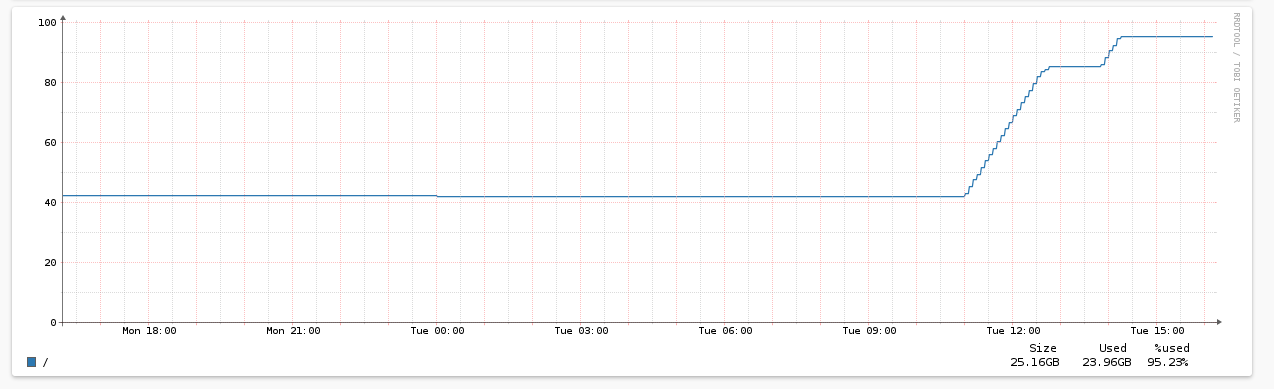
Does anyone have an idea what could be happening here? Are there any clamd Logfiles written to the container?
| Question | Answer |
| --- | --- |
| My operating system | Debian GNU/Linux 10 |
| Is Apparmor, SELinux or similar active? | No |
| Virtualization technlogy (KVM, VMware, Xen, etc) | KVM |
| Server/VM specifications (Memory, CPU Cores) | Enough |
| Docker Version (docker version) | 19.03.2 CE |
| Docker-Compose Version (docker-compose version) | 1.19.0 |
| Reverse proxy (custom solution) | No |
 trick77
All 22 comments
Top file usage within clamd container:
docker exec 5f40abf1dc73 du -a / | sort -n -r | head -n 20
du: cannot read directory '/proc/19/map_files': Permission denied
du: cannot access '/proc/26/task/26/fd/4': No such file or directory
du: cannot access '/proc/26/task/26/fdinfo/4': No such file or directory
du: cannot access '/proc/26/fd/3': No such file or directory
du: cannot access '/proc/26/fdinfo/3': No such file or directory
13623200    /
13348092    /var
13346048    /var/lib
13339808    /var/lib/clamav
254308  /usr
203544  /usr/lib
172728  /usr/lib/x86_64-linux-gnu
142036  /var/lib/clamav/clamav-ee6cacd7aa4f3f8dbb8070259fc5cc17.tmp
142032  /var/lib/clamav/clamav-ee6cacd7aa4f3f8dbb8070259fc5cc17.tmp/clamav-acd951e8c6057a99c94634eb7777a18e.cld
141992  /var/lib/clamav/clamav-57427bf5454b2604b04eaca4d3aa2d98.tmp
141988  /var/lib/clamav/clamav-ff4c384f4b64c60cf5e44a72644541d4.tmp
141988  /var/lib/clamav/clamav-f9c68b9ef8d2d9cb54eb4e305680bab0.tmp
141988  /var/lib/clamav/clamav-f30947ed1322290fffbc6cbf9743b0b5.tmp
141988  /var/lib/clamav/clamav-ef8f792cf59b8ddfba3c17954e6ccb4d.tmp
141988  /var/lib/clamav/clamav-e77ba10569806a947b36969322fa9f83.tmp
141988  /var/lib/clamav/clamav-e43c248151005a4993c7ddd16c40e504.tmp
141988  /var/lib/clamav/clamav-dd0016f077cd43a2e81c249b478eb987.tmp
141988  /var/lib/clamav/clamav-d789c9fbe21f804cc4d647907b24621a.tmp
141988  /var/lib/clamav/clamav-d5695561b5aa25cbb9d56e03042a4060.tmp
141988  /var/lib/clamav/clamav-cc8eab5cec4371165a78327369a6adfe.tmp
Any idea why it's creating so many tmp directories with a large .cld file in it?
trick77
on 24 Sep 2019
Thanks for posting the pathes.
It happens mostly when ClamAV runs oom and is therefore killed forcefully.
I can add something to remove those files, when ClamAV starts.
 andryyy
on 24 Sep 2019
andryyy
on 24 Sep 2019
Thanks @andryyy !
Do you think 3 GB of RAM is not enough for a Mailcow-only KVM? There's not a lot going on on that mailserver. Maybe 50 emails a day (unless it's attacked somehow).
trick77
on 24 Sep 2019
Hmm. If you disable Solr it should be fine. Solr is greedy. But so is ClamAV. Both eat a lot of RAM, sadly.
If you can upgrade to 4G or disable Solr, you should be fine.
I will patch the container in a bit.
Aaaand: If you don't use SOGo a lot (not many EAS devices), you can reduce the WorkerCount in sogo.conf to something like 6 or 7.
andryyy
on 24 Sep 2019
Here's the clamd container log when it was happening:
dos2unix: converting file /var/lib/clamav/whitelist.ign2 to Unix format...
Tue Sep 24 16:46:28 2019 -> Limits: Global time limit set to 120000 milliseconds.
Tue Sep 24 16:46:28 2019 -> Limits: Global size limit set to 52428800 bytes.
Tue Sep 24 16:46:28 2019 -> Limits: File size limit set to 26214400 bytes.
Tue Sep 24 16:46:28 2019 -> Limits: Recursion level limit set to 5.
Tue Sep 24 16:46:28 2019 -> Limits: Files limit set to 200.
Tue Sep 24 16:46:28 2019 -> Limits: MaxEmbeddedPE limit set to 10485760 bytes.
Tue Sep 24 16:46:28 2019 -> Limits: MaxHTMLNormalize limit set to 10485760 bytes.
Tue Sep 24 16:46:28 2019 -> Limits: MaxHTMLNoTags limit set to 2097152 bytes.
Tue Sep 24 16:46:28 2019 -> Limits: MaxScriptNormalize limit set to 5242880 bytes.
Tue Sep 24 16:46:28 2019 -> Limits: MaxZipTypeRcg limit set to 1048576 bytes.
Tue Sep 24 16:46:28 2019 -> Limits: MaxPartitions limit set to 50.
Tue Sep 24 16:46:28 2019 -> Limits: MaxIconsPE limit set to 100.
Tue Sep 24 16:46:28 2019 -> Limits: MaxRecHWP3 limit set to 16.
Tue Sep 24 16:46:28 2019 -> Limits: PCREMatchLimit limit set to 100000.
Tue Sep 24 16:46:28 2019 -> Limits: PCRERecMatchLimit limit set to 2000.
Tue Sep 24 16:46:28 2019 -> Limits: PCREMaxFileSize limit set to 26214400.
Tue Sep 24 16:46:28 2019 -> Archive support enabled.
Tue Sep 24 16:46:28 2019 -> AlertExceedsMax heuristic detection disabled.
Tue Sep 24 16:46:28 2019 -> Heuristic alerts enabled.
Tue Sep 24 16:46:28 2019 -> Portable Executable support enabled.
Tue Sep 24 16:46:28 2019 -> ELF support enabled.
Tue Sep 24 16:46:28 2019 -> Mail files support enabled.
Tue Sep 24 16:46:28 2019 -> OLE2 support enabled.
Tue Sep 24 16:46:28 2019 -> PDF support enabled.
Tue Sep 24 16:46:28 2019 -> SWF support enabled.
Tue Sep 24 16:46:28 2019 -> HTML support enabled.
Tue Sep 24 16:46:28 2019 -> XMLDOCS support enabled.
Tue Sep 24 16:46:28 2019 -> HWP3 support enabled.
Tue Sep 24 16:46:28 2019 -> Heuristic: precedence enabled
Tue Sep 24 16:46:28 2019 -> Self checking every 3600 seconds.
Tue Sep 24 16:46:28 2019 -> Set stacksize to 8454144
Tue Sep 24 16:46:47 2019 -> ClamAV update process started at Tue Sep 24 16:46:47 2019
Tue Sep 24 16:46:47 2019 -> main.cvd is up to date (version: 58, sigs: 4566249, f-level: 60, builder: sigmgr)
Tue Sep 24 16:46:47 2019 -> Downloading daily-25582.cdiff [100%]
/bootstrap.sh: line 81:    18 Killed                  nice -n10 clamd
Worker 18 died, stopping container waiting for respawn...
/bootstrap.sh: line 82: kill: (18) - No such process
Copying non-empty whitelist.ign2 to /var/lib/clamav/whitelist.ign2
I reduced Sogo workers now and added another GB of RAM, let's see how it works. Thanks for the tip!
trick77
on 24 Sep 2019
Thanks for the quick update @andryyy, this will certainly solve the disk full problem if the container get's killed during the update.
Just FYI since the disk was full the database container couldn't shutdown properly and I had to
rm /var/lib/docker/volumes/mailcowdockerized_mysql-socket-vol-1/_data/mysqld.* or the database container would show an error during startup (WARNING: Connection pool is full, discarding connection: localhost).
trick77
on 24 Sep 2019
@andryyy I had the same exact issue, and upgrading the instance to one with 4 Gbs of ram did the trick (plus adding a swap file just in case). It took me longer than I thought to figure that out though. I don't have solr enabled though...
 compuguy
on 28 Sep 2019
compuguy
on 28 Sep 2019
Clam munches RAM. :)
andryyy
on 28 Sep 2019
@andryyy Yep. I'm sure Solr + ClamAV requires way more ram than 4 Gb + swap I'm currently using (since the ClamAV OOM issues cropped up)...
compuguy
on 28 Sep 2019
I currently experience memory problems with #1 clamd and #2 solr on a system with 4gb ram.
I'm trying it with solr disabled:
/opt/mailcow-dockerized/mailcow.conf:
SKIP_SOLR=y
How can I reduce sogo workers?
Maybe I'll just have to upgrade to 8gb...
 arusa
on 17 Oct 2019
arusa
on 17 Oct 2019
@arusa
Search for WOWorkersCount in data/conf/sogo/sogo.conf
https://github.com/mailcow/mailcow-dockerized/blob/master/data/conf/sogo/sogo.conf#L8
 MAGICCC
on 17 Oct 2019
MAGICCC
on 17 Oct 2019
Sorry for bringing this up again, but I have the exact same problem, but I'm much less advanced in using docker, unix etc. I would appreciate any help on how to get the problem solved, preferably step by step.
After manually removing all containers (stopping everything, deleting all containers and redownloading the images) all runs well for 2-3 days and then suddenly, within a couple of hours, the Clamd container filesystem is filled again to the brink.
For example, I don't know how to remove these containers without losing my data, I think this command from the docs would remove everything, including data(?):
docker-compose down -v --rmi all --remove-orphans
root@v22019034633485880:/opt/mailcow-dockerized# df -H
Dateisystem    Größe Benutzt Verf. Verw% Eingehängt auf
udev            4,2G       0  4,2G    0% /dev
tmpfs           836M     89M  747M   11% /run
/dev/sda3        42G     35G  5,2G   87% /
tmpfs           4,2G     13k  4,2G    1% /dev/shm
tmpfs           5,3M       0  5,3M    0% /run/lock
tmpfs           4,2G       0  4,2G    0% /sys/fs/cgroup
/dev/sda2       1,1G    197M  757M   21% /boot
tmpfs           836M    4,1k  836M    1% /run/user/112
overlay          42G     35G  5,2G   87% /var/lib/docker/overlay2/b09621d4aa57343549aa70dc331b99f5dc63503a44b650c019a73526cbdc45b1/merged
overlay          42G     35G  5,2G   87% /var/lib/docker/overlay2/b331f90c533b8323ee036bd77b8145a2914ccd60fea878990a52080d0a1e28bb/merged
overlay          42G     35G  5,2G   87% /var/lib/docker/overlay2/707b5f38ee841c41c84bafaba0d6a633c43e636f26ae1ad01409ab3c8e0b2559/merged
overlay          42G     35G  5,2G   87% /var/lib/docker/overlay2/93e992f2ecc165a897dfdc6708fa426e26f8304097e49c2a77c68626677ef857/merged
overlay          42G     35G  5,2G   87% /var/lib/docker/overlay2/32bdc7385f3aa18c1d81dee897cf59d10e42c4520a0c745d937f9e7da17a9242/merged
overlay          42G     35G  5,2G   87% /var/lib/docker/overlay2/4621ece906741584e4d395bfd46d4d0b5b30c42044717807604e6fd8392479a8/merged
overlay          42G     35G  5,2G   87% /var/lib/docker/overlay2/07977b90e02c56219a0597d33bed9a0bc05aedcdff31a5a7b0c8fbb8ce9fd53b/merged
shm              68M       0   68M    0% /var/lib/docker/containers/0fe184945c4e219e2f0bb4e498298ef4d8d25ee56e309758a9272538c9c4ae1f/mounts/shm
shm              68M       0   68M    0% /var/lib/docker/containers/e25e3c442df0899f521fcb669108f75dea1593cd68b061e2bb9fbc304392d360/mounts/shm
overlay          42G     35G  5,2G   87% /var/lib/docker/overlay2/370b4454c28b3c3c7baf7d2662dd828f4a05ffe5758b0783b64d5090eb6d9ec9/merged
shm              68M       0   68M    0% /var/lib/docker/containers/05b5ceccaf278f241b1efa9202796063cb9bf7b925ddf2b5eb33efc18676c2f8/mounts/shm
shm              68M       0   68M    0% /var/lib/docker/containers/d1d7ad99316a28877ca2e13bbcbe845b911c2a33357453413b12cf7263297d14/mounts/shm
shm              68M       0   68M    0% /var/lib/docker/containers/aa24ff5034df7342a8e6d001fceb40f441f08b480babf3ac4ed4b24b4df88535/mounts/shm
shm              68M       0   68M    0% /var/lib/docker/containers/477cac50ae20fd3d0831e2e99a6affad7434b76e9820e594d82a2a4847753b93/mounts/shm
shm              68M       0   68M    0% /var/lib/docker/containers/b5ad2b9c6f3955e40bab206a1d62f19a3ecb34d7a8d1ed14f3c956f0d00ab646/mounts/shm
shm              68M       0   68M    0% /var/lib/docker/containers/da896d06cd0599387e79a47c61fb61e75c58a8b0056980b8abc5947233656b7d/mounts/shm
overlay          42G     35G  5,2G   87% /var/lib/docker/overlay2/1590eeeae89091e54820cfdb17a92b0adcb15a1983ef7d6c8d1cab154a60b12c/merged
shm              68M       0   68M    0% /var/lib/docker/containers/063a0fab10e4b45ef57afc938d138ce1cfb7f81bc3b65e0088bfb5c45ab6a2ee/mounts/shm
overlay          42G     35G  5,2G   87% /var/lib/docker/overlay2/add48fbf90b13c0624155f2d1e4b5ea33a32c6b1482faefffd1c40d9a867e72b/merged
shm              68M       0   68M    0% /var/lib/docker/containers/d0a7dc15dd098127585b134408067fc11867c9a6cbd916fd1502971c02768b4b/mounts/shm
tmpfs           836M    4,1k  836M    1% /run/user/1000
overlay          42G     35G  5,2G   87% /var/lib/docker/overlay2/72a5c4b5fb88e954fec5925638dc24593c6250ae542108441a60b3be7f2e0ceb/merged
overlay          42G     35G  5,2G   87% /var/lib/docker/overlay2/b67a091c2ab67a6b814ea10831bdb83c9086b8cdf86d55e07e11da58fe997555/merged
overlay          42G     35G  5,2G   87% /var/lib/docker/overlay2/824dcb91ab3dfe7b5d818cd2c8dd2921993a190734e78bdd9e19e55c56dd4a36/merged
shm              68M       0   68M    0% /var/lib/docker/containers/74617d3031eb84f746c89c4480f7b64dee5b25263c051b00cc83db596991c3b3/mounts/shm
overlay          42G     35G  5,2G   87% /var/lib/docker/overlay2/83919059b7331465a16c9cb975e871ffa903e1dde020fed9766426eb5419fd1d/merged
overlay          42G     35G  5,2G   87% /var/lib/docker/overlay2/e0e670e0dfd1c9499c505f815642de271597bd0c289e33405b8f1c39d5140ee7/merged
overlay          42G     35G  5,2G   87% /var/lib/docker/overlay2/370f98229dcb569de31cef09e16bf9f5c176d981c23df2486def73b7490d36e3/merged
overlay          42G     35G  5,2G   87% /var/lib/docker/overlay2/599323a23941708efd2540092e1bdba9fc71002d4063244fa2beee38efa1c6ac/merged
overlay          42G     35G  5,2G   87% /var/lib/docker/overlay2/35285ffdb30bec7d3d9eae6572750b6bfbef82865b687e0862ce6f0c13409541/merged
overlay          42G     35G  5,2G   87% /var/lib/docker/overlay2/097c31cd58a8e8c1e7c7f4daeb6ff8a4ffad19cd3274073e567459d582818688/merged
shm              68M       0   68M    0% /var/lib/docker/containers/92001061a5bf71f3c477ff606f152cdb9323b415f1e71a0b5071ec4ae36b7b24/mounts/shm
shm              68M       0   68M    0% /var/lib/docker/containers/37a8903af65410f2498a814ccad45b5946c7fc5d6d5bebd77cad8bddc797c65b/mounts/shm
shm              68M       0   68M    0% /var/lib/docker/containers/3ff044c44f8db8bc51757f1a80e862e071cb499122c286806c2aa4bd3219e25a/mounts/shm
shm              68M       0   68M    0% /var/lib/docker/containers/bed67baf33b7a19265ae8d7c2cb94125471ba7d260ad094dc154154232bc9f5e/mounts/shm
shm              68M       0   68M    0% /var/lib/docker/containers/bb7b98bacb72e009778bf3e4a30e19b1cacd85ad48a9192e9f55c4bfb7691aff/mounts/shm
shm              68M       0   68M    0% /var/lib/docker/containers/e10ffc58b4468f3e0dcf81d242dcd3e0172f511002feefce4089d7725a85bef5/mounts/shm
shm              68M    8,2k   68M    1% /var/lib/docker/containers/1d213e311e461f753ba8acc5b6358810dac2b1d3a075f03e8beab08b7b22fa50/mounts/shm
shm              68M       0   68M    0% /var/lib/docker/containers/f94e28630e60f332d33b07ab35d61fcb16e21c0ccd5fcfbdcc0b6d736e09e2bc/mounts/shm
overlay          42G     35G  5,2G   87% /var/lib/docker/overlay2/778dd7531d3a038cfe5721606d5539f06c4fb06842487320ebbb14da04c8ee50/merged
overlay          42G     35G  5,2G   87% /var/lib/docker/overlay2/e102319c0b1a5c5687db15093b1a92b77effb72d1d0fc4d0ff37983a793c69a7/merged
shm              68M       0   68M    0% /var/lib/docker/containers/09a7e29744b413f27c66a589dd939bf56252e3eb43cfa4d66cb715c36e3a24a1/mounts/shm
overlay          42G     35G  5,2G   87% /var/lib/docker/overlay2/f4cf7a8c266bb4138a18d157ac8256f44fe1c7990daf7458f563d1000d2473fc/merged
overlay          42G     35G  5,2G   87% /var/lib/docker/overlay2/a5798ad673e58d67a70bbc9cebd73f1a34abef3392ba1db5f4c81146ff0d464d/merged
overlay          42G     35G  5,2G   87% /var/lib/docker/overlay2/da4aae57138fc6f5969850d46fa7549dde92cd9bd309359afb048bc26e6023c3/merged
shm              68M       0   68M    0% /var/lib/docker/containers/0487680c1558cc045d2ef85b4095bf1eb0d9abb88c4bbbd1af0b97c27f4d9e58/mounts/shm
overlay          42G     35G  5,2G   87% /var/lib/docker/overlay2/63cb7a0205fa0d9e7d1a0f242f8a51e8bbd04f434a59e2973f5f1ac1db707d8a/merged
shm              68M       0   68M    0% /var/lib/docker/containers/4ef4cc9e94cd5b86f3ad73cd06334dae8c0535010d47426ef02acacb240d9b2f/mounts/shm
overlay          42G     35G  5,2G   87% /var/lib/docker/overlay2/828c4afea732daf353adeb2fa7ce423759089615b045d79ee2ce8024e0d1ed03/merged
shm              68M     70k   68M    1% /var/lib/docker/containers/3422b567ca32ec41098a8937f14bd85b2bcbf53e807d9a325abce05124618f3c/mounts/shm
overlay          42G     35G  5,2G   87% /var/lib/docker/overlay2/9323a62805b42d21436ba85bf367b5be51feba2471d7d2330917932c51bd1008/merged
overlay          42G     35G  5,2G   87% /var/lib/docker/overlay2/a349e5ba5b40b0ae79c7c9a5b75347d919b40b123eb0885ad4cbefd8b72312d0/merged
shm              68M       0   68M    0% /var/lib/docker/containers/6b7b8bd106f0bb33aa091709bdbcf74c62e527f04e268bd1c66918cd5067cf81/mounts/shm
shm              68M       0   68M    0% /var/lib/docker/containers/f125d4a413d2b2604062c34d0455c596411c4572401ed3176e423969747303c6/mounts/shm
shm              68M       0   68M    0% /var/lib/docker/containers/d99478a436d0e229f4220e06204294afd7ce266ad94004d8223c44babe14d5f0/mounts/shm
shm              68M    8,2k   68M    1% /var/lib/docker/containers/02cb75647b0ccc8b5ea008f6e9e33f1d4b6eab2b4662050309d79c3998206861/mounts/shm
shm              68M    8,2k   68M    1% /var/lib/docker/containers/5865d8262e09a34ad0f550b58b0593fda8efc23b0f63be16f66085391e8efe7c/mounts/shm
And:
root@v22019034633485880:/opt/mailcow-dockerized# docker system df -v
Images space usage:
REPOSITORY TAG IMAGE ID CREATED SIZE SHARED SIZE UNIQUE SIZE CONTAINERS
mariadb 10.3 721e6676fd27 45 hours ago 388.3MB 0B 388.3MB 1
mailcow/phpfpm 1.64 41bd14cb47b9 4 days ago 339.8MB 5.612MB 334.2MB 1
memcached alpine 6c8afc725f63 7 days ago 9.247MB 5.575MB 3.673MB 1
mailcow/watchdog 1.79 f028336fc63d 11 days ago 99.62MB 5.612MB 94.01MB 1
mailcow/clamd 1.36 d0678d4faef2 11 days ago 213.9MB 69.21MB 144.7MB 1
mailcow/dovecot 1.126 b9deafbd6308 11 days ago 398.1MB 69.21MB 328.9MB 1
mailcow/acme 1.70 5d575eefa4e8 12 days ago 112.2MB 5.612MB 106.5MB 1
mailcow/rspamd 1.68 1ee259815e70 12 days ago 170.2MB 69.21MB 100.9MB 1
mailcow/netfilter 1.36 53d28b324c3a 12 days ago 79.29MB 5.612MB 73.68MB 1
mailcow/postfix 1.50 b1bbd3653e63 12 days ago 269.6MB 69.21MB 200.4MB 1
mailcow/unbound 1.12 7893205369bd 12 days ago 38.21MB 5.612MB 32.6MB 1
mailcow/solr 1.7 96a5cd11e397 12 days ago 423.4MB 69.21MB 354.1MB 1
mailcow/sogo 1.74 763132a3d869 12 days ago 478.1MB 69.21MB 408.9MB 1
mailcow/olefy 1.3 bb8914b3caa8 12 days ago 86.64MB 5.612MB 81.03MB 1
mailcow/dockerapi 1.37 8080d2f8ee16 12 days ago 73.93MB 5.612MB 68.31MB 1
redis 5-alpine 58084f18c7ec 2 weeks ago 29.69MB 5.575MB 24.12MB 1
nginx mainline-alpine 7d0cdcc60a96 2 weeks ago 21.25MB 5.612MB 15.64MB 1
bitwarden/web 2.14.0 8fe12e915c97 4 weeks ago 221.4MB 207.4MB 14.07MB 1
bitwarden/setup 1.34.0 c776144a926a 4 weeks ago 263.7MB 207.4MB 56.36MB 0
bitwarden/mssql 1.34.0 1f5ed9d614df 4 weeks ago 1.404GB 0B 1.404GB 1
bitwarden/admin 1.34.0 726ae86eb0ac 4 weeks ago 281.7MB 209.2MB 72.49MB 1
bitwarden/events 1.34.0 086920aec14c 4 weeks ago 263.1MB 209.2MB 53.85MB 1
bitwarden/notifications 1.34.0 dfadf84c582c 4 weeks ago 264.4MB 209.2MB 55.2MB 1
bitwarden/icons 1.34.0 f87c70a6d539 4 weeks ago 264.2MB 209.2MB 54.91MB 1
bitwarden/attachments 1.34.0 3a463364fe35 4 weeks ago 209.4MB 207.4MB 2.077MB 1
bitwarden/nginx 1.34.0 18fb1a0854c6 4 weeks ago 132.6MB 0B 132.6MB 1
bitwarden/identity 1.34.0 8750acc4f7f7 4 weeks ago 355.7MB 209.2MB 146.5MB 1
bitwarden/api 1.34.0 86f509874ec3 4 weeks ago 358.3MB 209.2MB 149MB 1
bitwarden/setup 1.33.1 dda6c883a727 3 months ago 265.4MB 0B 265.4MB 0
robbertkl/ipv6nat latest f46f4d37caac 6 months ago 21.47MB 5.553MB 15.91MB 1
certbot/certbot latest 3b7ec24cacc3 6 months ago 147.8MB 5.553MB 142.3MB 0
bitwarden/setup 1.32.0 da65b2fb2aed 9 months ago 222.8MB 0B 222.8MB 0
Containers space usage:
CONTAINER ID IMAGE COMMAND LOCAL VOLUMES SIZE CREATED STATUS NAMES
6b7b8bd106f0 robbertkl/ipv6nat "/docker-ipv6nat-com…" 0 102B 10 minutes ago Up 10 minutes mailcowdockerized_ipv6nat-mailcow_1
4ef4cc9e94cd mailcow/netfilter:1.36 "python3 -u /server.…" 0 0B 10 minutes ago Up 10 minutes mailcowdockerized_netfilter-mailcow_1
3422b567ca32 mailcow/rspamd:1.68 "/docker-entrypoint.…" 1 0B 10 minutes ago Up 10 minutes mailcowdockerized_rspamd-mailcow_1
0487680c1558 mailcow/acme:1.70 "/sbin/tini -g -- /s…" 1 0B 10 minutes ago Up 10 minutes mailcowdockerized_acme-mailcow_1
d99478a436d0 nginx:mainline-alpine "/docker-entrypoint.…" 1 2B 10 minutes ago Up 10 minutes mailcowdockerized_nginx-mailcow_1
5865d8262e09 mailcow/postfix:1.50 "/docker-entrypoint.…" 4 2.72MB 10 minutes ago Up 10 minutes mailcowdockerized_postfix-mailcow_1
02cb75647b0c mailcow/dovecot:1.126 "/docker-entrypoint.…" 5 690kB 10 minutes ago Up 10 minutes mailcowdockerized_dovecot-mailcow_1
09a7e29744b4 mailcow/phpfpm:1.64 "/docker-entrypoint.…" 2 3.84MB 10 minutes ago Up 10 minutes mailcowdockerized_php-fpm-mailcow_1
f125d4a413d2 mariadb:10.3 "docker-entrypoint.s…" 2 0B 10 minutes ago Up 10 minutes mailcowdockerized_mysql-mailcow_1
bb7b98bacb72 mailcow/unbound:1.12 "/docker-entrypoint.…" 0 11.7kB 10 minutes ago Up 10 minutes mailcowdockerized_unbound-mailcow_1
1d213e311e46 mailcow/sogo:1.74 "/docker-entrypoint.…" 3 32.3kB 10 minutes ago Up 10 minutes mailcowdockerized_sogo-mailcow_1
37a8903af654 mailcow/clamd:1.36 "/sbin/tini -g -- /c…" 0 207MB 10 minutes ago Up 10 minutes mailcowdockerized_clamd-mailcow_1
bed67baf33b7 mailcow/dockerapi:1.37 "python3 -u /app/doc…" 0 5.16kB 10 minutes ago Up 10 minutes mailcowdockerized_dockerapi-mailcow_1
f94e28630e60 redis:5-alpine "docker-entrypoint.s…" 1 0B 10 minutes ago Up 10 minutes mailcowdockerized_redis-mailcow_1
e10ffc58b446 memcached:alpine "docker-entrypoint.s…" 0 0B 10 minutes ago Up 10 minutes mailcowdockerized_memcached-mailcow_1
3ff044c44f8d mailcow/solr:1.7 "docker-entrypoint.s…" 1 74.5kB 10 minutes ago Up 10 minutes mailcowdockerized_solr-mailcow_1
74617d3031eb mailcow/olefy:1.3 "python3 -u /app/ole…" 0 0B 10 minutes ago Up 10 minutes mailcowdockerized_olefy-mailcow_1
92001061a5bf mailcow/watchdog:1.79 "/bin/sh -c '/watchd…" 3 0B 10 minutes ago Up 10 minutes mailcowdockerized_watchdog-mailcow_1
d0a7dc15dd09 bitwarden/nginx:1.34.0 "/entrypoint.sh" 0 11.7kB 3 weeks ago Up 3 weeks (healthy) bitwarden-nginx
063a0fab10e4 bitwarden/admin:1.34.0 "/entrypoint.sh" 0 72.5MB 3 weeks ago Up 3 weeks (healthy) bitwarden-admin
d1d7ad99316a bitwarden/attachments:1.34.0 "/entrypoint.sh" 0 211kB 3 weeks ago Up 3 weeks (healthy) bitwarden-attachments
aa24ff5034df bitwarden/web:2.14.0 "/entrypoint.sh" 0 12.2MB 3 weeks ago Up 3 weeks (healthy) bitwarden-web
477cac50ae20 bitwarden/api:1.34.0 "/entrypoint.sh" 0 149MB 3 weeks ago Up 3 weeks (healthy) bitwarden-api
da896d06cd05 bitwarden/identity:1.34.0 "/entrypoint.sh" 0 146MB 3 weeks ago Up 3 weeks (healthy) bitwarden-identity
05b5ceccaf27 bitwarden/icons:1.34.0 "/entrypoint.sh" 0 54.9MB 3 weeks ago Up 3 weeks (healthy) bitwarden-icons
e25e3c442df0 bitwarden/mssql:1.34.0 "/entrypoint.sh" 0 92.5kB 3 weeks ago Up 3 weeks (healthy) bitwarden-mssql
b5ad2b9c6f39 bitwarden/notifications:1.34.0 "/entrypoint.sh" 0 55.2MB 3 weeks ago Up 3 weeks (healthy) bitwarden-notifications
0fe184945c4e bitwarden/events:1.34.0 "/entrypoint.sh" 0 53.9MB 3 weeks ago Up 3 weeks (healthy) bitwarden-events
Local Volumes space usage:
VOLUME NAME LINKS SIZE
mailcowdockerized_crypt-vol-1 2 419B
mailcowdockerized_mysql-vol-1 1 204.7MB
mailcowdockerized_sogo-web-vol-1 2 47.01MB
mailcowdockerized_vmail-attachments-vol-1 1 0B
mailcowdockerized_vmail-vol-1 1 4.929MB
mailcowdockerized_sogo-userdata-backup-vol-1 1 0B
mailcowdockerized_mysql-socket-vol-1 7 2B
mailcowdockerized_postfix-vol-1 2 33B
mailcowdockerized_redis-vol-1 1 1.731MB
mailcowdockerized_rspamd-vol-1 5 44.15MB
mailcowdockerized_solr-vol-1 1 6.308MB
Build cache usage: 0B
CACHE ID CACHE TYPE SIZE CREATED LAST USED USAGE SHARED
System information:
| Question | Answer |
| --- | --- |
| My operating system | Debian 10 Buster |
| Is Apparmor, SELinux or similar active? | No |
| Virtualization technlogy (KVM, VMware, Xen, etc - LXC and OpenVZ are not supported | KVM |
| Server/VM specifications (Memory, CPU Cores) | 8589 MB RAM, 2 CPU Cores |
| Docker Version (docker version) | 19.03.9 CE |
| Docker-Compose Version (docker-compose version) | 1.26.0 |
| Reverse proxy (custom solution) | No |
Few screenshots of memory usage:
https://i.imgur.com/zOyAvRI.png
https://i.imgur.com/hhym7q8.png
https://i.imgur.com/vttmWp3.png
https://i.imgur.com/UuUuY9g.png
 comniemeer
on 19 Jun 2020
comniemeer
on 19 Jun 2020
Step by step is something we can do in the ticket system, but I cannot provide this kind of support here, obviously.
You might want to check the logs (docker-compose logs --tail=200 -f clamd-mailcow) and post them. What about git diff origin/master?
You could also try to enter the container and search for the huge files (docker-compose exec clamd-mailcow bash)
andryyy
on 19 Jun 2020
Step by step is something we can do in the ticket system, but I cannot provide this kind of support here, obviously.
Okay, I understand that.
Log output: https://gist.github.com/comniemeer/31def3e49f9e046a7bc6cf187ca08e85
Git diff is empty:
root@v22019034633485880:/opt/mailcow-dockerized# git diff origin/master
root@v22019034633485880:/opt/mailcow-dockerized#
Regarding the huge files, when entering the container, I have only few possibilities to find them, because ncdu (like you recommended in this issue: https://github.com/mailcow/mailcow-dockerized/issues/1817#issuecomment-426318589) can't be found and installed:
root@v22019034633485880:/opt/mailcow-dockerized# docker-compose exec clamd-mailcow bash
root@d8a03b2c71a3:/# apk add ncdu ### Isn't apk a package manager for Alpine Linux?
bash: apk: command not found
root@d8a03b2c71a3:/# apt-get install ncdu
Reading package lists... Done
Building dependency tree
Reading state information... Done
E: Unable to locate package ncdu
root@d8a03b2c71a3:/# ncdu
bash: ncdu: command not found
But using du I found out, that most of the space is in /var/lib/clamav:
root@v22019034633485880:/opt/mailcow-dockerized# docker-compose exec clamd-mailcow bash
root@cd0b6259155a:/# du -ah / | sort -h -r | head -n 20
du: cannot read directory '/proc/28/map_files': Permission denied
du: cannot access '/proc/59/task/59/fd/4': No such file or directory
du: cannot access '/proc/59/task/59/fdinfo/4': No such file or directory
du: cannot access '/proc/59/fd/3': No such file or directory
du: cannot access '/proc/59/fdinfo/3': No such file or directory
399M    /
189M    /var
188M    /usr
187M    /var/lib
181M    /var/lib/clamav
143M    /usr/lib
128M    /usr/lib/x86_64-linux-gnu
113M    /var/lib/clamav/main.cvd
68M     /var/lib/clamav/daily.cvd
26M     /usr/lib/x86_64-linux-gnu/libicudata.so.63.1
26M     /usr/lib/x86_64-linux-gnu/libicudata.a
20M     /usr/bin
15M     /usr/include
12M     /lib/x86_64-linux-gnu
12M     /lib
9.1M    /usr/lib/libclamav.so.9.0.4
7.9M    /usr/share
7.4M    /usr/lib/x86_64-linux-gnu/gconv
6.8M    /usr/lib/x86_64-linux-gnu/libpthread.a
6.8M    /usr/lib/x86_64-linux-gnu/libicui18n.a
But there is no sign for 42+ GB inside this container?! Is it possible that it is because I have updated mailcow inbetween to the newest version, and old files are still there and not getting removed? And how would I get rid of them?
comniemeer
on 19 Jun 2020
No other containers on that machine? Then try...
docker-compose down
docker stop $(docker ps -a -q)
docker rm -f $(docker ps -a -q)
docker-compose up -d
docker system prune
Only Mailcow and Bitwarden.
https://gist.github.com/comniemeer/9c57c6c3fc55b47b976342c788cca4f8
It seems like it helped freeing some space, but there are still 39 GB I can't find out where they are from.
root@v22019034633485880:/opt/mailcow-dockerized# df -h
Dateisystem    Größe Benutzt Verf. Verw% Eingehängt auf
udev            3,9G       0  3,9G    0% /dev
tmpfs           797M     84M  714M   11% /run
/dev/sda3        39G     25G   13G   67% /
tmpfs           3,9G       0  3,9G    0% /dev/shm
tmpfs           5,0M       0  5,0M    0% /run/lock
tmpfs           3,9G       0  3,9G    0% /sys/fs/cgroup
/dev/sda2       976M    145M  765M   16% /boot
tmpfs           797M    4,0K  797M    1% /run/user/112
tmpfs           797M    4,0K  797M    1% /run/user/1000
overlay          39G     25G   13G   67% /var/lib/docker/overlay2/7692e2682030bbad2c5a6f3e4696c801f5268b44812e3f69ded9226d51be5490/merged
shm              64M       0   64M    0% /var/lib/docker/containers/861b5e70efe8e47b47e29043d60b5f02d7bc01b3810fca8c61f9c6a63473c245/mounts/shm
overlay          39G     25G   13G   67% /var/lib/docker/overlay2/96bef917db9cc8fe32e243f4ea56ac995ab59a6a711d85e37be0fc42709f92db/merged
overlay          39G     25G   13G   67% /var/lib/docker/overlay2/596c2af5dc20e74568b5808955678555dc56bdf1f18c638cfdaf0e836cddbca1/merged
overlay          39G     25G   13G   67% /var/lib/docker/overlay2/d30ccc09cc6d704673cbd6f9d99a4db2e925ae1df313a9948b23669e58554a49/merged
overlay          39G     25G   13G   67% /var/lib/docker/overlay2/75188b9d261d3c984c7e8de47da190275112be66b64e3980c4fd5f65d6b98e44/merged
overlay          39G     25G   13G   67% /var/lib/docker/overlay2/93f28b3ef9f74c0ea6802dd37de2df9362a8e9afd528434e1a1d372e0317485f/merged
overlay          39G     25G   13G   67% /var/lib/docker/overlay2/1c608589922262943f3220e97df06565d557eed63191ab9cf9e4ef89af7bde42/merged
overlay          39G     25G   13G   67% /var/lib/docker/overlay2/2c924f25bb53f19504065b7635348b53f95a14b950a4bf382f8b2dc84203d73b/merged
overlay          39G     25G   13G   67% /var/lib/docker/overlay2/32d1de50c5a4688d68fdff0f00536ee5dc01eaa9544b4bce63ae30cb18fc7123/merged
shm              64M       0   64M    0% /var/lib/docker/containers/266c34ea7bbe673f91d70000f39b1e7ad1696476cb7de9e5cb77d2d2eb0923ca/mounts/shm
shm              64M       0   64M    0% /var/lib/docker/containers/efa941e7cd3ea6ac7eb7b841004593b718f7f2aad0a4e4b8138e8001a4ac1d36/mounts/shm
shm              64M       0   64M    0% /var/lib/docker/containers/6b10b67dda2e22822e43665453e3fc1965deb08d8b3bc1030eea0bf6b296ac28/mounts/shm
shm              64M       0   64M    0% /var/lib/docker/containers/804e7fa33110fec721dd87923a79845bedbc9b11222214f418b922936ba2aa03/mounts/shm
shm              64M       0   64M    0% /var/lib/docker/containers/1c068c3cea06556f5bfb4228e15bd6f5ee86f5a5d04ff9ec81b5dbcddc482bf2/mounts/shm
shm              64M       0   64M    0% /var/lib/docker/containers/cdf4558cd9b3e379364f8ff9d2ed16e4934fd9ad2aa990b339506a8bbfe0bc14/mounts/shm
shm              64M    8,0K   64M    1% /var/lib/docker/containers/04f85781a3127689d15577de304f45bd5ca412dedc8f478b0638c0a056ff57d8/mounts/shm
shm              64M       0   64M    0% /var/lib/docker/containers/d5caa147740394df381153fa94beef4d767d8349067bda513cb544fd460c101a/mounts/shm
overlay          39G     25G   13G   67% /var/lib/docker/overlay2/90213820810f35dcbcff02ab601478c53c2c30b2ebf46bf47e63427585d04d15/merged
shm              64M       0   64M    0% /var/lib/docker/containers/6f79dd8caffa21c2695aa684f7357b5838a334290ef6e34708330e8bbd0b13f3/mounts/shm
overlay          39G     25G   13G   67% /var/lib/docker/overlay2/f0bf57633a9e2faa927a9f40d8c1ef1ad24ba539604e36fc3104badd51d3bf2b/merged
shm              64M       0   64M    0% /var/lib/docker/containers/e9a1dd06358f28553a45e4d29d486357d27b458224df770a288edcce75597730/mounts/shm
overlay          39G     25G   13G   67% /var/lib/docker/overlay2/36a90e8e540fb12c2d300c073e21d7c2bde6b4dc1d819960aaca6c1a1835e526/merged
overlay          39G     25G   13G   67% /var/lib/docker/overlay2/45770457c1682cf2cd63cc0c02cff79206cf19ab10547bbf1a33be43993acc4e/merged
shm              64M    8,0K   64M    1% /var/lib/docker/containers/c2e762e7bda96e4817b67a5426ab62162934db6c8fa4751bd6a8c99ee7e7fb49/mounts/shm
shm              64M    8,0K   64M    1% /var/lib/docker/containers/216a2e98b53ba2d4659c855287a03fc513f42c88276176ce0bd73263a1fc3ef1/mounts/shm
overlay          39G     25G   13G   67% /var/lib/docker/overlay2/abf774bc76f1becf9d45e14e8cb0aa75c64d0a9df544c4cfdb4a3edfaaa0c4d6/merged
shm              64M       0   64M    0% /var/lib/docker/containers/30fdbf539a0579d0d5ae0650f90825cef83988c786b48ba164227dbc41c494f6/mounts/shm
overlay          39G     25G   13G   67% /var/lib/docker/overlay2/7ba1f9446e9d3917acfc800ab36326a44ef11b4a2918a58c4ad0ef02ea1ef0d2/merged
shm              64M       0   64M    0% /var/lib/docker/containers/5cae48ef947e5329ff6cb14245b40aa6b6958c4b886d0c25c06e2b17c15747a7/mounts/shm
overlay          39G     25G   13G   67% /var/lib/docker/overlay2/99087a3b82b5353a835dc421402f87f8d6772535cf3b8d64d2b424c0e5468cd7/merged
shm              64M    8,0K   64M    1% /var/lib/docker/containers/b2e9a3039e92e4fe776635920cec32d835ca4f43f30aa82310e21afaf67c4929/mounts/shm
overlay          39G     25G   13G   67% /var/lib/docker/overlay2/b0daaac25e2dd8e7f277f0e4f63380e0fc637256676d2d9fed791456a57a6282/merged
shm              64M       0   64M    0% /var/lib/docker/containers/0833d085db4ffed6c6448f4bf1889997a7880f39ccaaed5290c073a8045702a5/mounts/shm
overlay          39G     25G   13G   67% /var/lib/docker/overlay2/8a265e6d735b7e753f284b6ce41fe6f34ed5ce4a1e56fa10a3c67adb5fb0a2ed/merged
shm              64M       0   64M    0% /var/lib/docker/containers/8f6b1c8f120b1e00e70b12a353afd69e05444067540c4efa62da76ff5d5d3cf9/mounts/shm
Edit: The 3 GB difference in this df output compared to the one above seem to be from Bitwarden, because after starting it again, it was 42 GB again.
comniemeer
on 19 Jun 2020
You may also try to use docker system prune -a
This will also delete
- all stopped containers
- all networks not used by at least one container
- all images without at least one container associated to them
- all build cache
ncdu can be installed inside the clamd container when you do an apt update first.
Also on your host you may use ncdu and/or apt autoremove and such
MAGICCC
on 19 Jun 2020
You may also try to use
docker system prune -a
Yes, I did this already, didn't free much space.
I was able to install ncdu after running apt update, it shows these files to be the largest ones:

But I don't think anymore it's the same problem OP had (clamd doesn't seem to be the problem), should I open a separate issue?
comniemeer
on 19 Jun 2020
I cannot help you. I don't see a blown clamd volume anywhere and I cannot provide remote hands here.
andryyy
on 19 Jun 2020
Yes, I did this already, didn't free much space.
You only did a normal docker system prune
MAGICCC
on 19 Jun 2020
You only did a normal
docker system prune
I did both, I tried with -a after searching up the problem myself and following steps other people followed.
comniemeer
on 19 Jun 2020
Related issues
 damdinsharav
·
3Comments
damdinsharav
·
3Comments
 Braintelligence
·
3Comments
Braintelligence
·
3Comments
 a3li
·
3Comments
a3li
·
3Comments
 patrick7
·
3Comments
patrick7
·
3Comments
 thannaske
·
3Comments
thannaske
·
3Comments
Most helpful comment
Clam munches RAM. :)