Mailcow-dockerized: Mailcow is eating my disk space
Hey guys,
I´m using mailcow now for a long time, no problems so far.
Since ~3 weeks, I am getting problems with my disk space.
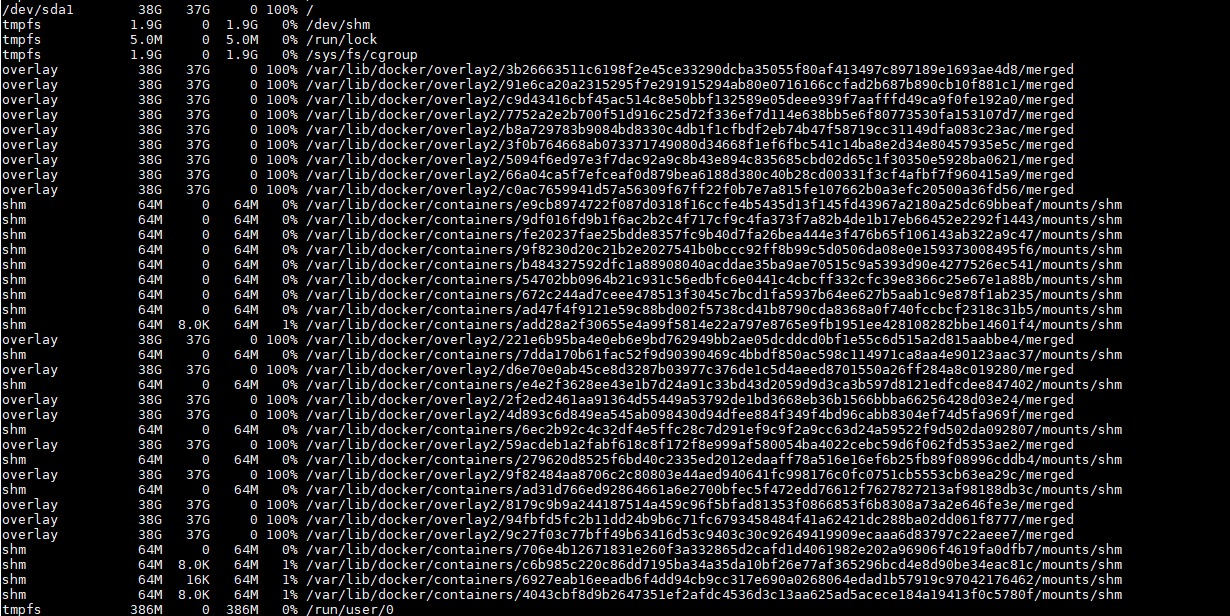
The drive (40GB) is running out of space, BUT I do not need that much mailspace.
After running an update and deleting old image tags, the drive space is fine again.
Today I got the same problem and stopped the compose.
I ran "docker system prune" and it deleted 29GB of space.
Is there any bug in my installation?
I attached you some screenshots, maybe someone can help.

 haiopaii
All 11 comments
I don't know about your system specs, you deleted the template... :) Could be clamd-mailcow oom dying and filling the temp folder.
 andryyy
on 17 Sep 2019
andryyy
on 17 Sep 2019
I got a 4GB RAM, 2 CPU, 40GB NVME Server (CX21) from Hetzner Cloud.
running latest debian 10
haiopaii
on 17 Sep 2019
A docker system df -v may help for a first check. Also ncdu is a nice tool
 MAGICCC
on 17 Sep 2019
MAGICCC
on 17 Sep 2019
I also recommend to run ncdu /var/lib/docker/volumes/ as soon as it fills your disk. Please post the results afterwards.
andryyy
on 18 Sep 2019
Probably is not a Mailcow issue, but a Docker peculiarity.
When you upgrade Mailcow you should delete old images and volumes. The first is an automatic operation inside update script: "Do you want delete old images?" (more or less).
For the second one, you must run prune command manually.
After updates, you must be sure that all services are up and running (you can see them in "debug" page or your mailcow gui panel: configuration -> system information -> System and containers. Here you also can view your disk usage)
Go to /opt/mailcow-dockerized and run "docker system prune -a --volumes".
Now refresh your debug web page and take a look at your disk space usage.
Be sure that every mailcow service are up and running, because this command delete every unused volumes.
 PaoloVIP
on 18 Sep 2019
PaoloVIP
on 18 Sep 2019
This must be within Mailcow.
Had this problem also a few days ago.
Mailcow data volumes (mail, db,redis,rspam,postfix,crypt) are seperate from the /var/lib/docker in my architecture and the docker mount runs out of space. Just a simple restart frees 75% of the space. No update done in between
 WFWG
on 20 Sep 2019
WFWG
on 20 Sep 2019
As @MAGICCC suggested you might want to use ncdu to track down the exact folder or service which is continously filling up your space. Without any further details, it's hard to determine the cause of this. As there are not much reported issues like that, it seems to be an more isolated issue.
 patschi
on 20 Sep 2019
patschi
on 20 Sep 2019
@patschi "du" should be sufficient to track down the folder. but ncdu is helpful - not everyone likes to install additional software ;)
right now its operating normal so nothing to see. I will configure my monitoring to track this in detail. if it comes up again I will share the data.
Stuff like this happens from time to time - for me it's no big deal - I just came over this issue reading the issuelist and added my 20cents.
WFWG
on 20 Sep 2019
Never seen this. Need the du or ncdu output. :)
andryyy
on 20 Sep 2019
After disabling ClamAV everything works fine.
Looks like clamav runs oom and eats the disk space after.
haiopaii
on 24 Sep 2019
The new image at least cleans up after itself. I can check for watchdog-mailcow. If a worker dies, it writes a Redis key and howls.
andryyy
on 24 Sep 2019
Related issues
 Braintelligence
·
3Comments
Braintelligence
·
3Comments
 RogerSik
·
3Comments
RogerSik
·
3Comments
 mritzmann
·
3Comments
mritzmann
·
3Comments
 Adorfer
·
3Comments
Adorfer
·
3Comments
 K2rool
·
3Comments
K2rool
·
3Comments
Most helpful comment
Never seen this. Need the du or ncdu output. :)