Mailcow-dockerized: Letsencrypt Certificate can not be renewing or validated
Hi! I recently upgrade my installation to the last version. I can not regenerate my certificates. Hostname (Primary Domain) certificates its ok.
root@mail:/opt/mailcow-dockerized# docker-compose logs acme-mailcow
Attaching to mailcowdockerized_acme-mailcow_1_df600f891e4b
acme-mailcow_1_df600f891e4b | Fri Apr 5 19:21:12 -03 2019 - Waiting for Docker API...OK
acme-mailcow_1_df600f891e4b | Fri Apr 5 19:21:13 -03 2019 - Waiting for database... Uptime: 6 Threads: 9 Questions: 14 Slow queries: 0 Opens: 22 Flush tables: 1 Open tables: 16 Queries per second avg: 2.333
acme-mailcow_1_df600f891e4b | OK
acme-mailcow_1_df600f891e4b | Fri Apr 5 19:21:14 -03 2019 - Waiting for Nginx... OK
acme-mailcow_1_df600f891e4b | Fri Apr 5 19:21:14 -03 2019 - Waiting for domain table... OK
acme-mailcow_1_df600f891e4b | Fri Apr 5 19:21:15 -03 2019 - Initializing, please wait...
acme-mailcow_1_df600f891e4b | Fri Apr 5 19:21:15 -03 2019 - Using existing domain key /var/lib/acme/acme/key.pem
acme-mailcow_1_df600f891e4b | Fri Apr 5 19:21:15 -03 2019 - Using existing Lets Encrypt account key /var/lib/acme/acme/account.pem
acme-mailcow_1_df600f891e4b | Fri Apr 5 19:21:15 -03 2019 - Detecting IP addresses... OK
acme-mailcow_1_df600f891e4b | Fri Apr 5 19:21:54 -03 2019 - Found A record for autodiscover.ebinaria.com.ar: 8.26.21.51
acme-mailcow_1_df600f891e4b | Fri Apr 5 19:21:54 -03 2019 - Confirmed AAAA record 8.26.21.51, but HTTP validation failed
acme-mailcow_1_df600f891e4b | Fri Apr 5 19:21:55 -03 2019 - Found A record for autodiscover.elcidro.com.ar: 8.26.21.51
acme-mailcow_1_df600f891e4b | Fri Apr 5 19:21:55 -03 2019 - Confirmed AAAA record 8.26.21.51, but HTTP validation failed
acme-mailcow_1_df600f891e4b | Fri Apr 5 19:21:56 -03 2019 - Found A record for autodiscover.gracias.co: 8.26.21.51
acme-mailcow_1_df600f891e4b | Fri Apr 5 19:21:56 -03 2019 - Confirmed AAAA record 8.26.21.51, but HTTP validation failed
acme-mailcow_1_df600f891e4b | Fri Apr 5 19:21:56 -03 2019 - Found A record for mail.ebinaria.com.ar: 8.26.21.51
acme-mailcow_1_df600f891e4b | Fri Apr 5 19:21:56 -03 2019 - Confirmed A record 8.26.21.51, but HTTP validation failed
acme-mailcow_1_df600f891e4b | Fri Apr 5 19:21:56 -03 2019 - Found A record for mail.elcidro.com.ar: 8.26.21.51
acme-mailcow_1_df600f891e4b | Fri Apr 5 19:21:56 -03 2019 - Confirmed A record 8.26.21.51, but HTTP validation failed
acme-mailcow_1_df600f891e4b | Fri Apr 5 19:21:56 -03 2019 - Found A record for mail.gracias.co: 8.26.21.51
acme-mailcow_1_df600f891e4b | Fri Apr 5 19:21:56 -03 2019 - Confirmed A record 8.26.21.51, but HTTP validation failed
acme-mailcow_1_df600f891e4b | Fri Apr 5 19:21:56 -03 2019 - Cannot validate hostnames, skipping Let's Encrypt for 1 hour.
acme-mailcow_1_df600f891e4b | Fri Apr 5 19:21:56 -03 2019 - Use SKIP_LETS_ENCRYPT=y in mailcow.conf to skip it permanently.
 e-tinchux
All 33 comments
TEST
root@mail:/opt/mailcow-dockerized# docker-compose exec acme-mailcow curl -4 http://${MAILCOW_HOSTNAME}/.well-known/acme-challenge/1 --write-out %{http_code}
curl: (7) Failed to connect to mail.ebinaria.com.ar port 80: Connection refused
Skip running ACME (acme-mailcow, Let's Encrypt certs) - y/n
SKIP_LETS_ENCRYPT=n'
Skip IPv4 check in ACME container - y/n
SKIP_IP_CHECK=n
e-tinchux
on 6 Apr 2019
which OS ?
 JOduMonT
on 6 Apr 2019
JOduMonT
on 6 Apr 2019
It is running on Debian 8.5.2
Thanks in advance
e-tinchux
on 6 Apr 2019
did you notice
you have to run a specific kernel

and use the docker-ce version (not the debian one) ?
https://docs.docker.com/install/linux/docker-ce/debian/
JOduMonT
on 6 Apr 2019
My kernel version is 4.9.0 and my docker-ce is 18.06.0. What do you recommend?
e-tinchux
on 6 Apr 2019
what change in the last since the last certificate query ?
did you change something in your DNS ?
do you use IPv6 ?
JOduMonT
on 8 Apr 2019
Ich hab das selbe problem. die innstallation ist älter als 6Monate und vor 3 Monate hat das erneuern noch geklappt, jetzt bekomme ich diese Meldung:
1.4.2019, 22:17:08 | Use SKIP_LETS_ENCRYPT=y in mailcow.conf to skip it permanently.
-- | --
11.4.2019, 22:17:08 | Cannot validate hostnames, skipping Let's Encrypt for 1 hour.
11.4.2019, 22:17:08 | Confirmed AAAA record , but HTTP validation failed
11.4.2019, 22:17:08 | Found AAAA record for - skipping A record check
11.4.2019, 22:17:07 | Confirmed AAAA record , but HTTP validation failed
11.4.2019, 22:17:07 | Found AAAA record for - skipping A record check
11.4.2019, 22:17:07 | Confirmed AAAA record , but HTTP validation failed
11.4.2019, 22:17:07 | Found AAAA record for - skipping A record check
11.4.2019, 22:17:07 | Confirmed AAAA record , but HTTP validation failed
11.4.2019, 22:17:07 | Found AAAA record for - skipping A record check
11.4.2019, 22:17:07 | Confirmed AAAA record , but HTTP validation failed
11.4.2019, 22:17:07 | Found AAAA record for - skipping A record check
11.4.2019, 22:17:07 | Confirmed AAAA record , but HTTP validation failed
11.4.2019, 22:17:07 | Found AAAA record for - skipping A record check
11.4.2019, 22:17:07 | Confirmed AAAA record , but HTTP validation failed
11.4.2019, 22:17:07 | Found AAAA record for - skipping A record check
11.4.2019, 22:17:07 | Confirmed AAAA record , but HTTP validation failed
11.4.2019, 22:17:07 | Found AAAA record for - skipping A record check
11.4.2019, 22:17:07 | Confirmed AAAA record , but HTTP validation failed
11.4.2019, 22:17:07 | Found AAAA record for - skipping A record check
11.4.2019, 22:17:06 | OK
11.4.2019, 22:17:05 | Detecting IP addresses...
11.4.2019, 22:17:05 | Using existing Lets Encrypt account key /var/lib/acme/acme/account.pem
11.4.2019, 22:17:05 | Using existing domain key /var/lib/acme/acme/key.pem
11.4.2019, 22:17:05 | Initializing, please wait...
11.4.2019, 22:17:05 | OK
11.4.2019, 22:17:00 | Waiting for domain table...
11.4.2019, 22:17:00 | OK
11.4.2019, 22:17:00 | Waiting for Nginx...
11.4.2019, 22:17:00 | OK
Ich hab keine Konfig verändert.
Min Root Server hat so woll Statische Ipv4 als auch Ipv6.
Gruss Conan
 Conan179
on 11 Apr 2019
Conan179
on 11 Apr 2019
@Conan179 try to hardcode your principal hostname inside ACME container in /etc/host pointing to private IP 172.xxx.xxx. ...and comment us your results.
Regards
e-tinchux
on 11 Apr 2019
Und wie mache ich das?
Conan179
on 11 Apr 2019
Mein problem ist offiziell gelöst.
Und zwar hatte ich Mailcow auf meine IPv4 addresse gebound, aber der ACME client will unbedingt ipv6 machen, oben in meinem Post ist der Hinweis versteckt, im log steht nämlich nur
Found AAAA record for - skipping A record check
Confirmed AAAA record , but HTTP validation failed
Nicht einmal A record, hab das bounding raus genommen und neugestartet und es wurde sofort einen neues Zert angefordert, hat es bekommen und gleich innstalliert.
Conan179
on 14 Apr 2019
I've had the same issue.
The ACME Container could not connect to the external nginx address in order to use HTTP Verification.
Only after adding the private IP of the nginx Container to the /etc/hosts of the ACME Container could the Verification be done.
Should there be a iptables rule in place or something?
 tzelch
on 15 Apr 2019
tzelch
on 15 Apr 2019
It should be able to do that, other things will fail if it cannot connect from the Docker bridge to the external interface, so you should fix it.
firewalld/ufw is not supported by mailcow. You can use it, but you need to configure it on your own, as it belongs to your own network. Same applies to any custom iptables ruleset.
 andryyy
on 15 Apr 2019
andryyy
on 15 Apr 2019
@andryyy eine frage, warum ruft der ACME nur noch ipv6 ab?
Conan179
on 15 Apr 2019
ACME bevorzugt immer AAAA, wenn es im DNS existiert.
andryyy
on 15 Apr 2019
ok, ipv6 wird bevorzugt, aber warum nimmt ACME dann nicht den A als Fallback? Ich hab meine Innstallation seid ca. Juli 18 und das ipv4 bind schon länger drin, er muss es also früher mal gemacht haben.
Conan179
on 15 Apr 2019
Das macht es einfach nicht. :) Das kommt zudem von Lets Encrypt selber, da haben wir keinen Einfluss drauf.
Wenn der AAAA im DNS steht, möchte er ihn auch verwenden.
andryyy
on 15 Apr 2019
I had the same issue that it cannot validate hostnames.
I've iptables running with some strict rules.
To fix it i had to add the iprange of docker to the INPUT chain to accept port 80.
Example (where 172.20.1.0/24 is the docker ip range):
iptables -A INPUT -p tcp -s 172.20.1.0/24 --dport 80 -j ACCEPT
 dvzunderd
on 15 Apr 2019
dvzunderd
on 15 Apr 2019
I think you can use -I br-mailcow as in-source, too.
Thanks for your report, @dvzunderd ! Your fix would not work for the DNS check though. Better allow the bridge access to the public interface. It is your public interface after all. Why would you exclude mailcow from access to itself. :-)
andryyy
on 15 Apr 2019
@andryyy, Was not activly blocking mailcow. But this should have been picked up by the docker rules for port 80. Don't know why it does not pick. This solved the issue.
It is not the solution for the DNS but i had the same logging as the initial poster so this could help with his issue (if the same).
dvzunderd
on 16 Apr 2019
I think you can use
-I br-mailcowas in-source, too.Thanks for your report, @dvzunderd ! Your fix would not work for the DNS check though. Better allow the bridge access to the public interface. It is your public interface after all. Why would you exclude mailcow from access to itself. :-)
@andryyy I'm facing this issue too, what's the workaround for this? iptables -I br-mailcow ?
I am double checking so I won't make any troubles
 molaga
on 21 Apr 2019
molaga
on 21 Apr 2019
@molaga I did some testing on my own machine and the iptables -I br-mailcow did not fix the issue for me.
What i did to fix it was the following:
First you need to find out what the ip range is with:
ip route | grep br-mailcow
This would give the ip range used by br-mailcow like this:
172.20.1.0/24 dev br-mailcow proto kernel scope link src 172.22.1.1
Now use that range to add it to iptables:
iptables -A INPUT -p tcp -s 172.20.1.0/24 --dport 80 -j ACCEPT
dvzunderd
on 21 Apr 2019
This issue has been automatically marked as stale because it has not had recent activity. It will be closed if no further activity occurs. Thank you for your contributions.
![stale[bot] picture](https://avatars3.githubusercontent.com/in/1724?v=4&s=40) stale[bot]
on 20 Jun 2019
stale[bot]
on 20 Jun 2019
Since the last time i've updated, i have the same issue.
docker-compose exec acme-mailcow curl -4 http://mail.example.org/.well-known/acme-challenge/1 --write-out %{http_code}
results in curl: (7) Failed to connect to mail.example.org port 80: Connection refused
when i ping mail.example.org i get my internal ip 10.10.10.50
docker-compose exec acme-mailcow curl -4 http://10.10.10.50/.well-known/acme-challenge/1 --write-out %{http_code}
results in 200
i dont know why this is
mail.example.org has a public dns entry which is not reachable from mailcow server itself, but as it resolves locally into it's own ip, this shouldn't matter, right?
 lug-gh
on 11 Aug 2019
lug-gh
on 11 Aug 2019
We don't change your network with our updates. :o This probably never worked, when unbound-mailcow was not able to resolve that name.
You can disable the checks in mailcow.conf (http verification and ip checks).
andryyy
on 11 Aug 2019
It worked for over a year...
If i disable the check and rerun source mailcow.conf & curl, it's still the same error.
Did you implement any external dns resolver in acme-mailcow?
lug-gh
on 11 Aug 2019
Check the last commits. :) We use our own resolver since forever.
andryyy
on 11 Aug 2019
So, any idea how to debug that? If I create data/web/.well-known/acme-challenge/1 and open it from an external network/pc, it works just fine, so acme server should be able to read everything just fine.
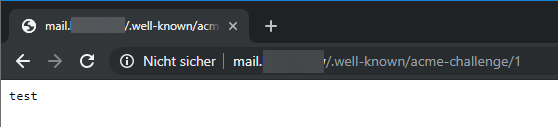
As I said, it worked for over a year and I didn't do any changes but updating mailcow ...
lug-gh
on 12 Aug 2019
No, we didn't change anything. We added verification checks. Just disable those checks in mailcow.conf if they don't work with your setup.
andryyy
on 12 Aug 2019
I've set SKIP_IP_CHECK=y yesterday, that's the only option I could find.
lug-gh
on 12 Aug 2019
There should be a HTTP verification option. :)
andryyy
on 12 Aug 2019
Okay I'll try. But why is that option in the solr section? ^^
lug-gh
on 12 Aug 2019
It will be appended with an update. So new options will always be found at the bottom.
Am 12.08.2019 um 14:15 schrieb lug-gh notifications@github.com:
Okay I'll try. But why is that option in the solr section? ^^
—
You are receiving this because you were mentioned.
Reply to this email directly, view it on GitHub, or mute the thread.
andryyy
on 12 Aug 2019
There should be a HTTP verification option. :)
That indeed worked. Thanks ;)
lug-gh
on 12 Aug 2019
Related issues
 bonanza123
·
3Comments
bonanza123
·
3Comments
 GalacticLion7
·
3Comments
GalacticLion7
·
3Comments
 schoebelh
·
3Comments
schoebelh
·
3Comments
 starcraft0429
·
3Comments
starcraft0429
·
3Comments
 thannaske
·
3Comments
thannaske
·
3Comments