Mailcow-dockerized: How to properly disable SOGo
I have read #64 - It results in lots of dependency errors. I don't have much RAM and SOGo appears to use about half of it:
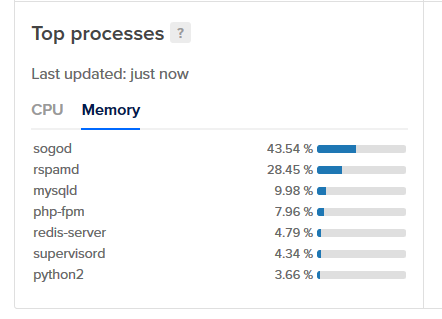
I don't need it as I use rainloop. How do I disable it?
BTW: I have almost no experience with Docker.
 archiecodes
All 7 comments
Guys, read the issue template, please.
It is not possible at the moment to disable SOGo completly. You can reduce its workers (WOWorkersCount) to something like 1, it will eat much less RAM then.
 andryyy
on 26 Oct 2018
andryyy
on 26 Oct 2018
How?
EDIT: Found it - #415
archiecodes
on 26 Oct 2018
@andryyy Also, where does it say that in the issue template?
archiecodes
on 26 Oct 2018
@archiebaer He's meaning that your issue is neither a bug report nor a feature request and thus not expected here.
 Braintelligence
on 26 Oct 2018
Braintelligence
on 26 Oct 2018
Okay
archiecodes
on 27 Oct 2018
FYI, I'm doing docker-compose stop sogo-mailcow after each update/restart to save some pricy :moneybag: RAM.
Never had any issues :ok_hand:, been doing it since 05/2017.
 discofris
on 12 Feb 2019
discofris
on 12 Feb 2019
Yes, you can do that, as long as you let it start once. :) Stopping it is fine, just dont remove it from the compose file. :)
andryyy
on 12 Feb 2019
Related issues
 bonanza123
·
3Comments
bonanza123
·
3Comments
 a3li
·
3Comments
Braintelligence
·
3Comments
a3li
·
3Comments
Braintelligence
·
3Comments
 Adorfer
·
3Comments
Adorfer
·
3Comments
 poldixd
·
3Comments
poldixd
·
3Comments
Most helpful comment
Yes, you can do that, as long as you let it start once. :) Stopping it is fine, just dont remove it from the compose file. :)