Mailcow-dockerized: Clamd use to much disk space
Hello,
i have an problem with my mailcow instance. After a few days (Holidays) without to check my server i have seen, that my server runs out of disk space. I found out that the docker container clamd has over 13 GB
Im not sure what i have to do now because i do not know docker very well. Hope anyone can help me
Serverstats:
Debian 9.5
Debian 4.9.110-3+deb9u2 (2018-08-13) x86_64 GNU/Linux
20 GB of Disk Space (Cloud Server)
 ClepToManix
All 36 comments
More details about your server/config please. RAM, vCores?
 Braintelligence
on 2 Oct 2018
Braintelligence
on 2 Oct 2018
2 GB of RAM and 1 CPU
i think i solved the problem. I cleaned some litte space to update the mailcow container. And now its ok (5GB are used) Screenshot below shows the full container.

I dont know why this happend?
Clamd is for virus and spam detection, isn't it?
@Braintelligence thanks für your fast answear 👍
ClepToManix
on 2 Oct 2018
2GB is not enough for mailcow + clamd if I'm informed correctly. Look for other issues containing "clamd ram". I think there was someone else experiencing problems with 2GB RAM and clamd running.
Braintelligence
on 2 Oct 2018
I had no problems with mailcow and 2GB of RAM. Maybe Clam write to much logs or something like this :-o

My Server is Only for Mailcow
ClepToManix
on 2 Oct 2018
Check if you run into RAM problems. There are several issues with people running 2GB vServers that run out of RAM (EDIT: While using clamd, which you can skip in the config.). I'm not saying this is the underlying problem here, but it could at least add to it.
Braintelligence
on 2 Oct 2018
Check if you run into RAM problems. There are several issues with people running 2GB vServers that run out of RAM. I'm not saying this is the underlying problem here, but it could at least add to it.
I agree with you. I will still watching it
ClepToManix
on 2 Oct 2018
You can check disk usage inside the container:
docker-compose exec clamd-mailcow /bin/bash
apk add ncdu
ncdu /
Which folder is it to contain > 10 GB?!
 andryyy
on 2 Oct 2018
andryyy
on 2 Oct 2018
I use mailcow with 2GB RAM and 2 vCPU's @ Digital Ocean, been running fine with clamd. :) no issues (infact I am also running nextcloud, gitea, and bookstack on my mailcow server too with no issues)
 mitchellurgero
on 2 Oct 2018
mitchellurgero
on 2 Oct 2018
You can check disk usage inside the container:
docker-compose exec clamd-mailcow /bin/bash
apk add ncdu
ncdu /
Which folder is it to contain > 10 GB?!
Already tried this, but its always says, that it cant find it or it displays
No such service: mailcowdockerized-clamd-mailcow_1 or
No such service: clamd-mailcow
After 1 Day this Container contains 271 MB but i think thats normal (?)

ClepToManix
on 4 Oct 2018
But you see in your screenshot that it is running. It exists. You probably didn't run the command from within mailcow-dockerized.
363MB is fine. Maybe it was old overlayfs stuff from previous images.
andryyy
on 4 Oct 2018
I'm closing this for now, because the container seems to be back to normal.
andryyy
on 4 Oct 2018
Space is already getting low. I will send a screenshot from the containers later.
ClepToManix
on 12 Oct 2018
Okay, it's again the clamd container. actual it contain 10 gb. After upgrading mailcow via scrpt it has round about 300mb.
I dont know why they uses so much space -.-
You can check disk usage inside the container:
docker-compose exec clamd-mailcow /bin/bash
apk add ncdu
ncdu /
my docker path is /opt/mailcow-dockerized/ to run this command i navigated to this folder, but it doesnt work.
Also tried those commands:
docker-compose exec clamd-mailcow /bin/bash
docker-compose exec mailcowdockerized_clamd-mailcow /bin/bash
docker-compose exec mailcowdockerized_clamd-mailcow_1 /bin/bash
docker-compose exec clamd-mailcow_1 /bin/bash
docker-compose exec  mailcow/clamd /bin/bash
and i already get this message
 Can't find a suitable configuration file in this directory or any
        parent. Are you in the right directory?

        Supported filenames: docker-compose.yml, docker-compose.yaml
@andryyy please re-open this thread.
ClepToManix
on 12 Oct 2018
You need to run this inside the mailcow dockerized folder... Please check the docs.
I’m afraid something is wrong with your installation. It is not normal.
I cannot reproduce it on any of many setups.
Please check how to enter the container and run ncdu inside the container.
andryyy
on 12 Oct 2018
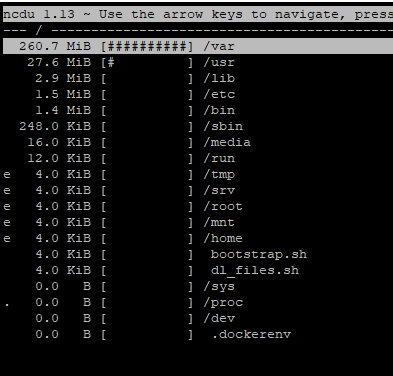

@andryyy thank you it works :) im very new in docker, sorry for my stupidness. Do u need more information?
At this time and after 4 days the container should be normal. i will run this comment if it runs out of space
ClepToManix
on 15 Oct 2018
This is not blown right now. I only see like 270 MiB. You will need to run that command again, when it gets full. :-)
andryyy
on 15 Oct 2018
yeah just write it at the same time :D thank you :) i will post it
ClepToManix
on 15 Oct 2018
So already the container runs out of space.
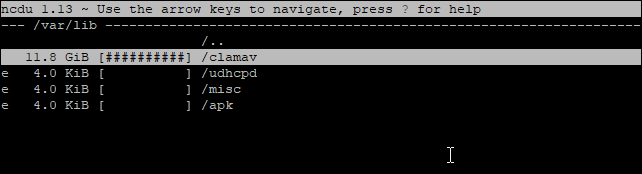
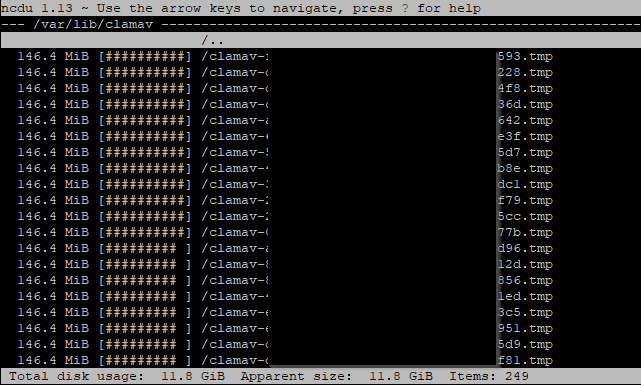
There are hundred of temp files (249):
ClepToManix
on 21 Oct 2018
Can you check the content? Or at least the first 200 lines or something like this?
andryyy
on 21 Oct 2018
And please post your clamd-mailcow logs. :-)
andryyy
on 21 Oct 2018
log.txt
Already updateted the Container because i cant sending mails. My clamd log only goes to yesterday becuase i updated there. It normaly takes up to friday and then clamd creates those temp file. At this time i will create new logs and look into the temp file
ClepToManix
on 22 Oct 2018
Seems to be restarting. How much memory is left? free -m?
andryyy
on 22 Oct 2018
ca. 400 MB left (of RAM)
Outlook for Androidhttps://aka.ms/ghei36 herunterladen
From: André Peters notifications@github.com
Sent: Monday, October 22, 2018 7:48:18 PM
To: mailcow/mailcow-dockerized
Cc: ClepToManix; Author
Subject: Re: [mailcow/mailcow-dockerized] Clamd use to much disk space (#1817)
Seems to be restarting. How much memory is left? free -m?
—
You are receiving this because you authored the thread.
Reply to this email directly, view it on GitHubhttps://github.com/mailcow/mailcow-dockerized/issues/1817#issuecomment-431912623, or mute the threadhttps://github.com/notifications/unsubscribe-auth/AYtdnqz43awgyAwlWxWDpsHNl1nv9z7Jks5ungTigaJpZM4XEJ_M.
ClepToManix
on 22 Oct 2018
When? Now? It can drop to 0 when clamd-mailcow starts.
And swap is available? Did you enable extra signatures in clamd? 0.100.1 is also not the most current image.
andryyy
on 22 Oct 2018
There are my stats. The command above is from htop

ClepToManix
on 22 Oct 2018
mailcow.txt
This is the inside of the .cld file.
the .tmp seems to be a directory
I will clean a few of them and store few of them for any questions
//edit: The content of the daily.cld is nearly the same
ClepToManix
on 29 Oct 2018
Thanks, you should really add a swapfile/device, I think it is being oom-killed when reading the signatures.
andryyy
on 29 Oct 2018
okay, i will create a swap file. If the error persists, I'll contact you again. Thanks for ur help :)
ClepToManix
on 29 Oct 2018
Sounds good. I will implement something to cleanup the old tmp files.
andryyy
on 29 Oct 2018
I think you solved my problem. Every Friday my machine runs out of space and at this point its all normal. I would like to wait until Wednesday to be sure. Thank you mate 👍
ClepToManix
on 2 Nov 2018
works fine 👍
ClepToManix
on 12 Nov 2018
Hmm I encountered this issue, @andryyy is your fix supposed to be ran automatically? I had about 13GB of tmp files in /var/lib/clamav. I might just create a crontab to delete those files daily but this is hardly a fix :/
 lesurp
on 20 Apr 2019
lesurp
on 20 Apr 2019
Your machine is not able to run ClamAV and runs out of memory. You should not automatically delete the temp files but disable Clam completely.
andryyy
on 20 Apr 2019
Having the same issue as @pLesur. We actually noticed this issue some months ago after an update (the server ran perfectly fine for many many months before that). But now, our mail server constantly runs out of disk space. Are "get better hardware" and "disable ClamAV" our only options? Currently, we're stopping and starting the Docker stack every now and then. Why is ClamAV unable to delete those tmp files?
 tobihagemann
on 14 May 2019
tobihagemann
on 14 May 2019
Yes, when a container runs out of memory, that’s the only option. We could cleanup those files on start, but how does it help? You will still have a broken ClamAV container, that constantly restarts.
andryyy
on 14 May 2019
Creating a swap file solved the issue for me. My server has 2g ram and the swap is 4g big and since my comment I haven't had any problem
lesurp
on 14 May 2019
Related issues
 constin
·
3Comments
constin
·
3Comments
 bonanza123
·
3Comments
bonanza123
·
3Comments
 schoebelh
·
3Comments
schoebelh
·
3Comments
 pgollor
·
3Comments
pgollor
·
3Comments
 starcraft0429
·
3Comments
starcraft0429
·
3Comments
Most helpful comment
Creating a swap file solved the issue for me. My server has 2g ram and the swap is 4g big and since my comment I haven't had any problem