Mailcow-dockerized: how to move dockerized installation to another host?
Dear mailcows,
my installation has been running smoothly for ages, but now I have to move it to another server.
Here is what I did:
- do a fresh mailcow-dockerized install on the new host
- rsync the whole backup folder (made with backup_and_restore.sh) to the new host
- change the ip of the mx ANAME in DNS
- restore all parts of the latest backup on the new host via backup_and_restore.sh
- reboot new host
When I try to connect to mailcow on the new host via browser, then I see that there does not seem to be a certificate on :443.
An imap connect does not seem to work, either.
Can you please point me to what I may have forgotten above?
I looked for a description of moving an installation to another host, but did not find anything suitable (for me ;-) ).
Thank you in advance
Claudio
 cklabautermann
All 18 comments
Sounds like the DNS propagation maybe didn't have enough time for letsencrypt to realize your DNS entry has a new IP and thus no new SSL certificate is distributed.
IMAP via TLS should also be based on such a certificate, so maybe same problem.
 Braintelligence
on 26 Sep 2018
Braintelligence
on 26 Sep 2018
This was my first thought, too, but I gave the migration enough time for letsencrypt to realize that the IP to the host changed. I only gave up after about an hour yesterday. I am used to fetch LE certs via certbot and it never takes more time than 10-20 min - in most cases even less.
Unfortunately I´m not strong enough at troubleshooting docker/mailcow-dockerized things, so I don´t know where to look for problems and (probably) what to do then.
But I promise to deliver a brief dummy documentation about how to do this when I´m done :-D
cklabautermann
on 26 Sep 2018
Did you try running
docker-compose logs --tail=100 <SERVICE>-mailcow
Like docker-compose logs --tail=100 nginx-mailcow to find out what's wrong?
Braintelligence
on 26 Sep 2018
No, I didn´t. I preferred to show the steps I took so specialists may decide if I forgot a crucial step in migration or point me to a documentation which I did not find.
However if you think what I did shoud be enough for a successful migration, then I will give it another try and fetch logs the way you showed.
Thanx, Claudio
cklabautermann
on 26 Sep 2018
I'm not a specialist in moving mailcow, because I create a VM for every mailcow instance I run. This way I just need to download a backup of the VM and spin it up on another host and alter some networking settings and everything just works.
I did a backup & restore on the same host once because of a reinstall, though, and ran into an issue then. The mysql backup wasn't created properly because of image naming issues I believe. When you ran restore.sh did it show all possible options? (I think it should be 5)
If I were you I'd try to look for errors in the containers now, especially nginx and acme if the certificate is the problem currently.
Braintelligence
on 26 Sep 2018
restore.sh just showed me single options to restore, I think 4. I ran it once for each option.
However I will look into the logs of the new host - they should still be there although I had to go back to the old host.
cklabautermann
on 26 Sep 2018
https://mailcow.github.io/mailcow-dockerized-docs/b_n_r_backup/#
It should have been five options. Which one are you missing? One of those could be missing: vmail|redis|rspamd|postfix|mysql
Braintelligence
on 26 Sep 2018
xcuse me, you are right, there were five options and I restored all of them :-)
cklabautermann
on 26 Sep 2018
This is good. You should be really close to get it working or at least could reinstall any time with the provided backup. Now if we could find out why serving via 443 won't work, would help a lot.
Just to make sure: There can't be any firewall issues involved? I'm using ufw for example and it's working well.
Braintelligence
on 26 Sep 2018
now I found this:
root@vmd30627:/opt/mailcow-dockerized/data/conf/nginx# docker-compose logs --tail=100 acme-mailcow
WARNING: The TZ variable is not set. Defaulting to a blank string.
WARNING: The DBROOT variable is not set. Defaulting to a blank string.
WARNING: The DBNAME variable is not set. Defaulting to a blank string.
WARNING: The DBUSER variable is not set. Defaulting to a blank string.
WARNING: The DBPASS variable is not set. Defaulting to a blank string.
WARNING: The MAILCOW_HOSTNAME variable is not set. Defaulting to a blank string.
WARNING: The ADDITIONAL_SAN variable is not set. Defaulting to a blank string.
WARNING: The WATCHDOG_NOTIFY_EMAIL variable is not set. Defaulting to a blank string.
Attaching to
For me it looks as if my mailcow isn´t reading mailcow.conf. Do I have to reconfigure/run something before starting it on the new server for the first time?
No firewall on this host by the way.
cklabautermann
on 26 Sep 2018
now I did
source mailcow.conf and restarted the whole docker thing. And now the log of acme-mailcow looks much more interesting:
docker-compose logs --tail=200 acme-mailcow
Attaching to mailcowdockerized_acme-mailcow_1
acme-mailcow_1 | Wed Sep 26 09:55:42 CEST 2018 - Waiting for Docker API...OK
acme-mailcow_1 | Wed Sep 26 09:55:42 CEST 2018 - Found Let's Encrypt or mailcow snake-oil CA issued certificate with SANs: my.domain.tld
acme-mailcow_1 | Wed Sep 26 09:55:42 CEST 2018 - Waiting for database...
acme-mailcow_1 | mysqld is alive
.......
this looks really better now. I will do a new backup and restore it to the new host. In the meantime I will turn DNS to the new host and retry my migration.
Thank you for your help! @Braintelligence
cklabautermann
on 26 Sep 2018
Did you miss the generate_config step or didn't move your mailcow.conf with you?
Braintelligence
on 26 Sep 2018
I did the generate_config step but did not move the mailcow.conf to the new server manually.
cklabautermann
on 26 Sep 2018
again no success. I noticed that my many autoconfigs and autodisovers are ANAMES in DNS. I will change them to CNAMES pointing to my MX.
cklabautermann
on 26 Sep 2018
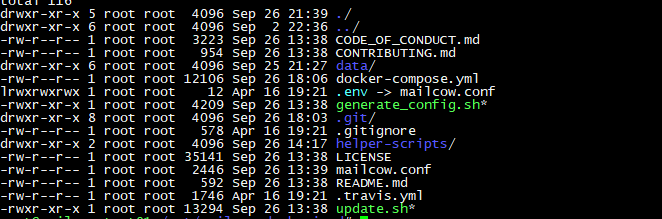
When you copy the mailcow folder you most likely destroy the symlink from .env to mailcow.conf.
 andryyy
on 26 Sep 2018
andryyy
on 26 Sep 2018
@andryyy the symlink looks fine. Do you think I missed an important step here?
Thank you
Claudio
cklabautermann
on 27 Sep 2018
I gave it another try and noticed that in nginx now appeared the error that the database connection didn´t succeed. I saw then the mismatch in DBPASS and DBROOT and corrected it. After doing so I did a new backup and restored it on the new host. For me the howto now looks like this:
- do a fresh mailcow-dockerized install on the new host
- rsync the whole backup folder (made with backup_and_restore.sh) to the new host and adjust the DBPASS and DBROOT lines in mailcow.conf (maybe better: use mailcow.conf from former host?)
- change the ip of the mx ANAME in DNS and every autodiscover/autoconfig etc. to that of the new host
- restore all parts of the latest backup on the new host via backup_and_restore.sh
- reboot new host
did I miss anything?
Thanks for your help, @Braintelligence and @andryyy !
cklabautermann
on 28 Sep 2018
You can use the old mailcow.conf after adjusting related stuff like the hostname (if it changed).
Braintelligence
on 28 Sep 2018
Related issues
 RogerSik
·
3Comments
RogerSik
·
3Comments
 Adorfer
·
3Comments
Braintelligence
·
3Comments
Adorfer
·
3Comments
Braintelligence
·
3Comments
 bonanza123
·
3Comments
bonanza123
·
3Comments
 damdinsharav
·
3Comments
damdinsharav
·
3Comments