Mailcow-dockerized: Mail for domain loops back to myself
mail for example.com loops back to myself
Hi there, I'm moving to new server, and I'm experiencing this issue, mail server is on mail.example.com and mails are on @ example.com.
any idea on what is the problem would be great
 Bersam
All 16 comments
Did you check the "Backup MX" checkbox when creating the domain? You need to remove it.
Am 09.08.2017 um 14:26 schrieb bersam notifications@github.com:
mail for example.com loops back to myself
Hi there, I'm moving to new server, and I'm experiencing this issue, mail server is on mail.example.com and mails are on @ example.com.—
You are receiving this because you are subscribed to this thread.
Reply to this email directly, view it on GitHub, or mute the thread.
 andryyy
on 9 Aug 2017
andryyy
on 9 Aug 2017
@andryyy great! thanks 👍
Bersam
on 9 Aug 2017
I had this issue just now, in 2019 I unchecked Relay domain (I think its been renamed)
Thanks @andryyy
 dawoodjee
on 23 Jul 2019
dawoodjee
on 23 Jul 2019
I get this message (Mail for domain loops back to itself) on my Backup MX mailcow server. Is it normal? Backup seems to be working otherwise.
 tkeil69575
on 21 Dec 2019
tkeil69575
on 21 Dec 2019
Hi, is this really your secondary MX? Backup might sound a bit confusing here. :) It is meant for the non primary MX in your domain.
If this server is the only server in your environment, it tries to forward the message to the single primary MX: itself. So it would be stuck in a loop. :)
André
andryyy
on 21 Dec 2019
Hi, yes, sorry I should have been more specific. I followed this guide, https://autoize.com/backup-mx-configuration-for-mailcow/. When my main MX (mailcow on Server 1) is down, the secondary MX (2nd backup mailcow install on other server) kicks in. Then when the main MX is back up, I see the mail in secondary MX's queue manager, instead of the main MX's qm. The guide suggests the opposite. But I am guessing it's (the loop message) because I sent a message via an email associated with the same domain that the main MX is running under? Or perhaps there is something wrong with how the guide suggests the config should be?
tkeil69575
on 21 Dec 2019
Perhaps you assigned your primary MX a higher priority (eg 100) while your backup has a lower number like 10.
A lower number indicates a higher/better priority.
andryyy
on 21 Dec 2019
No, no ... primary = 10, secondary (backup) = 20.
tkeil69575
on 21 Dec 2019
Hi, yes, sorry I should have been more specific. I followed this guide, https://autoize.com/backup-mx-configuration-for-mailcow/. When my main MX (mailcow on Server 1) is down, the secondary MX (2nd backup mailcow install on other server) kicks in. Then when the main MX is back up, I see the mail in secondary MX's queue manager, instead of the main MX's qm. The guide suggests the opposite. But I am guessing it's (the loop message) because I sent a message via an email associated with the same domain that the main MX is running under? Or perhaps there is something wrong with how the guide suggests the config should be?
I have test - the same problem for me; on secondary server 20 ( main 10 ) priority; if I try to down main server - email arrive to secondary but the same message - > (Mail for domain loops back to itself) ;
If I up main server - email from secondary arrive to main; all working in general, but message (Mail for domain loops back to itself) exist on every email comes to secondary server
 dariusateik
on 21 Dec 2019
dariusateik
on 21 Dec 2019
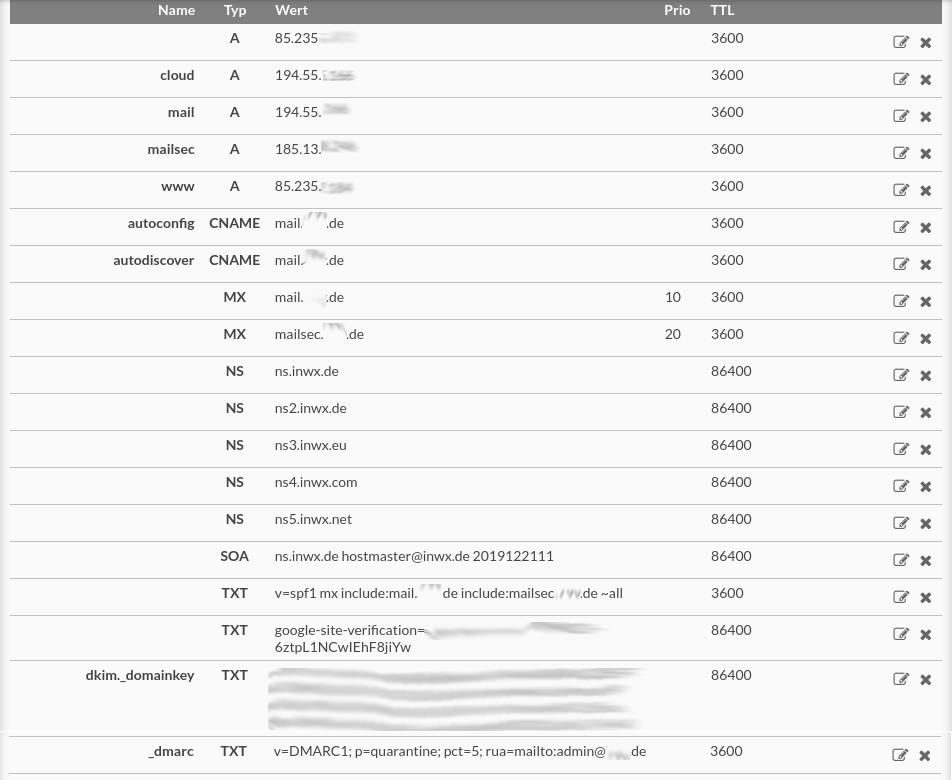
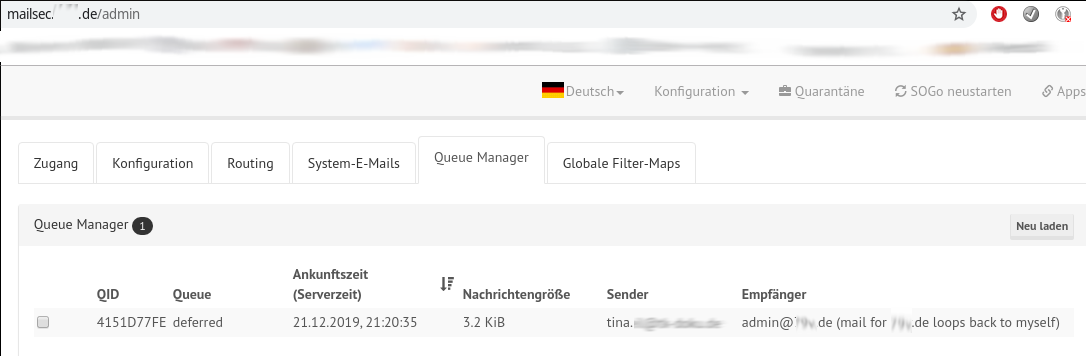
to clarify, here my dns and the queue manager of the secondary (backup) mailcow. thanks Andre for you help ... much appreciated
194.55 = main mailcow server
185.13 = secondary (backup) mailcow
- 235 = different webserver (no mail at all)
:)
tkeil69575
on 21 Dec 2019
We probably need to add fixed routes.
Tina, can you please use the Servercow Ticket System so we can chat about a session where I can check it on your servers? It is much easier for me to understand the problem then. :)
andryyy
on 21 Dec 2019
It is happening because it uses DNS to find the next hop. If you down the primary MX, the next best hop is your backup. That creates a loop. I am curious why the loop is a temporary error. But I'm glad it is after all...
andryyy
on 21 Dec 2019
Thanks Andre, looks promising :) I'll do a ticket tomorrow afternoon ...
tkeil69575
on 22 Dec 2019
@andryyy:
I also encountered this issue today while sending an email to an email alias that uses a domain alias.
X-Postcow; mail for domain-alias.example loops back to myself
Backup MX is disabled, so this can't be the cause of this issue.
I also checked the DNS records for both, the primary domain of the mailbox to which the alias delivers and of the alias domain.
Everything else works fine, just not this alias that uses a virtual domain.
If an explicit alias that contains a domain that is already an alias domain causes this issue,
the mailcow-docker UI should contain a condition or warning or both to prevent such aliases from being set up in the first place.
 strarsis
on 2 Jan 2020
strarsis
on 2 Jan 2020
Experiencing the same issue as @tkeil69575, was there any solution to this discussed in the ticket @andryyy? Would be very happy to know :)
 lunarthegrey
on 12 Jan 2020
lunarthegrey
on 12 Jan 2020
We ignored it as cosmetic error. A transport map entry to force mail to go to your primary mx will "fix" it.
andryyy
on 12 Jan 2020
Related issues
 CrAazZyMaN21
·
3Comments
CrAazZyMaN21
·
3Comments
 lgleim
·
3Comments
lgleim
·
3Comments
 damdinsharav
·
3Comments
damdinsharav
·
3Comments
 Adorfer
·
3Comments
Adorfer
·
3Comments
 phipag
·
3Comments
phipag
·
3Comments
Most helpful comment
Did you check the "Backup MX" checkbox when creating the domain? You need to remove it.