Mailcow-dockerized: CPU running on 100 % and unaccessible server
It has already happened to me twice that the server running solely mailcow started running some process on 100 % and overloaded the server which became unaccessible via any means (like SSH).
First time it happened around 23:30 on one day, second time it was this morning at 5:07.
It seems to have no apparent reason and currently it is unknown to me which process does it. There is no cron task that should be run at these times so I am guessing it could be one of the containers. I am investigating the logs and will post them later on when I may have some clue.
My question is whether this has happened to anyone already? It is a production server and I have not done any modifications whatsoever.
 kunago
All 21 comments
Hi,
I have not seen this happening... ClamAV can use some cpu time when updating, but not _that_ much.
Couldn't you see the process? This will ultimately help. :-)
 andryyy
on 14 Jul 2017
andryyy
on 14 Jul 2017
I saw something happening there; unfortunately I don't have the previous log as I assumed it could have been some cron task. This is now not the case.
It drove the server unaccesible and I saw errors in various containers which is hard to debug as some do not log the time. I am posting what I found interesting in logs cutting out the unimportant and useless older or newer logs:
mailcow-clamd.log.txt
mailcow-dovecot.log.txt
mailcow-fail2ban.log.txt
mailcow-mysql.log.txt
mailcow-php-fpm.log.txt
mailcow-postfix.log.txt
mailcow-redis.log.txt
mailcow-rspamd.log.txt
mailcow-unbound.log.txt
kunago
on 14 Jul 2017
Oh and no, I could not see the process. There was no way for me to enter the server.
kunago
on 14 Jul 2017
I don't see anything indicating the start of a problem. Though there was a problem - obviously.
Maybe the server run out of memory? Looks like it took Redis way to long to write to memory.
andryyy
on 14 Jul 2017
As for the resources, I am posting CPU and memory usage.
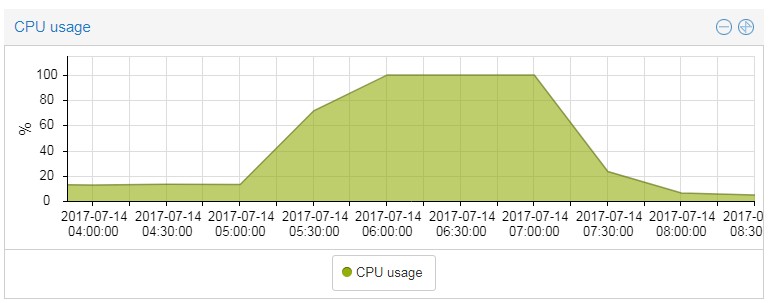
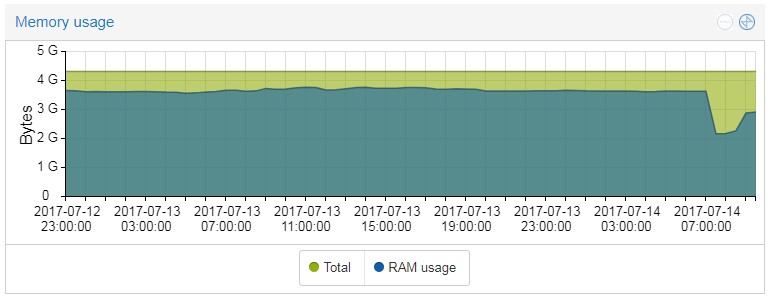
I am running PROMOX and the server is virtualized so it is simple to see these resources but as with any other locked server, it is still locked when it is locked.
kunago
on 14 Jul 2017
I also found interesting in the log there are various errors around that time:
- clamav started an update with some dn_expand errors (which I have not figured out what they mean)
- redis memory usage
- mysql crashed
So it may be either clamav or redis.
kunago
on 14 Jul 2017
dn_expand seem to be a DNS test, by the way.
kunago
on 14 Jul 2017
Hm, you shouldn't assume this by the logs. Processes can die or stuck and stop further logging. Other innocent processes then log strange errors due to being low on resources (CPU, memory).
Can you install some kind of process logging?
Am 14.07.2017 um 09:42 schrieb kunago notifications@github.com:
I also found interesting in the log there are various errors around that time:
clamav started an update with some dn_expand errors (which I have not figured out what they mean)
redis memory usage
mysql crashed
So it may be either clamav or redis.—
You are receiving this because you commented.
Reply to this email directly, view it on GitHub, or mute the thread.
andryyy
on 14 Jul 2017
I tried looking for some monitoring software. The thing is what to monitor? I found a nice command "docker stats". Would that be good to start with?
kunago
on 14 Jul 2017
I set up my own monitoring script so once I have some news about the CPU usage, I will post more details.
kunago
on 15 Jul 2017
Do you use Debian 9 and have some snapshots on your Proxmox
 elvirdz
on 16 Jul 2017
elvirdz
on 16 Jul 2017
So here it goes.

Seems to be some kernel issue. It was also happening on another server of mine but I tought it was the VPS provider issue. It was not apparently.
I am using Debian 8 by the way.
kunago
on 16 Jul 2017
Kernel Version ? uname -a
elvirdz
on 16 Jul 2017
It turns out this is an already documented issue and the solution is to upgrade the kernel.
If it happens to somebody else, please see this page in the docs: Prepare Your System.
I must have missed this notice since I was updating mailcow since a few versions back and even though this was a quite important one, I saw it nowhere.
kunago
on 16 Jul 2017
@elvirdz : It must me the case with kernel, right now working on the update.
kunago
on 16 Jul 2017
As healthchecks were an on-the-fly change and kernel upgrade means to change the storage drive to anything but _aufs_ as it is not supported in Kernel 4.9, could anyone point me to a safe way to migrate everything?
kunago
on 16 Jul 2017
ok u have to change docker on overlay2 on 4.9 kernel
docker-compose down
service docker stop
rm -r /var/lib/docker/aufs
nano /etc/docker/daemon.json
{
  "storage-driver": "overlay2"
}
service docker start
docker-compose up -d
elvirdz
on 16 Jul 2017
Will that affect any data, such as email storage?
kunago
on 16 Jul 2017
no just docker-compose down
elvirdz
on 16 Jul 2017
That's right, the driver is used by the containers. Just run "down" to drop all containers (and every other container that may be running on this host, too).
andryyy
on 16 Jul 2017
Nice, guys. Thank you very much for your help. It was just how @elvirdz wrote down, fairly easy. It would be good to leave this topic here for the reference.
kunago
on 16 Jul 2017
Related issues
 pgollor
·
3Comments
pgollor
·
3Comments
 mritzmann
·
3Comments
mritzmann
·
3Comments
 starcraft0429
·
3Comments
starcraft0429
·
3Comments
 a3li
·
3Comments
a3li
·
3Comments
 damdinsharav
·
3Comments
damdinsharav
·
3Comments
Most helpful comment
no just docker-compose down