Mailcow-dockerized: High Availablilty
Implement the functionality for setting up:
- A backup MX. In the installer, one can choose the behaviour, like the installation of a anti-spam stack (to prevent backscatter mail) _(No mails get lost, service will be interrupted, less hardware required)_
- A hot spare. Synchronize the configuration and contents. When one server goes down, the other immediately continues the service. _(No mails get lost, service will NOT be interrupted, at least the same hardware required)_
 SomeGeek
All 47 comments
You can already configure this as a backup mx. The hot spare would be cool though. Also, keep in mind, mail won't be lost unless your mail server is down for like.. days on end.
 philip-ulrich
on 4 May 2017
philip-ulrich
on 4 May 2017
And to counter it being down or not functional you can incorporate healthchecks.
 Braintelligence
on 4 May 2017
Braintelligence
on 4 May 2017
I like the hot spare request. Looking forward to it!
 thomas126
on 16 Sep 2018
thomas126
on 16 Sep 2018
@andryyy Wouldn't traefik help with high-availability on a docker-scale? It could route everything as needed, but how would postfix/dovecot and so on replicate properly?
Braintelligence
on 16 Sep 2018
No, it wouldn't help or do anything better than Nginx.
And yes, the important replication is for Dovecot.
I don't plan this in the open source mailcow, same with ACL in the long run. But you can still go ahead and configure two mailcows to replicate, that's not a problem. I did this quite often over the past weeks. But that's something used and asked for primarily by commercial users. I offer it as commercial service by mail and soon via mailcow.email and servercow.de. As part of a service package or one-time setup.
 andryyy
on 16 Sep 2018
andryyy
on 16 Sep 2018
Would it be alright to submit a PR for the mailcow docs to include how to achieve replication?
Braintelligence
on 16 Sep 2018
Sure, but there are several things to note... about the SQL cluster and its hurdles (versions, upgrading, witness, failover etc.),the replication of Dovecot itself (specific settings), HAProxy (most will want this) and the proper service configuration + changes (proxy protocol) to not break functions etc.
A simple Dovecot replication is not enough in most cases.
andryyy
on 16 Sep 2018
So you are not planning on including this in the open source version but offer this as a paid one time setup service? Or did I misunderstood?
thomas126
on 16 Sep 2018
As of today I offer to create replicated setups, but it is not part of mailcow dockerized.
andryyy
on 16 Sep 2018
Do you have an email address for further information?
Also would it be possible to manually restore one server out of the primary one and then use some kind of software to sync IMAP mailboxes? That would at least be some kind of workaround right?
thomas126
on 16 Sep 2018
Yes, you can do it like this. Or restore files from the maildir. Dovecot is very good in auto-fixing its index.
andryyy
on 16 Sep 2018
Why not create a wiki entry @andryyy, so everyone can configure it themselves? :)
 ntimo
on 16 Sep 2018
ntimo
on 16 Sep 2018
Why not support mailcow?
andryyy
on 17 Sep 2018
Depends on how much it costs, I for example as a student don't have a lot of money to pay for a feature that could be publicly documented so everyone can just add it themselves.
ntimo
on 17 Sep 2018
I don’t have a problem helping anyone on his/her server, when it is used private or in a community. I get the most support from private donators actually (strange, but thanks!). Some people that run it commercially write me mails when they have trouble and DEMAND support for free etc. - or promise a donation and then run away.
I seriously don’t want to spend my time for them to profit.
It got very annoying, some of these mails are very fucked up.
andryyy
on 17 Sep 2018
Oh I can fully understand that, that's also not very fair if the person you are helping is making money from selling mailcow hosted mailboxes, and then never donates. Thanks for this explanation :)
I have one question how can this work without a load balancer (because when one server does down the dns entry will still point to the server that is down, this would make the client to be unable to connect)? I would be quite interested in using this kind of setup if it works securely and reliably. How does the synchronization work? Do you use docker overlay networks to synchronize the data?
ntimo
on 17 Sep 2018
Depends on how much it costs, I for example as a student don't have a lot of money to pay for a feature that could be publicly documented so everyone can just add it themselves.
I‘m not sure it makes sense to use a hot spare setup for a mail server only used by you and a few others for personal purposes. This kind of feature is mostly aimed at companies and users where every minute of downtimes costs serious amounts of money. Microsoft Exchange is probably Mailcow’s main competitor in that field, and it’s way more expensive than anything @andryyy could charge.
High availability a rather complex thing to set up and maintain. Most people wouldn’t care if their mail server is down for a few hours once or twice a year. Make sure you have a good hourly backup and if the server breaks, just set up a new one within 72 hours so you don’t lose any incoming messages. Also, HA doesn‘t protect against misconfigurations, which are a far more common cause of downtime than the hardware failures that high availability could protect you against.
 mkuron
on 17 Sep 2018
mkuron
on 17 Sep 2018
@Braintelligence @andryyy A simple question: If I have two servers running mailcow-dockerized and they share the data folder through a common volume (or a NFS mount), would that be enough to act as a backup MX?
In simple terms, it works like this:
mx1: MailCow-Dockerized
- Data folder is mounted from an external source (say, an NFS mount).
mx2: MailCow-Dockerized
- Same data folder as mx1, sharing all the files
Would this be enough to make them both act as a high available setup (with the backup MX)? Or is there any other extra configuration that's required?
 rakshith-ravi
on 13 Oct 2018
rakshith-ravi
on 13 Oct 2018
Phew, I'd fear access collisions
Braintelligence
on 13 Oct 2018
That sounds quiet interesting!
thomas126
on 13 Oct 2018
Phew, I'd fear access collisions
Wouldn't NFS handle that? If I'm not wrong, it uses round robin to allow access for multiple connections to the same file. Nevertheless, would this be adequate as a backup MX? It would save up on space of the duplication too
rakshith-ravi
on 13 Oct 2018
There are options you want to enable in dovecot.conf for NFS.
You should consider SQL replication, too.
andryyy
on 13 Oct 2018
You also need to replicate the Redis database and make sure Postfix can handle its queue on NFS.
mkuron
on 13 Oct 2018
@rakshith-ravi If it uses round-robin NFS should work fine. (Never used same access for multiple devices yet.) But obviously there are things you have to take account for when you use NFS with dovecot, as andryyy points out :).
Braintelligence
on 13 Oct 2018
You should consider SQL replication too
@andryyy but why? Both the SQL instances would share the same data volume. Wouldn't that be adequate to keep them both in sync? I mean, if one SQL instance writes data, the other should be able to read the same data due to reading from the same volume right? Moreover, the backup MX would probably be having a lower priority so it'll only have to read data when the first one is down. So I doubt if there would be any access collisions
@Braintelligence so I found this question on serverfault and I'm not sure if this is good enough to prevent access collisions. Perhaps you could help me understand?
rakshith-ravi
on 14 Oct 2018
If you have two instances of a database running on the same backing files simultaneously, you will get data corruption. MySQL and Redis are just not made to support that. They need you to use replication instead.
mkuron
on 14 Oct 2018
Indeed. That does make sense. Thank you for the clarification. So Redis and MySQL (replicated) will be running individually on each server. Other than that, everything else can be shared across the two servers? That would suffice to have a backup MX system setup?
rakshith-ravi
on 14 Oct 2018
For a backup MX, you don't need any of this. Backup MX is already supported.
For a hot spare, database replication and a shared NFS for the mailcow git directory, Dovecot vmail and Postfix queue should suffice (none of the other volumes should be shared though). You may also need to make some slight changes to the ACME container so that only one of the two machines renews the certificate but both restart their services. If you do get that all to work, please submit a pull request to the documentation repository.
mkuron
on 14 Oct 2018
2 questions:
- What's the difference between a backup MX and a hot spare?
- Could you point me out to the documentation for how to setup a backup MX? Depending on what the difference between them is, I might roll with a backup MX.
That being said, a hot spare does sound like a fun thing to work on going by what you've described. I'm gonna give this a shot and submit a PR with how to achieve it. 😜
rakshith-ravi
on 14 Oct 2018
There are many, many pitfalls. Please do not push anything not fully tested. :-)
andryyy
on 14 Oct 2018
@rakshith-ravi A hotspare is basicly a second instance of mailcow which will be used when the first instance is down.
It only really works when you used a shared storage
 MAGICCC
on 14 Oct 2018
MAGICCC
on 14 Oct 2018
Then what's a backup MX? And how do I set one up?
rakshith-ravi
on 14 Oct 2018
@rakshith-ravi: The main difference is that a backup MX takes the email and stores it until the main host is up again. So these mails are not lost, but delayed. A hot spare - on the other hand - is a full replica of the main host which takes over the service (or better, all Mailcow services) when the main host is down.
Unfortunately, there is no clear documentation on how to setup a backup MX. I would like a main contributor to Mailcow to write one - as for production you want to go with 'recommended practice'.
Mailcow has support for relay/smarthosts so it is possible to set it up right away though.
SomeGeek
on 19 Oct 2018
i think this thematic is still current, sofar in my theorie it is easier to add an export for all domains and an import as backup-mx config
 djdomi
on 22 Aug 2019
djdomi
on 22 Aug 2019
I am very interested in this. I am planning on building a more comprehensive system (not just related to email) to make it easier for non-technical users to manage a set of personal servers that are capable of replication and failover. I will probably be working on this in the next couple of years, I may even go so far as to make my own HA oriented fork of mailcow-dockerized.
I think shared storage is not a good idea, because it will probably crap out and cause tons of bugs down the road. Better idea would be, each host has its own disk and its own data but we set up replication on all relevant data (at the database level). Yes, its more difficult and requires lots of very big changes to the project. But such is life when you want to achieve HA for one of the crappiest protocols and complex problems known to humankind!! (SMTP/ setting up a reliable secure email server)
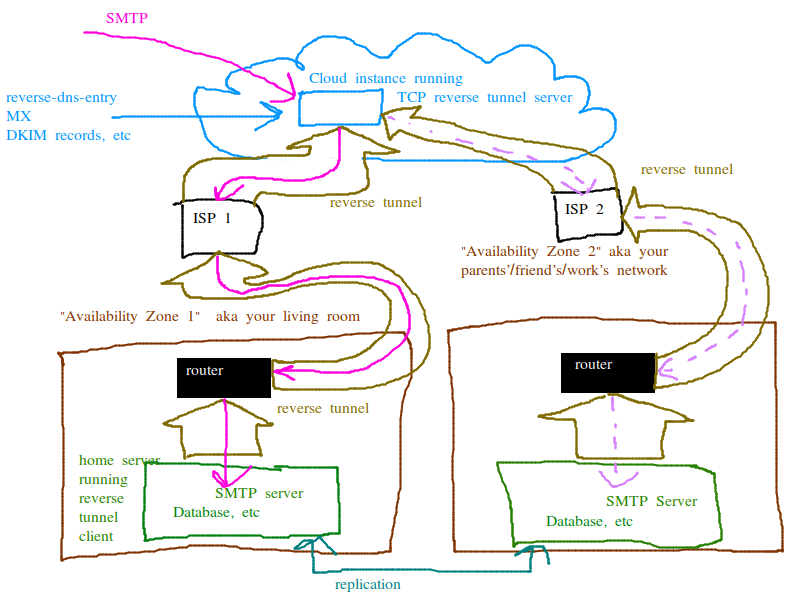
This is my general plan. more than 1 availability zone, 2 servers with replication at the database level. both servers can receive emails, and handle requests from users (POP/IMAP/HTTP) there is a gateway in the cloud which is where all the DNS entries point. When 1 host goes down the gateway in the cloud starts forwarding connections to the one thats still up. I also set it up this way so that the user does not have to call up their ISP and beg for things like reverse DNS entry. Also since the connections from the cloud instance to the home servers are thru a tunnel, the user does not have to configure port forwarding on their router or even be able to. they can just press the "go" button and the provisioning system does everything for them, literally everything.
 sequentialread
on 24 Oct 2019
sequentialread
on 24 Oct 2019
Also if you wanted to you could probably have the 2 servers with replication set up without the gateway and use the same backup MX mechanism. But I think for non-technical users the cloud based gateway is required since its unreasonable to ask them to learn how to configure port forwarding on the router and beg their ISP for reverse DNS entry and such. And for example if they live in dorms or something they may not even be able to.
sequentialread
on 24 Oct 2019
If two server keep the same certificates and the same configuration but diferent name like mail1 and mail2 the mail problem is the mysql replication will be complicated because has diferent name.
 ediazrod
on 3 Feb 2020
ediazrod
on 3 Feb 2020
Also ipv6 and netfilter...
MAGICCC
on 3 Feb 2020
I´d be interested to join the journey.. at present I am doing on- and offsite backups but I´d prefer to move to a more resilient setup, because any subscriber line outage is a pain in the ass..
with "reverse tunnel" you mean some sort of VPN that also addresses the need of a static IP address that typical home internet connections lack?
At present I am using wireguard between my single mailcow-dockerized instance and a virtual private server with a static ip address. I am ignoring ipv6 for smtp. My current network setup uses iptables to forward smtp and imap traffic into the VPN, and I am using nginx to forward https traffic based on SNI hello via the VPN (but without terminating https - ultimately the VPS is treated like network equipment).
From other issues and discussions, my understanding is:
- one needs to replicate MySQL content and dovecot (https://github.com/mailcow/mailcow-dockerized/issues/174#issuecomment-291011194)
- one needs to configure both instances adequately
Now configuration probably depends on whether one wants to achieve a hot-standby and is willing to switch configuration (DNS entries and others) or whether a fully automated failover is to be achieved.
If we want to achive full resiliance, then the central cloud instance is also a no-go. There got to be two. With that we can go for two options: single DNS names with two A addresses, or double MX etc with each a single A address. Afaik, many https clients (and EAS is https) fail over from one A to the next if there is a failure. I don´t know for sure for SMTP or IMAP clients - anyone?
With dual IP addreses or if one accepts the central instance as a single-point-of-failure, then certificates etc can all be the same and there shouldn´t be any issue with client configuration.
@ediazrod - can you please enlighten me/us on what you are referring to exactly?
 jol64
on 8 Feb 2020
jol64
on 8 Feb 2020
with "reverse tunnel" you mean some sort of VPN that also addresses the need of a static IP address that typical home internet connections lack?
yes, exactly. Also addresses the need for reverse DNS entry.
willing to switch configuration (DNS entries and others)
I was planning on having the configuration be dynamic, in the sense of when you send a packet to the cloud based VPS acting as a gateway, that packet will be forwarded to one server or the other depending on which one is currently considered "active". I believe this is called active passive replication with fail-over.
same configuration but different name like mail1 and mail2 the mail problem is the mysql replication will be complicated because has different name.
I don't know enough about mailcow to know what you are referring to, but I believe you. I think with the active-passive setup I was talking about, they would have the same name.
...a fully automated failover is to be achieved. If we want to achive full resiliance, then the central cloud instance is also a no-go. There got to be two.
I think this would be called active-active configuration. Both are always on so if one dies its fine.
In an ideal world the whole architecture of how the mail server works would be set up to be replicated. For example, when server 1 receives a new message, it doesn't just write it to the DB. It publishes it to the new message received queue. the new message received queue could be federated so it gets replicated to both servers. Then there is a separate process on each server that consumes the new message received queue and saves to the DB.
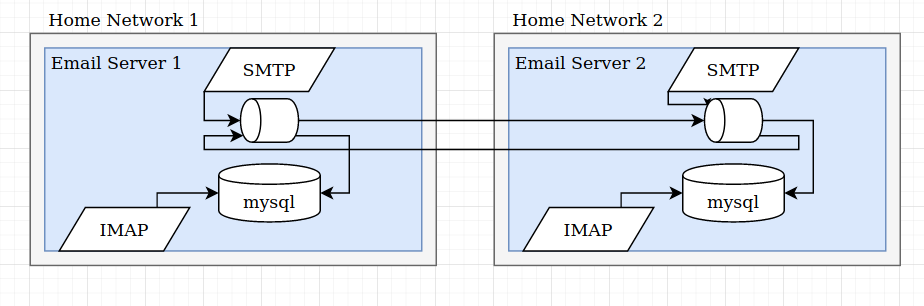
This also opens up the possibility of sharding and horizontal scalability ala kafka and cassandra. But that is a pandoras box I dont care to open right now.
That would probably be such a big effort, would it even be mailcow anymore after building something like that?
 ForestJohnson
on 29 Mar 2020
ForestJohnson
on 29 Mar 2020
@ForestJohnson your suggestion is different than what @sequentialread suggested (or what I perceived to be his suggestion, see my comment above). @sequentialread suggested to rely on replication by MySQL and dovecot (see ), whereas you suggest to process everything twice. In fact the queue placement suggests you process inbound twice and it is unclear whether outbound is processed redundantly at all, in particular as sent email is sometimes saved via IMAP. And then what about deleting old mails? ask users to do it twice? Last but not least, where do you want to place the queue? on either or both sites or centrally?
I definitley would like feedback and guidance from @andryyy on what is feasable (or has been tried before), and whether the team is planning something like this or whether this is a "paid" option.
jol64
on 29 Mar 2020
your suggestion is different than what @sequentialread suggested
Yes thats true. Actually I am the same person I just have a couple different accounts :P
I am just spitballing and trying to bring up different options, I have worked on both types of replication systems before (RDBMS replication versus distributed event based systems) I just don't know which would be the best option for adapting mailcow to be redundant / HA.
in particular as sent email is sometimes saved via IMAP. And then what about deleting old mails? ask users to do it twice?
In general with the event based system every single database change has to come from an event, the event stream is the source of truth and the DB is just a queryable derived view of that truth. So sending email, deleting email, etc, those would all be events in the event stream as well. You are right, I should have drawn all the Write/Delete traffic from IMAP --> mysql as a federated queue as well. When I drew that I had a simplistic view that IMAP only queries (reads) the DB, nothing more.
If SOGo and other things directly modify the DB that would present a problem for this model.
Sending email is special because you don't actually want to send it twice. So the send email process would have to be set up so that a send event can be submitted to all nodes, but the actual SMTP transaction where the email is sent only occurs once. Typically for distributed systems this kinda thing happens via some sort of consensus platform like the raft protocol, ZooKeeper, Consul, etc. The consensus platform elects a single leader or master at any given time and the leader/master is responsible for doing the work that has to be done once. But the event records of whether or not the leader succeeded or failed in their duties are still replicated to all nodes.
As you can see the event-driven architecture has to have everything just-so and its very different from a traditional central RDBMS architecture. Thats why I said "would it even be mailcow anymore"? I bet it would be much easier to just hack in mysql replication.
ForestJohnson
on 29 Mar 2020
@andryyy Dumb question . . . can resilience for a home mail server [for a small number of users] be set up quite simply using two standard mailcow deployments and the following approach?
- set up two identical mailcow-dockerized servers with the same domains & email accounts on both (i.e. set up one mail server, fully test it and make it operational, then back up the server and restore it to the second server).
- locate each server in different household/location (e.g. at business/home or family/friend with whom you wish to share the resilient service), preferably with a fixed IP addresses from different ISPs in each case.
- point the DNS entries for the mail domain(s) to the IP address of one household/location (i.e. the ‘live’ or primary site).
- at the second household/location [on the second server], setup imap email synchronisation for each email account on a periodic basis (hourly?), referencing the ‘live’ primary server using each email. account imap details in the normal way.
- in the event of a hardware and/or ISP failure, simply change the DNS entries for your domain(s) to point to the second household/location and switch off email synchronisation at the second household/location [while you fix the ISP fault or replace the failed PC at the primary site].
- there is no reason why each household/location can’t have separate domains (e.g. surname.com), if required, and/or why this cant be extended to cover more than two households [with even greater resilience].
- while not absolutely necessary, remote SSH [with private/pubic key authentication and password authentication switched off] could be enabled to provide for remote server access/admin if required.
The two households/locations could easily be a small business owners work and home locations, or the two houses of different family members and/or friends and a total hardware cost of under £200/$200) per household/location.
The maximum loss/exposure risk would be determined by the frequency of the email synchronisation and/or the time to make changes to the relevant domain(s) DNS entries [setting the TTL to a relatively short time with the DNS (5 or 10 minutes) would ensure no DNS propagation delays in this regard either] . . . not forgetting the need to switch off the email synchronisation on the second [now primary] server.
If a third household/location were also involved full resilience would continue to be available, while the issues with the first household/location were addressed, as the third household /location would simply automatically be synchronising/replicating from the second [now primary] household/location.
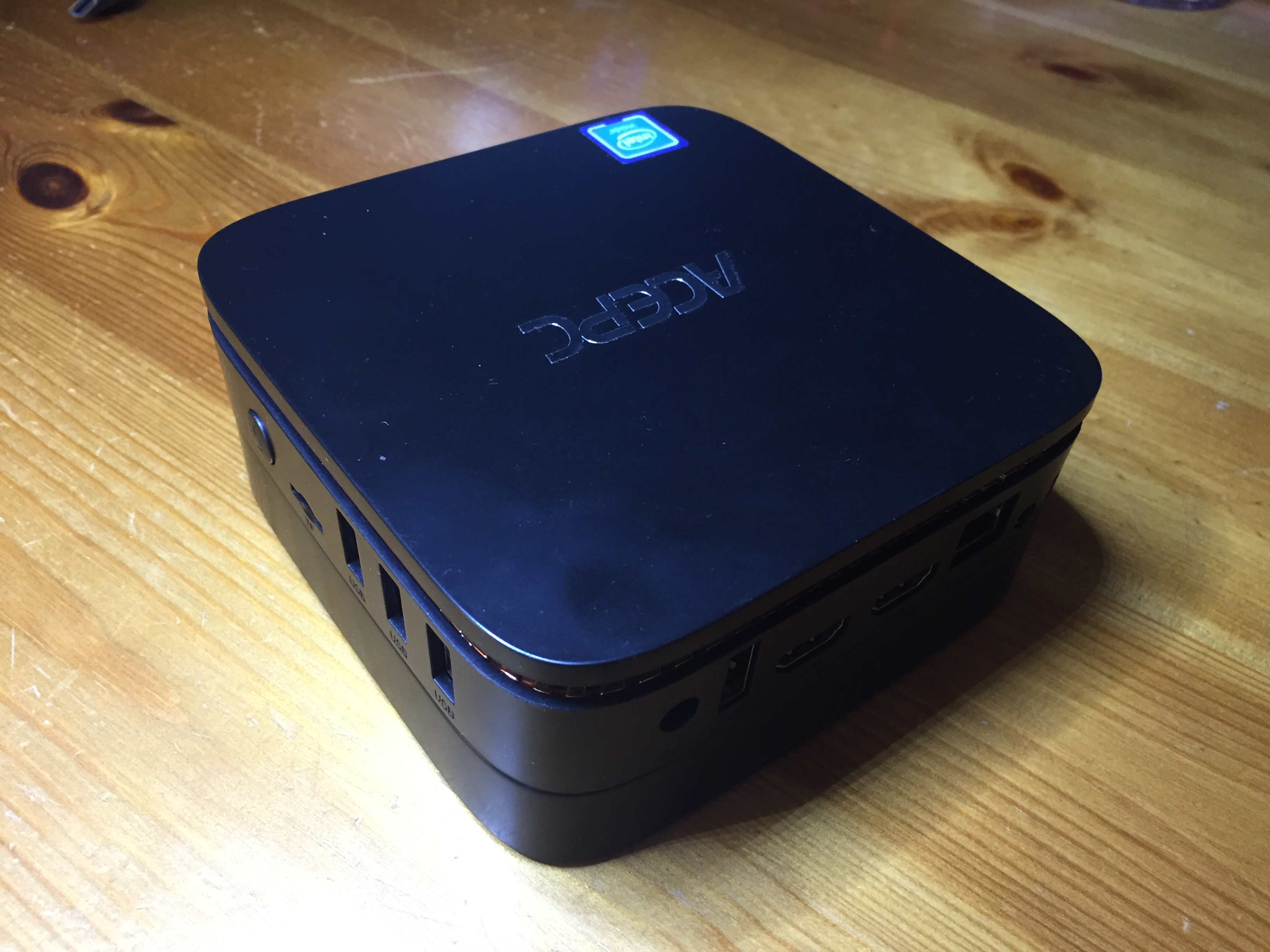
I use a very low cost (£100/$120) / low power (30 watt) quad core x86 processor 64gb memory mini PC to run my mailcow-dockerized instance (6gb & 8gb memory models are available at a slightly higher price, if desired). Although I boot off a £35/$40 250gb mSATA SSD (rather than the included 64gb mmc drive), that I have added for improved performance and reliability running ubuntu 20.04 LTS (amazon links to example hardware below) . . .
- https://www.amazon.co.uk/gp/product/B075RZT2PW/ref=ppx_yo_dt_b_asin_title_o09_s00?ie=UTF8&psc=1
- https://www.amazon.co.uk/gp/product/B07Y661DVG/ref=ppx_yo_dt_b_asin_title_o06_s00?ie=UTF8&psc=1
- https://www.amazon.co.uk/gp/product/B077ZPQZYB/ref=ppx_yo_dt_b_asin_title_o07_s00?ie=UTF8&psc=1
. . . with second a £24/£$30 240gb SSD, I have also added, for local daily backups of the entire mail system. All in all, a very compact and neat approach, I believe.
 DWiskow
on 13 Dec 2020
DWiskow
on 13 Dec 2020
@andryyy Dumb question . . . can resilience for a home mail server [for a small number of users] be set up quite simply using two standard mailcow deployments and the following approach?
@andryyy, If you agree the above approach is valid, could the text above be added to the mailcow documentation pages to help others trying to find/implement a simple and low cost approach to resilience using mailcow?
DWiskow
on 13 Dec 2020
I am very interested in this. I am planning on building a more comprehensive system (not just related to email) to make it easier for non-technical users to manage a set of personal servers that are capable of replication and failover. I will probably be working on this in the next couple of years, I may even go so far as to make my own HA oriented fork of mailcow-dockerized . . .
@sequentialread @ForestJohnson
Have a look at my post immediately above this post. Essentially, I have simply taken the concept and substituted a generic DNS provider in place of your “cloud instance” and simplified the replication process by using mailcow’s inbuilt “Sync jobs” functionality. This alternative approach, while not completely automatic [in the event of a failure], provides _a low cost and simple way to obtain dual site resilience with off-site backup for under $200 per site [one off capital/hardware investment, with no recurring or monthly fees] !_
I suspect it would be possible to automate this approach, by having a program running on the secondary server that detected the failure of the primary server and then automatically updated the domain(s) DNS records to point to the secondary household/location and de-activate the “Sync jobs’. What do you think?
DWiskow
on 13 Dec 2020
We offer to configure active/active setups via tinc.gmbh, please contact us/me there. We can also manage them fully, partly or occasionally give support in case of questions. We are able to setup two independent boxes, no shared storage necessary.
Please use [email protected], the team will provide you information. :)
I cannot recommend the sync job approach, but it's probably possible.
andryyy
on 13 Dec 2020
Hi @andryyy ,
I do understand that an Open Source project may want to monetize some advanced features. But before ordering, can you please share the basic architecture and prerequesites, like redundant network connections etc., and what needs to be done in failover situations (active/active suggests 0, but may depend on prerequesites - I don´t have an anycast IP)? And for various reasons I definitely prefer to setup and operate it on my own, not excluding I may need support of course.
Thanks, Joachim
jol64
on 14 Dec 2020
Related issues
 poldixd
·
3Comments
poldixd
·
3Comments
 mritzmann
·
3Comments
mritzmann
·
3Comments
 thannaske
·
3Comments
thannaske
·
3Comments
 bonanza123
·
3Comments
bonanza123
·
3Comments
 constin
·
3Comments
constin
·
3Comments
Most helpful comment
i think this thematic is still current, sofar in my theorie it is easier to add an export for all domains and an import as backup-mx config