Mail: Can not activate Mail app after migration 19 to 20
Expected behavior
I was hoping to find my apps after the migration.
When activating Mail it should activate the app
When clicking "download and activate" it should activate the app
Actual behavior
Mail was disabled during migration (after causing an error during migration)
Upon reactivation, a prompt appears saying An error occurred during the request. Could not process the request.
When I deleted and reinstalled the app, the same warning appeared after downloading the app.
Mail app
Mail app version: (see apps admin page, e.g. 0.5.3)
Mailserver or service:Infomaniak
Server configuration
Operating system: ?
Web server: Apache 2.4.34
Database: MariaDB
PHP version: 7.4
Nextcloud Version: 20.0.0
Client configuration
Browser: all
Operating system: all
 daraelmin
All 31 comments
Check data/nextcloud.log
 ChristophWurst
on 9 Oct 2020
ChristophWurst
on 9 Oct 2020
{"reqId":"X4B@mExUVTKFnq4b@FfN8QAACQY","level":3,"time":"2020-10-09T15:15:37+00:00","remoteAddr":"46.253.189.79","user":"xxxxxxxx","app":"index","method":"POST","url":"/index.php/settings/apps/enable","message":{"Exception":"Exception","Message":"Class 'Horde_Mail_Rfc822_Address' not found","Code":0,"Trace":[{"file":"/www/html/nextcloud/lib/private/AppFramework/App.php","line":152,"function":"dispatch","class":"OC\AppFramework\Http\Dispatcher","type":"->","args":[{"__class__":"OCA\Settings\Controller\AppSettingsController"},"enableApps"]},{"file":"/www/html/nextcloud/lib/private/Route/Router.php","line":308,"function":"main","class":"OC\AppFramework\App","type":"::","args":["OCA\Settings\Controller\AppSettingsController","enableApps",{"__class__":"OC\AppFramework\DependencyInjection\DIContainer"},{"action":null,"_route":"settings.AppSettings.enableApps"}]},{"file":"/www/html/nextcloud/lib/base.php","line":1009,"function":"match","class":"OC\Route\Router","type":"->","args":["/settings/apps/enable"]},{"file":"/www/html/nextcloud/index.php","line":37,"function":"handleRequest","class":"OC","type":"::","args":[]}],"File":"/www/html/nextcloud/lib/private/AppFramework/Http/Dispatcher.php","Line":110,"Previous":{"Exception":"Error","Message":"Class 'Horde_Mail_Rfc822_Address' not found","Code":0,"Trace":[{"file":"/www/html/nextcloud/apps/mail/lib/Migration/FixCollectedAddresses.php","line":56,"function":"fixAddress","class":"OCA\Mail\Migration\FixCollectedAddresses","type":"->","args":[{"id":46,"__class__":"OCA\Mail\Db\CollectedAddress"},{"__class__":"OC\Repair"}]},{"file":"/www/html/nextcloud/lib/private/Repair.php","line":106,"function":"run","class":"OCA\Mail\Migration\FixCollectedAddresses","type":"->","args":[{"__class__":"OC\Repair"}]},{"file":"/www/html/nextcloud/lib/private/legacy/OC_App.php","line":1042,"function":"run","class":"OC\Repair","type":"->","args":[]},{"file":"/www/html/nextcloud/lib/private/Installer.php","line":160,"function":"executeRepairSteps","class":"OC_App","type":"::","args":["mail",["OCA\Mail\Migration\FixCollectedAddresses","OCA\Mail\Migration\FixBackgroundJobs","OCA\Mail\Migration\MakeItineraryExtractorExecutable","OCA\Mail\Migration\MigrateProvisioningConfig","OCA\Mail\Migration\ProvisionAccounts"]]},{"file":"/www/html/nextcloud/apps/settings/lib/Controller/AppSettingsController.php","line":448,"function":"installApp","class":"OC\Installer","type":"->","args":["mail"]},{"file":"/www/html/nextcloud/lib/private/AppFramework/Http/Dispatcher.php","line":169,"function":"enableApps","class":"OCA\Settings\Controller\AppSettingsController","type":"->","args":[["mail"],[]]},{"file":"/www/html/nextcloud/lib/private/AppFramework/Http/Dispatcher.php","line":100,"function":"executeController","class":"OC\AppFramework\Http\Dispatcher","type":"->","args":[{"__class__":"OCA\Settings\Controller\AppSettingsController"},"enableApps"]},{"file":"/www/html/nextcloud/lib/private/AppFramework/App.php","line":152,"function":"dispatch","class":"OC\AppFramework\Http\Dispatcher","type":"->","args":[{"__class__":"OCA\Settings\Controller\AppSettingsController"},"enableApps"]},{"file":"/www/html/nextcloud/lib/private/Route/Router.php","line":308,"function":"main","class":"OC\AppFramework\App","type":"::","args":["OCA\Settings\Controller\AppSettingsController","enableApps",{"__class__":"OC\AppFramework\DependencyInjection\DIContainer"},{"action":null,"_route":"settings.AppSettings.enableApps"}]},{"file":"/www/html/nextcloud/lib/base.php","line":1009,"function":"match","class":"OC\Route\Router","type":"->","args":["/settings/apps/enable"]},{"file":"/www/html/nextcloud/index.php","line":37,"function":"handleRequest","class":"OC","type":"::","args":[]}],"File":"/www/html/nextcloud/apps/mail/lib/Migration/FixCollectedAddresses.php","Line":72},"CustomMessage":"--"},"userAgent":"Mozilla/5.0 (X11; Ubuntu; Linux x86_64; rv:81.0) Gecko/20100101 Firefox/81.0","version":"20.0.0.9"}
daraelmin
on 9 Oct 2020
"Class 'Horde_Mail_Rfc822_Address' not found
How did you install Mail? Manually?
ChristophWurst
on 12 Oct 2020
I dont know how to install a plugin manually...
I have just activate the plugin, maybe in an old version ( i use nextclpud in production since it has been forked from owncloud).
However I've configured my imap adress manually cause the imap mail server has not the same dns as the email I use.
daraelmin
on 12 Oct 2020
Not sure if it is important, but collabora plugin migration has also failed. I had to drop and create the table again (but i've lost the data) to solve the problem.
daraelmin
on 12 Oct 2020
I'm asking because it sounds like files are missing. Does the file apps/mail/vendor/pear-pear.horde.org/Horde_Mail/Horde/Mail/Rfc822.php exist?
ChristophWurst
on 12 Oct 2020
Yes it exists with 0644 perm
daraelmin
on 12 Oct 2020
Have you tried restarting the web server to flush opcaches?
ChristophWurst
on 12 Oct 2020
Im not sur that I can restart the server cause I am on a shared web hosting.
But, I have no cache defined cause it s not an option of the web hosting service.
daraelmin
on 12 Oct 2020
Is it possible to remove the mail app directory " manually" and reinstall it with the dashboard ?
If yes, I'll try tomorow.
daraelmin
on 12 Oct 2020
Do you have access to the CLI or ftp?
ChristophWurst
on 12 Oct 2020
Ffp and ssh yes.
I dont know what is cli... Probably not
daraelmin
on 12 Oct 2020
Command Line Interface.
 Ornias1993
on 13 Oct 2020
Ornias1993
on 13 Oct 2020
@ChristophWurst Same "fun" here during update:
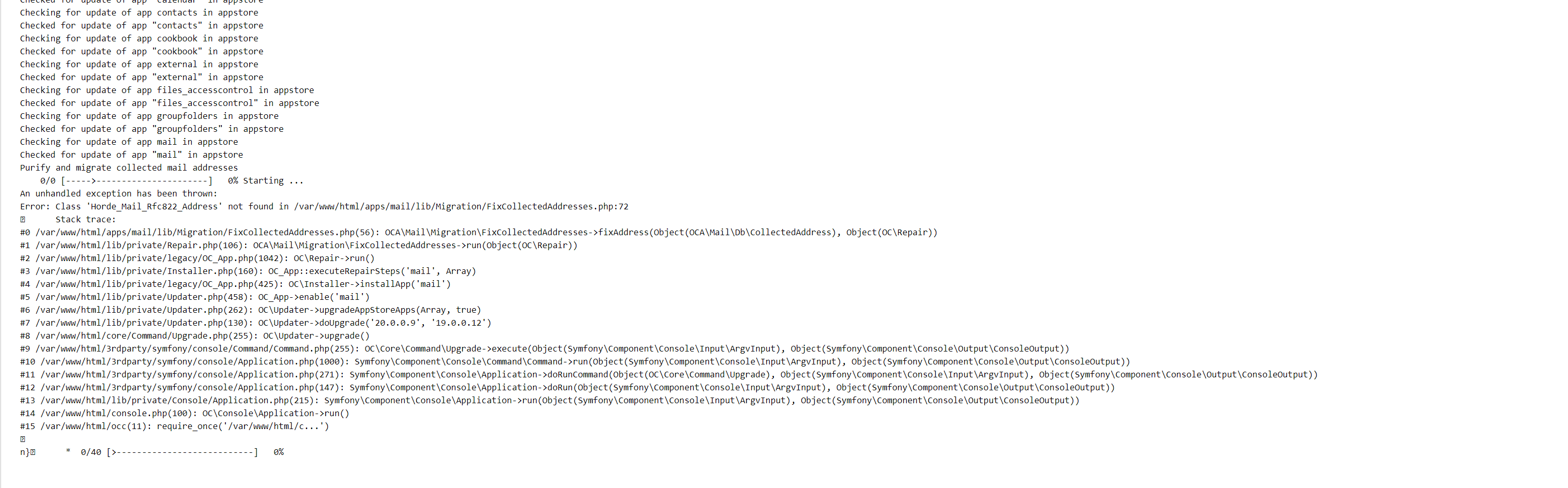
Manually:
occ app:remove mail
occ app:install mail
Same error.
Worth nothing: It looks to be hanging before the error
Ornias1993
on 13 Oct 2020
removing all rows from the mail_coll_addresses tables fixed the issue.
Ornias1993
on 13 Oct 2020
removing all rows from the mail_coll_addresses tables fixed the issue.
Yeah !!! Many thanks !!!
It works.
daraelmin
on 14 Oct 2020
fixed the issue.
FYI it does not. This is just a workaround.
ChristophWurst
on 14 Oct 2020
I think this is closely related to the issues of https://github.com/nextcloud/mail/issues/3727. Like some old app initialization code is loaded before the upgrade and after the upgrade we trigger some new code. Then conflicts happen.
ChristophWurst
on 14 Oct 2020
fixed the issue.
FYI it does not. This is just a workaround.
It fixes MY issue, my user issue of not being able to use mail.
It doesn't fix your issue with the code, but to be frank: My priority is being up-and-running after an update.
Ornias1993
on 14 Oct 2020
Ran into the same problem, should have seen this before.
 feutl
on 27 Oct 2020
feutl
on 27 Oct 2020
@feutl just add you :+1: to the original report
ChristophWurst
on 27 Oct 2020
@feutl just add you 👍 to the original report
thanks for the hint, did add my 👍
feutl
on 27 Oct 2020
removing all rows from the mail_coll_addresses tables fixed the issue.
@Ornias1993
Could you describe the whole process on how an upgrade can be done?
I am on 19.0.5 right now, using the Mail App from the beginning and would like to upgrade - somehow - to 20.x
What are the steps and in which order do they need to be done? Seems the the longterm fix only gets integrated in NC21 - or am I wrong?
Thanks
feutl
on 20 Nov 2020
DELETE FROM oc_mail_coll_addresses should do
ChristophWurst
on 20 Nov 2020
you'll lose collected sender addresses, though
ChristophWurst
on 20 Nov 2020
@ChristophWurst thanks, and I can live with loosing some data which gets recreated anyhow ;)
I tried this, but run into the same error again.
Is it necessary to deactivate or even delete the mail app before I start the upgrade procedure to NC 20?
feutl
on 20 Nov 2020
Which error specifically?
ChristophWurst
on 20 Nov 2020
I am very sorry, rerun the process, now using the CLI updater and realized it was the https://github.com/nextcloud/news app.
Sorry, thanks and "stupid" me 👍
feutl
on 20 Nov 2020
in your database
ChristophWurst
on 30 Nov 2020
"Downgrading is not supported and risks corrupting your data!"
Yeah, don't downgrade.
ChristophWurst
on 30 Nov 2020
Use https://help.nextcloud.com/ for community support. This is a bug tracker.
ChristophWurst
on 30 Nov 2020
Related issues
 StCyr
·
30Comments
StCyr
·
30Comments
 nRaecheR
·
40Comments
nRaecheR
·
40Comments
 guzzisti
·
28Comments
guzzisti
·
28Comments
 lepool
·
39Comments
lepool
·
39Comments
 hitam4450
·
177Comments
hitam4450
·
177Comments
Most helpful comment
removing all rows from the mail_coll_addresses tables fixed the issue.