I feel like I must be doing somthing wrong here, but I'm making a ticket anyway.
Expected behavior
At the "Connect your mail account" screen, I type in my name, address and password (or specify IMAP/SMTP settings in the manual tab) and the setup continues.
Actual behavior
The interface greys out for about ten seconds and nothing happens.
Mail app
Mail App v0.17.0
Mailserver or service: (e.g. Outlook, Yahoo, Gmail, Exchange,...)
Tried with Gmail, Office365 and Protonmail (auto and manual config), same result for all
Server configuration
Operating system:
Unraid 6.7.2
Web server:
nginx (official docker)
Database:
MariaDB
PHP version: (e.g. 7.0)
Can't find it for the moment
Nextcloud Version: (see admin page, e.g. 13.0.2)
16.0.5
Client configuration
Browser: (e.g. Firefox 48)
Firefox 69.0.1
Operating system: (e.g. Arch Linux)
Windows 10
Want to back this issue? Post a bounty on it! We accept bounties via Bountysource.
 northorsouth
All 37 comments
Could you check your data/nextcloud.log? It should contain information regarding this problem
 ChristophWurst
on 2 Oct 2019
ChristophWurst
on 2 Oct 2019
No new log entries appear when I try to connect a mail account.
This entry shows up a few times, but I don't think it's related (took out my name and IP)
{"reqId":"3GBdAPJWYBDCjFPlAwZI","level":3,"time":"2019-10-02T12:40:16+00:00","remoteAddr":"<my ip>","user":"dakota","app":"PHP","method":"PUT","url":"\/settings\/users\/<my name>\/settings","message":"unlink(\/data\/appdata_oclvz5td3gyj\/avatar\/<my name>\/generated): No such file or directory at \/config\/www\/nextcloud\/lib\/private\/Files\/Storage\/Local.php#228","userAgent":"Mozilla\/5.0 (Windows NT 10.0; Win64; x64; rv:69.0) Gecko\/20100101 Firefox\/69.0","version":"16.0.5.1"}
northorsouth
on 2 Oct 2019
Please inspect the network tab of your browser and the response from the request that tries to create the account. There should be an error message somewhere.
ChristophWurst
on 3 Oct 2019
Gotcha
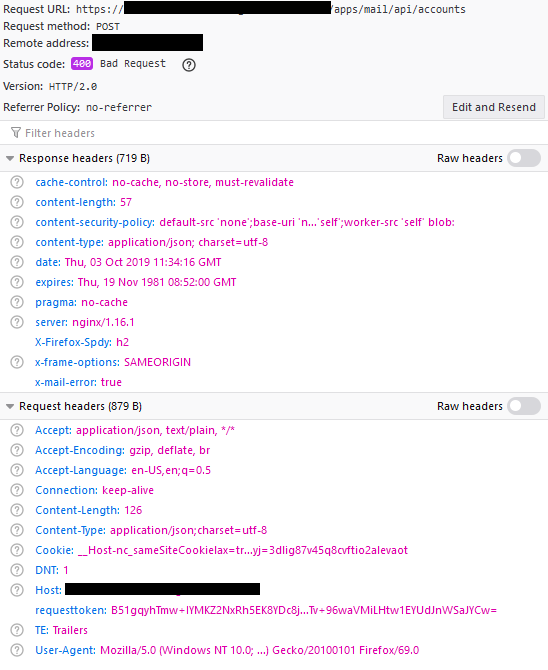
northorsouth
on 3 Oct 2019
That's the headers. But we know it's a HTTP400, so something that is caught. Change to the Response tab and you should see some (human readable) JSON.
ChristophWurst
on 3 Oct 2019
{"message":"Creating account failed: Authentication failed."}
northorsouth
on 3 Oct 2019
I'm still unable to connect any of my email accounts. Based on suggestions from random forum posts, I've tried:
- Enabling 2FA on my account
- Raising the IMAP and SMTP timeout settings
- Adding HTTP Strict Transport Security headers in my reverse proxy conf
northorsouth
on 8 Oct 2019
Update:
I've disabled 2FA but one of the other two solutions seems to have worked. I also had to enable less secure apps on my google account. I've added my yahoo and gmail accounts. Office365 still fails to authenticate.
northorsouth
on 8 Oct 2019
I also had to enable less secure apps on my google account.
This is unfortunately a known problem.
Have you read https://github.com/nextcloud/mail/blob/master/doc/admin.md#troubleshooting?
ChristophWurst
on 9 Oct 2019
2FA isnt enforced on my Office account and I dont have an option to enable it or add an app password (It's a school account). I'm pretty sure I've gotten this to work with Thunderbird in the past.
If Nextcloud is considered a "less secure app" would I not have to check that setting in google if 2FA was enabled in Nextcloud? I'd rather leave it off for now just to keep things simple but if 2FA would make Mail more compatible with email servers I'll figure it out.
-------- Original Message --------
On Oct 9, 2019, 2:07 AM, Christoph Wurst wrote:
I also had to enable less secure apps on my google account.
This is unfortunately a known problem.
Have you read https://github.com/nextcloud/mail/blob/master/doc/admin.md#troubleshooting?
—
You are receiving this because you authored the thread.
Reply to this email directly, view it on GitHub, or mute the thread.
northorsouth
on 9 Oct 2019
I got a similar issue with Status Code 400. I migrated my nextcloud to a separate machine - before it was running with a piHole on one raspberry. Until then e-mail was working fine, but with the migration it stopped working. I tried to add the e-mail accounts again and also run into the timout. In my case the Response is: Error connecting to mail server and when switching to TLS Could not open secure TLS connection to the IMAP server or without No supported IMAP authentication method could be found. Even when deactivating piHole.
Sending Test E-Mails via the E-Mail Server Settings in general settings works fine
 mkriegl
on 18 Oct 2019
mkriegl
on 18 Oct 2019
In my case the Response is:
Error connecting to mail serverand when switching to TLSCould not open secure TLS connection to the IMAP serveror withoutNo supported IMAP authentication method could be found. Even when deactivating piHole.
Did you use the correct ports? Was manual mode used or automatic mode?
ChristophWurst
on 25 Oct 2019
I used manual mode taking the settings of my provider. Also the standard ports for SSL/TLS are the same for the provider and I did not change those.
I did check gmail and gmx accounts via automatic setup. Also in that situation I get the error.
mkriegl
on 25 Oct 2019
Facing similar issues with Mailbox.org
Response is {"message":"Creating account failed: Error connecting to mail server."}
I have check the imap setting in outlook and they worked.
Other accounts on Mail App also work.
Anything I can ask the provider?
 duesseldorferjung
on 2 Nov 2019
duesseldorferjung
on 2 Nov 2019
The Nextcloud mail app offers an extensive logging system to make it easier identifying and tracking down bugs. Please enable debug mode and set the log level to debug in your admin settings. Then, try to reproduce your issue and take another look at data/nextcloud.log, data/horde_imap.log and data/horde_smtp.log. Before posting any logs publicly, make sure that sensitive information (also in encoded format) is removed.
ChristophWurst
on 14 Nov 2019
I hope I got everything correct:
nextcloud.log
{"reqId":"xxxxxxxxxxxx","level":4,"time":"2019-11-15T21:41:21+01:00","remoteAddr":"192.168.xxx.xxx","user":"xxxx","app":"mail","method":"POST","url":"\/apps\/mail\/api\/accounts","message":"Creating account failed: Error connecting to mail server.","userAgent":"Mozilla\/5.0 (Linux; Android 9; SM-xxxx) AppleWebKit\/537.36 (KHTML, like Gecko) Chrome\/78.0.3904.96 Safari\/537.36","version":"17.0.1.1"}
horde_imap.log
`------------------------------
Fri, 15 Nov 2019 20:41:20 +0000
Connection to: imap://mail.xxx-xxx.de:993/
Connection failed: Error connecting to server.
Connection failed: Error connecting to server.
Connection failed: Error connecting to server.
Connection failed: Error connecting to server.`
mkriegl
on 15 Nov 2019
ssh into the server and try to establish a connection manually. then we know if you generally can't connect to the other host or if php blocks it.
ChristophWurst
on 21 Nov 2019
I did a openssl s_client -showcerts -connect mail.xxx-xxx.de:993 for imap. Hopefully that's correct.
And I got a couple of information on the certificate and than at the end the following, which seems for me that the raspberry is able to connect via ssh:
-----END CERTIFICATE-----
---
Server certificate
subject=CN = mail.xxx-xxx.de

issuer=C = US, O = Let's Encrypt, CN = Let's Encrypt Authori
ty X3

---
No client certificate CA names sent
---
SSL handshake has read 3180 bytes and written 316 bytes
Verification: OK
---
New, (NONE), Cipher is (NONE)
Server public key is 2048 bit
Secure Renegotiation IS supported
Compression: NONE
Expansion: NONE
No ALPN negotiated
SSL-Session:
    Protocol  : TLSv1.2
    Cipher    : 0000
    Session-ID:
    Session-ID-ctx:
    Master-Key:
    PSK identity: None
    PSK identity hint: None
    SRP username: None
    Start Time: 1574699860
    Timeout   : 7200 (sec)
    Verify return code: 0 (ok)
    Extended master secret: no
---
Yes, that seems right. So your server can open a connection. What kind of installation is this? Do you have any security options enforced on your php that might block outgoing connections?
ChristophWurst
on 26 Nov 2019
Hey,
since some time I am also fighting with this problem. Funny thing was, that the mail was working for several months until suddenly the problem appeared.
I am also getting the 400 - "Updating account failed: Could not open secure TLS connection to the IMAP server. and the log in debug mode tells me additionally: stream_socket_enable_crypto(): SSL operation failed with code 1. OpenSSL Error messages:\nerror:141A318A:SSL routines:tls_process_ske_dhe:dh key too small at \/var\/www\/html\/apps\/mail\/vendor\/pear-pear.horde.org\/Horde_Socket_Client\/Horde\/Socket\/Client.php#153. Any ideas?
 mlthlschr
on 6 Dec 2019
mlthlschr
on 6 Dec 2019
Sorry, but I did not find the time to do further checks. Generally I guess it is within my reverse proxy on a 2nd raspberry. Yesterday I recognised also connections errors on my NAS while trying to connect the mail server. And I noticed some time ago, that a synchronisation isn't working anymore in the NAS since August.
Still trying to figure out the real root cause, but the only change I made to around that time was to redirect my main domain and implement a fail2ban.
mkriegl
on 6 Dec 2019
See https://docs.nextcloud.com/server/stable/admin_manual/configuration_server/reverse_proxy_configuration.html if you haven't already :v:
ChristophWurst
on 20 Dec 2019
I have some what similar problem.
I am running my setup behind haproxy.
I have followed the steps in the reverse_proxy_config that you pointed out.
I am running nextcloud 18 mail 1.0 the logs says that I am able to login to mail imap + smtp successfully with starttls
IMAP
>> Sat, 18 Jan 2020 13:53:49 +0000
>> Connection to: imap://imap.foo-bar.dk/
>> Server connection took 0.0093 seconds.
S: * OK [CAPABILITY IMAP4rev1 SASL-IR LOGIN-REFERRALS ID ENABLE IDLE LITERAL+ STARTTLS AUTH=PLAIN AUTH=LOGIN] Dovecot (Debian) ready.
C: 1 STARTTLS
S: 1 OK Begin TLS negotiation now.
>> Command 1 took 0.0022 seconds.
>> Successfully completed TLS negotiation.
C: 2 CAPABILITY
S: * CAPABILITY IMAP4rev1 SASL-IR LOGIN-REFERRALS ID ENABLE IDLE LITERAL+ AUTH=PLAIN AUTH=LOGIN
S: 2 OK Pre-login capabilities listed, post-login capabilities have more.
>> Command 2 took 0.0429 seconds.
C: 3 AUTHENTICATE PLAIN [INITIAL CLIENT RESPONSE (username: [email protected])]
S: 3 OK [CAPABILITY IMAP4rev1 SASL-IR LOGIN-REFERRALS ID ENABLE IDLE SORT SORT=DISPLAY THREAD=REFERENCES THREAD=REFS THREAD=ORDEREDSUBJECT MULTIAPPEND URL-PARTIAL CATENATE UNSELECT CHILDREN NAMESPACE UIDPLUS LIST-EXTENDED I18NLEVEL=1 CONDSTORE QRESYNC ESEARCH ESORT SEARCHRES WITHIN CONTEXT=SEARCH LIST-STATUS BINARY MOVE SNIPPET=FUZZY LITERAL+ NOTIFY SPECIAL-USE] Logged in
>> Command 3 took 0.0264 seconds.
>> CACHE: Using the OCA\Mail\Cache\Cache storage driver.
C: 4 ENABLE QRESYNC
C: 5 LOGOUT
S: * ENABLED QRESYNC
S: 4 OK Enabled (0.001 + 0.000 secs).
>> Command 4 took 0.0041 seconds.
S: * BYE Logging out
S: 5 OK Logout completed (0.001 + 0.000 secs).
>> Command 5 took 0.0055 seconds.
SMTP
>> Sat, 18 Jan 2020 13:53:49 +0000
>> Connection to: smtp://192.168.1.20:25
S: 220 mail.foo-bar.dk ESMTP Exim Sat, 18 Jan 2020 14:52:44 +0100
C: EHLO nc.foo-bar.dk
S: 250-mail.foo-bar.dk Hello nc.foo-bar.dk [192.168.200.30]
S: 250-SIZE 52428800
S: 250-8BITMIME
S: 250-PIPELINING
S: 250-STARTTLS
S: 250 HELP
C: STARTTLS
S: 220 TLS go ahead
C: QUIT
>> ERROR: Server closed the connection.
But my nextcloud log says this:
{"reqId":"WfRkp4Saex0lwfqvPFdW","level":0,"time":"2020-01-18T13:53:49+00:00","remoteAddr":"192.168.1.33","user":"karsten","app":"PHP","method":"POST","url":"/apps/mail/api/accounts","message":"stream_socket_enable_crypto(): SSL: Success at /var/www/html/custom_apps/mail/vendor/pear-pear.horde.org/Horde_Socket_Client/Horde/Socket/Client.php#153","userAgent":"Mozilla/5.0 (X11; Linux x86_64; rv:71.0) Gecko/20100101 Firefox/71.0","version":"18.0.0.10"}
{"reqId":"WfRkp4Saex0lwfqvPFdW","level":4,"time":"2020-01-18T13:53:49+00:00","remoteAddr":"192.168.1.33","user":"karsten","app":"mail","method":"POST","url":"/apps/mail/api/accounts","message":"Creating account failed: Could not open secure TLS connection to the server.","userAgent":"Mozilla/5.0 (X11; Linux x86_64; rv:71.0) Gecko/20100101 Firefox/71.0","version":"18.0.0.10"}
And my browser says this:
Creating account failed: Could not open secure TLS connection to the server.
 knfoo
on 18 Jan 2020
knfoo
on 18 Jan 2020
@knfoo hm. Strange. Did you use the auto or manual mode?
ChristophWurst
on 21 Jan 2020
@ChristophWurst I used manual mode.
knfoo
on 21 Jan 2020
Thanks. My wild guess would have been that the app tries another method after the successful authentication otherwise.
I don't know how to debug this further. Are you a php dev by any chance and familiar with xdebug? This is something one would need to step through with a debugger.
ChristophWurst
on 23 Jan 2020
OK,
Not really a php dev, I will try to get xdebug, runing any good guides on that? I am using the official nextcloud docker image, the apache one.
knfoo
on 26 Jan 2020
Any xdebug guide should work. With the existing image I'm afraid it could be tricky to get the xdebug extension installed and running, but it should be possible.
ChristophWurst
on 27 Jan 2020
I have the same problem in Nextcloud 18 to add a new account in Mail App 1.1.4. My server use STARTTLS The error is: "Creating account failed: Could not open secure TLS connection to the IMAP server." The error in logging: Fatal | mail | Creating account failed: Could not open secure TLS connection to the IMAP server"
 box18box
on 5 Apr 2020
box18box
on 5 Apr 2020
I never ran xdebug.
my problem was that I had a mix of settings.
I used tls for imap but clean for smtp and the problem was solved once I used starttls on smtp.
It seemed as if the settings in the smtp settings are not really followed.
knfoo
on 5 Apr 2020
Not, in my case. I use the same setting like thunderbird. I had the same problem for Nexcloud SMTP look: stream_socket_enable_crypto(): SSL operation failed with code 1. OpenSSL Error messages: error:1416F086:SSL routines:tls_process_server_certificate:certificate verify failed at /var/www/kuebebierg/3rdparty/swiftmailer/swiftmailer/lib/classes/Swift/Transport/StreamBuffer.php#94 For this I added in config.php this: "'mail_smtpstreamoptions' => array ( 'ssl' => array ( 'allow_self_signed' => true, 'verify_peer' => false, 'verify_peer_name' => false ) )" and now it works.
I also checked my mail server and ssl certificat with https://mxtoolbox.com and all is ok.
box18box
on 5 Apr 2020
This issue has been automatically marked as stale because it has not had recent activity. It will be closed if no further activity occurs. Thank you for your contributions.
![stale[bot] picture](https://avatars.githubusercontent.com/in/1724?v=4&s=40) stale[bot]
on 4 Oct 2020
stale[bot]
on 4 Oct 2020
some problem here. nextcloud 20 , manual add , info from activity admin log:
Fatal | mail | Creating account failed: Could not open secure TLS connection to the server.
-- | -- | --
PS: i turn off secure TLS, i try plaintext, and it still want to do TLS .. :-O
 lukaspavelka
on 13 Oct 2020
lukaspavelka
on 13 Oct 2020
Could not open secure TLS connection to the server.
https://github.com/nextcloud/mail/blob/master/doc/admin.md#disable-tls-verification-for-imapsmtp
ChristophWurst
on 14 Oct 2020
sorry , does not help to put in config file /var/www/nextcloud/config/config.php
line: 'app.mail.verify-tls-peer' => 'false'
STILL HAVE ERROR IN LOGS:
Error: Uninitialized string offset: 1 at /var/www/nextcloud/apps/mail/vendor/pear-pear.horde.org/Horde_Smtp/Horde/Smtp/Exception.php#238
DETAILS:
Error: Uninitialized string offset: 1 at /var/www/nextcloud/apps/mail/vendor/pear-pear.horde.org/Horde_Smtp/Horde/Smtp/Exception.php#238
/var/www/nextcloud/apps/mail/vendor/pear-pear.horde.org/Horde_Smtp/Horde/Smtp/Exception.php - line 238:
OC\Log\ErrorHandler::onError()
/var/www/nextcloud/apps/mail/vendor/pear-pear.horde.org/Horde_Smtp/Horde/Smtp.php - line 1060:
Horde_Smtp_Exception->setSmtpCode()
/var/www/nextcloud/apps/mail/vendor/pear-pear.horde.org/Horde_Smtp/Horde/Smtp.php - line 469:
Horde_Smtp->_getResponse()
/var/www/nextcloud/apps/mail/vendor/pear-pear.horde.org/Horde_Smtp/Horde/Smtp.php - line 881:
Horde_Smtp->logout()
/var/www/nextcloud/apps/mail/vendor/pear-pear.horde.org/Horde_Smtp/Horde/Smtp.php - line 405:
Horde_Smtp->_startTls()
/var/www/nextcloud/apps/mail/vendor/pear-pear.horde.org/Horde_Mail/Horde/Mail/Transport/Smtphorde.php - line 160:
Horde_Smtp->login("*** sensiti ... *")
/var/www/nextcloud/apps/mail/lib/Account.php - line 224:
Horde_Mail_Transport_Smtphorde->getSMTPObject()
/var/www/nextcloud/apps/mail/lib/Service/SetupService.php - line 125:
OCA\Mail\Account->testConnectivity()
/var/www/nextcloud/apps/mail/lib/Controller/AccountsController.php - line 320:
OCA\Mail\Service\SetupService->createNewAccount()
/var/www/nextcloud/lib/private/AppFramework/Http/Dispatcher.php - line 169:
OCA\Mail\Controller\AccountsController->create()
/var/www/nextcloud/lib/private/AppFramework/Http/Dispatcher.php - line 100:
OC\AppFramework\Http\Dispatcher->executeController()
/var/www/nextcloud/lib/private/AppFramework/App.php - line 152:
OC\AppFramework\Http\Dispatcher->dispatch()
/var/www/nextcloud/lib/private/Route/Router.php - line 308:
OC\AppFramework\App::main()
/var/www/nextcloud/lib/base.php - line 1009:
OC\Route\Router->match()
/var/www/nextcloud/index.php - line 37:
OC::handleRequest()
lukaspavelka
on 14 Oct 2020
STILL HAVE ERROR IN LOGS:
We hear you. No need for capitals.
See https://github.com/nextcloud/mail/blob/master/doc/admin.md#disable-tls-verification-for-imapsmtp. There was an error with 'false' vs just false.
If this continues to be an issue please open a new ticket.
:v:
ChristophWurst
on 14 Oct 2020
Sorry for capitals. I don’t wish to be rude... sry
Thx for your hint, it helps. All good now
STILL HAVE ERROR IN LOGS:
We hear you. No need for capitals.
See https://github.com/nextcloud/mail/blob/master/doc/admin.md#disable-tls-verification-for-imapsmtp. There was an error with
'false'vs justfalse.If this continues to be an issue please open a new ticket.
✌️
lukaspavelka
on 18 Oct 2020
Related issues
 ovv
·
27Comments
ovv
·
27Comments
 devcrafting
·
37Comments
devcrafting
·
37Comments
 doc75
·
50Comments
doc75
·
50Comments
 hitam4450
·
177Comments
hitam4450
·
177Comments
 StCyr
·
30Comments
StCyr
·
30Comments