Mail: IMAP folders appear in random order
Steps to reproduce
Connect to an IMAP account which has several folders.
Expected behaviour
Folders should display in alphabetical order.
Actual behaviour
Folders are displayed in a completely random order. I can't find a setting to change this. I know folder maintenace is scheduled as a future enhancement. But displaying the folders in a sensible order would be a quick win.
Mail app
0.7.10
Mailserver or service:** (e.g. Outlook, Yahoo, Gmail, Exchange,...)
imap.zoho.com:993
 tenbob
All 18 comments
The Nextcloud mail app offers an extensive logging system to make it easier identifying and tracking down bugs. Please enable debug mode and set the log level to debug in your admin settings. Then, try to reproduce your issue and take another look at data/nextcloud.log, data/horde_imap.log and data/horde_smtp.log.
 ChristophWurst
on 9 May 2018
ChristophWurst
on 9 May 2018
They are sorted. Please provide the sections of your horde_imap.log file where the server lists your mailboxes.
ChristophWurst
on 9 May 2018
@ChristophWurst. I turned on debug and checked the logs, but there wasn't anything significant. Just these two lines.
~
Debug mail loading messages of folder
~
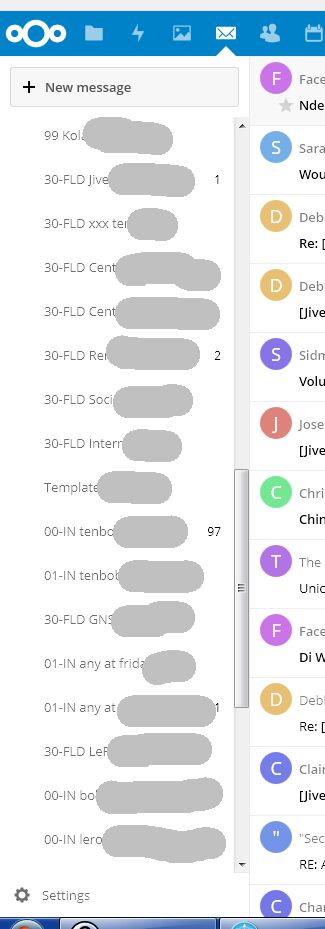
Here is a screenshot of my IMAP folders. I have a lot of folders and I have added numbers to the names so they sort the way I want. This works OK in other clients, But not in Nextcloud. I am trying to find the horde_imap.log for you.
tenbob
on 18 May 2018
Are these top-level folders or subfolders?
ChristophWurst
on 19 May 2018
These are top level folders at imap.zoho.com.
Sorry. I can't find the instructions for horde logging. Can you please point me to a description.
tenbob
on 20 May 2018
Sorry. I can't find the instructions for horde logging. Can you please point me to a description.
https://github.com/nextcloud/mail/issues/901#issuecomment-387797578
ChristophWurst
on 21 May 2018
Oops, thanks. I have now located the horde log and done some more tests.
I wanted to find out exactly when the folder list gets updated. To do that I used a different client to rename a folder, then went back to Nextcloud to check if the change was detected. I discovered that the folder list is only updated when you first open the mail application. So this is the test I did.
- I exited from the Nextcloud mail app and deleted the contents of
data/horde_imap.log. - Using a different mail client I renamed an existing IMAP folder.
- I then opened the Nextcloud mail app and looked at the folder list. I could see the folder I renamed. But the folder order was still scrambled.
- I then looked at the contents of
data/horde_imap.log. I expected to see a command that listed all the folders. Or at least a reference to the changed folder. But I couldn't see anything about it.
So maybe I failed to capture the event I was looking for. Can you send a hint about how to capture the event better. I will send the logs anyway to the email address on your homepage. Hope this helps. Bob
tenbob
on 24 May 2018
So maybe I failed to capture the event I was looking for. Can you send a hint about how to capture the event better. I will send the logs anyway to the email address on your homepage. Hope this helps. Bob
Thanks for the logs. The IMAP logging did indeed not capture the folder list. But at some point it definitely should query and log them. Could you re-check your logs? It has possibly been logged since you last checked.
ChristophWurst
on 28 May 2018
Hi @ChristophWurst. I tried again several times, but the file data/horde_imap.log does not contain the listing of folders. I can see plenty of other activity like FETCH commands. But for some reason the folder listing is not being captured.
Instead I tried another method. I connected manually to the IMAP server using openssl. I entered various LIST commands and captured the output. I will mail this file to you. Maybe you can see something wrong with the server response.
I used the following commands
openssl s_client -connect imap.zoho.com:993
a login myusername mypassword
a list "" "*"
a list "" "%"
a list "" "%/%"
I hope this helps
tenbob
on 29 May 2018
I will mail this file to you.
Please always post those logs here, publicly. Otherwise other developers are unable to collaborate on fixing this bug and also other reporters can use the logs to identify identical issues. Thanks!
ChristophWurst
on 29 May 2018
Sorry. I am not willing to post these logs on a public forum. The logs contain confidential information from my personal emails. I sent them to you in good faith to help fix a problem. Please respect my confidentiality. I do not want this information to be shared with anyone outside a small group of developers.
tenbob
on 29 May 2018
Okay, no problem. Maybe the issue lies in the naming scheme you're using for your folders. It seems that most of the folders start with digits.
ChristophWurst
on 29 May 2018
Hi @ChristophWurst. I have done a lot of testing and I think I have identified the problem. It's in the class FolderMapper.php. This has a method sortFolders() which isn't working properly for me.
The main part of the sorting is done using the test at line 259 -
return strcasecmp($f1->getDisplayName(), $f2->getDisplayName());
This test isn't working because the displayName property is always an empty string. The name of the folder is actually in a different property mailbox.
So when I change line 259 to the following, the sorting works correctly :-
return strcasecmp($f1->getMailbox(), $f2->getMailbox());
A similar change is also required on line 253.
I can't see where displayName is meant to be populated. The constructor sets it to an empty string and it never changes.
There is another minor problem. On my server there is a special folder called "Templates". This should be flagged as a special and sorted to the top of the list.
Hope this helps.
Bob
tenbob
on 1 Jun 2018
Hope this helps.
These are some great findings. Thanks a lot for digging into the code!
ChristophWurst
on 4 Jun 2018
Just looked at my production setup and noticed that my folders are in a pretty much random order as well, so I guess you might be right in that the display name is actually never set :man_shrugging:
ChristophWurst
on 4 Jun 2018
I just tested the change and can confirm.
@tenbob Great debugging!
 Gomez
on 5 Jun 2018
Gomez
on 5 Jun 2018
This test isn't working because the displayName property is always an empty string. The name of the folder is actually in a different property mailbox.
One thing to note is that displayName was chosen deliberately over the raw mailbox string because the display name might be a translated version of the folder name. So to fix this issue we should rather fix the population of the display name rather than sorting by mailbox.
ChristophWurst
on 5 Jun 2018
This thread has been automatically locked since there has not been any recent activity after it was closed. Please open a new issue for related bugs and questions.
![lock[bot] picture](https://avatars.githubusercontent.com/in/6672?v=4&s=40) lock[bot]
on 20 Nov 2018
lock[bot]
on 20 Nov 2018
Related issues
 g6094199
·
3Comments
g6094199
·
3Comments
 fsedarkalex
·
5Comments
fsedarkalex
·
5Comments
 MariusBluem
·
3Comments
MariusBluem
·
3Comments
 Valdnet
·
3Comments
Valdnet
·
3Comments
 HLFH
·
3Comments
HLFH
·
3Comments
Most helpful comment
Hi @ChristophWurst. I have done a lot of testing and I think I have identified the problem. It's in the class
FolderMapper.php. This has a methodsortFolders()which isn't working properly for me.The main part of the sorting is done using the test at line 259 -
This test isn't working because the
displayNameproperty is always an empty string. The name of the folder is actually in a different propertymailbox.So when I change line 259 to the following, the sorting works correctly :-
A similar change is also required on line 253.
I can't see where
displayNameis meant to be populated. The constructor sets it to an empty string and it never changes.There is another minor problem. On my server there is a special folder called "Templates". This should be flagged as a special and sorted to the top of the list.
Hope this helps.
Bob