Mail: Subfolders are not expandable/collapsible (fix 606)
Steps to reproduce
- Open Mail-App
- Click on "Show all folders"
Expected behaviour
open folders
Actual behaviour
not open folders only changing text to "close folders"
Nextcloud 12.0.4
Mail app
**Mail app version: 0.7.9
**Mailserver or service: own server with plesk, webmail horde, courier imap, postfix
Fix #606 with z-indx is not working. Workaround:
delete &.collapsible:not(.open) { > ul, > .folders {...} on line 851
 omocinteractive
All 20 comments
cc @jancborchardt @skjnldsv
 ChristophWurst
on 23 Jan 2018
ChristophWurst
on 23 Jan 2018
@jancborchardt ping
ChristophWurst
on 1 Feb 2018
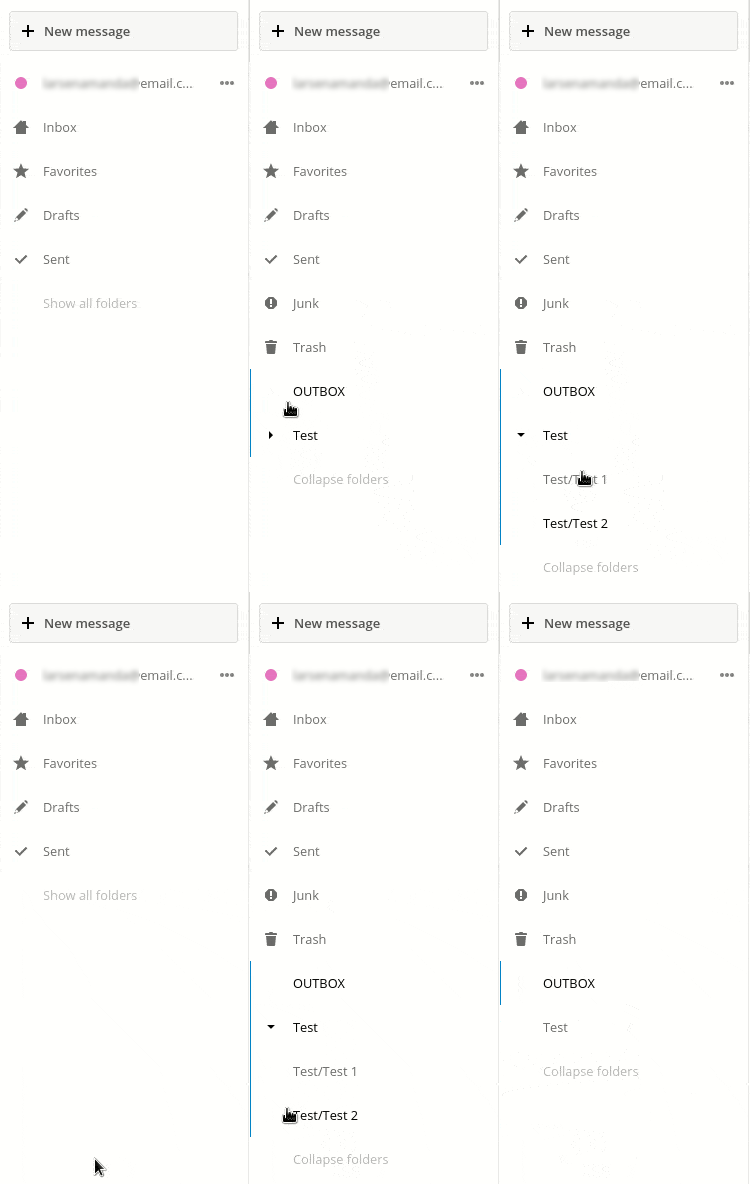
I can't reproduce! Works fine here :/
0.7.9
 skjnldsv
on 8 Feb 2018
skjnldsv
on 8 Feb 2018
Yeah, works fine for me too.
 jancborchardt
on 8 Feb 2018
jancborchardt
on 8 Feb 2018
Cannot reproduce -> closing
ChristophWurst
on 8 Feb 2018
... i installed the latest version and it definitely not working:

omocinteractive
on 8 Feb 2018
Then please complete the issue template so that we get a better understanding of your setup and the problem to be able to fix the issue.
Thank you.
ChristophWurst
on 8 Feb 2018
And clear your cache! :D
skjnldsv
on 8 Feb 2018
I have the same issue on a fresh OC13 installation with Mail 0.7.9. I noticed though that if I click the "show all folders" the drop down actually has items it's just they are not visible (though examining via Firefox's developer tools clearly show the folders are there). I can also click the invisible items and the respective folders load.
Addendum 1: observed so on a Linux client with Firefox 58.0.1
Addendum 2: same issue happens on Android with Firefox 58.0.1
 zpuskas
on 9 Feb 2018
zpuskas
on 9 Feb 2018
... i replaced all files, cleared my cache and tried it on different browser - allways the same. see my configuration issue template for details. what kind of information do you need exactly? i think it is a problem with js/css (see my workaround - the folders have been loaded but js/css don't show them). i disabled pagespeed-mod also and other apache-mods (because of js-problems in nextcloud and other projects).
omocinteractive
on 9 Feb 2018
Any errors in your js console?
ChristophWurst
on 9 Feb 2018
... no errors!
omocinteractive
on 9 Feb 2018
You need to clear your appdata server cache. @rullzer? 😂
skjnldsv
on 9 Feb 2018
... do you have a short tip or little how-to for me, please? i found nothing for clearing app cache under nextcloud.
omocinteractive
on 9 Feb 2018
@omocinteractive sorry, you can try the dedicated app rullzer made here :
https://github.com/rullzer/appdatacleaner
Then use the occ command line to clear css and js! :)
skjnldsv
on 9 Feb 2018
... thx a lot! i will try it on weekend :)
omocinteractive
on 9 Feb 2018
... sorry, nothing happend. i think it is'nt a problem of caching (see @zpuskas posting - fresh installation). i merged the output css file - it is exactly the same. i will wait for new versions, maybe some day it will work. and - if it is a problem of caching - there is a generally problem with nc updater, i think ...
omocinteractive
on 11 Feb 2018
Hey @omocinteractive,
are you using a mailserver that has an INBOX prefix? There are known bugs with those. Try clicking the inbox icon and its subfolders will magically expand 😉
ChristophWurst
on 13 Feb 2018
ARRRRGH - 10.000 kisses :) Yes, my mailserver use an INBOX prefix! Thx a lot!
omocinteractive
on 13 Feb 2018
Now that I understand the problem, I'm pretty sure this is a duplicate of https://github.com/nextcloud/mail/issues/386
ChristophWurst
on 14 Feb 2018
Related issues
 doc75
·
50Comments
doc75
·
50Comments
 ovv
·
27Comments
ovv
·
27Comments
 hitam4450
·
177Comments
skjnldsv
·
33Comments
hitam4450
·
177Comments
skjnldsv
·
33Comments
 devcrafting
·
37Comments
devcrafting
·
37Comments
Most helpful comment
ARRRRGH - 10.000 kisses :) Yes, my mailserver use an INBOX prefix! Thx a lot!