Steps to reproduce
- Open mail app
- Click on an (IMAP) folder that contains subdirectories
- The folder will not expand/shot its subdirectories
Expected behaviour
When clicking on the "triangle" icon the folder should be expanded to shot its subdirectories.
Actual behaviour
Nothing happens. Only the contents of the parent folder are shown (mails but not the subdirectories).
Mail app
Mail app version: 0.6.4
Mailserver or service: Posteo
Transport security - IMAP: SSL/TLS
Transport security - SMTP: SSL/TLS
Number of accounts: 1
Mail app version build date: N/A
Client configuration
Browser: Tested in recent versions of FireFox and Chrome. No errors shown in developer console.
Operating system: Linux
 rawbertp
All 9 comments
I can confirm this issue. I have 2 Nextcloud instances on 2 different (both nxing+maridb) servers. Both have Mail 0.6.4 installed, the only difference is that the one that has this issue is on Nextcloud 12. On the other one, running 11, subdirectories work just fine.
Account is the same one, so it shouldn't be mail server issue.
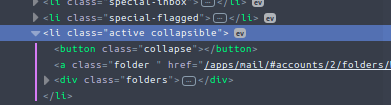
I checked HTML, and it seems that the .open class is not added to .collapsible when the latter is clicked on. Instead, .active class is added, which does nothing in particular:
 pixelipo
on 8 Jun 2017
pixelipo
on 8 Jun 2017
I have the same problem since I am using NC 12.
It is a bit weird, the event click .collapse does not work anymore.
When I click on the collapse button, the event click .folder is raised instead.
The Marionnette events on that view have not been changed for a really long time though...
Maybe it is some kind of CSS collisions with the apps.scss from the NC server ; that file seems new with NC12, and introduced some #app-navigation [...] collapse stuffs.
 lcalaresu
on 13 Jun 2017
lcalaresu
on 13 Jun 2017
It is a bit weird, the event click .collapse does not work anymore.
When I click on the collapse button, the event click .folder is raised instead.

looks like there's no event registered for clicking the .collapse element, hence the parent element gets it.
 ChristophWurst
on 13 Jun 2017
ChristophWurst
on 13 Jun 2017
Seems to be a CSS problem. The parent folder a-Tag overlays the button
<button class="collapse"></button>
Adding a z-index (append in apps/mail/css/mail.css)
#app-navigation button.collapse {
    z-index: 1;
}
solves the problem for me.
 oniehaus
on 16 Jun 2017
oniehaus
on 16 Jun 2017
Adding a z-index [...] solves the problem for me.
Oh yeah! Works for me too (will check if there is no side effects however).
I never really got this z-index stuff (css is not "my thing" though). But now I totally get it after being pissed off for half an hour by this stupid button being under the a-link!!
lcalaresu
on 16 Jun 2017
@oniehaus thanks a lot for your patch. This indeed solves the problem. Apparently the anchor element caused a wrong navigation event whenever the user clicked the triangle. I've pushed your fix together with some other tiny fixes/cleanups as https://github.com/nextcloud/mail/pull/396 :)
ChristophWurst
on 19 Jun 2017
Hi,
I use the Version 0.7.3 and Nextcloud 12.0.3 (Nginx and MariaDB) and I have exactly the same problem
 flonowa
on 22 Oct 2017
flonowa
on 22 Oct 2017
Please file a new ticket. Thanks!
ChristophWurst
on 22 Oct 2017
This thread has been automatically locked since there has not been any recent activity after it was closed. Please open a new issue for related bugs and questions.
![lock[bot] picture](https://avatars.githubusercontent.com/in/6672?v=4&s=40) lock[bot]
on 20 Nov 2018
lock[bot]
on 20 Nov 2018
Related issues
 kalle-ankan
·
28Comments
kalle-ankan
·
28Comments
 doc75
·
34Comments
doc75
·
34Comments
 ovv
·
27Comments
doc75
·
50Comments
ovv
·
27Comments
doc75
·
50Comments
 jancborchardt
·
29Comments
jancborchardt
·
29Comments
Most helpful comment
Seems to be a CSS problem. The parent folder a-Tag overlays the button
<button class="collapse"></button>Adding a z-index (append in apps/mail/css/mail.css)
solves the problem for me.