Mail: Allow Mailbody formating [$100 awarded]
Steps to reproduce
- Open Mail App
- Click on Button "New Message"
- Type some Text in the Textarea for Mailbody
Expected behaviour
There should be a Buttonbar, which let me format the Mail with the most needed Formats like bold, italic, font color, font size, font name. Maybe its possible to add something like tinymce.
Actual behaviour
Currently, its a pure Textarea, only normal Text could be entered.
Mail app
Mail app version: 0.60
*Mailserver or service: Personal IMAP Server *
Server configuration
Operating system: Raspbian (Debian, Jessie)
Web server: Nginx
Database: MariaDB
PHP version: 5.6
Updated from an older version or fresh install: fresh install
Client configuration
Browser: Firefox 50
Operating system: Windows
The $100 bounty on this issue has been claimed at Bountysource.
 Offerel
All 25 comments
We talked about this in the past and even had a pull request for it at https://github.com/owncloudarchive/mail/pull/1536
But we decided that this is a lot of work (and a lot to maintain) for little gain at the moment.
And for the record, like I said in that pull request – when we should ever go forward with this: Interface-wise this unobtrusive bar which appears when marking text would be great: https://yabwe.github.io/medium-editor/demo.html (Also used by pretty popular blogging platform Medium)
Instead of using a permanently-visible big button bar which distracts too much when writing the usual emails with no need of formatting.
 jancborchardt
on 30 Nov 2016
jancborchardt
on 30 Nov 2016
Personally, i like more the button bar, but that's not so problematic. Mainly, i write formatted HTML Mails since years and never looked back. Yes I'm a heavy Outlook User but i think, formatting Mails, should be a Optional thing. Some users like it, some need it and some hate it :-)
Offerel
on 2 Dec 2016
@Offerel maybe at some point we will do it, but we have lots of other things higher on the priority list (like better performance, moving mails, maybe threading at some point, and fixing bugs). :)
It would be cool if you can help, for example by reviewing pull requests: https://github.com/nextcloud/mail/pulls – it’s very easy, you just check them out and test if stuff works. :)
jancborchardt
on 2 Dec 2016
So, I've yet again spent a few hours finding a suitable WYSIWYG editor. Here are some notes to the future me to know which ones I don't have to look into again:
- Trumbowyg looks great, but does not support to be loaded as js module, it simply injects itself to the global jQuery, which we don't use.
- Simditor also looks slick good, but apparently it's unmaintained and I also found some security reports that are probably unaddressed
- Quill looks okay-ish but its design doesn't really fit ours. Moreover, code snippets from the official docs didn't work for this app. The editor bar showed up, but the text was not editable.
Most other libs I've found seem to target a specific framework (mostly React, the some Vue and Angular).
 ChristophWurst
on 1 Feb 2018
ChristophWurst
on 1 Feb 2018
This is so disappointing. TinyMCE claims to work with webpack, if I use it it doesn't do anything anything. The code is exactly the one from the documentation. If I initialize it via the tinymce global it somehow works, though. ☹️
ChristophWurst
on 1 Feb 2018
As much as I personally would love to have a decent editor, I'm giving in on this. I didn't expect this to be that hard.
ChristophWurst
on 1 Feb 2018
Maybe you can try CKEditor. Personally, i like it more than TinyMCE, since TinyMCE is complicated under some circuumstates. Currently, i use both in my Notes Plugin for Roundcube. The user can switch the editor with a config parameter.
Offerel
on 1 Feb 2018
Spent a few minutes on getting CKEditor to run: failed. Basically, it's quite cumbersome to use it with Webpack at the moment: https://github.com/ckeditor/ckeditor5/issues/139#issuecomment-276876222
ChristophWurst
on 1 Feb 2018
I use CKEditor4. I don't know, if this is better in terms of Webpack.
Offerel
on 1 Feb 2018
Will give it a try another day. There were too many failing attempts today 🙈
ChristophWurst
on 1 Feb 2018
Will give it a try another day. There were too many failing attempts today see_no_evil
Today is the day
ChristophWurst
on 3 Sep 2019

so far, so good
ChristophWurst
on 3 Sep 2019
Ohhh looks like something changes in that topic. I will try it at the weekend.
Offerel
on 3 Sep 2019
it's getting better

ChristophWurst
on 4 Sep 2019
Very nice! :) I was gonna say there are a few too many formatting options in the bar but you’re handling it. :+1:
jancborchardt
on 5 Sep 2019
Some research on plain text vs right/html text toggle
Gmail
Option hidden in menu (they have a lot of other actions/options)

Outlook online/365
Option hidden in menu

and as far as I understood you can set a default in the account settings.
Gnome Evolution
Has a directly visible dropdown
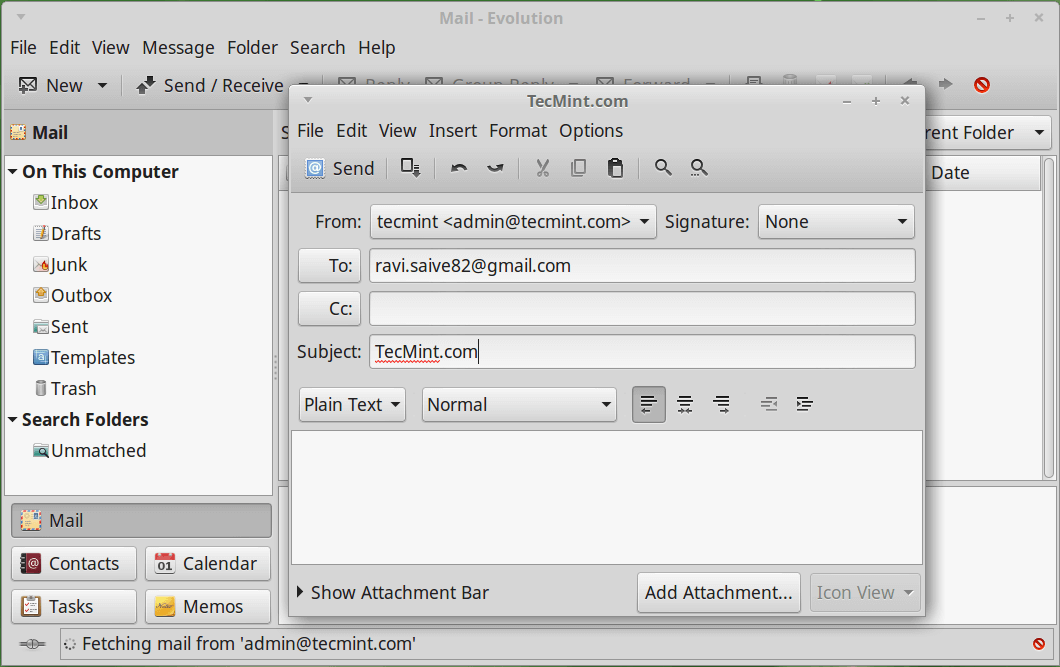
Thunderbird
Has the setting somewhere nobody would ever find it

Kopano
You have to change the account settings. Nothing found in the composer itself

Open-Xchange
The have message options similar to those of Outlook and Gmail

ChristophWurst
on 11 Sep 2019
Option hidden in menu (they have a lot of other actions/options)
What about the underlined A formatting options icon next to the "Send" button? Isn’t that there always, and if you use an option then it just switches to rich text automatically?
jancborchardt
on 11 Sep 2019
What about the underlined
Aformatting options icon next to the "Send" button? Isn’t that there always, and if you use an option then it just switches to rich text automatically?
the A toggles the editor toolbar. and yes, if automatically switches to rich editing once any rich formatting is used
while form a user's perspective this is nice, I'm afraid it's a lot of work to integrate this magic. we should start with a simple on/off switch in some kind. fancier stuff can follow later.
ChristophWurst
on 11 Sep 2019
Just using any option for the first time could switch it on for that mail?
Or: when you click on the formatting icon, the first item in the list could be "Rich text" with a checkbox.
This setting:
- could be a global setting then for any mail you compose.
- could either go back to being unchecked every time.
- or be specific to the type of mail: mails you compose by yourself, and then have separate defaults e.g. replies to plain text mails will always be plaintext initially, or replies to rich text mails will always be rich text too.
For reference also Apple Mail, which is a bit more relevant than Kopano, Open X-Change, Thunderbird and Evolution. (We only need the widely used ones: Google Mail, Apple Mail and Outlook as review. :)

Full description: http://osxdaily.com/2019/03/21/format-emails-mac-mail-format-bar/
jancborchardt
on 11 Sep 2019
I would
- Add a setting to the user account for the default value
- Let the user toggle the mode for each message individually without changing the account default
Just using any option for the first time could switch it on for that mail?
https://github.com/nextcloud/mail/issues/210#issuecomment-530306859
ChristophWurst
on 11 Sep 2019
Seems good. :+1:
And then for the formatting balloon, we should look at the sleek design by Medium:
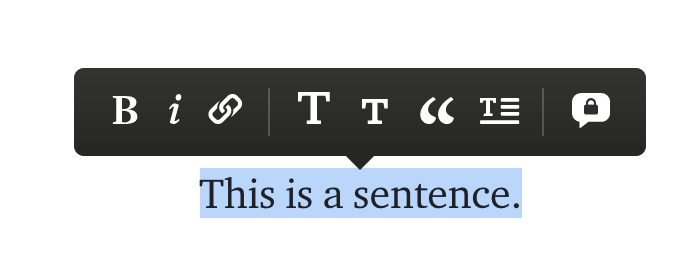
https://help.medium.com/hc/en-us/articles/215194537-Format-text
jancborchardt
on 11 Sep 2019
And then for the formatting balloon, we should look at the sleek design by Medium:
That will be your part :v:
ChristophWurst
on 11 Sep 2019
If you think about the general settings (which is a good idea), you should also add a setting for the default font-family and font-size. For example, you can use a dropdown-box with some pre-defined font-familys which are default on the mainstream system. For Windows 10, this would be Calibri and a size of 11(points). Other systems have other font-settings. Only mainstream systems should be pre-defined like Windows 10, Ubuntu/Mint, not minor ones like mac or something else.
Offerel
on 11 Sep 2019
@Offerel yep, but let’s start with the basics and get a minimum viable version working. :) Then we can see what else is needed step by step.
jancborchardt
on 11 Sep 2019
I have to respectfully disagree with the position that features everyone expects and are accustomed to in modern day email messaging is a distraction.
I think the focus is misplaced. Being that Nextcloud is targeting enterprise like features (particularly for monetization) Mail, in my opinion, should be paramount in Nextcloud's _app_ development.
How a permanent bar becomes a distraction which includes all the features everyone _expects_ is beyond me.
I find the need to highlight text to learn that there even be formatting availability is a major distraction. I don't want to have to teach people how to email.
Additionally. I find the colored areas a glaring distraction over anything mentioned here:

 republicus
on 28 Feb 2020
republicus
on 28 Feb 2020
Related issues
 clem-bcc
·
4Comments
clem-bcc
·
4Comments
 MariusBluem
·
3Comments
MariusBluem
·
3Comments
 sscherfke
·
5Comments
sscherfke
·
5Comments
 StCyr
·
4Comments
StCyr
·
4Comments
 CHazz
·
3Comments
CHazz
·
3Comments
Most helpful comment
Today is the day