Mahapps.metro: Setting SelectedItem of HamburgerMenu doesn't trigger UI anymore
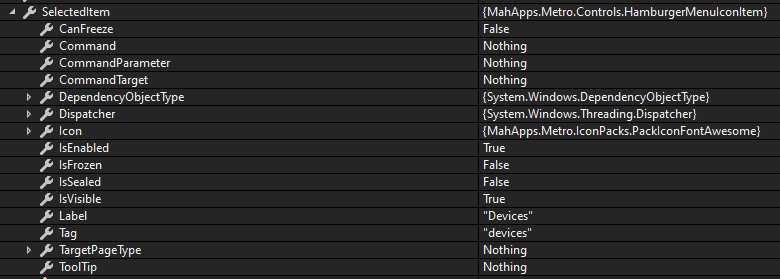
I just updated one of my apps from v1.6.5 to v2.2.0 and noticed that HamburgerMenuControl.SelectedItem doens't trigger the UI anymore to select that item. When inspecting the code at runtime the item is really selected but it looks like the UI isn't triggered to update.
For testing purposes i create a simple app from scratch in vb.net with MahApps v2.2.0 to reproduce the problem:
Application.xaml:
<Application
    x:Class="Application"
    xmlns="http://schemas.microsoft.com/winfx/2006/xaml/presentation"
    xmlns:x="http://schemas.microsoft.com/winfx/2006/xaml"
    xmlns:local="clr-namespace:MahAppsTest"
    StartupUri="MainWindow.xaml">
    <Application.Resources>
        <ResourceDictionary>
            <ResourceDictionary.MergedDictionaries>

                <!--  Control Styles  -->
                <ResourceDictionary Source="pack://application:,,,/MahApps.Metro;component/Styles/Controls.xaml" />

                <!--  Fonts and color styles  -->
                <ResourceDictionary Source="pack://application:,,,/MahApps.Metro;component/Styles/Fonts.xaml" />

                <!--  Theme styling  -->
                <ResourceDictionary Source="pack://application:,,,/MahApps.Metro;component/Styles/Themes/Dark.Blue.xaml" />
            </ResourceDictionary.MergedDictionaries>
        </ResourceDictionary>
    </Application.Resources>
</Application>
MainWindow.xaml
<Controls:MetroWindow
    x:Class="MainWindow"
    xmlns="http://schemas.microsoft.com/winfx/2006/xaml/presentation"
    xmlns:x="http://schemas.microsoft.com/winfx/2006/xaml"
    xmlns:Controls="http://metro.mahapps.com/winfx/xaml/controls"
    xmlns:d="http://schemas.microsoft.com/expression/blend/2008"
    xmlns:iconPacks="http://metro.mahapps.com/winfx/xaml/iconpacks"
    xmlns:local="clr-namespace:MahAppsTest"
    xmlns:mc="http://schemas.openxmlformats.org/markup-compatibility/2006"
    Title="MainWindow"
    Width="1280"
    Height="800"
    mc:Ignorable="d">
    <Window.Resources>
        <ResourceDictionary>
            <!--  This is the template for the menu items.  -->
            <DataTemplate x:Key="MenuItemTemplate" DataType="{x:Type Controls:HamburgerMenuIconItem}">
                <Grid Height="48">
                    <Grid.ColumnDefinitions>
                        <ColumnDefinition Width="48" />
                        <ColumnDefinition />
                    </Grid.ColumnDefinitions>
                    <ContentControl
                        Grid.Column="0"
                        HorizontalAlignment="Center"
                        VerticalAlignment="Center"
                        Content="{Binding Icon}"
                        Focusable="False"
                        IsTabStop="False" />
                    <TextBlock
                        Grid.Column="1"
                        VerticalAlignment="Center"
                        FontSize="16"
                        Text="{Binding Label}" />
                </Grid>
            </DataTemplate>
        </ResourceDictionary>
    </Window.Resources>

    <Grid Name="MyGrid">
        <Grid.ColumnDefinitions>
            <ColumnDefinition Width="25*" />
            <ColumnDefinition Width="187*" />
        </Grid.ColumnDefinitions>
        <Controls:HamburgerMenu
            x:Name="HamburgerMenuControl"
            Grid.ColumnSpan="2"
            HamburgerWidth="48"
            IsPaneOpen="True"
            ItemInvoked="HamburgerMenuControl_ItemInvoked"
            ItemTemplate="{StaticResource MenuItemTemplate}"
            OptionsItemTemplate="{StaticResource MenuItemTemplate}"
            SelectedIndex="0"
            VerticalScrollBarOnLeftSide="False">
            <!--  Items  -->
            <Controls:HamburgerMenu.ItemsSource>
                <Controls:HamburgerMenuItemCollection>
                    <Controls:HamburgerMenuIconItem
                        Icon="{iconPacks:FontAwesome Kind=HomeSolid}"
                        Label="Home"
                        Tag="home" />
                    <Controls:HamburgerMenuIconItem
                        Icon="{iconPacks:FontAwesome Kind=MicrochipSolid}"
                        Label="Devices"
                        Tag="devices" />
                </Controls:HamburgerMenuItemCollection>
            </Controls:HamburgerMenu.ItemsSource>

            <!--  Options  -->
            <Controls:HamburgerMenu.OptionsItemsSource>
                <Controls:HamburgerMenuItemCollection>
                    <Controls:HamburgerMenuIconItem
                        Icon="{iconPacks:FontAwesome Kind=SaveSolid}"
                        Label="Save"
                        Tag="save" />
                </Controls:HamburgerMenuItemCollection>
            </Controls:HamburgerMenu.OptionsItemsSource>
        </Controls:HamburgerMenu>
    </Grid>
</Controls:MetroWindow>
MainWindow.xaml.vb
Imports MahApps.Metro.Controls

Class MainWindow

    Dim PreviousSelectedHamburgerMenuIconItem As HamburgerMenuIconItem

    Private Sub HamburgerMenuControl_ItemInvoked(sender As Object, e As MahApps.Metro.Controls.HamburgerMenuItemInvokedEventArgs)

        'Load the corresponding settingspage
        If Not e.InvokedItem Is Nothing Then

            HamburgerMenuControl.IsPaneOpen = False

            If CType(e.InvokedItem, HamburgerMenuIconItem).Tag.ToString.ToLower <> "save" Then
                PreviousSelectedHamburgerMenuIconItem = CType(e.InvokedItem, HamburgerMenuIconItem)
            End If

            Select Case CType(e.InvokedItem, HamburgerMenuIconItem).Tag.ToString.ToLower
                Case "home"
                    'Load homepage

                Case "devices"
                   'Load devices page

                Case "save"
                    'Save the Settings

                    'Deselect this option and select previous/current MenuItem
                    HamburgerMenuControl.SelectedOptionsItem = Nothing
                    HamburgerMenuControl.SelectedItem = PreviousSelectedHamburgerMenuIconItem
            End Select
        End If
    End Sub
End Class
Some screenshots:

 TripleNico
All 2 comments
@TripleNico It seems like that there is maybe a bug in your code?
You have these lines, which are saves the selected item if you current selected is != save:
If CType(e.InvokedItem, HamburgerMenuIconItem).Tag.ToString.ToLower <> "save" Then
    PreviousSelectedHamburgerMenuIconItem = CType(e.InvokedItem, HamburgerMenuIconItem)
End If
So if you click the save item you will always get the last PreviousSelectedHamburgerMenuIconItem which seems like the device item.
But on the other hand, normally you don't need to set the SelectedItem or SelectedOptionsItem inside the ItemInvoked event, because this is already done by the HamburgerMenu itself.
 punker76
on 8 Oct 2020
punker76
on 8 Oct 2020
Thanks for getting back on this. Your correct, it was something with my code. Don't know what exactly anymore since i rebuild some stuff. I also moved from Invoked to Clicked.
Keep up the good work! 👍
TripleNico
on 8 Oct 2020
Related issues
 barryBithead
·
5Comments
punker76
·
3Comments
barryBithead
·
5Comments
punker76
·
3Comments
 BornToBeRoot
·
3Comments
BornToBeRoot
·
3Comments
 somil55
·
3Comments
somil55
·
3Comments
 AzureZeng
·
3Comments
AzureZeng
·
3Comments
Most helpful comment
Thanks for getting back on this. Your correct, it was something with my code. Don't know what exactly anymore since i rebuild some stuff. I also moved from Invoked to Clicked.
Keep up the good work! 👍