Mahapps.metro: The window background is not shown correctly in the designer
Describe the bug
If one designs a MetroWindow in the Visual Studios designer it is not shown correctly. It is shown correctly at runtime. This issue is more visible if one uses the dark theme
Steps to reproduce
- Create a blank App with MahApps.Metro imported
- Set the theme to dark
- Create a new
MetroWindow - You will notice that the
Backgroundis white
Expected behavior
MetroWindow should render the Background correctly. It does if one sets the Background explicitly in XAML
Sample
see https://github.com/Volmancer/OWGENC
Environment
MahApps.Metro version: v2.0.0 v2.1.0 tested
Windows build number: Win10 and Win7 tested
Visual Studio: 2019 16.6.3
Target Framework: .Net Core 3.1 (v4.5.2, v4.7.2)
Screenshots

Designer
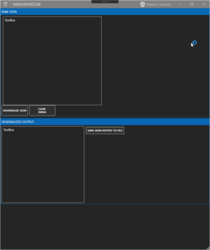
Runtime
 timunie
All 6 comments
This seems to be fixed.
Tested with
Microsoft Visual Studio Enterprise 2019
Version 16.6.3
and
Microsoft Visual Studio Enterprise 2019 Preview
Version 16.7.0 Preview 3.1

 punker76
on 8 Jul 2020
punker76
on 8 Jul 2020
@punker76 yes, with this line:

If you are not using this line, it does not work. But I know it seems to be a VS issue.
timunie
on 8 Jul 2020
I'll double check this issue in the upcomming v16.7 release of VS and see if it is fixed there.
timunie
on 8 Jul 2020
Oh yeah, I didn't noticed that the Background was set explicitly. Doesn't work in preview. But it's not a MahApps issue, it should be delegate to VS team.
punker76
on 8 Jul 2020
Created an issue at VS: https://developercommunity.visualstudio.com/content/problem/1106526/wpf-designer-the-window-background-is-not-shown-co.html
The more people vote for it, the better the chance that MS looks for it.
timunie
on 8 Jul 2020
(Closed - Not a Bug) Here is the answer from Microsoft: https://developercommunity2.visualstudio.com/t/wpf-designer-the-window-background-is-not-shown-co/1106526#T-N1239787
This is a limitiation of the designer. The designer does not instantiate the real Window MainWindow. It can’t because the designer process has his own window in order to display the content. This is known XAML designer limitation, Repro class hierarchy is:
MainWindow > MetroWindow (from MashApp SDK) > Window (from WPF).
Then in XAML:
Designer cannot create any Window-derived class. So we end up massaging XAML to be:
<_0:StandInWindow />
As a result we lose MetroWindow default style (see https://github.com/MahApps/MahApps.Metro/blob/develop/src/MahApps.Metro/Themes/MetroWindow.xaml).
If you’re using the XAML Designer for .NetCore, you’ll be able to see d:Background on the Window and setting a design-time background color.
punker76
on 1 Nov 2020
Related issues
 SamOxyPlot
·
14Comments
SamOxyPlot
·
14Comments
 AndrzejKl
·
12Comments
AndrzejKl
·
12Comments
 ghost
·
18Comments
ghost
·
18Comments
 oschwab
·
17Comments
oschwab
·
17Comments
 webprofusion-chrisc
·
11Comments
webprofusion-chrisc
·
11Comments
Most helpful comment
Oh yeah, I didn't noticed that the Background was set explicitly. Doesn't work in preview. But it's not a MahApps issue, it should be delegate to VS team.