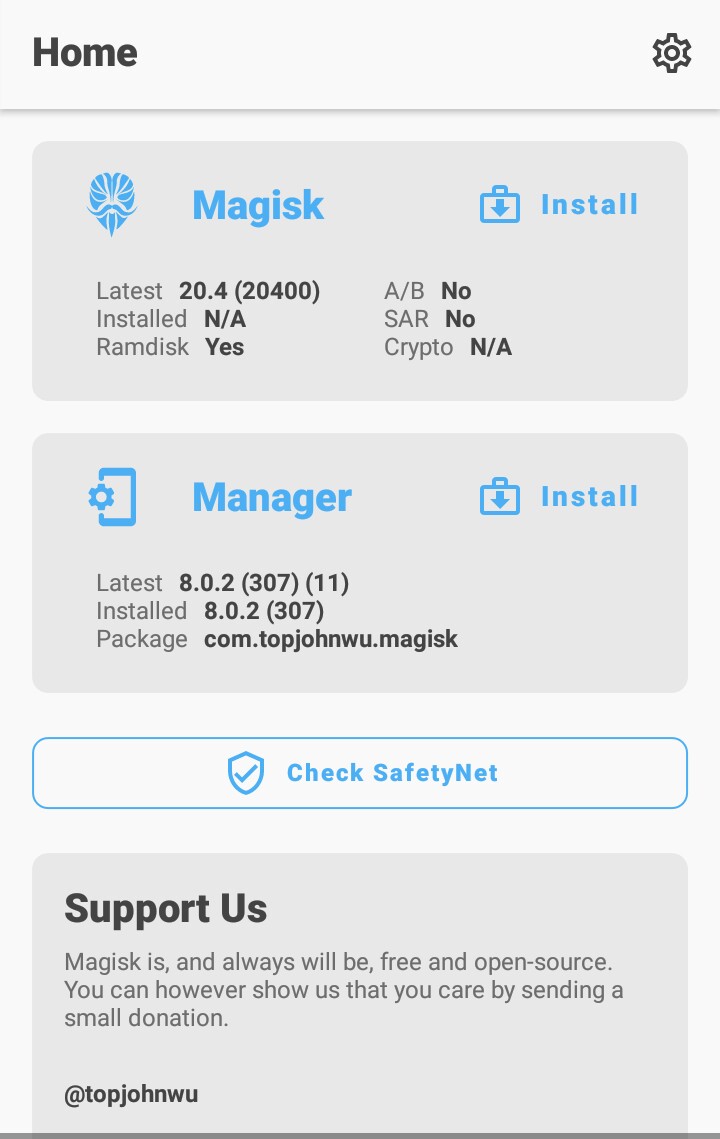
Magisk: Not able to see the three horizontal lines ( Menu bar) on top left
I am not able to open that menu bar after installing the magisk manager from official website. I have the latest version of it installed.
Pls help me on how to correct this.
Note- I have not yet rooted it with magisk, so I wanted to know whether I will see it atleast after rooting?
 Rocky471
All 6 comments
There is no menu bar in the upper left anymore. Once you're rooted you'll have a navigation bar at the bottom of the Manager.
You can close this now.
 Didgeridoohan
on 27 Oct 2020
Didgeridoohan
on 27 Oct 2020
There is no menu bar in the upper left anymore. Once you're rooted you'll have a navigation bar at the bottom of the Manager.
You can close this now.
Thanks a lot for answering ☺️😃. It would be great if you could pls attach and send me the photo of how the home screen of magisk will look after rooting like, where the navigation bar will be!!
Rocky471
on 27 Oct 2020
One more question, can I install and root it in my Moto G Turbo device??
I recently rooted it with super su but had to unroot due to certain reasons. While unrooting the super su gave many errors so I had to flash the ' Un-Supersu' file. Then too if I check with root checker, it should that device is not rooted but when I install certain other apps like banking apps, they tell that my device is rooted and don't allow me to use them.
So, I wanted to root my device using ' Magisk ' and then use the 'Magisk Hide' feature so that I could use those banking apps. But when I flash the magisk.zip that I installed officially from Magisk app, it tells that there is some problem with ' Boot.img'
I would be very thankful to you guys I'd you helped me out 🤗🤗
Rocky471
on 27 Oct 2020
Didgeridoohan
on 27 Oct 2020
I will try it this weekend then!!!
Thanks a lot for your the Swift reply!!
I will contact you if I face any other issues 😜
Rocky471
on 27 Oct 2020
https://www.didgeridoohan.com/magisk/Magisk#hn_Boot_image_patched_by_other_programs
I successfully rooted my phone with Magisk and also ran apps that dont run on rooted phones with Magisk Hide.
Thanks a lot Magisk team and @Didgeridoohan for guiding me through this and answering my queries.
Regards,
A very happy and satisfied Magisk Customer
Rocky471
on 28 Oct 2020
Related issues
 HikariCalyx
·
3Comments
HikariCalyx
·
3Comments
 ananjaser1211
·
4Comments
ananjaser1211
·
4Comments
 Kratos291
·
3Comments
Kratos291
·
3Comments
 ThiefMaster
·
3Comments
ThiefMaster
·
3Comments
 dg28gadhavi
·
3Comments
dg28gadhavi
·
3Comments
Most helpful comment
There is no menu bar in the upper left anymore. Once you're rooted you'll have a navigation bar at the bottom of the Manager.
You can close this now.