Magick.net: Text becomes a black rectangle after converting SVG to GIF
Description
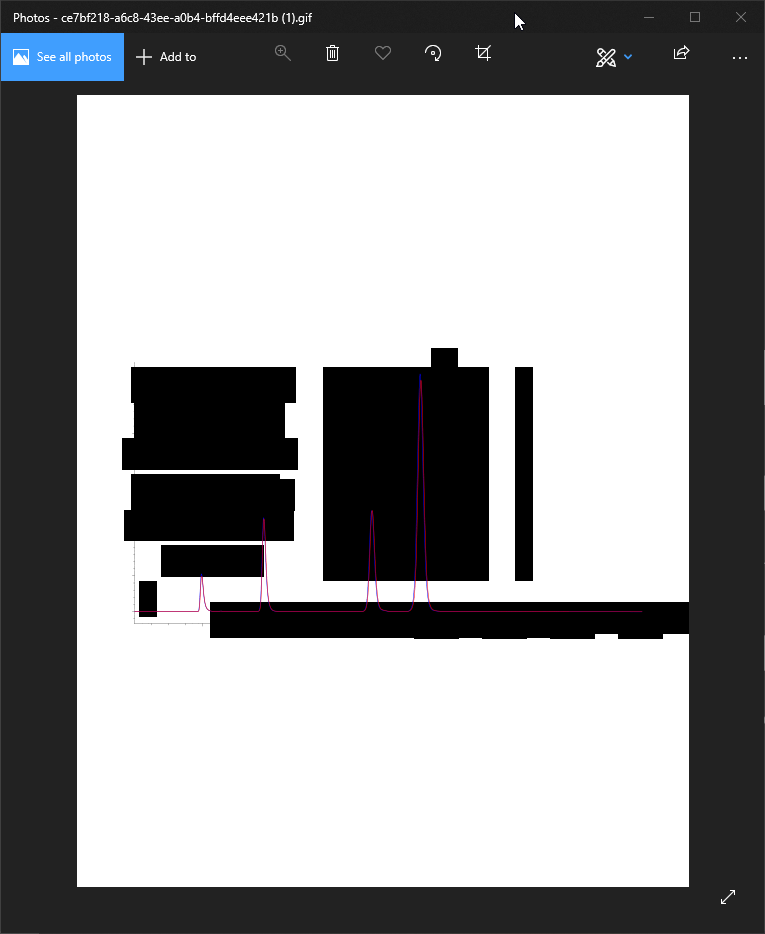
We are converting SVGs to GIFs using the minimal sample code (as provided in the examples) and get black rectangles instead of all text. The only related bug I found online was related to flowed text, which we do not use.
Steps to Reproduce
SVG example file download link: https://gofile.io/?c=IhnrQh
Conversion result:

System Configuration
- Magick.NET version: Magick.NET-Q8-AnyCPU 7.14.2
- Environment: .NET 4.7.2
 denious
All 35 comments
I am unable to reproduce your issue with the following code:
C#
using (var image = new MagickImage("e7bf218-a6c8-43ee-a0b4-bffd4eee421b.svg"))
{
    image.Write("test.png");
}
 dlemstra
on 8 Aug 2019
dlemstra
on 8 Aug 2019
Hmm I am not able to reproduce it locally either, only on the remote Azure web app once published. Let me see if I can get more details and come back to this... Issue closed, thanks for the help!
denious
on 9 Aug 2019
@dlemstra Hi, Dirk.
I am able to replicate on demand but the issue only happens when running the code in an Azure Web App vs. locally. I converted over 7000 SVGs locally and haven't seen it once, remotely it's a 100% fail rate.
Definitely text related, SVGs with no text convert without black rectangles.
What can I provide you for debugging information?
There are no warnings and no errors as far as I can see
denious
on 20 Aug 2019
What are you using to read the SVG files?
dlemstra
on 20 Aug 2019
Files are posted to the API. All relevant code below.
Does that answer your question?
[HttpPost]
[Route("{id}/upload/chromatograms")]
[ValidateModelState]
[SwaggerOperation("ApplicationsIdUploadChromatogramsPost")]
[SwaggerResponse(200, typeof(FileUpload), "single part number name success return array object")]
public virtual async Task<IActionResult> ApplicationsIdUploadChromatogramsPost(
  [FromRoute] [Required] int? id,
  [Required()] IFormFile files,
  [FromHeader(Name = "x-fileid")] [Required()] string xFileId)
{
    // validate presence
    if (files == null)
        throw new ArgumentNullException(nameof(files));

    // validate size
    if (files.Length < 1024)
        return BadRequest("Invalid file: less than 1KB");

    // validate type
    var extension = Path.GetExtension(files.FileName) ?? "";
    if (!extension.Equals(".svg", StringComparison.InvariantCultureIgnoreCase))
        return BadRequest("Invalid file: extension must be SVG");

    // get reference to container
    var containerName = _configuration["BlobStorage:Containers:chromatograms"];

    // upload SVG and save to DB
    var mappedUploads = await UploadFiles(files.FileName, files.OpenReadStream(), Guid.Parse(xFileId),
        containerName,
        async (fileName, blobUri) =>
        {
            // save DTO
            var documentDto = new ApplicationChromatogramDTO
            {
                ApplicationID = id,
                FileName = fileName,
                ApplicationChromatogramGUID = xFileId,
                Chromatogram = blobUri,
                FileSize = files.Length
            };
            await _dbContext.CreateApplicationChromatogramAsync(documentDto);

            return documentDto;
        });

    try
    {
        // convert to gif
        MemoryStream gifStream;
        using (var svgStream = files.OpenReadStream())
        using (var svgToGif = new MagickImage(svgStream, new MagickReadSettings
        {
            // TODO: remove once new creative SOP is in place
            Density = new Density(1000)
        }))
        {
            // TODO: remove once new creative SOP is in place
            svgToGif.Trim();
            svgToGif.RePage();

            // TODO: remove once new creative SOP is in place
            if (svgToGif.Width > 1600)
            {
                var resizePercentage = 100 / ((double)svgToGif.Width / 1600);
                svgToGif.Resize(new Percentage(resizePercentage));
            }

            // TODO: add once new creative SOP is in place
            //// validate dpi
            //if (svgToGif.Density.X < 1000)
            //    return BadRequest("Conversion exception: invalid image DPI");

            // TODO: add once new creative SOP is in place
            //// validate size
            //if (svgToGif.Width < 1550 || svgToGif.Width > 1650)
            //    return BadRequest("Conversion exception: invalid image size");
            //}

            svgToGif.Format = MagickFormat.Gif;

            var gifBytes = svgToGif.ToByteArray();
            gifStream = new MemoryStream(gifBytes);
        }

        // upload converted GIF
        var gifName = Path.ChangeExtension(files.FileName, ".gif");
        await UploadFiles(gifName, gifStream, Guid.Parse(xFileId), containerName, null);
    }
    catch (Exception ex)
        when (ex is MagickImageErrorException || ex is MagickErrorException)
    {
        return BadRequest("Image conversion exception: " + ex.Message);
    }

    return Json(mappedUploads);
}
Do you have something like GhostScript installed in your environment? Maybe you are running into memory issues? Using a DPI of 1000 is a bit huge and results in a very large image. What happens when you change your read settings to this:
C#
var settings = new MagickReadSettings()
{
     Width = 1600,
};
This should result in an image when the with is not larger than 1600 wide.
dlemstra
on 20 Aug 2019
I do not have Ghostscript installed either locally or in the remote environment.
How would I confirm running into memory issues? No exceptions are thrown.
All image modifications are just a bonus, still having the same problem with the simple code below.
If you think it might help, I can build a quick demo app repo and try to replicate in a brand new Azure environment...
            try
            {
                // convert to gif
                MemoryStream gifStream;
                using (var svgStream = files.OpenReadStream())
                using (var svgToGif = new MagickImage(svgStream))
                {
                    svgToGif.Format = MagickFormat.Gif;

                    var gifBytes = svgToGif.ToByteArray();
                    gifStream = new MemoryStream(gifBytes);
                }

                // upload converted GIF
                var gifName = Path.ChangeExtension(files.FileName, ".gif");
                await UploadFiles(gifName, gifStream, Guid.Parse(xFileId), containerName, null);
            }
            catch (Exception ex)
                when (ex is MagickImageErrorException || ex is MagickErrorException)
            {
                return BadRequest("Image conversion exception: " + ex.Message);
            }
denious
on 20 Aug 2019
Maybe fonts dont work in an Azure Web App? See the answer here: https://stackoverflow.com/a/38866726?
dlemstra
on 20 Aug 2019
Hmm I'm not too familiar with GDI, but would the lack of GDI support affect ImageMagick? And if so, is there any workaround like specifying a physical font file location or loading fonts in memory for ImageMagick to use?
How about a custom type-windows.xml config that routes, for example, Arial to a folder of my choice?
Also, is there any way to confirm that black rectangles appear instead of text when no default font can be found? That would be a great pointer in the right direction!
denious
on 20 Aug 2019
@dlemstra Any pointers? :)
Thanks for your help so far, I really appreciate it!
denious
on 23 Aug 2019
I took another look at your log file and now I am wondering why I don't see a trace for mvg.c in the log files. Could you also set image.Settings.Debug to true so we can get more information? I also just updated the sample to include this.
dlemstra
on 1 Sep 2019
@dlemstra This is the code I got now for logging, does it look right?
Output: https://pastebin.com/BWjF4Tti
                // log all events
                MagickNET.SetTempDirectory(Path.GetTempPath());
                MagickNET.SetLogEvents(LogEvents.All);
                MagickNET.Log += (sender, args) =>
                {
                    magickLog.AppendLine(args.Message);
                };

                // convert to gif
                MemoryStream gifStream;
                using (var svgStream = files.OpenReadStream())
                using (var svgToGif = new MagickImage(svgStream, new MagickReadSettings
                {
                    // TODO: remove once black rectangle text bug is fixed
                    Debug = true,
                    Verbose = true,

                    // TODO: remove once new creative SOP is up to par
                    Density = new Density(1000)
                }))
                {
                    // TODO: remove once black rectangle text bug is fixed
                    svgToGif.Settings.Debug = true;

                    // TODO: remove once black rectangle text bug is fixed
                    svgToGif.Warning += (sender, args) =>
                    {
                        magickLog.AppendLine(args.Message);
                    };
Did you copy the correct output to pastebin? The date is 2019-08-20T?
dlemstra
on 4 Sep 2019
My bad! Here's a new one: https://pastebin.com/i0Bdhd5N
denious
on 4 Sep 2019
I am still missing some logging. Could you change your code to this:
```C#
using (var svgToGif = new MagickImage())
{
svgToGif.Debug = true;
svgToGif.Read(svgStream, new MagickReadSettings
{
// TODO: remove once black rectangle text bug is fixed
Debug = true,
Verbose = true,
    // TODO: remove once new creative SOP is up to par
    Density = new Density(1000)
 });
}
```
dlemstra
on 5 Sep 2019
@dlemstra Apologies for a late reply!
Latest pastebin: https://pastebin.com/iuQyc5wV
denious
on 16 Sep 2019
@dlemstra Let me know if there is anything else I can provide you with. Thank you for the support!
denious
on 25 Sep 2019
Sorry, I forgot to take a look at this again. I would expect Trace logging to show up with the example that I posted. Are you sure that you changed the way you read the image to my code sample?
dlemstra
on 25 Sep 2019
I had to switch svgToGif.Debug = true; to svgToGif.Settings.Debug = true; for the code to compile.
That's the code I have now.
            var magickLog = new StringBuilder();
            try
            {
                // log all events
                MagickNET.SetTempDirectory(Path.GetTempPath());
                MagickNET.SetLogEvents(LogEvents.All);
                MagickNET.Log += (sender, args) =>
                {
                    magickLog.AppendLine(args.Message);
                };

                // convert to gif
                MemoryStream gifStream;
                using (var svgStream = files.OpenReadStream())
                using (var svgToGif = new MagickImage())
                {
                    svgToGif.Settings.Debug = true;

                    svgToGif.Read(svgStream, new MagickReadSettings
                    {
                        Debug = true,
                        Verbose = true,
                        Density = new Density(1000)
                    });

                    svgToGif.Warning += (sender, args) =>
                    {
                        magickLog.AppendLine(args.Message);
                    };
It turns out that trace logging was not enabled when calling SetLogEvents with LogEvents.All. I just pushed a patch to resolve this . This will be fixed in the next release.
dlemstra
on 25 Sep 2019
Good catch! I will watch our for the next release and re-generate the logs. Thanks again!
denious
on 25 Sep 2019
Just realized that with SetLogEvents(LogEvents.Trace) we should get just the trace logging. And that might help us a bit already. Could you try that and post the logging here?
dlemstra
on 25 Sep 2019
@dlemstra It is currently set to All, which seems to include Trace and Detailed. Am I not understanding this right?
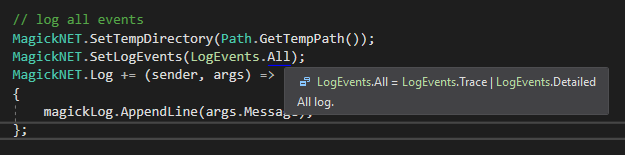
Here's the log with the Trace option on:
https://pastebin.com/Gcm9TkZ7
denious
on 4 Oct 2019
The current release has a bug where using All would not result in including Trace events. But with just using Trace this bug does not occur. It looks like somewhere in the librsvg library things break but I would need to attach a debugger to figure out why. What happens when you use the internal SVG library of ImageMagick called MSVG that isn't as great as librsvg but might work in your situation:
C#
new MagickReadSettings {
    Format = MagickFormat.Msvg
}
dlemstra
on 4 Oct 2019
Getting this weird error now:
Image conversion exception: attempt to perform an operation not allowed by the security policy 'MVG' @ error/constitute.c/IsCoderAuthorized/408
denious
on 4 Oct 2019
And I completely forgot that the MVG coder is disabled by default due to its security implications. Not sure if I can help you further. My guess is that somewhere inside the librsvg it cannot render fonts but I don't understand why. Going to need a debugger for that.
dlemstra
on 4 Oct 2019
I believe the issue is related to the lack of pre-installed fonts on Azure VMs.
Is there any way to confirm locally that black rectangles appear instead of text when no default font can be found? That would be a great pointer in the right direction! Then I could look into a custom type-windows.xml config that routes, for example, Arial to a physical font file deployed with my code.
denious
on 4 Oct 2019
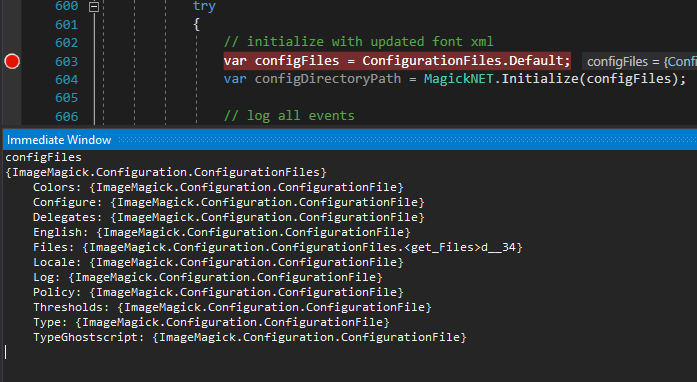
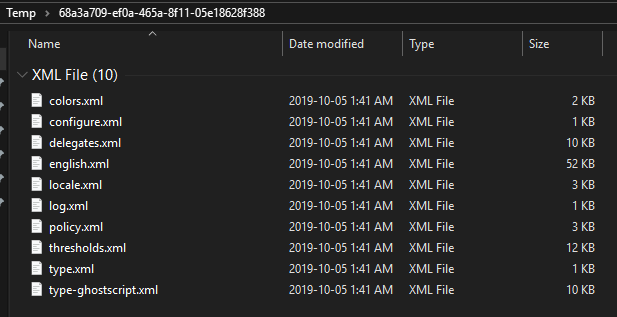
I am trying to retrieve the default configuration files but the initialization documentation has a broken link.
Using the following code I was able to get the default configuration when the tool is running but I do not see type-windows.xml in the list or in the physical directory, am I missing something?
denious
on 5 Oct 2019
The type-windows.xml file is not used in the Windows distribution that is created with Visual Studio. It might be used on something like cygwin but I am not sure. And for your case this would not matter because the issue is inside the libsrvg library. That library is not using that ImageMagick file. It is going to take a deep dive into that library to figure out why it fails.
Just took a quick peek inside the cairo library that is used to draw the fonts and it looks like this has support for FreeType and Win32 fonts. It might be possible that using FreeType instead could solve your issue but that will take quite some time to research and test.
dlemstra
on 6 Oct 2019
@dlemstra Isn't MSVG an internal ImageMagick renderer, independent from librsvg? Or is that what you mean by using cairo?
What do you think of Option 1 in this SO answer?
https://stackoverflow.com/questions/52634959/imagemagick-net-embedded-fonts?answertab=active#tab-top
I have control over which fonts will be used in the SVGs, so a short hard-coded list of fonts would be a fine solution.
denious
on 7 Oct 2019
The cairo library is used by the librsvg to do the rendering and that library uses Win32 (GDI) fonts. I have not tried option one but that might work. But the MSVG library is disabled by default and it should not be used when you have untrusted input.
dlemstra
on 7 Oct 2019
Input is 100% internal and trusted, how simple is it to enable MSVG?
denious
on 7 Oct 2019
You could do the following:
```C#
var configuration = ConfigurationFiles.Default;
configuration.Policy.Data = configuration.Policy.Data.Replace(@"
MagickNET.Initialize(configuration);
```
You will need to run this at the start of your project.
dlemstra
on 7 Oct 2019
With MSVG enabled, the font deployed and hardcoded, everything works as expected.
Thank you so much for your help, @dlemstra!
svgToGif.Read(svgStream, new MagickReadSettings
{
    Font = "ArialUnicodeMS.ttf",
    Format = MagickFormat.Msvg
});
Happy to hear that we were finally able to resolve this. Thank you for your patience 👍
dlemstra
on 7 Oct 2019
Related issues
 Anu6is
·
6Comments
Anu6is
·
6Comments
 tttrrryyyyeer
·
6Comments
tttrrryyyyeer
·
6Comments
 vlad-vi
·
4Comments
vlad-vi
·
4Comments
 itty53
·
4Comments
itty53
·
4Comments
 KylerJohnson26
·
4Comments
KylerJohnson26
·
4Comments