Magick.NET-Q16-AnyCPU v7.11.1
I load from net image and try create "MagickImage", but i catch next error:
using (var httpResponseStream = await httpResponse.Content.ReadAsStreamAsync())
{
    using (var image = new MagickImage(httpResponseStream))
    {
        var size = new MagickGeometry(width, height);
        image.Resize(size);
        image.Format = MagickFormat.Jpg;
        image.Write(outStream);
     }
}
ImageMagick.MagickCoderErrorException: TIFF directory is missing required "ImageLength" field. `MissingRequired' @ error/tiff.c/TIFFErrors/656
   at ImageMagick.NativeInstance.CheckException(IntPtr exception, IntPtr result)
   at ImageMagick.MagickImage.NativeMagickImage.ReadStream(MagickSettings settings, ReadWriteStreamDelegate reader, SeekStreamDelegate seeker, TellStreamDelegate teller)
   at ImageMagick.MagickImage.Read(Stream stream, MagickReadSettings readSettings, Boolean ping)


md5-2cd80299f87a19499154f21ea39d7473


using (var image = new MagickImage(path))
{
    var size = new MagickGeometry(width, height);
    image.Resize(size);
    image.Format = MagickFormat.Jpg;
    image.Write($"{path}_{image.Width}x{image.Height}.jpg");
}
I split file on part, please remove "zip" in the end.
sony_a7_iii_01.001.zip
sony_a7_iii_01.002.zip
sony_a7_iii_01.003.zip
sony_a7_iii_01.004.zip
 tttrrryyyyeer
All 6 comments
It looks like you are not resetting the position of your input stream: httpResponseStream.Position = 0;
 dlemstra
on 10 Apr 2019
dlemstra
on 10 Apr 2019
@dlemstra
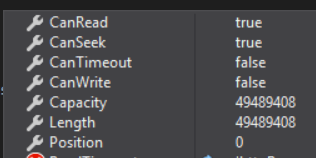
I try also httpResponseStream.Seek(0, SeekOrigin.Begin);
tttrrryyyyeer
on 10 Apr 2019
The ReadAsStreamAsync class is apparently doing this already. Have you tried doing a byte wise comparison to check if both streams contain the same data? Maybe something odd is happening in front of this?
dlemstra
on 10 Apr 2019
@dlemstra I was wrong, I'm sorry. the successful creation "MagickImage" only if loaded from file path on device. If try load from stream I catch error.
using (var image = new MagickImage(path))
{
var size = new MagickGeometry(width, height);
image.Resize(size);
image.Format = MagickFormat.Jpg;
image.Write($"{path}_{image.Width}x{image.Height}.jpg");
}
ImageMagick will try to guess the file format because you are reading from a stream and guesses that your file is a TIFF file. When reading from file it sees the .arw extension and knows your file is a RAW file. If you want to read from a stream you will need to tell Magick.NET the format of the file:
C#
var settings = new MagickReadSettings { Format = MagickFormat.Raw };
using (var image = new MagickImage(stream, settings))
{
}
dlemstra
on 11 Apr 2019
@dlemstra thank you, it works.
tttrrryyyyeer
on 15 Apr 2019
Related issues
 trong8820
·
8Comments
trong8820
·
8Comments
 0xRaf
·
7Comments
0xRaf
·
7Comments
 zygimantaskazlauskas
·
3Comments
zygimantaskazlauskas
·
3Comments
 vlad-vi
·
4Comments
vlad-vi
·
4Comments
 aleksandarveljanov
·
6Comments
aleksandarveljanov
·
6Comments
Most helpful comment
ImageMagick will try to guess the file format because you are reading from a stream and guesses that your file is a TIFF file. When reading from file it sees the
.arwextension and knows your file is a RAW file. If you want to read from a stream you will need to tell Magick.NET the format of the file:C# var settings = new MagickReadSettings { Format = MagickFormat.Raw }; using (var image = new MagickImage(stream, settings)) { }