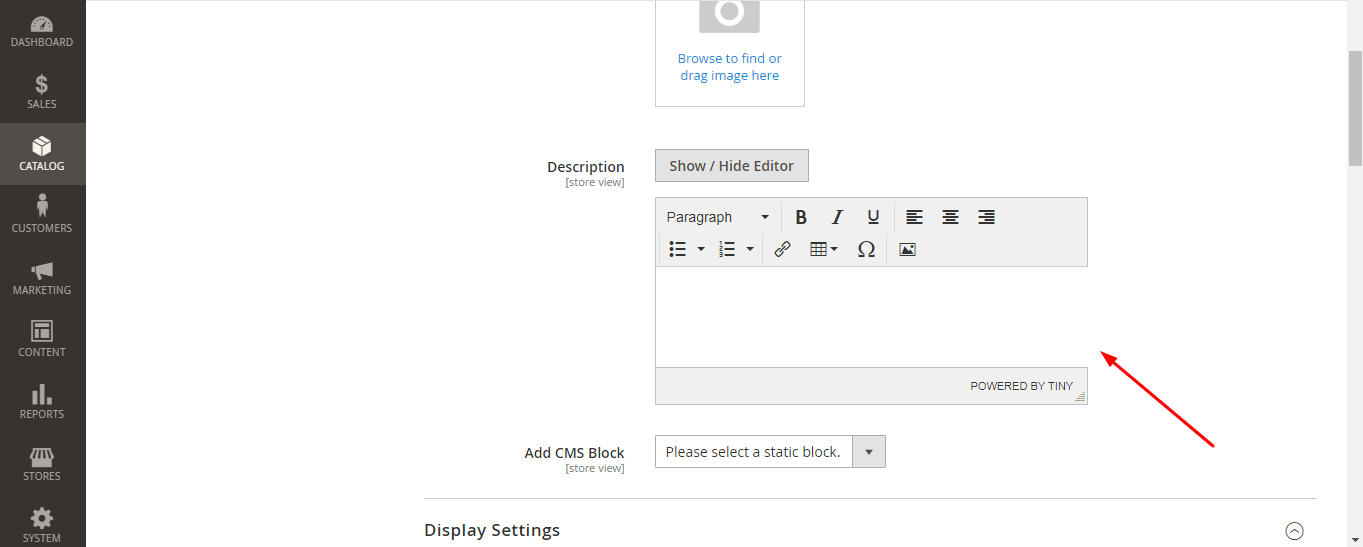
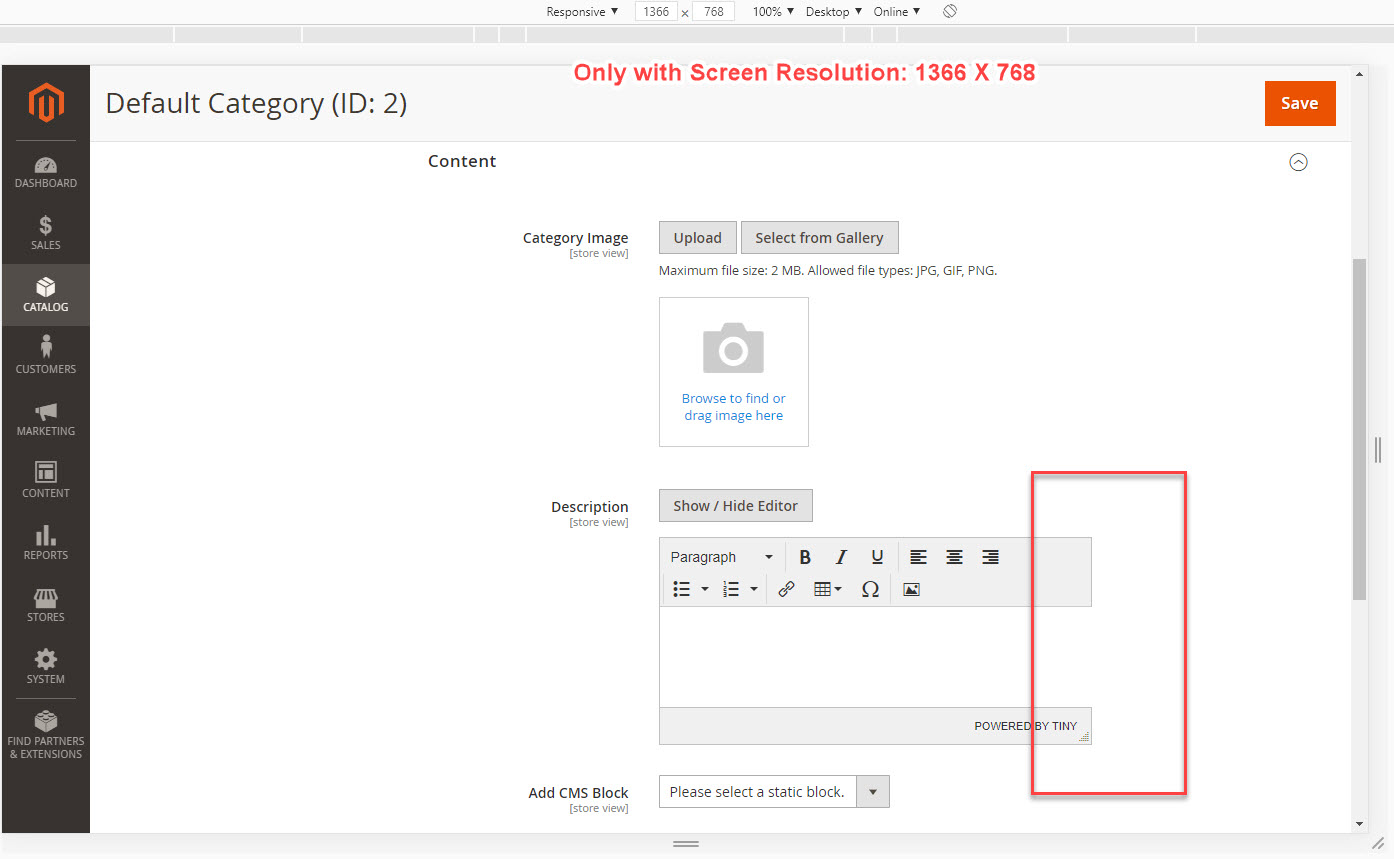
Magento2: Right side border not show in category description block in my screen 1366X768
Right side border not display in category description block in my screen 1366
Preconditions (*)
Chrome: Version 80.0.3987.163 (Official Build) (32-bit)
OS: Windows 7
Screen Resolution: 1366 X 768
Magento 2.3.4
Steps to reproduce (*)
Admin > Category > Edit any
Review the Description box
Expected result (*)
It should show appropriate
Actual result (*)
 renard123
All 13 comments
Hi @renard123. Thank you for your report.
To help us process this issue please make sure that you provided the following information:
- [ ] Summary of the issue
- [ ] Information on your environment
- [ ] Steps to reproduce
- [ ] Expected and actual results
Please make sure that the issue is reproducible on the vanilla Magento instance following Steps to reproduce. To deploy vanilla Magento instance on our environment, please, add a comment to the issue:
@magento give me 2.4-develop instance - upcoming 2.4.x release
For more details, please, review the Magento Contributor Assistant documentation.
@renard123 do you confirm that you were able to reproduce the issue on vanilla Magento instance following steps to reproduce?
- [ ] yes
- [ ] no
- Join Magento Community Engineering Slack and ask your questions in #github channel.
![m2-assistant[bot] picture](https://avatars0.githubusercontent.com/in/27048?v=4&s=40) m2-assistant[bot]
on 4 Apr 2020
m2-assistant[bot]
on 4 Apr 2020
Hi @krishprakash. Thank you for working on this issue.
In order to make sure that issue has enough information and ready for development, please read and check the following instruction: :point_down:
- [x] 1. Verify that issue has all the required information. (Preconditions, Steps to reproduce, Expected result, Actual result).
Details
If the issue has a valid description, the labelIssue: Format is validwill be added to the issue automatically. Please, edit issue description if needed, until labelIssue: Format is validappears.
[x] 2. Verify that issue has a meaningful description and provides enough information to reproduce the issue. If the report is valid, add
Issue: Clear Descriptionlabel to the issue by yourself.[x] 3. Add
Component: XXXXXlabel(s) to the ticket, indicating the components it may be related to.[x] 4. Verify that the issue is reproducible on
2.4-developbranchDetails
- Add the comment@magento give me 2.4-develop instanceto deploy test instance on Magento infrastructure.
- If the issue is reproducible on2.4-developbranch, please, add the labelReproduced on 2.4.x.
- If the issue is not reproducible, add your comment that issue is not reproducible and close the issue and _stop verification process here_![x] 5. Add label
Issue: Confirmedonce verification is complete.[x] 6. Make sure that automatic system confirms that report has been added to the backlog.
m2-assistant[bot]
on 4 Apr 2020
@magento give me 2.4-develop instance
 krishprakash
on 4 Apr 2020
krishprakash
on 4 Apr 2020
Hi @krishprakash. Thank you for your request. I'm working on Magento 2.4-develop instance for you
 magento-engcom-team
on 4 Apr 2020
magento-engcom-team
on 4 Apr 2020
Hi @krishprakash, here is your Magento instance.
Admin access: https://i-27573-2-4-develop.instances.magento-community.engineering/admin_df4d
Login: 808caee6 Password: a98f81b17c51
Instance will be terminated in up to 3 hours.
magento-engcom-team
on 4 Apr 2020
:white_check_mark: Confirmed by @krishprakash
Thank you for verifying the issue. Based on the provided information internal tickets MC-33091 were created
Issue Available: @krishprakash, _You will be automatically unassigned. Contributors/Maintainers can claim this issue to continue. To reclaim and continue work, reassign the ticket to yourself._
magento-engcom-team
on 4 Apr 2020
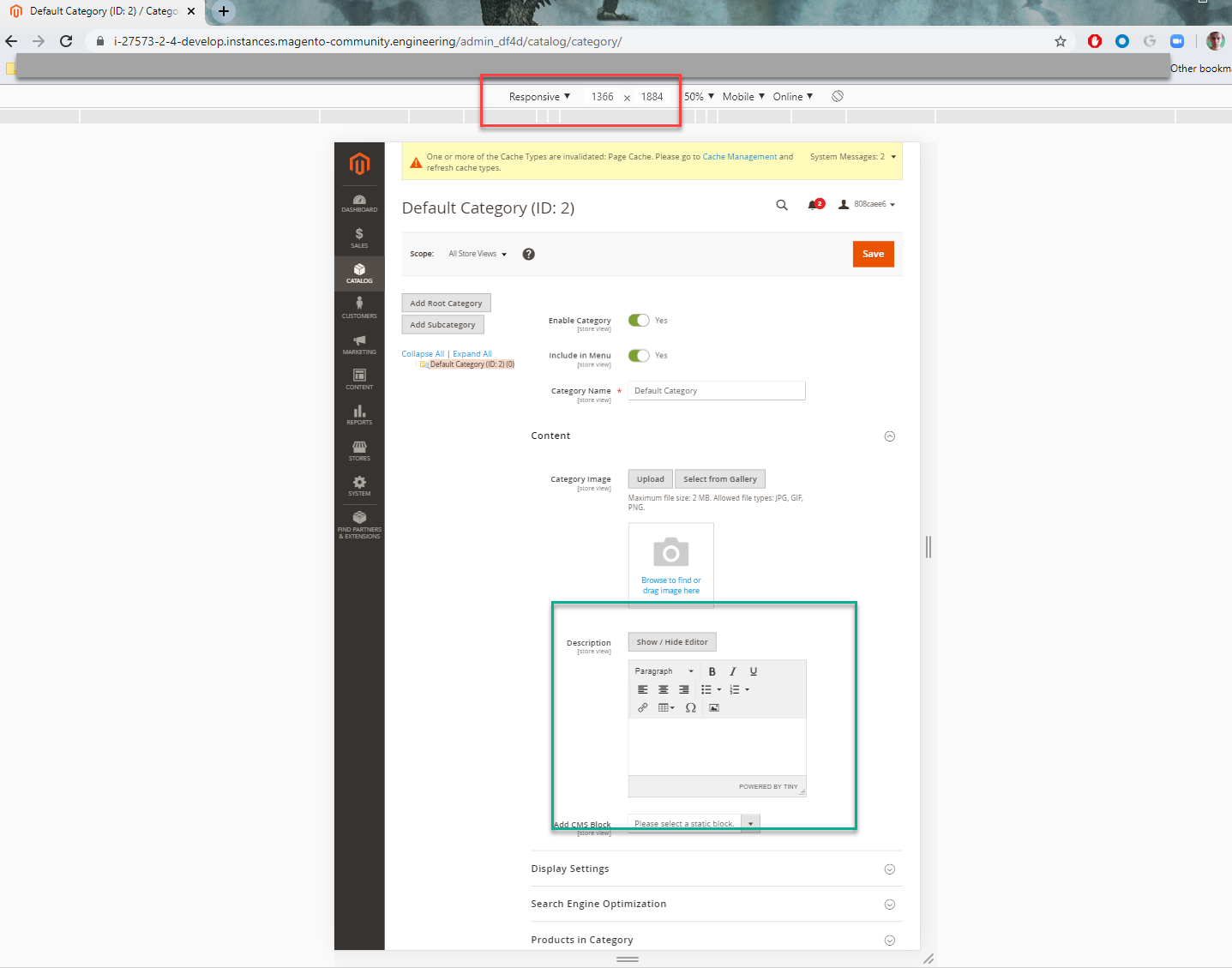
Hi @renard123. Looks fine in my screen view but when I update the screen resolution with 1366 Yes seems border not showing so approve this as It should display proper in all screen resolution
Thanks !!
krishprakash
on 4 Apr 2020
Hello @renard123 and @renard123
Could you please provide an exact screen resolution(browser etc) into the issue description?
 sdzhepa
on 4 Apr 2020
sdzhepa
on 4 Apr 2020
@sdzhepa Sure.
Chrome: Version 80.0.3987.163 (Official Build) (32-bit)
OS: Windows 7
Screen Resolution: 1366 X 768
renard123
on 4 Apr 2020
Hi @abrarpathan19. Thank you for working on this issue.
Looks like this issue is already verified and confirmed. But if you want to validate it one more time, please, go though the following instruction:
- [ ] 1. Add/Edit
Component: XXXXXlabel(s) to the ticket, indicating the components it may be related to.
[ ] 2. Verify that the issue is reproducible on
2.4-developbranchDetails
- Add the comment@magento give me 2.4-develop instanceto deploy test instance on Magento infrastructure.
- If the issue is reproducible on2.4-developbranch, please, add the labelReproduced on 2.4.x.
- If the issue is not reproducible, add your comment that issue is not reproducible and close the issue and _stop verification process here_![ ] 3. If the issue is not relevant or is not reproducible any more, feel free to close it.
- Join Magento Community Engineering Slack and ask your questions in #github channel.
m2-assistant[bot]
on 4 Apr 2020
Hi @david-ziffity. Thank you for working on this issue.
Looks like this issue is already verified and confirmed. But if you want to validate it one more time, please, go though the following instruction:
- [ ] 1. Add/Edit
Component: XXXXXlabel(s) to the ticket, indicating the components it may be related to.
[ ] 2. Verify that the issue is reproducible on
2.4-developbranchDetails
- Add the comment@magento give me 2.4-develop instanceto deploy test instance on Magento infrastructure.
- If the issue is reproducible on2.4-developbranch, please, add the labelReproduced on 2.4.x.
- If the issue is not reproducible, add your comment that issue is not reproducible and close the issue and _stop verification process here_![ ] 3. If the issue is not relevant or is not reproducible any more, feel free to close it.
- Join Magento Community Engineering Slack and ask your questions in #github channel.
m2-assistant[bot]
on 16 Apr 2020
Checked on the latest 2.4-develop
sdzhepa
on 27 Jul 2020
Hello @renard123
The issue has been reviewed and discussed during regular triage meeting with Product Managers.
Due to
- is not a functional issue - it does not break any functionality
- It is just cosmetic correction
- Magento officially does not support full mobile/tablet experience working with Admin Panel: https://devdocs.magento.com/guides/v2.4/install-gde/system-requirements_browsers.html
was decided to close this issue, as a very low priority
sdzhepa
on 30 Jul 2020
Related issues
 dmitry-fedyuk
·
3Comments
dmitry-fedyuk
·
3Comments
 kirashet666
·
3Comments
kirashet666
·
3Comments
 denis-g
·
3Comments
denis-g
·
3Comments
 andreaskoch
·
3Comments
andreaskoch
·
3Comments
 PushEngineering
·
3Comments
PushEngineering
·
3Comments
Most helpful comment
@sdzhepa Sure.
Chrome: Version 80.0.3987.163 (Official Build) (32-bit)
OS: Windows 7
Screen Resolution: 1366 X 768