Magento2: Dimensions missing from new product
Preconditions (*)
- Magento v2.3.3
Steps to reproduce (*)
- Magento Admin > Catalog > Products > Add new Product
Expected result (*)
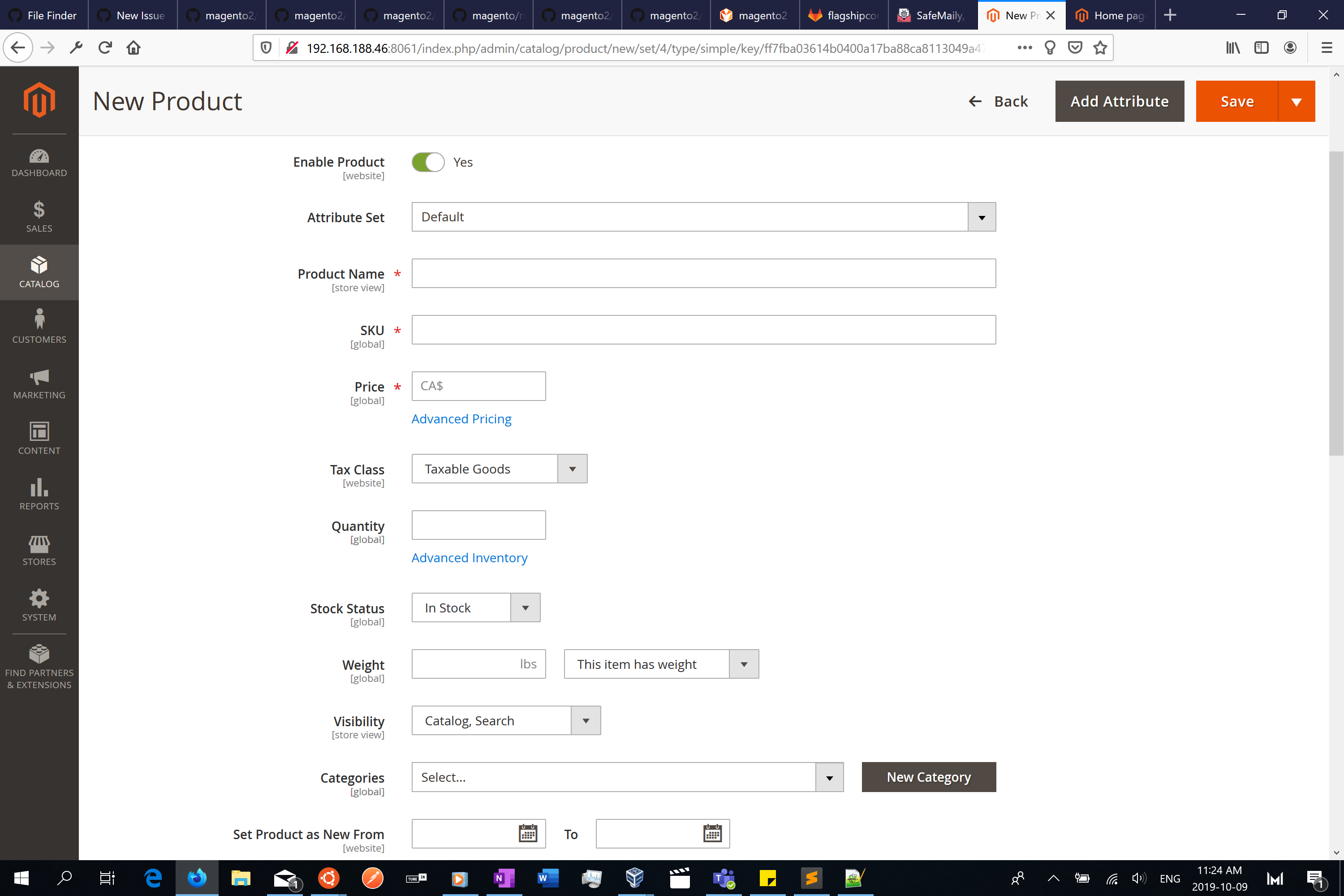
- Product attribute set 'Default' should show fields for Length, Width and Height
Actual result (*)
- Above mentioned fields are missing
Triage Note
- The issue is reproducible on
2.3.3release version - The issue is NOT reproducible on
2.3-develop 2.3.3is not merged into2.3-developat this moment
 radua
radua
All 21 comments
Hi @radua. Thank you for your report.
To help us process this issue please make sure that you provided the following information:
- [ ] Summary of the issue
- [ ] Information on your environment
- [ ] Steps to reproduce
- [ ] Expected and actual results
Please make sure that the issue is reproducible on the vanilla Magento instance following Steps to reproduce. To deploy vanilla Magento instance on our environment, please, add a comment to the issue:
@magento give me 2.3-develop instance - upcoming 2.3.x release
For more details, please, review the Magento Contributor Assistant documentation.
@radua do you confirm that you were able to reproduce the issue on vanilla Magento instance following steps to reproduce?
- [ ] yes
- [ ] no
- Join Magento Community Engineering Slack and ask your questions in #github channel.
![m2-assistant[bot] picture](https://avatars0.githubusercontent.com/in/27048?v=4&s=40) m2-assistant[bot]
on 9 Oct 2019
m2-assistant[bot]
on 9 Oct 2019
Hi @krishprakash. Thank you for working on this issue.
In order to make sure that issue has enough information and ready for development, please read and check the following instruction: :point_down:
- [x] 1. Verify that issue has all the required information. (Preconditions, Steps to reproduce, Expected result, Actual result).
Details
If the issue has a valid description, the labelIssue: Format is validwill be added to the issue automatically. Please, edit issue description if needed, until labelIssue: Format is validappears.
[x] 2. Verify that issue has a meaningful description and provides enough information to reproduce the issue. If the report is valid, add
Issue: Clear Descriptionlabel to the issue by yourself.[x] 3. Add
Component: XXXXXlabel(s) to the ticket, indicating the components it may be related to.[x] 4. Verify that the issue is reproducible on
2.3-developbranchDetails
- Add the comment@magento give me 2.3-develop instanceto deploy test instance on Magento infrastructure.
- If the issue is reproducible on2.3-developbranch, please, add the labelReproduced on 2.3.x.
- If the issue is not reproducible, add your comment that issue is not reproducible and close the issue and _stop verification process here_![x] 5. Add label
Issue: Confirmedonce verification is complete.[x] 6. Make sure that automatic system confirms that report has been added to the backlog.
m2-assistant[bot]
on 9 Oct 2019
@magento give me 2.3-develop instance
 drpayyne
on 10 Oct 2019
drpayyne
on 10 Oct 2019
Hi @drpayyne. Thank you for your request. I'm working on Magento 2.3-develop instance for you
 magento-engcom-team
on 10 Oct 2019
magento-engcom-team
on 10 Oct 2019
Hi @drpayyne, here is your Magento instance.
Admin access: https://i-24948-2-3-develop.instances.magento-community.engineering/admin
Login: admin Password: 123123q
Instance will be terminated in up to 3 hours.
magento-engcom-team
on 10 Oct 2019
Hi @radua.
You need to set scope as global for this attributes then after it display while add product.
Let me know is there anything
Thanks.
 krishprakash
on 11 Oct 2019
krishprakash
on 11 Oct 2019
hi @krishprakash ,
Thanks for your comment.
I did change the scope to global, still these fields were not visible.
radua
on 11 Oct 2019
:white_check_mark: Confirmed by @krishprakash
Thank you for verifying the issue. Based on the provided information internal tickets MC-21731 were created
Issue Available: @krishprakash, _You will be automatically unassigned. Contributors/Maintainers can claim this issue to continue. To reclaim and continue work, reassign the ticket to yourself._
magento-engcom-team
on 11 Oct 2019
@magento I am working on it
 vinay-chhabra
on 12 Oct 2019
vinay-chhabra
on 12 Oct 2019
Hi @vinay-chhabra. Thank you for working on this issue.
Looks like this issue is already verified and confirmed. But if you want to validate it one more time, please, go though the following instruction:
- [ ] 1. Add/Edit
Component: XXXXXlabel(s) to the ticket, indicating the components it may be related to.
[ ] 2. Verify that the issue is reproducible on
2.3-developbranchDetails
- Add the comment@magento give me 2.3-develop instanceto deploy test instance on Magento infrastructure.
- If the issue is reproducible on2.3-developbranch, please, add the labelReproduced on 2.3.x.
- If the issue is not reproducible, add your comment that issue is not reproducible and close the issue and _stop verification process here_![ ] 3. If the issue is not relevant or is not reproducible any more, feel free to close it.
- Join Magento Community Engineering Slack and ask your questions in #github channel.
m2-assistant[bot]
on 12 Oct 2019
@magento I am working on it
 webkul-deepak
on 12 Oct 2019
webkul-deepak
on 12 Oct 2019
Hi @webkul-deepak. Thank you for working on this issue.
Looks like this issue is already verified and confirmed. But if you want to validate it one more time, please, go though the following instruction:
- [ ] 1. Add/Edit
Component: XXXXXlabel(s) to the ticket, indicating the components it may be related to.
[ ] 2. Verify that the issue is reproducible on
2.3-developbranchDetails
- Add the comment@magento give me 2.3-develop instanceto deploy test instance on Magento infrastructure.
- If the issue is reproducible on2.3-developbranch, please, add the labelReproduced on 2.3.x.
- If the issue is not reproducible, add your comment that issue is not reproducible and close the issue and _stop verification process here_![ ] 3. If the issue is not relevant or is not reproducible any more, feel free to close it.
- Join Magento Community Engineering Slack and ask your questions in #github channel.
m2-assistant[bot]
on 12 Oct 2019
@vinay-chhabra can you please tell me when this issue will be fixed, any idea?
and will it be available in this release as a fix or it will be provided in new release ?
 dev-Z-Apx
on 24 Oct 2019
dev-Z-Apx
on 24 Oct 2019
I have Upgraded My Magento Version to 2.3.3 from 2.3.1,
Using this version I found the solution for LInk (href) Removal from all CMS Pages while using wynsing editor but all the Dimension fields got invisible, have you guys found any solution for this ?
 sagarppanchal
on 9 Jan 2020
sagarppanchal
on 9 Jan 2020
@sagarppanchal It is still under Dev at Magento end, however there is a temporary fix
just update the eav_attribute table and source_model = NULL WHERE attribute_code = 'ts_packaging_type'
it will make the attributes appear and working as it has to be.
dev-Z-Apx
on 10 Jan 2020
@dev-Z-Apx
Thank you so much for this Solution, this would be helpfull & work for me as of now.
I will also look forward to this issue and will let you guys know If can find anything related to this.
sagarppanchal
on 10 Jan 2020
@dev-Z-Apx
What I have done is inside SetupData.php by applying new attribute name(s).
> const ATTRIBUTE_CODE_LENGTH = 'temando_dimensions_length';
> const ATTRIBUTE_CODE_WIDTH = 'temando_dimensions_width';
> const ATTRIBUTE_CODE_HEIGHT = 'temando_dimensions_height';
Also I have Created respective Product Attributes with the Same Name.
and this worked for me.
Hope this would be helpful for others.
sagarppanchal
on 10 Jan 2020
Is there a solution to this? I’m on Magento 2.3.3 and my length, width, height aren’t populating when I creat a product
 gabrielxavila
on 12 Mar 2020
gabrielxavila
on 12 Mar 2020
Is there a solution to this? I’m on Magento 2.3.3 and my length, width, height aren’t populating when I creat a product
Hi @gabrielxavila Turns out so long as the attribute_code is ts_dimensions_length, it won't show. If you change the attribute_code to something else like dimensions_length or just length, the fields show up. You will have to do this change in the database. The same applies to width and height.
Hope this helps!
radua
on 16 Mar 2020
Is there a solution to this? I’m on Magento 2.3.3 and my length, width, height aren’t populating when I creat a product
Hi @gabrielxavila Turns out so long as the attribute_code is ts_dimensions_length, it won't show. If you change the attribute_code to something else like dimensions_length or just length, the fields show up. You will have to do this change in the database. The same applies to width and height.
Hope this helps!
Hello @radua can you elaborate on the best way to accomplish this please. I’m relatively new to Magento and can greatly use any help that comes my direction. My understanding is the only way to access or change the tables is through sql?
gabrielxavila
on 17 Mar 2020
Magento stops supporting of Temando module. Please see more details https://magento.com/shipping
Long story short:
- The extension owner does not work and support this module anymore.
- Magento will support "_existing customers until November 15, 2020_" only through the support channel associated with your Magento account.
- In the internal Magento backlog there is a ticket to completely remove Temando from Magento.
 sdzhepa
on 8 Oct 2020
sdzhepa
on 8 Oct 2020
Related issues
 kandrejevs
·
3Comments
kandrejevs
·
3Comments
 comunidademagento
·
3Comments
comunidademagento
·
3Comments
 salelsol
·
3Comments
salelsol
·
3Comments
 phirunson
·
3Comments
phirunson
·
3Comments
 kirashet666
·
3Comments
kirashet666
·
3Comments
Most helpful comment
@sagarppanchal It is still under Dev at Magento end, however there is a temporary fix
just update the eav_attribute table and source_model = NULL WHERE attribute_code = 'ts_packaging_type'
it will make the attributes appear and working as it has to be.