Magento2: Install Magento 2.3.0 : Install fail with unchecked some modules
Preconditions (*)
- Magento 2.3.0
- Wampserver 3.1.6 / Windows 10
- PHP 7.2.13
- Apache 2.4.35
- MySQL 5.7.23
Steps to reproduce (*)
- Download magento 2.3.0 with Composer and open browser to get setup wizard page
- Readiness Check approved
- Add DB
- Use normal settings, Magento generated key
- Uncheck some or all additional modules, or check them all, tried every variation
- Install
Expected result (*)
You'd expect with a clean install, an easy install.
Actual result (*)
I get error seen in the title, well, the first time i did.
Because after the error written down below I thought that maybe I needed to restart computer, that maybe some files of WAMP after upgrade PHP were not properly found,
After I did this I did not get the error below but you see the install not progressing, it stays at : Installing... 15%. Console Log shows that it hangs at: Module 'Magento_InventorySales':
The first time it did not hang but gave this message:
Unable to apply patch for module Magento_InventorySales. Original exception message: The store that was requested wasn't found. Verify the store and try again.
To be complete, this one:
Module 'Magento_InventorySales':
 alex4allofyou
All 18 comments
Hi @alex4allofyou. Thank you for your report.
To help us process this issue please make sure that you provided the following information:
- [ ] Summary of the issue
- [ ] Information on your environment
- [ ] Steps to reproduce
- [ ] Expected and actual results
Please make sure that the issue is reproducible on the vanilla Magento instance following Steps to reproduce. To deploy vanilla Magento instance on our environment, please, add a comment to the issue:
@magento-engcom-team give me $VERSION instance
where $VERSION is version tags (starting from 2.2.0+) or develop branches (for example: 2.3-develop).
For more details, please, review the Magento Contributor Assistant documentation.
@alex4allofyou do you confirm that you was able to reproduce the issue on vanilla Magento instance following steps to reproduce?
- [ ] yes
- [ ] no
 magento-engcom-team
on 19 Dec 2018
magento-engcom-team
on 19 Dec 2018
@magento-engcom-team give me 2.3.0 instance
alex4allofyou
on 19 Dec 2018
Hi @alex4allofyou. Thank you for your request. I'm working on Magento 2.3.0 instance for you
magento-engcom-team
on 19 Dec 2018
Hi @alex4allofyou, here is your Magento instance.
Admin access: https://i-19882-2-3-0.instances.magento-community.engineering/admin
Login: admin Password: 123123q
Instance will be terminated in up to 3 hours.
magento-engcom-team
on 19 Dec 2018
Did not know I had to reproduce it like this, of course I cannot, it is happening during install.
alex4allofyou
on 19 Dec 2018
@alex4allofyou,
Wampserver 3.1.6 / Windows 10
Can you reproduce an issue using a supported operating system: http://devdocs.magento.com/guides/v2.2/install-gde/system-requirements-tech.html? Please reopen then. Note that Windows is not in the list.
 orlangur
on 19 Dec 2018
orlangur
on 19 Dec 2018
@alex4allofyou,
Wampserver 3.1.6 / Windows 10
Can you reproduce an issue using a supported operating system: http://devdocs.magento.com/guides/v2.2/install-gde/system-requirements-tech.html? Please reopen then. Note that Windows is not in the list.
I have tested it.
Yes I have the same issue with Apache/2.4.6 CentOS with PHP 7.2.13. Hangs at Magento_InventorySales. Have tried many times.
alex4allofyou
on 22 Dec 2018
The Problem might be that the store ID was changed through a webserver configuration before the installation. At least that was causing this problem for me. Make sure your webserver sets the MAGE_RUN_CODE to "default" (or not at all) for the URL you're using for the installation process.
 simonspoerri
on 10 Jul 2019
simonspoerri
on 10 Jul 2019
@alex4allofyou sorry, missed your comment. Let's recheck. If you was able to figure out a root cause, please share your findings.
orlangur
on 10 Jul 2019
Hello @alex4allofyou. Update your newely Preconditions and Actual result
 engcom-Bravo
on 11 Jul 2019
engcom-Bravo
on 11 Jul 2019
Hi @engcom-Bravo. Thank you for working on this issue.
In order to make sure that issue has enough information and ready for development, please read and check the following instruction: :point_down:
- [ ] 1. Verify that issue has all the required information. (Preconditions, Steps to reproduce, Expected result, Actual result).
Details
If the issue has a valid description, the labelIssue: Format is validwill be added to the issue automatically. Please, edit issue description if needed, until labelIssue: Format is validappears.
[ ] 2. Verify that issue has a meaningful description and provides enough information to reproduce the issue. If the report is valid, add
Issue: Clear Descriptionlabel to the issue by yourself.[ ] 3. Add
Component: XXXXXlabel(s) to the ticket, indicating the components it may be related to.[ ] 4. Verify that the issue is reproducible on
2.3-developbranchDetails
- Add the comment@magento give me 2.3-develop instanceto deploy test instance on Magento infrastructure.
- If the issue is reproducible on2.3-developbranch, please, add the labelReproduced on 2.3.x.
- If the issue is not reproducible, add your comment that issue is not reproducible and close the issue and _stop verification process here_!
[ ] 5. Verify that the issue is reproducible on
2.2-developbranch.Details
- Add the comment@magento give me 2.2-develop instanceto deploy test instance on Magento infrastructure.
- If the issue is reproducible on2.2-developbranch, please add the labelReproduced on 2.2.x[ ] 6. Add label
Issue: Confirmedonce verification is complete.[ ] 7. Make sure that automatic system confirms that report has been added to the backlog.
![m2-assistant[bot] picture](https://avatars0.githubusercontent.com/in/27048?v=4&s=40) m2-assistant[bot]
on 11 Jul 2019
m2-assistant[bot]
on 11 Jul 2019
@magento give me 2.3-develop instance
engcom-Bravo
on 11 Jul 2019
Hi @engcom-Bravo. Thank you for your request. I'm working on Magento 2.3-develop instance for you
magento-engcom-team
on 11 Jul 2019
Hi @engcom-Bravo, here is your Magento instance.
Admin access: https://i-19882-2-3-develop.instances.magento-community.engineering/admin
Login: admin Password: 123123q
Instance will be terminated in up to 3 hours.
magento-engcom-team
on 11 Jul 2019
Hi @sdzhepa. Thank you for working on this issue.
In order to make sure that issue has enough information and ready for development, please read and check the following instruction: :point_down:
- [ ] 1. Verify that issue has all the required information. (Preconditions, Steps to reproduce, Expected result, Actual result).
Details
If the issue has a valid description, the labelIssue: Format is validwill be added to the issue automatically. Please, edit issue description if needed, until labelIssue: Format is validappears.
[ ] 2. Verify that issue has a meaningful description and provides enough information to reproduce the issue. If the report is valid, add
Issue: Clear Descriptionlabel to the issue by yourself.[ ] 3. Add
Component: XXXXXlabel(s) to the ticket, indicating the components it may be related to.[ ] 4. Verify that the issue is reproducible on
2.3-developbranchDetails
- Add the comment@magento give me 2.3-develop instanceto deploy test instance on Magento infrastructure.
- If the issue is reproducible on2.3-developbranch, please, add the labelReproduced on 2.3.x.
- If the issue is not reproducible, add your comment that issue is not reproducible and close the issue and _stop verification process here_!
[ ] 5. Verify that the issue is reproducible on
2.2-developbranch.Details
- Add the comment@magento give me 2.2-develop instanceto deploy test instance on Magento infrastructure.
- If the issue is reproducible on2.2-developbranch, please add the labelReproduced on 2.2.x[ ] 6. Add label
Issue: Confirmedonce verification is complete.[ ] 7. Make sure that automatic system confirms that report has been added to the backlog.
m2-assistant[bot]
on 11 Jul 2019
Hi @alex4allofyou . We can't reproduce this issue.
We tried on 4 computers and we never met such a problem.
Can you give more information and maybe more steps for testing scenario?
Thanks!
engcom-Bravo
on 16 Jul 2019
Hello @alex4allofyou
I close this issue as cannot reproduce because we are not able to reproduce it by provided steps.
 sdzhepa
on 30 Jul 2019
sdzhepa
on 30 Jul 2019
As @simonspoerri correctly pointed out, the issue is reproducible when non-existing store code is specified in a web server configuration.
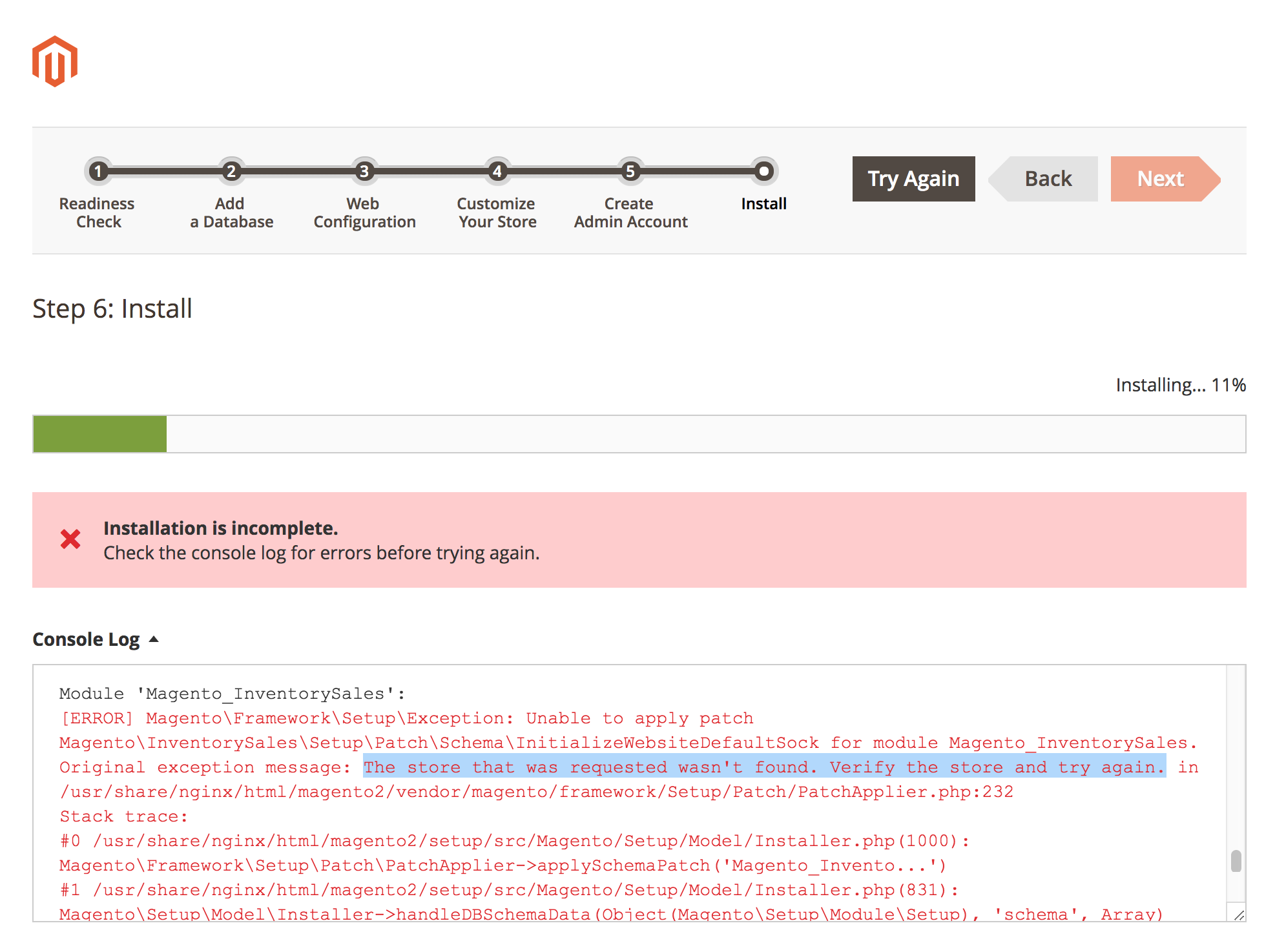
You may have something like this in the Nginx config:
map $host $MAGE_RUN_CODE {
    default                store1;
    store1.example.com     store1;
    store2.example.com     store2;
}
The issue is the Nginx misconfiguration and the fix would be:
map $host $MAGE_RUN_CODE {
    default                "";
    store1.example.com     store1;
    store2.example.com     store2;
}
 sshymko
on 23 Oct 2019
sshymko
on 23 Oct 2019
Related issues
 PascalBrouwers
·
3Comments
PascalBrouwers
·
3Comments
 ostmond
·
3Comments
ostmond
·
3Comments
 punkstar
·
3Comments
punkstar
·
3Comments
 phirunson
·
3Comments
phirunson
·
3Comments
 dmitry-fedyuk
·
3Comments
dmitry-fedyuk
·
3Comments
Most helpful comment
I have tested it.
Yes I have the same issue with Apache/2.4.6 CentOS with PHP 7.2.13. Hangs at Magento_InventorySales. Have tried many times.