Magento2: Magento Admin pages not fully loading and rendering when opened in the background
Preconditions
- Magento Version 2.2.3
- Chrome Version 66.0.3359.181 (Official Build) (64-bit)
Steps to reproduce
- Login to Magento Admin
- Navigate to Products
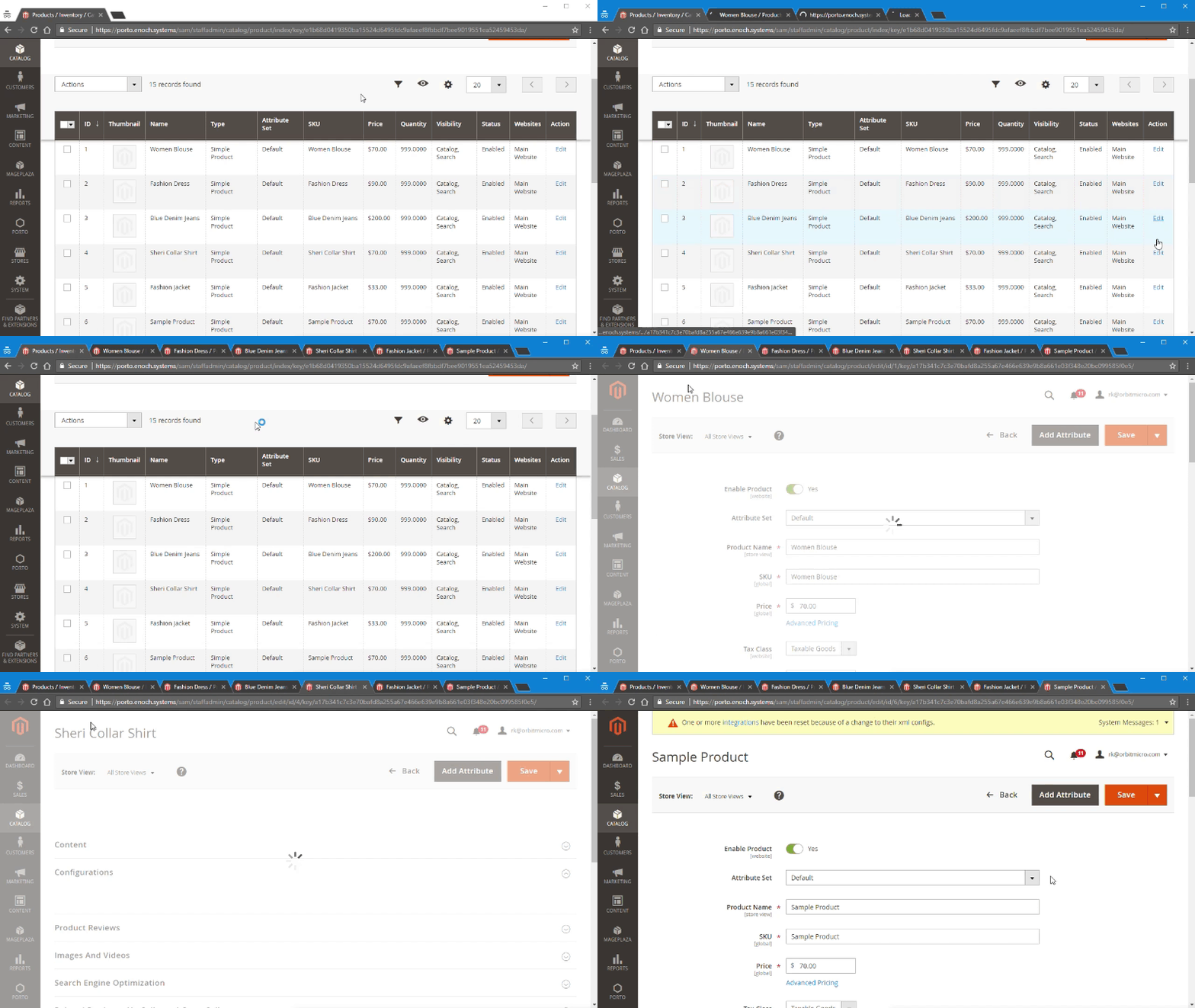
- Open multiple edit product links in new tabs
- Wait a few seconds for all loading indicators to stop spinning for new tabs
- Switch to new tabs that were opened
Expected result
- The new pages should fully load and render in the background.
- When switching to the new tab the page should be fully loaded and rendered.
Actual result
- When switching to the new tabs, the pages are not ready to go. They are not fully loaded and require a little more time for the product fields and information to populate.
 orbitrod
All 15 comments
I have done some more testing and I believe that this behavior might be exclusive to Chrome. Firefox and Edge do not behave this way. They fully load pages in the background.
Does anyone know why Chrome might be behaving this way vs the other browsers?
orbitrod
on 1 Jun 2018
Does anyone have any advice on how I can get these pages to load in the background?
orbitrod
on 7 Jun 2018
@orbitrod, thank you for your report.
We've acknowledged the issue and added to our backlog.
 ghost
on 19 Jul 2018
ghost
on 19 Jul 2018
Awesome, thank you for the update.
orbitrod
on 19 Jul 2018
@orbitrod I have found the same issue on Firefox too. I believe this is not browser specific It must be due to Magento 2 UI js behavior. I will work on it to find the exact reason behind it.
 shikhamis11
on 5 Dec 2018
shikhamis11
on 5 Dec 2018
Hi @shikhamis11. Thank you for working on this issue.
Looks like this issue is already verified and confirmed. But if your want to validate it one more time, please, go though the following instruction:
- [ ] 1. Add/Edit
Component: XXXXXlabel(s) to the ticket, indicating the components it may be related to.
[ ] 2. Verify that the issue is reproducible on
2.3-developbranchDetails
- Add the comment@magento-engcom-team give me 2.3-develop instanceto deploy test instance on Magento infrastructure.
- If the issue is reproducible on2.3-developbranch, please, add the labelReproduced on 2.3.x.
- If the issue is not reproducible, add your comment that issue is not reproducible and close the issue and _stop verification process here_!
[ ] 3. Verify that the issue is reproducible on
2.2-developbranch.Details
- Add the comment@magento-engcom-team give me 2.2-develop instanceto deploy test instance on Magento infrastructure.
- If the issue is reproducible on2.2-developbranch, please add the labelReproduced on 2.2.x[ ] 4. If the issue is not relevant or is not reproducible any more, feel free to close it.
 magento-engcom-team
on 5 Dec 2018
magento-engcom-team
on 5 Dec 2018
@magento-engcom-team give me 2.3-develop instance
orbitrod
on 9 Jan 2019
Hi @orbitrod. Thank you for your request. I'm working on Magento 2.3-develop instance for you
magento-engcom-team
on 9 Jan 2019
Hi @orbitrod, here is your Magento instance.
Admin access: https://i-15504-2-3-develop.instances.magento-community.engineering/admin
Login: admin Password: 123123q
Instance will be terminated in up to 3 hours.
magento-engcom-team
on 9 Jan 2019
Firefox
I have done some more testing and I believe that this behavior might be exclusive to Chrome. Firefox and Edge do not behave this way. They fully load pages in the background.
Does anyone know why Chrome might be behaving this way vs the other browsers?
Firefox clearly behaves the same. (Magento 2.3.3)
I'm annoyed by this ever since I switched from Magento 1.9 to Magento 2.1 (and later 2.2 and 2.3).
 MarcusWolschon
on 13 Dec 2019
MarcusWolschon
on 13 Dec 2019
"Assignees: No one assigned" after 1.5 years?
MarcusWolschon
on 18 Dec 2019
@MarcusWolschon Glad to see you on this issue. If we can get more people to confirm this problem, we might be able to get the attention of the developers to issue a fix.
orbitrod
on 18 Dec 2019
This poor design or a bug is still happening in 2.3.5-p1. Even more time is wasted when you do tracking on Sales > Orders page.
I will give you an example.
- Open an order to enter tracking information, once done click on Back button, page starts loading
- Switch to another tab to, for example, get tracking for another order
- Go make a coffee and get back after 15 minutes
- Open the tab showing Orders... it hasn't loaded at all!!!!
I am not sure how this "feature" is still in Magento 2, after 4 years. Small businesses running M2 do not have unlimited amount of time. Why would you stop loading pages when a tab is switched? Those 5-7 seconds it takes to load the Order page I can do "other" stuff. Those seconds add up when you do 10 hrs a day every in Magento 2. Countless hours are wasted waiting for page to load.
 Grumag
on 3 Jul 2020
Grumag
on 3 Jul 2020
just for the search folks:
you just have to add an template to the pages or global for every adminhtml page with "$(window).trigger('blur');".
tested with magento 2.3
_Custom/Module/view/adminhtml/layout/default.xml_
<?xml version="1.0"?>
<layout xmlns:xsi="http://www.w3.org/2001/XMLSchema-instance" xsi:noNamespaceSchemaLocation="urn:magento:framework:View/Layout/etc/layout_generic.xsd">
    <referenceContainer name="content">
        <block class="Magento\Backend\Block\Template" name="alway.blur" template="Custom_Module::blur.phtml"/>
    </referenceContainer>
</layout>
_Custom/Module/view/adminhtml/templates/blur.phtml_
<script type="text/javascript">
    require([
        'jquery'
    ], function ($) {
        window.setTimeout(function() {
            $(window).trigger('blur');
        }, 1000)
    });
</script>
 mklooss
on 23 Dec 2020
mklooss
on 23 Dec 2020
Yes, this is really annoying. Think of all the power users that have to work with magento every day.
I am just developing and I am already getting nervous twitches whenever I see a spinner on the screen.
 OvalMedia
on 23 Dec 2020
OvalMedia
on 23 Dec 2020
Related issues
 PascalBrouwers
·
3Comments
PascalBrouwers
·
3Comments
 BenSpace48
·
3Comments
BenSpace48
·
3Comments
 fvillata
·
3Comments
fvillata
·
3Comments
 ostmond
·
3Comments
ostmond
·
3Comments
 punkstar
·
3Comments
punkstar
·
3Comments
Most helpful comment
This poor design or a bug is still happening in 2.3.5-p1. Even more time is wasted when you do tracking on Sales > Orders page.
I will give you an example.
I am not sure how this "feature" is still in Magento 2, after 4 years. Small businesses running M2 do not have unlimited amount of time. Why would you stop loading pages when a tab is switched? Those 5-7 seconds it takes to load the Order page I can do "other" stuff. Those seconds add up when you do 10 hrs a day every in Magento 2. Countless hours are wasted waiting for page to load.