Magento2: [2.2.4] Back button is now labelled "Back to register or connect an account" everywhere
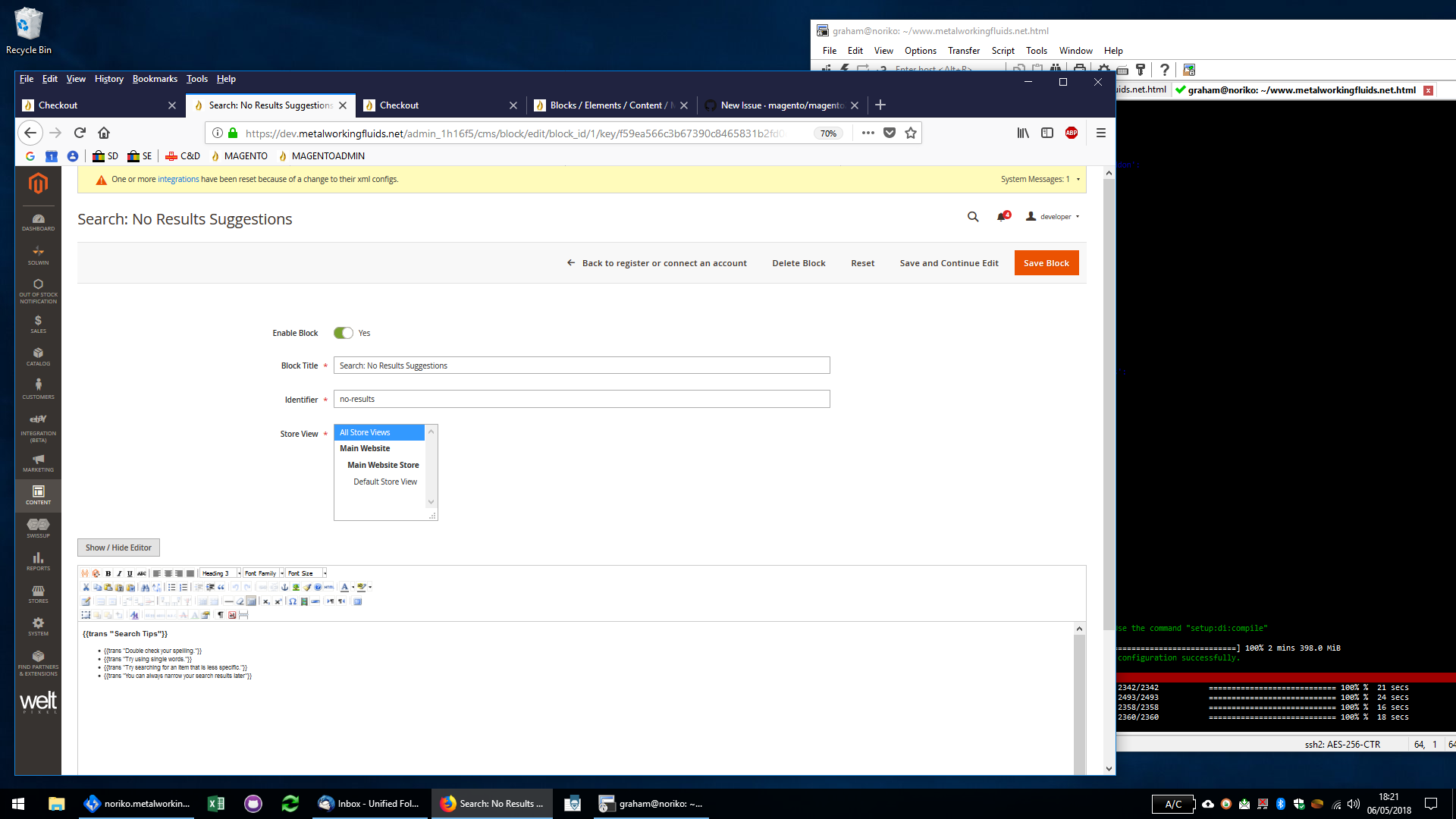
On any admin screen where there is a back button, it is now labelled "Back to register or connect an account" instead of "Back".
This is new behaviour in 2.2.4
Preconditions
- Stock Magento 2.2.4
Steps to reproduce
- Edit a product, Edit a block, Edit anything on a screen that has a back button.
Expected result
- The back button has the label "Back"
Actual result
- The back button has the label "Back to register or connect an account"
In the below example, I am editing a block.
 gwharton
All 19 comments
Issue:
I have checked and found that there is an issue in amazon payment library. This issue is fixed but that branch is not merged with master branch.
Amazon pay login library: https://github.com/amzn/amazon-payments-magento-2-plugin
Translation issue is fixed in pre_2.0.0_2018-02-21 branch: https://github.com/amzn/amazon-payments-magento-2-plugin/tree/pre_2.0.0_2018-02-21
This issue will be fixed after amazon will merge -> remove this line.
Translation issue is fixed in pre_2.0.0_2018-02-21 branch but not merged in master branch yet
Solution:
I have checked and found that there is an issue If we change "Back","Back to register or connect an account" to "Back","Back" in below file then it will work
 gelanivishal
on 7 May 2018
gelanivishal
on 7 May 2018
Can confirm this issue..
 craigcarnell
on 7 May 2018
craigcarnell
on 7 May 2018
I have applied the fix mentioned above, and can confirm that fixes the issue. Unless anyone has any objections I'll leave this issue open for now, otherwise we'll just get a barrage of duplicate issues raised until the fix is rolled out.
gwharton
on 7 May 2018
This seems to me to be a deeper issue than just editing the i18n file (as a local module "override" to revert this should work). I think I may have narrowed down part of the root issue, or the root itself.
During the creation of the translation dictionary there is this check:
        if ($key === $value) {
            continue;
        }
Which in 99% of the modules "Back" will always be translated to "Back" for english. When Amzn_Core overrides "Back" in the module, trying to "revert" it back to "Back" will fail because "Back" === "Back".
The simple solution I've found would be to check if the $key exists in the current dictionary and is strictly the same as the proposed value as well as if the $key is strictly the same as $value:
if ($key === $value && (!array_key_exists($key, $this->_data) || $this->_data[$key] === $value)) {
Since this is a "framework" issue, I'll just leave this here as to where I made the change to test that it worked.
magento/framework/Translate.php:314
 bap14
on 7 May 2018
bap14
on 7 May 2018
Same issue here.
 tomasmarcik
on 8 May 2018
tomasmarcik
on 8 May 2018
@bap14 did you do some bisecting to pinpoint the actual regression?
 DanielRuf
on 15 May 2018
DanielRuf
on 15 May 2018
@DanielRuf Yeah kind of. I just ended up tracing the translation piece back to where it loads the module and global translation files to determine why my module translation wasn't working. That's how I found how they are loaded and then followed them to how they're merged to find the logic bug when replacing with the same value as the key.
I'm not convinced this is the "correct" solution; however, since translation files are so simple to create and each module should provide one, it's acceptable to me. Ideally, the translations would be merged per-module and have a fallback to the default; however, that is probably too much overhead.
I checked out the GitHub repo, but didn't see an app/code/Magento/Framework folder, so I couldn't contribute a fix to it.
bap14
on 16 May 2018
Have you checked my above response? It will be fixed in future when Amazon library version is updated in Magento.
For temporary, we change "Back","Back to register or connect an account" to "Back","Back" in below file then it will work
- vendor/amzn/amazon-pay-and-login-magento-2-module/src/Core/i18n/en_GB.csv:79
- vendor/amzn/amazon-pay-and-login-magento-2-module/src/Core/i18n/en_US.csv:79
then deploy static content. It will work.
gelanivishal
on 16 May 2018
I saw your initial response. If you read my first comment, you'd see that I said "This seems to me to be a deeper issue [...]".
You should be allowed to change "Back" to "Back to register or create an account" in your module translation. What Amazon is doing is fixing the symptom, not the actual problem. The problem can be interpreted in one of two ways:
- There is no way to revert a translation back to itself once it's overridden by a module.
- Translations from other modules are interfering with the fallback relationship of translations in other modules.
Either way, just changing the translation to match all other modules isn't the solution to the real problem. The real problem(s) should be fixed. My suggested fix is interpreting the problem the first way.
I could easily see this same problem occurring when a third party developer wants to translate "Save", or some other often-used term, to something else and it affects all other modules. This isn't an Amazon extension issue, it's a framework issue and should be fixed in the framework, not just the translation file.
bap14
on 16 May 2018
Thanks for your fix @vgelani & thanks for your deeper insight @bap14 regarding the flaw in the framework itself. The point you've raised is quite valid indeed.
 evagabond
on 17 May 2018
evagabond
on 17 May 2018
Looking through the code, there is a js-translation.json file which literally ONLY translates the back button text to Back to register or connect an account
This definitely seems like a small mistake, but has significant consequences. This seems so easy to fix...
var/view_preprocessed/pub/static/adminhtml/Magento/backend/en_US/js-translation.json
{"Back":"Back to register or connect an account"}
I should note that even deleting the var/view_preprocessed folder, in developer mode, the js-translation.json file is regenerated.
Hope this helps.
 PivitParkour94
on 21 May 2018
PivitParkour94
on 21 May 2018
@PivitParkour94 You can find a better solution in above comment and no need to worry about deleting the var/view_preprocessed folder.
Thank you.
gelanivishal
on 21 May 2018
@PivitParkour94, It is possible to get back to the original situation by reverting the changes in the files
vendor/amzn/amazon-pay-and-login-magento-2-module/src/Core/i18n/en_GB.csv:79
vendor/amzn/amazon-pay-and-login-magento-2-module/src/Core/i18n/en_US.csv:79
as detailed above. However @bap14 correctly raises the wider issue that it should not have been possible for a single module to override a translation and have this applied system wide. If Magento had been working as designed, the changes to the Amazon button labels should have applied only to the Amazon screens and not system wide, so although reverting the changes in the amazon translation files appears to fix the problem, it is only masking an underlying problem, that is sure to rear its head again in the future if not fixed.
gwharton
on 21 May 2018
This shows the quality of QA testing of Magento when such an obvious bug like this gets deployed. It was the first thing I noticed when I logged into Magento admin after deploying 2.2.4. What's almost worse, is that we'll have to wait several months for this to be fixed without patching it ourselves.
 ctadlock
on 21 May 2018
ctadlock
on 21 May 2018
@gwharton and @vgelani,
You are right, those solutions work but they are extremely tacky and I was hoping for a more elegant solution, that addresses the root issue of the js-translation.json file being generated.
The adjusting of the vendor files is such bad practise and unfortunate that we are left with issues as simple as this, that require an entirely new deployment process to fix.
Guess Magento2 Dev will be a bandage the holes as it develops for a while. Such is life as a Magento 2 developer I guess.
PivitParkour94
on 23 May 2018
@PivitParkour94 I believe the js-translation.json file is generated based on the current translation inheritance for the module. So the solution I proposed, which fixes how the framework deals with "overriding" the "Back" value in your module, should mean the js-translation.json file is generated with the correct translations for each module as well.
bap14
on 23 May 2018
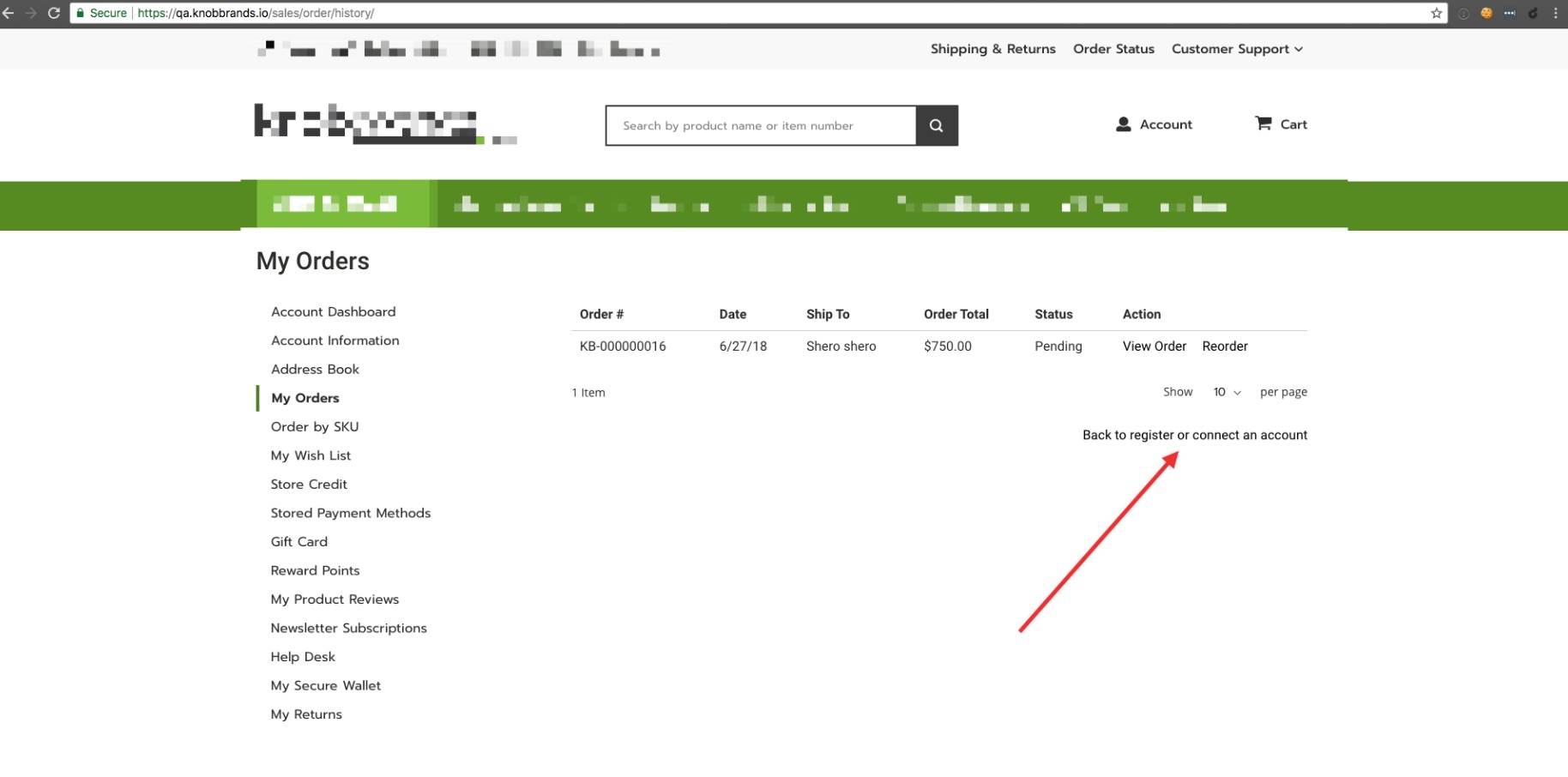
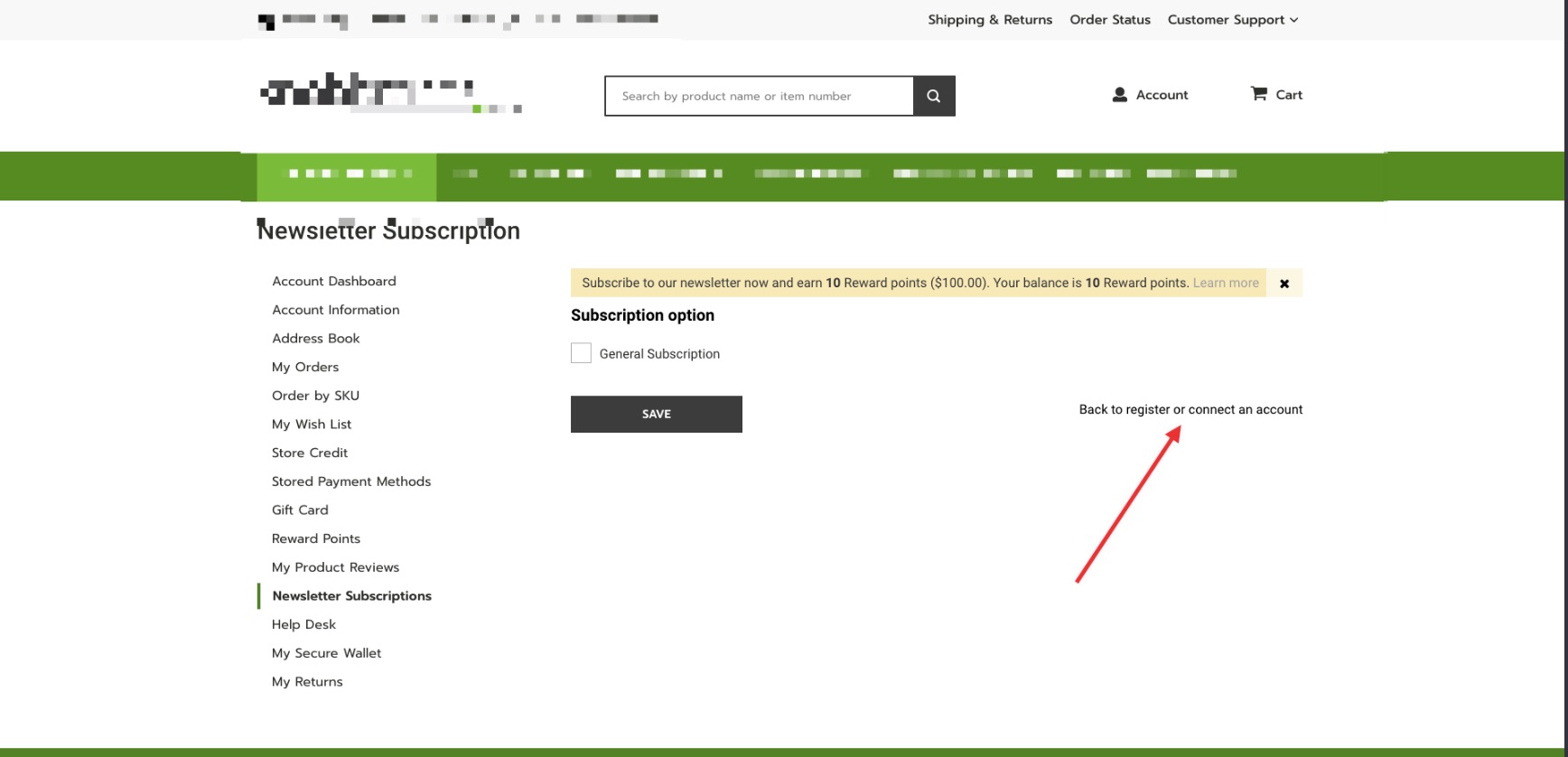
The same sentence shows up on the front end also on all the account dashboard [ages
 ArdjanShero
on 27 Jun 2018
ArdjanShero
on 27 Jun 2018
I dont think it helps that github installs (where most, if not all testing is done) does not have the amazon payment module installed by default, hence why this was never picked up in testing.
gwharton
on 27 Jun 2018
@gwharton. thank you for your report. This issue already fixed in magento 2.2.5
 engcom-backlog-nickolas
on 24 Jul 2018
engcom-backlog-nickolas
on 24 Jul 2018
Related issues
 fvillata
·
3Comments
fvillata
·
3Comments
 BenSpace48
·
3Comments
BenSpace48
·
3Comments
 PascalBrouwers
·
3Comments
PascalBrouwers
·
3Comments
 xi-ao
·
3Comments
xi-ao
·
3Comments
 kandrejevs
·
3Comments
kandrejevs
·
3Comments
Most helpful comment
This shows the quality of QA testing of Magento when such an obvious bug like this gets deployed. It was the first thing I noticed when I logged into Magento admin after deploying 2.2.4. What's almost worse, is that we'll have to wait several months for this to be fixed without patching it ourselves.