Magento2: Magento 2 Fresh Install - Admin can't add/view products, categories, pages, etc.
Preconditions
- Fresh Ubuntu 16.04 LTS install
- PHP 7.0.22
- MySQL 5.7.20
- Apache 2.4.18
- Fresh Magento 2.2.2 Install
Steps to reproduce
- Install Magento (I have tried via browser and composer, with or without sample data)
- Launch and login to admin
- Navigate to Catalog > Products
Expected result
- On another machine I see products at this point, and if I click Add Product I get a form. Same thing with categories, or pages.
Actual result
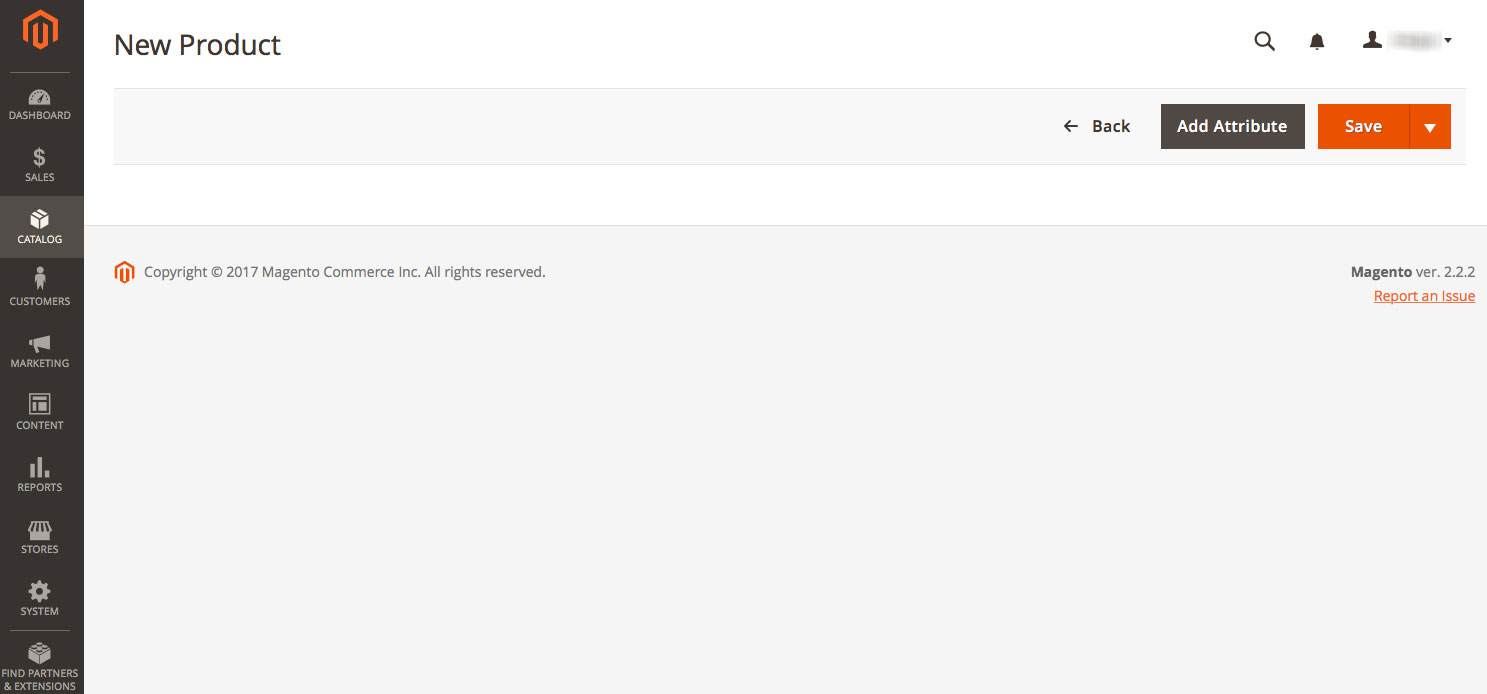
- I see the spinner for a few seconds and then, nothing. There are no apache errors or errors in the javascript console. Also happens whether or not the sample data is loaded. The front end of the store shows all the products and pages as expected.
Here are some screenshots.

 macguydvd
All 2 comments
When in doubt, execute this giant pile of commands and try again. We have to do this non stop during development.
rm -rf var/di var/generation generated/code
Clean and Rebuild
php bin/magento cache:clean
php bin/magento cache:flush
php bin/magento setup:upgrade
php bin/magento setup:di:compile
php bin/magento indexer:reindex
php bin/magento setup:static-content:deploy
Reset Permissions
chown <user>:<group> -R *
find . -type f -exec chmod 644 {} \;
find . -type d -exec chmod 755 {} \;
find ./var -type d -exec chmod 777 {} \;
find ./pub/media -type d -exec chmod 777 {} \;
find ./pub/static -type d -exec chmod 777 {} \;
chmod 777 ./app/etc
chmod 644 ./app/etc/*.xml
 mombrea
on 27 Dec 2017
mombrea
on 27 Dec 2017
Thanks for the suggestions, there are a few there I wasn't already using and I'm sure they will come in handy. Of course after several days of trying to figure this out, the answer presented itself as soon as I posted an issue here.
For me the problem was mod_pagespeed, specifically the command:
ModPagespeedEnableFilters pedantic,remove_comments
This was inserted based upon a tutorial online and as soon as I commented it out, everything came to life on the admin side of Magento.
Thanks again for the great list of Magento tools!
macguydvd
on 28 Dec 2017
Related issues
 andreaskoch
·
3Comments
andreaskoch
·
3Comments
 algostore
·
3Comments
algostore
·
3Comments
 comunidademagento
·
3Comments
comunidademagento
·
3Comments
 phirunson
·
3Comments
phirunson
·
3Comments
 PascalBrouwers
·
3Comments
PascalBrouwers
·
3Comments
Most helpful comment
Thanks for the suggestions, there are a few there I wasn't already using and I'm sure they will come in handy. Of course after several days of trying to figure this out, the answer presented itself as soon as I posted an issue here.
For me the problem was mod_pagespeed, specifically the command:
ModPagespeedEnableFilters pedantic,remove_commentsThis was inserted based upon a tutorial online and as soon as I commented it out, everything came to life on the admin side of Magento.
Thanks again for the great list of Magento tools!