Magento2: Magento 2.2.2 update gives error 500
After I updated from Magento 2.2.1 to 2.2.2 my Website is not working any longer. Its giving internal server error 500.
Preconditions
Magento 2.2.2
PHP 7.0.
Steps to reproduce
Go to admin and load web setup wizard to upgrade magento 2.2
Expected result
Website should load without any errors
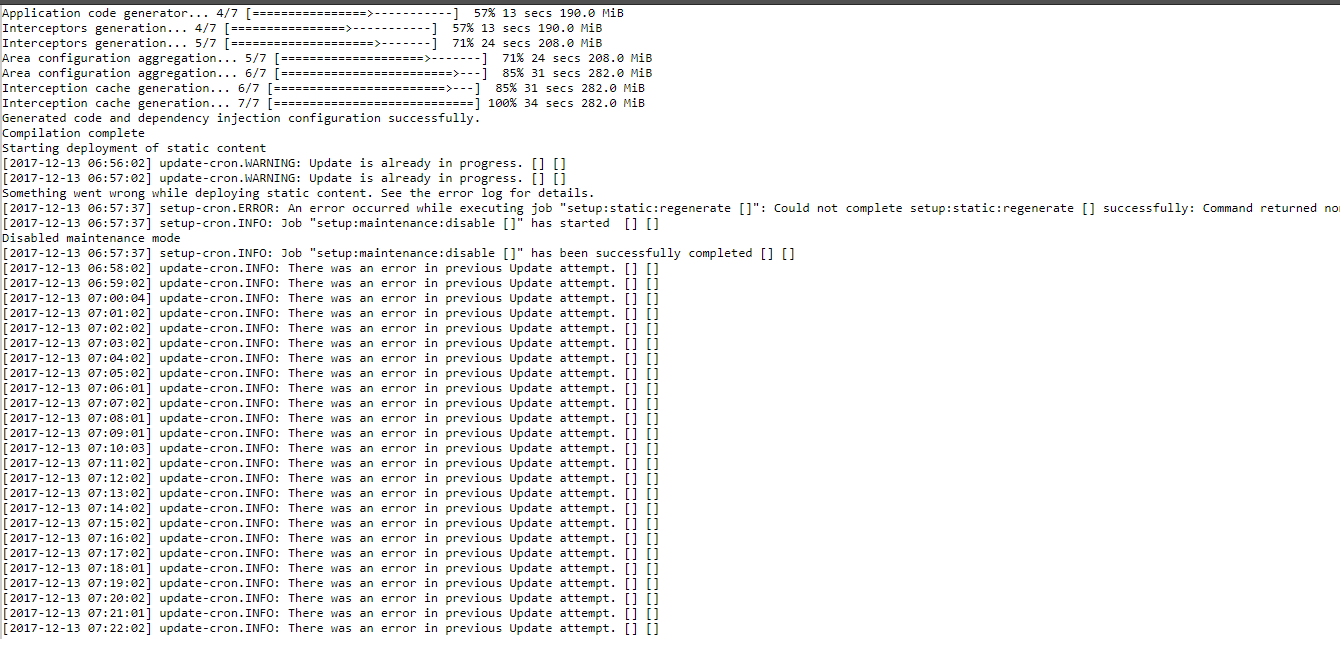
Actual result

 terrybakshi
All 22 comments
terrybakshi
on 14 Dec 2017
@magento-engcom-team I'm experiencing the same issue when upgrading from 2.2.1 to 2.2.2. 500 Internal Server Error. Renaming the .htaccess file will then allow the page to load but all the file assets 500 anyway. Any help to get this resolved asap would be greatly appreciated as we need to upgrade to the latest version for all the fixes and enhancements. Thanks, Tony
 tonybrown85
on 14 Dec 2017
tonybrown85
on 14 Dec 2017
Facing same problem
 webazad
on 15 Dec 2017
webazad
on 15 Dec 2017
I had the same problem.
The issue was with apache. It did not have the module "mod_version" installed.
Also, you might want to replace
############################################
## adjust memory limit
    php_value memory_limit 756M
    php_value max_execution_time 18000

############################################
## disable automatic session start
## before autoload was initialized

    php_flag session.auto_start off

############################################
## enable resulting html compression

    #php_flag zlib.output_compression on

###########################################
## disable user agent verification to not break multiple image upload

    php_flag suhosin.session.cryptua off
with
<IfModule mod_php5.c>
############################################
## adjust memory limit
    php_value memory_limit 756M
    php_value max_execution_time 18000

############################################
## disable automatic session start
## before autoload was initialized

    php_flag session.auto_start off

############################################
## enable resulting html compression

    #php_flag zlib.output_compression on

###########################################
## disable user agent verification to not break multiple image upload

    php_flag suhosin.session.cryptua off
</IfModule>
 bvboas
on 15 Dec 2017
bvboas
on 15 Dec 2017
@terrybakshi , thank for you report.
When facing a 500 error the first thing you should do is search for your webserver error log. When running on apache it can mostly be found in one of these 2 locations:
/var/log/httpd/ -> centos, archlinux ...
/var/log/apache2/ -> debian, ubuntu ...
 magento-engcom-team
on 15 Dec 2017
magento-engcom-team
on 15 Dec 2017
Thank you @bvboas I will give that a try. Much appreciated!
tonybrown85
on 15 Dec 2017
was able to fix the issue by turning on the module "mod_version" on apache no more error 500 while update or on checkout page so far
terrybakshi
on 16 Dec 2017
@terrybakshi , thanks for you update.
Please refer to the Community Forums or the Magento Stack Exchange site for advice or general discussion about this issue. The GitHub issue tracker is intended for Magento Core technical issues only.
magento-engcom-team
on 18 Dec 2017
@bvboas thanks.. I uncommented mod_version and it works now :)
Took me few hours to solve this :/
 Almusamim
on 26 Dec 2017
Almusamim
on 26 Dec 2017
unfortunately, I don't have have access to apache module on my hosting and I can't change or enable mod_version.
Hoe can i resolve it?
 gino-g
on 12 Jan 2018
gino-g
on 12 Jan 2018
@gino-g edit the .htaccess file and find the code similar to (there are multiple instances):
<Files auth.json>
<IfVersion < 2.4>
order allow,deny
deny from all
</IfVersion>
<IfVersion >= 2.4>
Require all denied
</IfVersion>
</Files>
If your apache version is equal or greater to 2.4, leave these lines:
<Files auth.json>
Require all denied
</Files>
If your apache version is lower than 2.4, leave these lines:
<Files auth.json>
order allow,deny
deny from all
</Files>
@bvboas
Hi,
Thank you for a quick response but unfortunately for me, even after removing the section 1
Require all denied
(my apache is 2.4.3-25) it did not work.
Changed my php to 7.1, even that did not help.
My upgrade was smooth and I can still execute all SSH commands but i wonder what went so wrong?
Any help getting it up would really mean a lot ..
Thank you again.
gino-g
on 12 Jan 2018
Hi,
I tried generating the same error on my localhost by commenting mod_version and I was not able to get the same 500 Internal server Error.
So, I am really not sure it is this one thing which is holding back the webpage..
Can someone guide me?
gino-g
on 15 Jan 2018
you are the boss, mod_version was the issue , thanks
 paginasweb
on 1 Mar 2018
paginasweb
on 1 Mar 2018
cPanel Solution

 Jamesyahugh
on 4 Mar 2018
Jamesyahugh
on 4 Mar 2018
This still exists on 2.2.4...I can't find mod_version and I'm hosted with siteground. Any advice?
 Ctucker9233
on 8 Jun 2018
Ctucker9233
on 8 Jun 2018
@magento-engcom-team This is still an issue. I checked with my hosting service and they tell me that the server is configured correctly.
Ctucker9233
on 8 Jun 2018
To Enable Apache or PHP Modules Using EasyApache
Log in to WHM as the 'root' user.
In the Find box type easy.
Click EasyApache (Apache Update).
Leave default, and then click the gear icon (Customize Profile).
Leave default, and then click Next Step.
Click Exhaustive Options List.
Click the name of the Apache or PHP module, and then click Save and build.
terrybakshi
on 9 Jun 2018
Please try to remove unnecessary data from .htaccess, You will defensively solved.
 Karanp13
on 9 Jul 2018
Karanp13
on 9 Jul 2018
@terrybakshi, thank you for your report.
We were not able to reproduce this issue by following the steps you provided. If you'd like to update it, please reopen the issue.
 ghost
on 3 Aug 2018
ghost
on 3 Aug 2018
I had the same problem.
The issue was with apache. It did not have the module "mod_version" installed.
Also, you might want to replace
############################################
## adjust memory limit
    php_value memory_limit 756M
    php_value max_execution_time 18000

############################################
## disable automatic session start
## before autoload was initialized

    php_flag session.auto_start off

############################################
## enable resulting html compression

    #php_flag zlib.output_compression on

###########################################
## disable user agent verification to not break multiple image upload

    php_flag suhosin.session.cryptua off
with
<IfModule mod_php5.c>
############################################
## adjust memory limit
    php_value memory_limit 756M
    php_value max_execution_time 18000

############################################
## disable automatic session start
## before autoload was initialized

    php_flag session.auto_start off

############################################
## enable resulting html compression

    #php_flag zlib.output_compression on

###########################################
## disable user agent verification to not break multiple image upload

    php_flag suhosin.session.cryptua off
</IfModule>
this is works, thanks you
 binamandiri
on 15 Sep 2018
binamandiri
on 15 Sep 2018
hi
i am facing error on magento 2 for installation on my vps my mod_version is also enable which i enable through WHM but when i am renaming my htaccess on my vps installation running but css and other settings nothing showing as pr theme however this theme is working fine on my localhost
i am sharing my htaccess which is on live anyone can help me plz?
htaccess(1).zip
 imranbashirseo
on 2 Dec 2019
imranbashirseo
on 2 Dec 2019
Related issues
 ostmond
·
3Comments
ostmond
·
3Comments
 phirunson
·
3Comments
phirunson
·
3Comments
 kirashet666
·
3Comments
kirashet666
·
3Comments
 BenSpace48
·
3Comments
BenSpace48
·
3Comments
 spyrule
·
3Comments
spyrule
·
3Comments
Most helpful comment
I had the same problem.
The issue was with apache. It did not have the module "mod_version" installed.
Also, you might want to replace
with