Magento2: Not able to view contents after clicking on System->Web Setup Wizard Magento 2.2
Grabbed Magento 2.2 using composer using below command:
sudo composer create-project --repository-url=https://repo.magento.com/ magento/project-community-edition /var/www/xxx.xxxx.com/public_html/
and then installed using below command:
sudo php bin/magento setup:install --admin-firstname "xxxxx" --admin-lastname "xxxxx" --admin-email "[email protected]" --admin-user "admin" -
-admin-password "xxxxx" --base-url "http://xxx.xxxx.com" --backend-frontname "admin123" --db-host "localhost" --db-name "xxxx" --db-user "xxxx" --db-password "xxxx" --language=en_US --currency=US
D --timezone=America/Chicago --use-rewrites=1
Preconditions
- Ubuntu 16.04
- PHP 7.0.22-0ubuntu0.16.04.1 (cli) ( NTS )
- Magento 2.2
Steps to reproduce
- On complete installation frontend and backend works just fine.
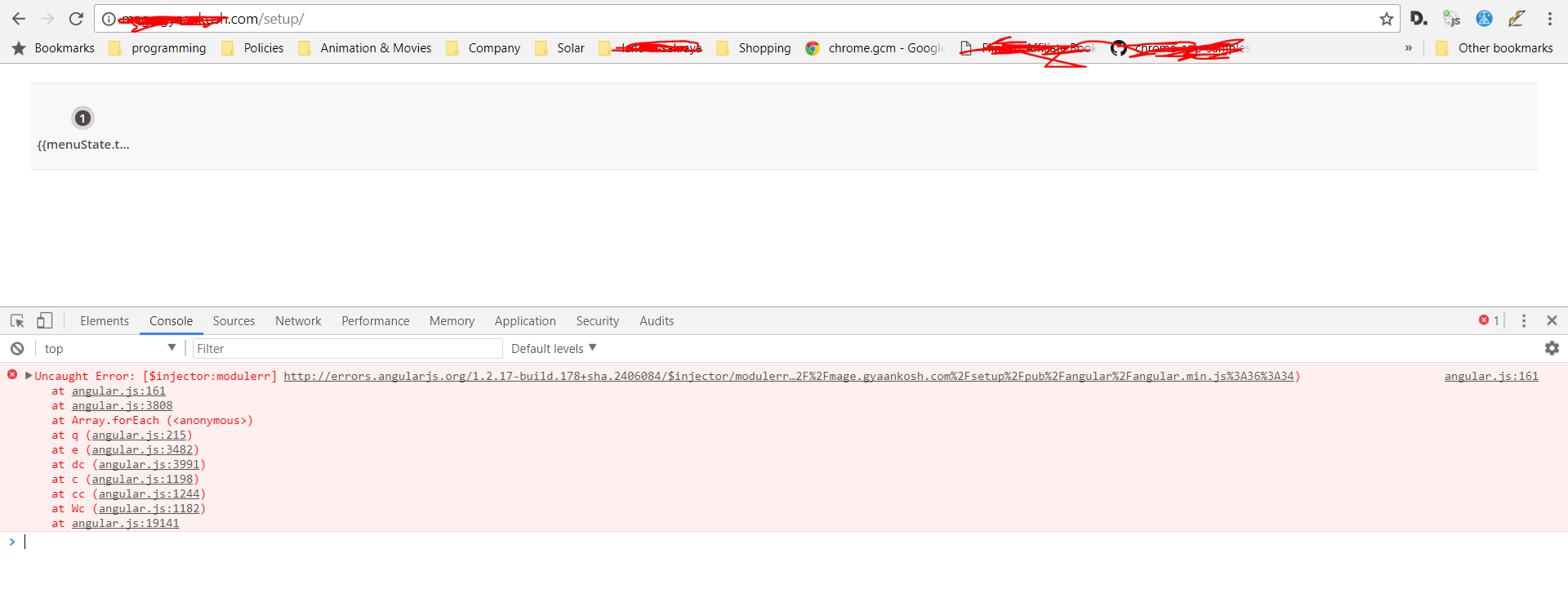
- However clicking on menu System->Web Setup Wizard, results into screen similar to shown in the image attached.
- It has some angular js related error as shown in image.
Expected result
- It should work find with 3-4 boxes to install extensions, system upgrade, etc.
Actual result
- Getting weird screen as shown in the image with below javascript error:
angular.js:161 Uncaught Error: [$injector:modulerr] http://errors.angularjs.org/1.2.17-build.178+sha.2406084/$injector/modulerr?p0=magentoSetup&p1=Error%3A%20%5B%24injector%3Amodulerr%5D%20http%3A%2F%2Ferrors.angularjs.org%2F1.2.17-build.178%2Bsha.2406084%2F%24injector%2Fmodulerr%3Fp0%3Dcomponent-grid%26p1%3DError%253A%2520%255B%2524injector%253Anomod%255D%2520http%253A%252F%252Ferrors.angularjs.org%252F1.2.17-build.178%252Bsha.2406084%252F%2524injector%252Fnomod%253Fp0%253Dcomponent-grid%250A%2520%2520%2520%2520at%2520http%253A%252F%252Fxxx.gxxxx.com%252Fsetup%252Fpub%252Fangular%252Fangular.min.js%253A6%253A472%250A%2520%2520%2520%2520at%2520http%253A%252F%xxx.gyaankosh.com%252Fsetup%252Fpub%252Fangular%252Fangular.min.js%253A20%253A260%250A%2520%2520%2520%2520at%2520http%253A%252F%252Fxxx.gxxxx.com%252Fsetup%252Fpub%252Fangular%252Fangular.min.js%253A21%253A262%250A%2520%2520%2520%2520at%2520http%253A%252F%252Fxxx.gxxxx.com%252Fsetup%252Fpub%252Fangular%252Fangular.min.js%253A33%253A1%250A%2520%2520%2520%2520at%2520Array.forEach%2520(%253Canonymous%253E)%250A%2520%2520%2520%2520at%2520q%2520(http%253A%252F%252Fxxx.gxxxx.com%252Fsetup%252Fpub%252Fangular%252Fangular.min.js%253A7%253A298)%250A%2520%2520%2520%2520at%2520e%2520(http%253A%252F%252Fxxx.gxxxx.com%252Fsetup%252Fpub%252Fangular%252Fangular.min.js%253A32%253A445)%250A%2520%2520%2520%2520at%2520http%253A%252F%252Fxxx.gxxxx.com%252Fsetup%252Fpub%252Fangular%252Fangular.min.js%253A33%253A18%250A%2520%2520%2520%2520at%2520Array.forEach%2520(%253Canonymous%253E)%250A%2520%2520%2520%2520at%2520q%2520(http%253A%252F%252Fxxx.gxxxx.com%252Fsetup%252Fpub%252Fangular%252Fangular.min.js%253A7%253A298)%0A%20%20%20%20at%20http%3A%2F%2Fxxx.gxxxx.com%2Fsetup%2Fpub%2Fangular%2Fangular.min.js%3A6%3A472%0A%20%20%20%20at%20http%3A%2F%2Fxxx.gxxxx.com%2Fsetup%2Fpub%2Fangular%2Fangular.min.js%3A33%3A332%0A%20%20%20%20at%20Array.forEach%20(%3Canonymous%3E)%0A%20%20%20%20at%20q%20(http%3A%2F%2Fxxx.gxxxx.com%2Fsetup%2Fpub%2Fangular%2Fangular.min.js%3A7%3A298)%0A%20%20%20%20at%20e%20(http%3A%2F%2Fxxx.gxxxx.com%2Fsetup%2Fpub%2Fangular%2Fangular.min.js%3A32%3A445)%0A%20%20%20%20at%20http%3A%2F%2Fxxx.gxxxx.com%2Fsetup%2Fpub%2Fangular%2Fangular.min.js%3A33%3A18%0A%20%20%20%20at%20Array.forEach%20(%3Canonymous%3E)%0A%20%20%20%20at%20q%20(http%3A%2F%2Fxxx.gxxxx.com%2Fsetup%2Fpub%2Fangular%2Fangular.min.js%3A7%3A298)%0A%20%20%20%20at%20e%20(http%3A%2F%2Fxxx.gxxxx.com%2Fsetup%2Fpub%2Fangular%2Fangular.min.js%3A32%3A445)%0A%20%20%20%20at%20dc%20(http%3A%2F%2Fxxx.gxxxx.com%2Fsetup%2Fpub%2Fangular%2Fangular.min.js%3A36%3A34)
at angular.js:161
at angular.js:3808
at Array.forEach (<anonymous>)
at q (angular.js:215)
at e (angular.js:3482)
at dc (angular.js:3991)
at c (angular.js:1198)
at cc (angular.js:1244)
at Wc (angular.js:1182)
at angular.js:19141
 sukhvir1313
All 6 comments
@sukhvir1313 We can not reproduce this issue. Please provide the detailed steps we must follow to reproduce this issue. In addition, any other information needed to reproduce your issue.
 magento-engcom-team
on 1 Nov 2017
magento-engcom-team
on 1 Nov 2017
Steps are same as above, run below command in same sequence on ubuntu 16.04 server having PHP 7.0.22:
sudo composer create-project --repository-url=https://repo.magento.com/ magento/project-community-edition /var/www/xxx.xxxx.com/public_html/
sudo php bin/magento setup:install --admin-firstname "xxxxx" --admin-lastname "xxxxx" --admin-email "[email protected]" --admin-user "admin" -
-admin-password "xxxxx" --base-url "http://xxx.xxxx.com" --backend-frontname "admin123" --db-host "localhost" --db-name "xxxx" --db-user "xxxx" --db-password "xxxx" --language=en_US --currency=US
D --timezone=America/Chicago --use-rewrites=1
cd public_htmlsudo chmod -R 777 var/ pub/ generated/Then login to admin section and try to visit menu System->Web Setup Wizard, it will throw angular js error as shown in attached image in the issue description above.
sukhvir1313
on 1 Nov 2017
Strange but this is happening in my chrome Version 61.0.3163.100 (Official Build) (64-bit), in other browser it is working fine. I hope it has something to do with cache of chrome extension or something.
sukhvir1313
on 1 Nov 2017
I got the same problem when I upgrade my magento2 from 2.1.8 to 2.2.1
Uncaught Error: [$injector:modulerr] http://errors.angularjs.org/1.2.17-build.178+sha.2406084/$injector/modulerr?p0=magentoSetup&p1=Error%3A%20%5B%24injector%3Amodulerr%5D%20http%3A%2F%2Ferrors.angularjs.org%2F1.2.17-build.178%2Bsha.2406084%2F%24injector%2Fmodulerr%3Fp0%3Dcomponent-grid%26p1%3DError%253A%2520%255B%2524injector%253Anomod%255D%2520http%253A%252F%252Ferrors.angularjs.org%252F1.2.17-build.178%252Bsha.2406084%252F%2524injector%252Fnomod%253Fp0%253Dcomponent-grid%250A%2520%2520%2520%2520at%2520http%253A%252F%252F192.168.0.55%253A8010%252Fsetup%252Fpub%252Fangular%252Fangular.min.js%253A6%253A472%250A%2520%2520%2520%2520at%2520http%253A%252F%252F192.168.0.55%253A8010%252Fsetup%252Fpub%252Fangular%252Fangular.min.js%253A20%253A260%250A%2520%2520%2520%2520at%2520http%253A%252F%252F192.168.0.55%253A8010%252Fsetup%252Fpub%252Fangular%252Fangular.min.js%253A21%253A262%250A%2520%2520%2520%2520at%2520http%253A%252F%252F192.168.0.55%253A8010%252Fsetup%252Fpub%252Fangular%252Fangular.min.js%253A33%253A1%250A%2520%2520%2520%2520at%2520Array.forEach%2520(%253Canonymous%253E)%250A%2520%2520%2520%2520at%2520q%2520(http%253A%252F%252F192.168.0.55%253A8010%252Fsetup%252Fpub%252Fangular%252Fangular.min.js%253A7%253A298)%250A%2520%2520%2520%2520at%2520e%2520(http%253A%252F%252F192.168.0.55%253A8010%252Fsetup%252Fpub%252Fangular%252Fangular.min.js%253A32%253A445)%250A%2520%2520%2520%2520at%2520http%253A%252F%252F192.168.0.55%253A8010%252Fsetup%252Fpub%252Fangular%252Fangular.min.js%253A33%253A18%250A%2520%2520%2520%2520at%2520Array.forEach%2520(%253Canonymous%253E)%250A%2520%2520%2520%2520at%2520q%2520(http%253A%252F%252F192.168.0.55%253A8010%252Fsetup%252Fpub%252Fangular%252Fangular.min.js%253A7%253A298)%0A%20%20%20%20at%20http%3A%2F%2F192.168.0.55%3A8010%2Fsetup%2Fpub%2Fangular%2Fangular.min.js%3A6%3A472%0A%20%20%20%20at%20http%3A%2F%2F192.168.0.55%3A8010%2Fsetup%2Fpub%2Fangular%2Fangular.min.js%3A33%3A332%0A%20%20%20%20at%20Array.forEach%20(%3Canonymous%3E)%0A%20%20%20%20at%20q%20(http%3A%2F%2F192.168.0.55%3A8010%2Fsetup%2Fpub%2Fangular%2Fangular.min.js%3A7%3A298)%0A%20%20%20%20at%20e%20(http%3A%2F%2F192.168.0.55%3A8010%2Fsetup%2Fpub%2Fangular%2Fangular.min.js%3A32%3A445)%0A%20%20%20%20at%20http%3A%2F%2F192.168.0.55%3A8010%2Fsetup%2Fpub%2Fangular%2Fangular.min.js%3A33%3A18%0A%20%20%20%20at%20Array.forEach%20(%3Canonymous%3E)%0A%20%20%20%20at%20q%20(http%3A%2F%2F192.168.0.55%3A8010%2Fsetup%2Fpub%2Fangular%2Fangular.min.js%3A7%3A298)%0A%20%20%20%20at%20e%20(http%3A%2F%2F192.168.0.55%3A8010%2Fsetup%2Fpub%2Fangular%2Fangular.min.js%3A32%3A445)%0A%20%20%20%20at%20dc%20(http%3A%2F%2F192.168.0.55%3A8010%2Fsetup%2Fpub%2Fangular%2Fangular.min.js%3A36%3A34)
 gerrybarron
on 14 Nov 2017
gerrybarron
on 14 Nov 2017
The problem is with the browser cache
Reset the cache that will resolve
 KenioJunio
on 28 Jun 2018
KenioJunio
on 28 Jun 2018
@KenioJunio is right. Try using an incognito tab or clean browser cache
 cpjeanpaul
on 10 Aug 2018
cpjeanpaul
on 10 Aug 2018
Related issues
 MauroNigrele
·
3Comments
MauroNigrele
·
3Comments
 dmitry-fedyuk
·
3Comments
dmitry-fedyuk
·
3Comments
 denis-g
·
3Comments
denis-g
·
3Comments
 spyrule
·
3Comments
spyrule
·
3Comments
 kirashet666
·
3Comments
kirashet666
·
3Comments
Most helpful comment
The problem is with the browser cache
Reset the cache that will resolve