Magento2: No actions links after upgrade to 2.2.0 from 2.1.9
Preconditions
- MAGENTO 2.2.0
- PHP 7.0.23 + FPM/FastCGI
- MYSQL
- Apache 2.4
Steps to reproduce
- No action links on products, pages, block etc. pages
- Only on first calumn Select dropdown menu but no content
Actual result
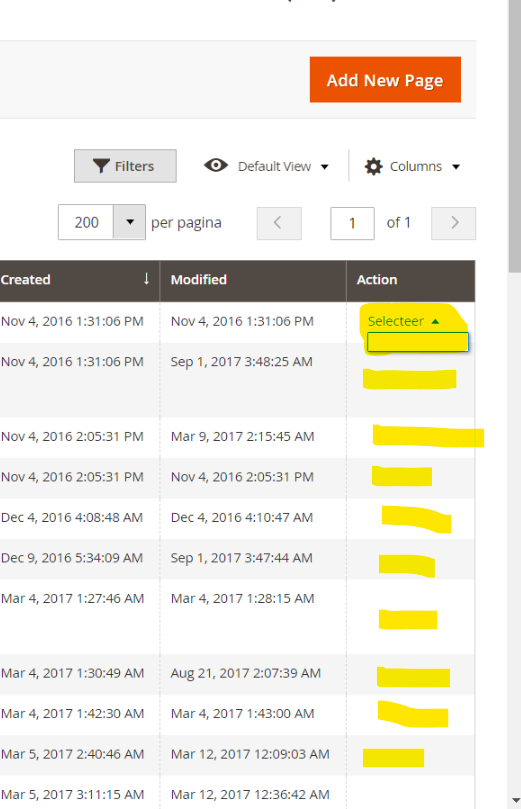
I found following JS errors from chrome console:
Uncaught TypeError: Unable to process binding "if: function (){return $col.isSingle($row()._rowIndex) }"
Message: Unable to process binding "repeat: function (){return {foreach:$col.getVisibleActions($row()._rowIndex),item:'$action'} }"
Message: Unable to process binding "attr: function (){return {target:$col.getTarget($action()),href:$action().href} }"
Message: $col.getTarget is not a function
    at attr (eval at createBindingsStringEvaluator (knockout.js:2624), <anonymous>:3:77)
    at update (knockout.js:3659)
    at ko.dependentObservable.disposeWhenNodeIsRemoved (knockout.js:3004)
    at evaluateImmediate (knockout.js:1737)
    at Object.ko.computed.ko.dependentObservable (knockout.js:1946)
    at knockout.js:3002
    at Object.arrayForEach (knockout.js:151)
    at applyBindingsToNodeInternal (knockout.js:2974)
    at applyBindingsToNodeAndDescendantsInternal (knockout.js:2854)
    at Object.ko.applyBindings (knockout.js:3065)
Expected result
Action links are present
 Ylmzef
All 11 comments
@Ylmzef
Unfortunately, I could not reproduce the issue as you described it.
Flush cache and run setup:static-content:deploy may be help you.
 magento-engcom-team
on 4 Oct 2017
magento-engcom-team
on 4 Oct 2017
@Ylmzef, thank you for your report.
We were not able to reproduce this issue by following the steps you provided. If you'd like to update it, please reopen the issue.
We tested the issue on 2.2.0
magento-engcom-team
on 4 Oct 2017
I've got the same issue. @Ylmzef did you ever find a solution for this?
 benjamin-dot
on 27 Oct 2017
benjamin-dot
on 27 Oct 2017
I just found the solution, it's a browser cache issue. I was press ctrl + ft to clear the cache for the page but it wasn't good enough, I had to clear my entire browser cache to get it to work.
benjamin-dot
on 27 Oct 2017
Great ! works to clear browser caches.
I'm using Chrome and had the same issue. :)
 bdandreas
on 8 Jan 2018
bdandreas
on 8 Jan 2018
Worked for me too after upgrading from 2.1 to 2.3, again a hard reload was not enough
 alex-james
on 23 Apr 2018
alex-james
on 23 Apr 2018
wtf is ft? I got the same problem and its super crucial right now
 artskeem
on 26 Jul 2018
artskeem
on 26 Jul 2018
that was a typeo it was suppose to say f5. However to solve the problem I cleared the browser cache from the settings menu in Chrome.
benjamin-dot
on 26 Jul 2018
ah .. thank you so much - that worked I was freaking out for a minute cause ya know these people that wont there site to never have any down time...... Ill stop there. thanks yo!
artskeem
on 26 Jul 2018
I am having the same issue in Magento 2.3.2 version. cleared browser cache, F5, hard reload but still no luck. Issue is still as it is.
Any solution, please!!!!
 priyanka795
on 22 Oct 2019
priyanka795
on 22 Oct 2019
On Chrome you might try hit F12 -> Application -> Clear storage and hit the "Clear site data" button
If you had upgraded Magento2 do also a whipe on cache and static content.
- php bin/magento2 dev:asset:clear
- php bin/magento2 generation:flush
- php bin/magento2 cache:flush or cache:clean.
Also if you use redis/varnish then flush that too.
Also the table ui_bookmark, i just trunk the table
bdandreas
on 1 Nov 2019
Related issues
 denis-g
·
3Comments
denis-g
·
3Comments
 MauroNigrele
·
3Comments
MauroNigrele
·
3Comments
 dmitry-fedyuk
·
3Comments
dmitry-fedyuk
·
3Comments
 kirashet666
·
3Comments
kirashet666
·
3Comments
 xi-ao
·
3Comments
xi-ao
·
3Comments
Most helpful comment
I just found the solution, it's a browser cache issue. I was press ctrl + ft to clear the cache for the page but it wasn't good enough, I had to clear my entire browser cache to get it to work.