Magento2: magento 2.2 after update composer can't run Cli
Preconditions
2.
Steps to reproduce
- composer require magento/product-community-edition 2.2 --no-update
- composer update
3.create file un_mask in root folder with value 022 - php bin/magento setup:upgrade
Expected result
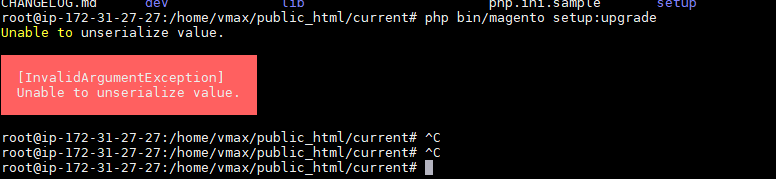
- [InvalidArgumentException]
Unable to unserialize value.
Actual result
- [Screenshot, logs]
 tomnyson
All 7 comments
create file u_mask in root folder with value 022
Without such step there will be no error?
 orlangur
on 28 Sep 2017
orlangur
on 28 Sep 2017
I have this problem as well. It happens without umask, adding a umask doesn't fix the problem for me.
 ghost
on 28 Sep 2017
ghost
on 28 Sep 2017
Do you have any third-party extensions or customizations?
Please check https://devdocs.magento.com/guides/v2.2/release-notes/backward-incompatible-changes.html#database-data-format-changes in order to adopt your instance.
orlangur
on 28 Sep 2017
Thanks for pointing this out. This wasn't what was causing the issue, but this does effect some of my modules.
Solution for my problem was too simple, first run:
php bin/magento cache:flush
ghost
on 28 Sep 2017
Oh, this is always first thing to try :) @tomnyson did cache clearing maybe solves your issue as well? Otherwise please confirm the problem not comes from any third-party extension or custom implementation.
orlangur
on 28 Sep 2017
@orlangur you right. I flushed cache for redis via
redis-cli flushall
my problem resolved
tomnyson
on 29 Sep 2017
Ok, thanks for quick response, http://devdocs.magento.com/guides/v2.2/comp-mgr/cli/cli-upgrade.html#upgrade-cli-upgr currently covers only cache stored in file system, probably would be better to replace by php bin/magento cache:flush.
orlangur
on 29 Sep 2017
Related issues
 BenSpace48
·
3Comments
BenSpace48
·
3Comments
 kirashet666
·
3Comments
kirashet666
·
3Comments
 dmitry-fedyuk
·
3Comments
dmitry-fedyuk
·
3Comments
 algostore
·
3Comments
algostore
·
3Comments
 denis-g
·
3Comments
denis-g
·
3Comments
Most helpful comment
@orlangur you right. I flushed cache for redis via
redis-cli flushall
my problem resolved