Magento2: Grunt aborts when running exec:
Preconditions
- Magento CE 2.1.5
- Luma is not installed
- Grunt has been set up according to: http://devdocs.magento.com/guides/v2.0/frontend-dev-guide/css-topics/css_debug.html
Steps to reproduce
- Clean up and deploy static content
- run the grunt:exec command
Expected result
Symlinks to the source files are republished to the pub/static/frontend/<Vendor>/<theme>/<locale> directory, after which the grunt less command can be run.
Actual result
- grunt exec command aborts with the following error message:
>> [InvalidArgumentException]
>> There are no commands defined in the "dev:source-theme" namespace.
>> Exited with code: 1.
Warning: Task "exec:Ganges" failed. Use --force to continue.
Aborted due to warnings.
- I have then tried running "bin/magento dev:source-theme:deploy" which fails because the Processed Area is the Luma theme, which is not installed.
Processed Area: frontend, Locale: en_US, Theme: Magento/luma, File type: less.
[InvalidArgumentException]
Verify entered values of the argument and options. Unable to resolve the source file for frontend/Magento/luma/en_US/css/styles-m.less
dev:source-theme:deploy [--type="..."] [--locale="..."] [--area="..."] [--theme="..."] [file1] ... [fileN]
 daanvdberg
All 4 comments
Hi there,
I cannot reproduce the issue you've stated.
I did the following:
- Removed di and generation from var and made sure that the directory permissions are set to 777
- Ran setup upgrade and compile commands
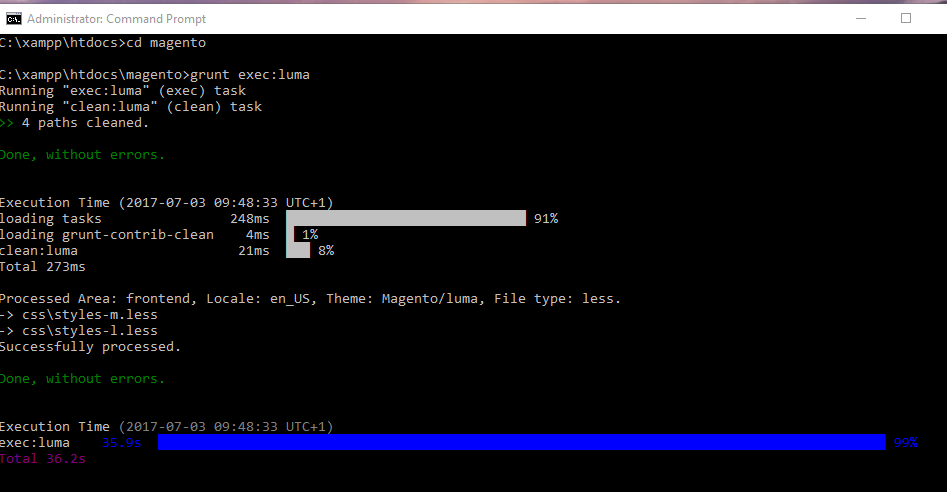
- Ran grunt exec:luma as an administrator. See screenshot:
 shoaibrehman
on 3 Jul 2017
shoaibrehman
on 3 Jul 2017
Hi shoaibrehman,
Thank you for giving it a try.
I, however, do not have Luma installed. Instead, I am working with a theme based on MGS Molly. Even though I have it set up this way, Luma is still requested when running "bin/magento dev:source-theme:deploy" which seems like the reason that grunt exec is not working.
daanvdberg
on 4 Jul 2017
@daanvdberg you should check the theme.xml file from the root of your theme, and the issue should be the <parent>Magento/luma</parent>, try to change the parent to Magento/blank. if not the case, please provide your dev/tools/grunt/configs/themes.js file
 patruvlad
on 22 Aug 2017
patruvlad
on 22 Aug 2017
@daanvdberg we are closing this issue due to inactivity. If you'd like to update it, please reopen the issue.
 magento-engcom-team
on 17 Oct 2017
magento-engcom-team
on 17 Oct 2017
Related issues
 spyrule
·
3Comments
spyrule
·
3Comments
 kandrejevs
·
3Comments
kandrejevs
·
3Comments
 phirunson
·
3Comments
phirunson
·
3Comments
 dmitry-fedyuk
·
3Comments
dmitry-fedyuk
·
3Comments
 algostore
·
3Comments
algostore
·
3Comments