Magento2: [2.2.0-RC1.1] Generate static content command still requires DB connection
Based on the technical details for the upcoming Magento 2.2 version it seems like you can generate static content without access to the DB, however it still seems to be trying to connect to the DB in my case.
Preconditions
- Magento 2.2 RC1.1 (3cfa32b)
- PHP 7.0.19
Steps to reproduce
- Clone latest
developbranch - Install Magento
- Run
php bin/magento app:config:dump - Rename
env.phpfile toenv2.php - Run
php bin/magento setup:static-content:deploy -l en_US -t Magento/blank -f
Expected result
- Static content should be deployed for the blank theme under en_US locale.
Actual result
Deploy using quick strategy


  [DomainException]
  Default website is not defined


setup:static-content:deploy [-f|--force] [-s|--strategy [STRATEGY]] [-a|--area [AREA]] [--exclude-area [EXCLUDE-AREA]] [-t|--theme [THEME]] [--exclude-theme [EXCLUDE-THEME]] [-l|--language [LANGUAGE]] [--exclude-language [EXCLUDE-LANGUAGE]] [-j|--jobs [JOBS]] [--symlink-locale] [--content-version CONTENT-VERSION] [--refresh-content-version-only] [--no-javascript] [--no-css] [--no-less] [--no-images] [--no-fonts] [--no-html] [--no-misc] [--no-html-minify] [--] [<languages>]...
If you rename the env.php file back it works fine. Am I missing something here?
I think I need to set the settings that Magento is trying to get from the DB in the env.php file of my build machine so it doesn't need to query the database but I'm not sure how.
 jahvi
jahvi
All 20 comments
Take a look on deployment pipeline docs: http://devdocs.magento.com/guides/v2.2/config-guide/deployment/pipeline/
It looks like you should have config.php to deploy static content.
 ihor-sviziev
on 25 Jun 2017
ihor-sviziev
on 25 Jun 2017
I had a look at the docs (as I link in the original issue) but they don't mention anything I haven't tried unfortunately, I do have the default config.php file you get after installing Magento but I perhaps I need to tweak it for building?
jahvi
on 26 Jun 2017
@jahvi Before you run static content deploy, dump your configuration to file by app:config:dump. This will write additional config to config.php file that is needed to generate static view files.
 misha-kotov
on 26 Jun 2017
misha-kotov
on 26 Jun 2017
@misha-kotov Thanks, I ran the app:config:dump command and my config.php file got updated, however I'm still getting the Default website is not defined error when I try to generate static assets.
jahvi
on 26 Jun 2017
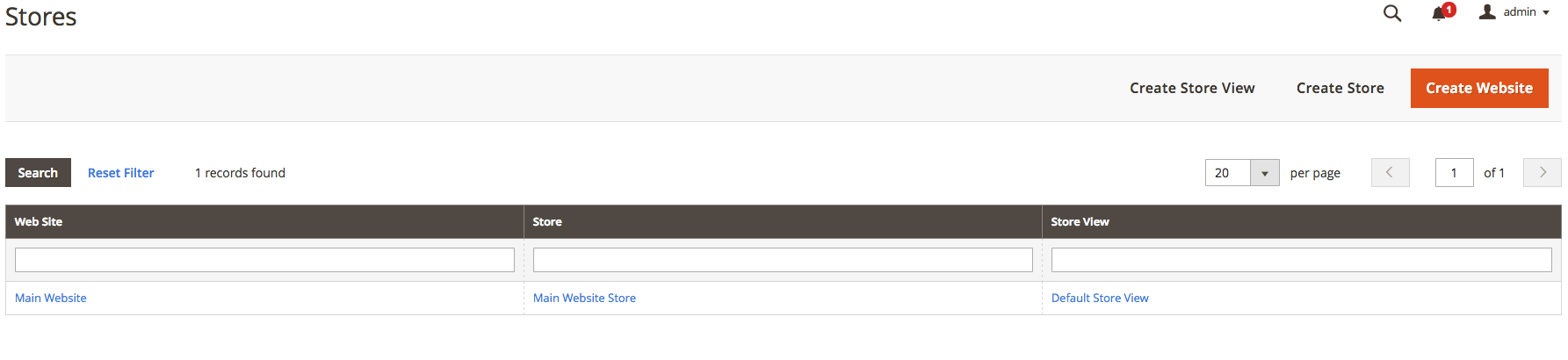
Do you have a website defined in Stores > Settings > All Stores?
misha-kotov
on 26 Jun 2017
Yes, this is how it looks in my config.php file:
<?php
return array (
  ...
  'scopes' =>
  array (
    'websites' =>
    array (
      'admin' =>
      array (
        'website_id' => '0',
        'code' => 'admin',
        'name' => 'Admin',
        'sort_order' => '0',
        'default_group_id' => '0',
        'is_default' => '0',
      ),
      'base' =>
      array (
        'website_id' => '1',
        'code' => 'base',
        'name' => 'Main Website',
        'sort_order' => '0',
        'default_group_id' => '1',
        'is_default' => '1',
      ),
    ),
    'groups' =>
    array (
      0 =>
      array (
        'group_id' => '0',
        'website_id' => '0',
        'code' => 'default',
        'name' => 'Default',
        'root_category_id' => '0',
        'default_store_id' => '0',
      ),
      1 =>
      array (
        'group_id' => '1',
        'website_id' => '1',
        'code' => 'main_website_store',
        'name' => 'Main Website Store',
        'root_category_id' => '2',
        'default_store_id' => '1',
      ),
    ),
    'stores' =>
    array (
      'admin' =>
      array (
        'store_id' => '0',
        'code' => 'admin',
        'website_id' => '0',
        'group_id' => '0',
        'name' => 'Admin',
        'sort_order' => '0',
        'is_active' => '1',
      ),
      'default' =>
      array (
        'store_id' => '1',
        'code' => 'default',
        'website_id' => '1',
        'group_id' => '1',
        'name' => 'Default Store View',
        'sort_order' => '0',
        'is_active' => '1',
      ),
    ),
  ),
  ...
);
We're looking into this issue.
misha-kotov
on 28 Jun 2017
@jahvi - Bug confirmed and internal issue MAGETWO-70318 has been created. We'll let you know if we have any additional questions.
 tjwiebell
on 28 Jun 2017
tjwiebell
on 28 Jun 2017
Hi @jahvi , the issue has been fixed and will be delivered in one of the nearest releases. Thank you!
 mslabko
on 14 Jul 2017
mslabko
on 14 Jul 2017
Thanks looking forward to checking it out
jahvi
on 14 Jul 2017
@jahvi we can provide a patch for 2.2 RC1.1 if you need to check it on your instance
mslabko
on 14 Jul 2017
@mslabko is it merged to develop branch? Where we can get it?
ihor-sviziev
on 14 Jul 2017
@mslabko Yes please, where can we get it from?
jahvi
on 14 Jul 2017
@jahvi , @ihor-sviziev
No, it is not merged to develop branch - it can be found in nearest RC's
Here is a patch which can be applied for 2.2.0-RC1.3
https://gist.github.com/mslabko/51a03854bab2d1719fdeca26f99d8469
mslabko
on 14 Jul 2017
Magento will be releasing updated versions of the RC every week on Friday. The new RC1.4 will be available by the end of the day (US).
misha-kotov
on 14 Jul 2017
@mslabko I tried pulling the latest code from develop and applied the patch, I followed the same steps as the original issue but this time I got:
[BadMethodCallException]
  Missing required argument $sources of Magento\Deploy\Source\SourcePool.
Am I missing something?
jahvi
on 14 Jul 2017
Nevermind, installed from scratch and applied the patch again seems to work, thanks!
jahvi
on 14 Jul 2017
I still have the problem in the current 2.2.0.0 Version. When will the fix released?
 boehsermoe
on 7 Nov 2017
boehsermoe
on 7 Nov 2017
@boehsermoe It was fixed in 2.2.0. If you're still experiencing this issue, please open a new issue with steps to reproduce on clean Magento.
misha-kotov
on 2 Jul 2018
@misha-kotov take a look at documentation for this feature https://devdocs.magento.com/guides/v2.2/config-guide/deployment/pipeline/
ihor-sviziev
on 3 Jul 2018
Related issues
 salelsol
·
3Comments
salelsol
·
3Comments
 MauroNigrele
·
3Comments
MauroNigrele
·
3Comments
 gg24
·
3Comments
gg24
·
3Comments
 fvillata
·
3Comments
fvillata
·
3Comments
 punkstar
·
3Comments
punkstar
·
3Comments