Magento2: Magento 2.1.4 Admin Panel Order Billing/Shipping Address Edit
Preconditions
- Magento 2.1.4
- PHP 7.0.15
- MYSQL 5.6.35
Steps to reproduce
- View pending/processing order in the admin panel
- Edit billing or shipping address of the order
- Change State/Region field by selecting it from dropdown menu
- Save
Expected result
- State/Region changed to new or kept the same if there are no changes
Actual result
- State/Region doesn't change. Form fields submit empty region text variable but the region_id is being submitted correctly, therefore, state/region text saves as blank.
In the source code of the form, all of the States and their ID's are properly generated in json format. I searched for tips and workarounds but couldn't find anything related. What I found though that the RegionUpdater is responsible for this part of the form, though I was not able to locate the source JS file for it.
I see that this seems to be a duplicate issue but this bug still exists in version 2.1.4.
 Joker2099
All 19 comments
Confirmed for 2.1.6 as well. State/Region becomes blank after save.
Update: If I go to the edit form again. I do see the state/region are changed. But it's not showing on the order view page
 heyqule
on 3 May 2017
heyqule
on 3 May 2017
@heyqule
Correct, I narrowed it down to that region_id is being passed to the database (that's why the dropdown shows correct state on edit each time) but the region text isn't. Though if you change the country to lets say Afghanistan, you are able to type in the region manually and it's being passed to the database.
I am still digging the files, if I find a workaround or solution I will post here.
Joker2099
on 4 May 2017
I got the solution. I added an observer for "customer_address_format" to check whether the region name is empty when region_id exists. If the condition matches, the observer will pull the region name based on region ID and save it to the address. That fixes the issue.
But the correct way is to patch it in execute() of Magento\Sales\Controller\Adminhtml\Order\AddressSave. That should be done between $address->addData($data); and $address->save();
However, my observer would fix the address if there are other controllers handle the address the same way as Magento\Sales\Controller\Adminhtml\Order\AddressSave.
I'll submit a pull request to fix it in execute() and post my observer when I arrive to work later.
heyqule
on 4 May 2017
https://gist.github.com/heyqule/2e6f2ebfd1717031a3c30e1b156587c0
Here is the observer I use at the moment
heyqule
on 4 May 2017
Works. Tested it on 2.1.4.
Joker2099
on 4 May 2017
@heyqule
@Joker2099
@southerncomputer
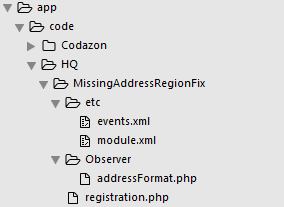
I tried your method but failed,would you mind tell me why ?
 sharkpee
on 27 Jul 2017
sharkpee
on 27 Jul 2017
@sharkpee Create another folder under etc called adminhtml and put events.xml in there. Make sure the class names in the registration.php is the same as the path name to your files and under module.xml
Once done run
bin/magento setup:upgrade
bin/magento setup:di:compile
bin/magento cache:flush
See if that works and let us know.
Edit: In my case I had to turn on the custom module to be able to run the code, so go into admin panel and turn on your module or do it via SSH
Joker2099
on 27 Jul 2017
TKS
sharkpee
on 27 Jul 2017
TKS
sharkpee
on 27 Jul 2017
@sharkpee Make sure when you do any changes you are in Developer mode first of all. Look in the debug.log & system.log for compilation errors when you compile. It may take a few tries to correctly compile.
If you are still not able to run it, I will install M 2.1.7 and try it on my end later today. As for 2.1.4 which I am still using due to not too many bugs, that fix is working perfectly.
Joker2099
on 27 Jul 2017
php bin/magento setup:upgrade
php bin/magento setup:di:compile
php bin/magento deploy:mode:set production
php bin/magento cache:flush
service php-fpm restart
service varnish restart
service nginx restart
chown -R yourusername *
the two orange error boxes are because you did not recompile/re deploy/cache flush!
 southerncomputer
on 27 Jul 2017
southerncomputer
on 27 Jul 2017
@Joker2099 @heyqule @southerncomputer Thanks a lot! It works in 2.1.7.
I run the cmd below:
php bin/magento setup:upgrade
php bin/magento setup:static-content:deploy
php bin/magento indexer:reindex
php bin/magento cache:flush
sharkpee
on 31 Jul 2017
Issue still present in 2.1.8.
That fix still works in 2.1.8 though.
Joker2099
on 31 Aug 2017
Issue still present in 2.1.9. Why has this not been corrected in the latest update?
 wilzon008
on 27 Sep 2017
wilzon008
on 27 Sep 2017
@Joker2099, thank you for your report.
The issue is already fixed in develop branch, 2.2.0
 magento-engcom-team
on 28 Sep 2017
magento-engcom-team
on 28 Sep 2017
Thanks, @heyqule tested your module and it worked on my end. I have the same problem using Magento 2.1.3
 mazestricks
on 27 Mar 2018
mazestricks
on 27 Mar 2018
Hi @heyqule , @sharkpee , @Joker2099 and everyone, this may be a dump question, but we are new on Magento, we have CE 2.1.7, and we were having this bug, so we applied this patch, and we are getting this error now when we try to see an order details on the cpanel
"Information Changes have been made to this section that have not been saved. This tab contains invalid data. Please resolve this before saving."
And this is what we are getting on the php log
"PHP Fatal error: Class 'HQ\MissingAddressRegionFix\Observer\AddressFormat' not found in ourPath/vendor/magento/framework/ObjectManager/Factory/AbstractFactory.php on line 93"
Can you guys please help us with this? Thanks
 oabreu
on 22 May 2018
oabreu
on 22 May 2018
@oabreu app/code/HQ/MissingAddressRegionFix/Observer/AddressFormat.php is where observer.php should go! it is named wrong
southerncomputer
on 22 May 2018
Thank you very much @southerncomputer , i called it addressFormat.php because of this picture
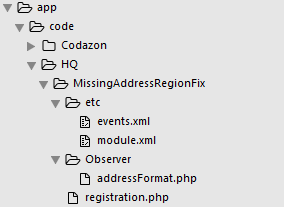
But now i changed the name to AddressFormat.php and is working :)
oabreu
on 22 May 2018
Related issues
 fvillata
·
3Comments
fvillata
·
3Comments
 punkstar
·
3Comments
punkstar
·
3Comments
 phirunson
·
3Comments
phirunson
·
3Comments
 denis-g
·
3Comments
denis-g
·
3Comments
 comunidademagento
·
3Comments
comunidademagento
·
3Comments