Magento2: Clicking on save twice while editing a configurable product causes current variations to disappear
Preconditions
- Magento2
- Chrome
Steps to reproduce
- Edit a configurable product and click on save.
- Be impatient and click on save again a few times, just really go at it.
- The 'current variations' are gone.
Expected result
- Current variations shouldn't disappear
Actual result
- Current variations are no longer current.
 samgranger
All 9 comments
We see the same behaviour in 2 of our installations, both running 2.1.1.
 fowbi
on 7 Nov 2016
fowbi
on 7 Nov 2016
The issue is caused when passing the configurable matrix for a second (or nth-time) to the controller via Ajax. The saveFormHandler in variations.js (in the ConfigurableProduct module) serialises the configurable-matrix value to configurable-matrix-serialized, but deletes the original configurable-matrix value afterwards. When the save button is pressed a second time, the configurable-matrix value will be empty and no simple products will be linked via the controller action.
Issue can be solved by editing the saveFormHandler in variations.js (https://github.com/magento/magento2/blob/develop/app/code/Magento/ConfigurableProduct/view/adminhtml/web/js/variations/variations.js#L306)
          saveFormHandler: function() {
              this.source.data["product"]["configurable-matrix-serialized"] =
                  JSON.stringify(this.source.data["configurable-matrix"]);
~             //delete this.source.data["configurable-matrix"];
Thanks for the additional information fowbi, hopefully Magento will sort this issue out with your fix.
samgranger
on 8 Nov 2016
@samgranger, thanks for reporting this issue.
We've created internal ticket MAGETWO-61608 to address this issue.
 yaroslavGoncharuk
on 30 Nov 2016
yaroslavGoncharuk
on 30 Nov 2016
@fowbi @samgranger
For some reason, I cannot find the variations.js file under the file structure you reference above. I can go as far as html/app however, the /code folder does not exist. Where can I properly find this file in order to fix this annoying bug?
 Isaiaham
on 30 Jan 2017
Isaiaham
on 30 Jan 2017
@samgranger, thank you for your report.
We've created internal ticket(s) MAGETWO-69704 to track progress on the issue.
 magento-engcom-team
on 9 Oct 2017
magento-engcom-team
on 9 Oct 2017
It's really worst than what you could think. If the admin validation has any error (like an empty title) and you click on save, than fix the title and click on save again ... BAM!
You lose all your configurables data!
The problem has been introduced in 2.1.1 with the following commit https://github.com/magento/magento2/commit/b75fc4f83aa2fdf093ceae25449fa0b95bbc4020
If someone need a fix for Magento 2.1.10, here is a patch: https://raw.githubusercontent.com/Hevelop/magento2-patches/master/Patch-Magento_ConfigurableProduct-M2.1.10-delete-simple-products-on-validation.patch
 alepane21
on 7 Mar 2018
alepane21
on 7 Mar 2018
Hi @engcom-Echo. Thank you for working on this issue.
In order to make sure that issue has enough information and ready for development, please read and check the following instruction: :point_down:
- [ ] 1. Verify that issue has all the required information. (Preconditions, Steps to reproduce, Expected result, Actual result).
Details
If the issue has a valid description, the labelIssue: Format is validwill be added to the issue automatically. Please, edit issue description if needed, until labelIssue: Format is validappears.
[ ] 2. Verify that issue has a meaningful description and provides enough information to reproduce the issue. If the report is valid, add
Issue: Clear Descriptionlabel to the issue by yourself.[ ] 3. Add
Component: XXXXXlabel(s) to the ticket, indicating the components it may be related to.[ ] 4. Verify that the issue is reproducible on
2.4-developbranchDetails
- Add the comment@magento give me 2.4-develop instanceto deploy test instance on Magento infrastructure.
- If the issue is reproducible on2.4-developbranch, please, add the labelReproduced on 2.4.x.
- If the issue is not reproducible, add your comment that issue is not reproducible and close the issue and _stop verification process here_![ ] 5. Add label
Issue: Confirmedonce verification is complete.[ ] 6. Make sure that automatic system confirms that report has been added to the backlog.
![m2-assistant[bot] picture](https://avatars0.githubusercontent.com/in/27048?v=4&s=40) m2-assistant[bot]
on 9 Dec 2019
m2-assistant[bot]
on 9 Dec 2019
Hello All
I am not able to reproduce this issue on the 2.4-develop branch by provided steps.
Testing scenario:
Preconditions:
- Magento 2.4
- Chrome (Version 78.0.3904.108 (Official Build) (64-bit))
- Configurable product is created.
Steps to reproduce:
- Edit a configurable product and click on save.
- Be impatient and click on save again a few times, just really go at it.
Result
Current variations are not disappear
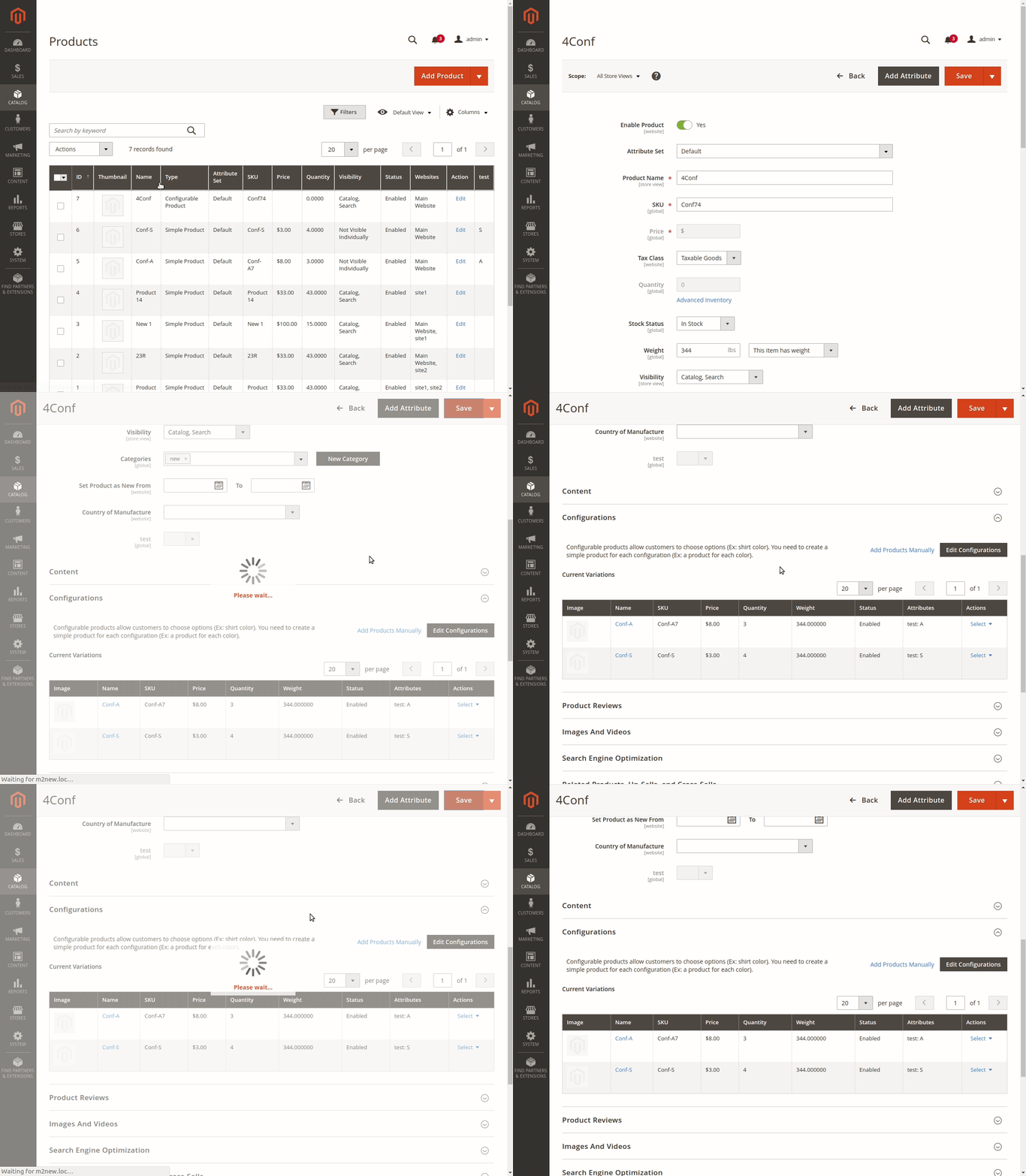
So I have to close this issue.
Thanks for your report!
 engcom-Echo
on 9 Dec 2019
engcom-Echo
on 9 Dec 2019
Related issues
 andreaskoch
·
3Comments
andreaskoch
·
3Comments
 salelsol
·
3Comments
salelsol
·
3Comments
 punkstar
·
3Comments
punkstar
·
3Comments
 BenSpace48
·
3Comments
BenSpace48
·
3Comments
 fvillata
·
3Comments
fvillata
·
3Comments
Most helpful comment
The issue is caused when passing the configurable matrix for a second (or nth-time) to the controller via Ajax. The saveFormHandler in variations.js (in the ConfigurableProduct module) serialises the configurable-matrix value to configurable-matrix-serialized, but deletes the original configurable-matrix value afterwards. When the save button is pressed a second time, the configurable-matrix value will be empty and no simple products will be linked via the controller action.
Issue can be solved by editing the saveFormHandler in variations.js (https://github.com/magento/magento2/blob/develop/app/code/Magento/ConfigurableProduct/view/adminhtml/web/js/variations/variations.js#L306)