Magento2: Configurable Products dropdown not showing pricing
I have a configurable product and the configurations all have different prices. The dropdown on my configurable product does not show pricing information (like it did in Magento 1.9).
Preconditions
Magento ver 2.1.2 up to 2.3.1
Steps to reproduce
- Create a configurable product with two attributes and that the second attribute (second in the list, never the first one - it's essential for reproduction) has pricing differences.
- Go to the Frontend and watch the second attribute dropdown.
Expected result
- Second attribute drop-down reflects pricing differences like on the screenshot below

Actual result
- No pricing information is shown in the second drop-down.


The pricing differences would be shown only in the first attribute dropdown if they were set for it.
 titus213
All 26 comments
Hi, thank you for your report. Internal issue is created MAGETWO-60362
 olysenko
on 1 Nov 2016
olysenko
on 1 Nov 2016
Hello any update on this ? when will be this issue fixed ?
 siddharth-vaghasia
on 8 Apr 2017
siddharth-vaghasia
on 8 Apr 2017
@titus213, thank you for your report.
We've created internal ticket(s) MAGETWO-60362 to track progress on the issue.
 magento-engcom-team
on 9 Oct 2017
magento-engcom-team
on 9 Oct 2017
Hi any update on this?
 rachana229
on 6 Feb 2018
rachana229
on 6 Feb 2018
I would also be interested in any update to this?
 aashworth-ldg
on 16 Feb 2018
aashworth-ldg
on 16 Feb 2018
@magento-engcom-team any news on this issue?
 arnoudhgz
on 16 May 2018
arnoudhgz
on 16 May 2018
Hi,
@magento-engcom-team seems this issue never considered?
 malikt
on 1 Jul 2018
malikt
on 1 Jul 2018
@magento-engcom-team Is this issue still on the radar? Is this fixed in upcoming updates (2.2.6+)?
 supportnubix
on 27 Nov 2018
supportnubix
on 27 Nov 2018
Hello @magento-engcom-team is there any chance this will be fixed in 2.3.1?
 1stKarkan
on 28 Mar 2019
1stKarkan
on 28 Mar 2019
Hi @vikalps4. Thank you for working on this issue.
Looks like this issue is already verified and confirmed. But if you want to validate it one more time, please, go though the following instruction:
- [ ] 1. Add/Edit
Component: XXXXXlabel(s) to the ticket, indicating the components it may be related to.
[ ] 2. Verify that the issue is reproducible on
2.3-developbranchDetails
- Add the comment@magento-engcom-team give me 2.3-develop instanceto deploy test instance on Magento infrastructure.
- If the issue is reproducible on2.3-developbranch, please, add the labelReproduced on 2.3.x.
- If the issue is not reproducible, add your comment that issue is not reproducible and close the issue and _stop verification process here_!
[ ] 3. Verify that the issue is reproducible on
2.2-developbranch.Details
- Add the comment@magento-engcom-team give me 2.2-develop instanceto deploy test instance on Magento infrastructure.
- If the issue is reproducible on2.2-developbranch, please add the labelReproduced on 2.2.x[ ] 4. If the issue is not relevant or is not reproducible any more, feel free to close it.
- Join Magento Community Engineering Slack and ask your questions in #github channel.
![m2-assistant[bot] picture](https://avatars0.githubusercontent.com/in/27048?v=4&s=40) m2-assistant[bot]
on 11 May 2019
m2-assistant[bot]
on 11 May 2019
@magento-engcom-team give me 2.3-develop instance
 vikalps4
on 11 May 2019
vikalps4
on 11 May 2019
Hi @vikalps4. Thank you for your request. I'm working on Magento 2.3-develop instance for you
magento-engcom-team
on 11 May 2019
Hi @vikalps4, here is your Magento instance.
Admin access: https://i-7200-2-3-develop.instances.magento-community.engineering/admin
Login: admin Password: 123123q
Instance will be terminated in up to 3 hours.
magento-engcom-team
on 11 May 2019
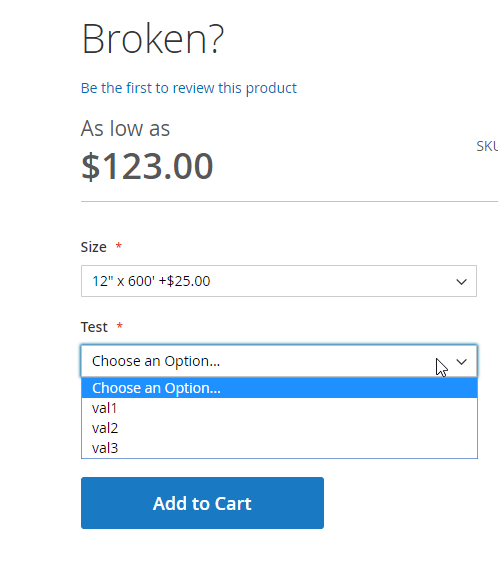
I tried it on that Demo Shop but apparently the feature only works for the first dropdown:
https://i-7200-2-3-develop.instances.magento-community.engineering/test.html
After selecting the first attribute, there are no prices visible on the options of the second.
This is really disappointing and makes it even worse for products with more than one configurable attribute as it is definitly more confusing for a buyer than not showing a price difference at all.
For my customer i added a working version of this feature via a lot of ugly javascript on the product page. But it would be great if this becomes a built in Feature of Magento 2. Actually i would appreciate it even more when the real difference is shown. So that if Option A is +5$ and you select it, the +5$ gets removed and Option B gets labeled -5$.
How come M1 has this Feature and M2 doesn't?
1stKarkan
on 11 May 2019
Hello @magento/quality-maintainers team,
May I ask you to review this Issue and Confirm is it still reproducible on the latest vanilla Magento?
Probably need to update Steps to Reproduce or Issue is not actual any more(was fixed with another pull request)
Thank you in advance!
 sdzhepa
on 22 May 2019
sdzhepa
on 22 May 2019
Hi @AlexWorking. Thank you for working on this issue.
In order to make sure that issue has enough information and ready for development, please read and check the following instruction: :point_down:
- [ ] 1. Verify that issue has all the required information. (Preconditions, Steps to reproduce, Expected result, Actual result).
Details
If the issue has a valid description, the labelIssue: Format is validwill be added to the issue automatically. Please, edit issue description if needed, until labelIssue: Format is validappears.
[ ] 2. Verify that issue has a meaningful description and provides enough information to reproduce the issue. If the report is valid, add
Issue: Clear Descriptionlabel to the issue by yourself.[ ] 3. Add
Component: XXXXXlabel(s) to the ticket, indicating the components it may be related to.[ ] 4. Verify that the issue is reproducible on
2.3-developbranchDetails
- Add the comment@magento-engcom-team give me 2.3-develop instanceto deploy test instance on Magento infrastructure.
- If the issue is reproducible on2.3-developbranch, please, add the labelReproduced on 2.3.x.
- If the issue is not reproducible, add your comment that issue is not reproducible and close the issue and _stop verification process here_!
[ ] 5. Verify that the issue is reproducible on
2.2-developbranch.Details
- Add the comment@magento-engcom-team give me 2.2-develop instanceto deploy test instance on Magento infrastructure.
- If the issue is reproducible on2.2-developbranch, please add the labelReproduced on 2.2.x[ ] 6. Add label
Issue: Confirmedonce verification is complete.[ ] 7. Make sure that automatic system confirms that report has been added to the backlog.
m2-assistant[bot]
on 22 May 2019
@magento-engcom-team give me 2.3-develop instance
 krishprakash
on 23 May 2019
krishprakash
on 23 May 2019
Hi @krishprakash. Thank you for your request. I'm working on Magento 2.3-develop instance for you
magento-engcom-team
on 23 May 2019
Hi @krishprakash, here is your Magento instance.
Admin access: https://i-7200-2-3-develop.instances.magento-community.engineering/admin
Login: admin Password: 123123q
Instance will be terminated in up to 3 hours.
magento-engcom-team
on 23 May 2019
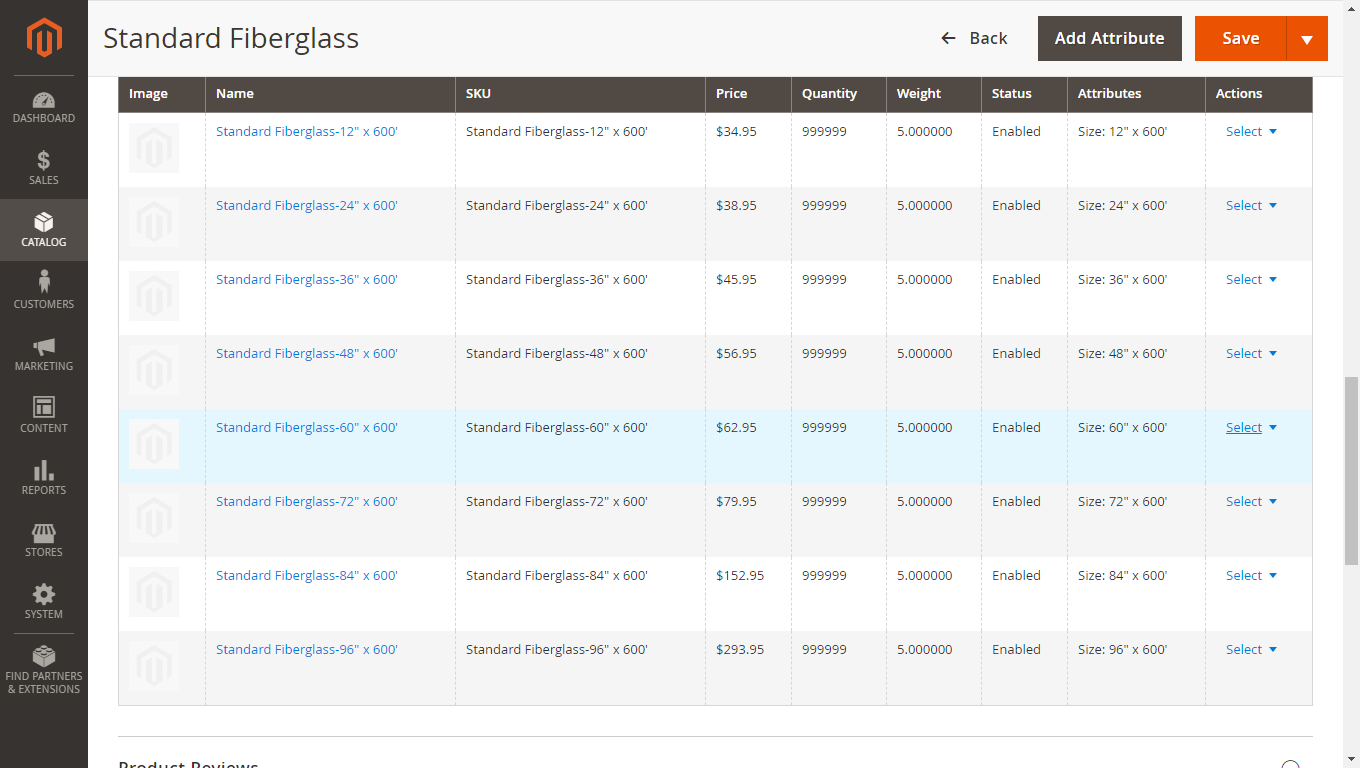
I have tested with same scenario as mentioned in issue description.
Also tried with some other scenarios.
But could not reproduce this issue on latest magento 2.3 instance.
Prices are displaying.
PFA
Admin:
Front end:
Thanks.
krishprakash
on 23 May 2019
Hello,
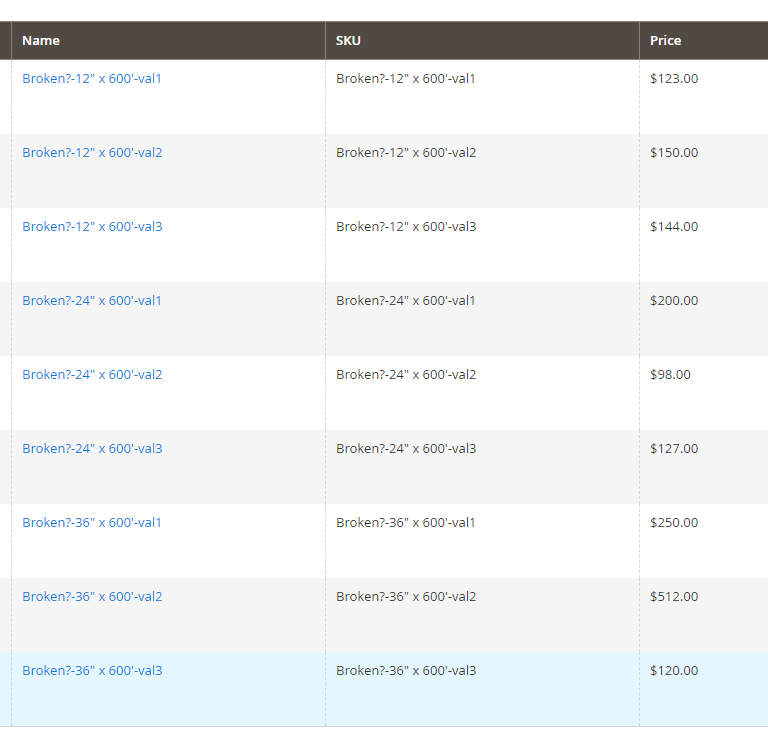
This issue is still not resolved. Yes, the prices are shown, but only for the first dropdown. Any other attribute will not show the prices on the dropdown. I made a second product with two configurable attributes and it breaks.
1stKarkan
on 23 May 2019
Is there any way to remove these prices? Any option for it?
One of my customers does not want to show the pricing difference on every option.
 mhenkel1
on 18 Jun 2019
mhenkel1
on 18 Jun 2019
Hi @Bartlomiejsz. Thank you for working on this issue.
Looks like this issue is already verified and confirmed. But if you want to validate it one more time, please, go though the following instruction:
- [ ] 1. Add/Edit
Component: XXXXXlabel(s) to the ticket, indicating the components it may be related to.
[ ] 2. Verify that the issue is reproducible on
2.3-developbranchDetails
- Add the comment@magento give me 2.3-develop instanceto deploy test instance on Magento infrastructure.
- If the issue is reproducible on2.3-developbranch, please, add the labelReproduced on 2.3.x.
- If the issue is not reproducible, add your comment that issue is not reproducible and close the issue and _stop verification process here_![ ] 3. If the issue is not relevant or is not reproducible any more, feel free to close it.
- Join Magento Community Engineering Slack and ask your questions in #github channel.
m2-assistant[bot]
on 22 Aug 2019
@magento-engcom-team give me 2.3-develop instance
 rani-webkul
on 23 Aug 2019
rani-webkul
on 23 Aug 2019
Hi @rani-webkul. Thank you for your request. I'm working on Magento 2.3-develop instance for you
magento-engcom-team
on 23 Aug 2019
Hi @rani-webkul, here is your Magento instance.
Admin access: https://i-7200-2-3-develop.instances.magento-community.engineering/admin
Login: admin Password: 123123q
Instance will be terminated in up to 3 hours.
magento-engcom-team
on 23 Aug 2019
Related issues
 kirashet666
·
3Comments
kirashet666
·
3Comments
 fvillata
·
3Comments
fvillata
·
3Comments
 BenSpace48
·
3Comments
BenSpace48
·
3Comments
 ostmond
·
3Comments
ostmond
·
3Comments
 spyrule
·
3Comments
spyrule
·
3Comments
Most helpful comment
Hi any update on this?