Magento2: Catalog fails to display when pageSize is set too high; no way to then reduce pageSize
Steps to reproduce
- Navigate to Products -> Catalog
- Set
pageSizeto a large integer by typing in a custom value - Catalog fails to load and displays generic "Attention Something went wrong" error
- PHP log shows
AH01328: Line too long, URI /index.php, referer: /admin/catalog/product/
- Now that page size preference has been set to an unusable amount, the user has no way of ever changing this value since it is not possible to change
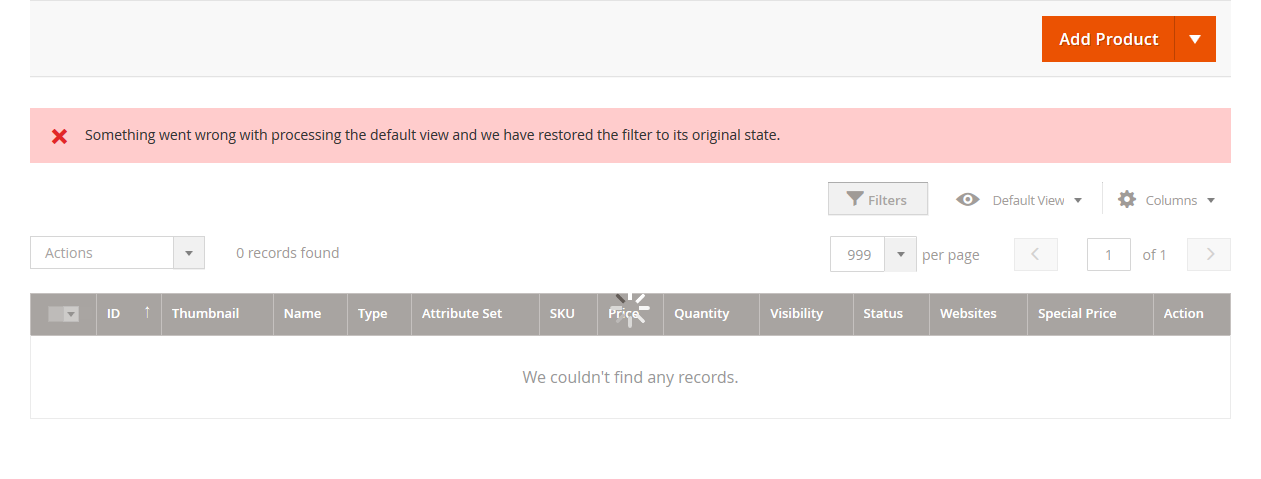
paging[pageSize]dropdown asadmin__data-grid-loading-mask(animated spinner) does not let the user modify values while it is working - Spinner never goes away, essentially permanently breaking the catalog view for that user as there is no obvious way to delete view preferences (where is
pageSizevalue stored?) - Deleting cookies, logging out does not reset this and the
pageSizevalue is still preserved session to session

Expected result
If value is set too high the user should be presented with a more specific error or at least the ability to reset it to a working value.
Actual result
The way the page is designed right now, the user can never ever see the catalog again from their account since it will repeatedly display that error with no way to restore a previous working value as the error locks the form.
I understand every environment has different limitations and perhaps some installations can support displaying 999 products, but if it cannot then it should fail more gracefully than bricking the account. A quick fix is to create a new user, where the default pagination is set to 20, but not an ideal solution.
 sammarcus
All 16 comments
@sammarcus which version are you using? In 2.0.5 it seems to be capped at 999, regardless of the value you enter and doesn't hang. How many products do you have?
 piotrekkaminski
on 14 May 2016
piotrekkaminski
on 14 May 2016
@piotrekkaminski thanks for the help. Yes, mine is indeed capped at 999 as well, but that wasn't my concern: the crux of this issue is not that 999 is a good or bad limit, but rather _whatever_ value is entered — if it so happens to be too high and causes the URI error — then it is impossible to ever recover from this error. Since after the error occurs the user is never able to reduce the value to rectify the problem.
In other words, some environments may trip up at five hundred items, others eight hundred. Whatever the breaking point is, if the user enters a number higher than that value, then their account becomes permanently inoperable for ever viewing the catalog backend again. Mine seems to exhibit significant performance issues around 700 and then totally fails at anything over 800. And once I set it to a value higher than 800, it is stuck at that and can never be reduced.
I have about 3K products, I am not sure how much of an edge case it is for a user to enter such a large number, but I believe it is very extremely problematic for an account to be rendered defective as a consequence for entering a value greater than it can handle. Ideally it should be able to handle whatever value the field will allow them to input, and if it does happen to fail, it should allow the user to change said value to a lower number.
sammarcus
on 16 May 2016
To me it's less of a problem that Magento cannot handle 999 products in this view to me. That doesn't bother me since it is not a pageSize I will ever really be using. The much larger issue is that once it _is_ set to something too high, it can (seemingly) never be set lower. Or if it can, I sure don't know how 😊
Hope this position makes sense.
sammarcus
on 16 May 2016
This is still an issue, and I think it is quite serious. An entire user account can permanently damage itself if the user inputs a number the field allows them to input.
Nothing the interface allows should ever permit the user to permanently corrupt their own account by accident.
cc @piotrekkaminski
sammarcus
on 5 Jun 2016
Still an issue in ver. 2.0.7. I had to create a new user which resets the view back to 20 products. 500 products displays fine.
 stefanjagger
on 15 Jul 2016
stefanjagger
on 15 Jul 2016
I am having this same problem on Magento 2.1 CE
 orbitrod
on 23 Aug 2016
orbitrod
on 23 Aug 2016
Hello @sammarcus. We were not able to reproduce this issue on develop versions, neither on 2.0.x, nor on 2.1.x. Probably the issue has already been fixed. If You are still experiencing it please let us know. Thanks for applying.
 AlexWorking
on 19 Jul 2017
AlexWorking
on 19 Jul 2017
Problem still persists (2.1.7, using Chrome). Steps to reproduce:
1) Navigate to Products -> Catalog
2) Change products per page to 999
3) *Import products (14k in my case)
4) Navigate to Products -> Catalog
Main page elements are loaded, but disabled (waiting for products grid). In my case products grid usually loads before Chrome crashes, but all rows are empty. Chrome Task Manager displays 100% CPU usage by Catalog and up to 2,5GB Memory before crash.
Poor solution is setting a break in devtools for every XHR request and deleting products grid container once it is displayed (before products are loaded). Then it is possible to reduce number of products per page.
*Probably not required if you already have a lot of products
 Parceti
on 20 Jul 2017
Parceti
on 20 Jul 2017
Could You @Parceti please send me the file with products You imported. I tried to reproduce the issue on different versions of Magento, but result was the same: page was loading, sometimes up to 60 seconds, maybe even some more, but in the end it was successfully downloaded. And please specify Your CPU and RAM.
AlexWorking
on 21 Jul 2017
Hi, I can still reproduce this, same exact steps and version as @Parceti.
My environment is at least a m3.large AWS instance (2 CPUs and 7+ GB of RAM). If @Parceti is not able to share their catalog export I don't mind sending it to you @AlexWorking. Where can I find appropriate contact information?
sammarcus
on 25 Sep 2017
@AlexWorking please let me know if you'd like sample data to reproduce?
sammarcus
on 3 Oct 2017
Hey there,
I have the same problem. Product list fails to reload, spinning stuck on 999 per page.
Magento 2.2.1
anyone any idea how to fix that ?
 fantomred
on 26 Feb 2018
fantomred
on 26 Feb 2018
Adding my voice to those who are experiencing this problem. I'm glad to know that there is a fix currently available (create a new account), but I agree that it's a clunky solution, and would love to see a more graceful failure that allows the user to recover functionality instead. The Magento 2.2 instance I'm working with has 4K+ products, deployed on shared A2 hosting servers. The items have dropdown attributes with 2K+ options, in case that has any impact.
Edit: I see that this issue was closed as unable to reproduce...is there another place my comments might be more helpful to the dev team?
 your-data-programmer
on 6 Apr 2018
your-data-programmer
on 6 Apr 2018
Yea, this should not have been closed but they did not want to follow up. I am able to repro on 2.2.3 by following my original precise steps outlined above. @AlexWorking @magento-engcom-team please consider reopening or re-reviewing this, the issue is still very much present in the latest build.
sammarcus
on 11 Apr 2018
solution is here.
Go to database table "ui_bookmark" and use below query
SELECT * FROM ui_bookmark where namespace like 'product_listing' AND identifier like 'current' AND user_id = 1
then copy "config" column value from result and search 999 you will get below json -
......"paging":{"options":{"20":{"value":20,"label":20},"30":{"value":30,"label":30},"50":{"value":50,"label":50},"100":{"value":100,"label":100},"200":{"value":200,"label":200},"999":{"value":999,"label":999,"_value":999,"editable":true}},"value":999},...........
and replace last 999 to 20 from json so final json will be -
......"paging":{"options":{"20":{"value":20,"label":20},"30":{"value":30,"label":30},"50":{"value":50,"label":50},"100":{"value":100,"label":100},"200":{"value":200,"label":200},"999":{"value":999,"label":999,"_value":999,"editable":true}},"value":20},...........
and update same config column from resultant row.
This will definitely help you. Enjoy coding !
 Lucky03
on 7 May 2018
Lucky03
on 7 May 2018
The problem still persists in magento 2.3.5-p1
- Navigate to Products -> Catalog
- 953 products found, lots of configurable products with size
- Change products per page to 200
- above behaviour and no chance to reset the view other than the database glitch from @Lucky03
 janvonquaeldich
on 26 Jun 2020
janvonquaeldich
on 26 Jun 2020
Related issues
 gg24
·
3Comments
gg24
·
3Comments
 kandrejevs
·
3Comments
kandrejevs
·
3Comments
 MauroNigrele
·
3Comments
MauroNigrele
·
3Comments
 dmitry-fedyuk
·
3Comments
dmitry-fedyuk
·
3Comments
 fvillata
·
3Comments
fvillata
·
3Comments
Most helpful comment
solution is here.
Go to database table "ui_bookmark" and use below query
SELECT * FROM ui_bookmark where namespace like 'product_listing' AND identifier like 'current' AND user_id = 1
then copy "config" column value from result and search 999 you will get below json -
......"paging":{"options":{"20":{"value":20,"label":20},"30":{"value":30,"label":30},"50":{"value":50,"label":50},"100":{"value":100,"label":100},"200":{"value":200,"label":200},"999":{"value":999,"label":999,"_value":999,"editable":true}},"value":999},...........
and replace last 999 to 20 from json so final json will be -
......"paging":{"options":{"20":{"value":20,"label":20},"30":{"value":30,"label":30},"50":{"value":50,"label":50},"100":{"value":100,"label":100},"200":{"value":200,"label":200},"999":{"value":999,"label":999,"_value":999,"editable":true}},"value":20},...........
and update same config column from resultant row.
This will definitely help you. Enjoy coding !