Mage: Deck Editor doesn't work (low memory)
Devs: looks here for solution
Can't add cards to mainboard or sideboard.
Edit: Tried reinstalling XMage to fix the issue. No luck.
Edit 2: Found a solution for anyone still having this problem.
Go to xmage -> xmage-client and open startClient.bat in Notepad++.
Change the last line to this:
start javaw -Xms1024m -Xmx2048m -Dfile.encoding=UTF-8 -jar .lib\mage-client-1.4.48.jar
Save and run startClient.bat. The problem is being caused by insufficient heap memory in the client, per the logs.
 RyanSwanson42
All 33 comments
Currently experiencing the same issue. I am able to remove cards from the mainboard/Side and able to save the deck, but unable to add any cards to the list, both new and old.
 VladdViever
on 7 Feb 2021
VladdViever
on 7 Feb 2021
- Delete logs file
\xmage\mage-client\mageclient.log; - Run app and reproduce that bug;
- Upload logs to https://pastebin.com/ or here
 JayDi85
on 7 Feb 2021
JayDi85
on 7 Feb 2021
I have a similar yet different issue. After adding my commander to the sideboard and saving the deck, when loading the deck I get the following error:
Layout mismatch: Expected 100 cards, but got 99 in layout MAIN
.Layout mismatch: Expected 0 cards, but got 1 in layout SIDEBOARD
Here the logs:
INFO 2021-02-07 23:23:20,674 Orphan when setting with layout: =>[AWT-EventQueue-0] DragCardGrid.setCards
INFO 2021-02-07 23:23:40,411 Orphan when setting with layout: =>[AWT-EventQueue-0] DragCardGrid.setCards
INFO 2021-02-07 23:23:40,412 Orphan when setting with layout: =>[AWT-EventQueue-0] DragCardGrid.setCards
INFO 2021-02-07 23:23:40,412 Orphan when setting with layout: =>[AWT-EventQueue-0] DragCardGrid.setCards
INFO 2021-02-07 23:23:40,412 Orphan when setting with layout: =>[AWT-EventQueue-0] DragCardGrid.setCards
INFO 2021-02-07 23:23:40,413 Orphan when setting with layout: =>[AWT-EventQueue-0] DragCardGrid.setCards
INFO 2021-02-07 23:23:40,413 Orphan when setting with layout: =>[AWT-EventQueue-0] DragCardGrid.setCards
INFO 2021-02-07 23:23:48,298 Orphan when setting with layout: =>[AWT-EventQueue-0] DragCardGrid.setCards
INFO 2021-02-07 23:24:05,278 Orphan when setting with layout: =>[AWT-EventQueue-0] DragCardGrid.setCards
INFO 2021-02-07 23:24:05,278 Orphan when setting with layout: =>[AWT-EventQueue-0] DragCardGrid.setCards
INFO 2021-02-07 23:24:05,278 Orphan when setting with layout: =>[AWT-EventQueue-0] DragCardGrid.setCards
INFO 2021-02-07 23:24:05,279 Orphan when setting with layout: =>[AWT-EventQueue-0] DragCardGrid.setCards
INFO 2021-02-07 23:24:05,279 Orphan when setting with layout: =>[AWT-EventQueue-0] DragCardGrid.setCards
INFO 2021-02-07 23:24:05,279 Orphan when setting with layout: =>[AWT-EventQueue-0] DragCardGrid.setCards
 delatvan
on 7 Feb 2021
delatvan
on 7 Feb 2021
- Delete logs file
\xmage\mage-client\mageclient.log;- Run app and reproduce that bug;
- Upload logs to https://pastebin.com/ or here
Looks like this is the stack trace for the problem we're facing. Some heap space issue.
FATAL 2021-02-07 16:47:18,150 MAGE Client UI error =>[AWT-EventQueue-0] EDTExceptionHandler.handle
java.lang.OutOfMemoryError: Java heap space: failed reallocation of scalar replaced objects
RyanSwanson42
on 7 Feb 2021
Fixed the problem for myself, see my second edit in OP.
RyanSwanson42
on 8 Feb 2021
@RyanSwanson42
Error related to deck editor and low memory (#7177). I recommends to use launcher (it allows to manage memory and other command lines, also it allows to use correct java settings). startClient.bat file will be reset to default on each update. If you can't run launcher on windows then try run-launcher file from that zip-package: http://xmage.today/X/run.zip (unpack it to your folder with XMageLauncher-0.3.8 file).
@delatvan
It's a layout error related to non standard reprint/promo card numbers. Try to find problem card and replace it by another from another set. It can help.
JayDi85
on 8 Feb 2021
@JayDi85
I faced this issue when using the launcher. I don't normally use startClient.bat to start the application.
RyanSwanson42
on 8 Feb 2021
I can confirm this issue as well with the newest client. I'm using the mac os x version and the newest client and OS.
 spcphd1976
on 8 Feb 2021
spcphd1976
on 8 Feb 2021
@spcphd1976 check your launcher settings for java -> client. It must have max memory command like:
-Xmx2000m
But it must be with spaces between other commands. Example:
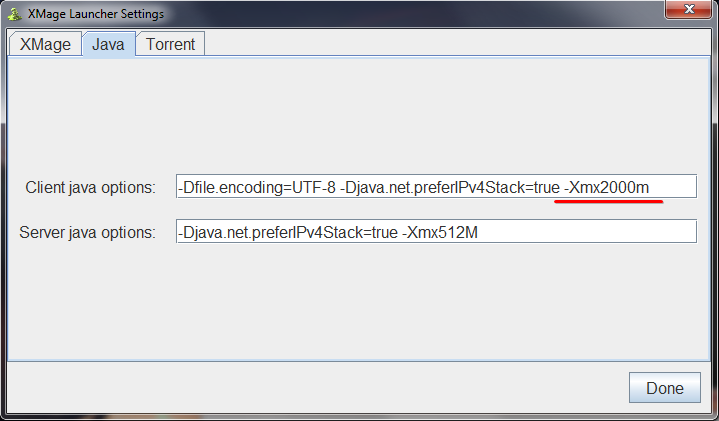
Current recommended commands for client:
-Dfile.encoding=UTF-8 -Djava.net.preferIPv4Stack=true -Xmx2000m
JayDi85
on 8 Feb 2021
Hi, im having the same issue with very high lag and not being able to add cards to decks, but i cant seem to figure out how to do the fix you have stated in edit 2, any advice or help?
 DarkosRox
on 8 Feb 2021
DarkosRox
on 8 Feb 2021
@DarkosRox follow instructions from my comment above (with launcher settings).
JayDi85
on 8 Feb 2021
@DarkosRox follow instructions from my comment above (with launcher settings).
I did and it didnt work :(
DarkosRox
on 8 Feb 2021
@DarkosRox can you show two screenshots? Preferences - java settings from the launcher and a freezed deck editor screen (with cards and main menu visible).
JayDi85
on 8 Feb 2021
@JayDi85 ; @RyanSwanson42: Hello, I'm currently having the same problem. I've tried everything and im still stuck on 519m for the memory. Anything higher the bat file will not work.
 KefflynMar
on 9 Feb 2021
KefflynMar
on 9 Feb 2021
Hello, I'm also having the same problem with not being able to add cards to my deck, and I don't really have any computer experience to fix the issue how you guys are explaining it. Can anybody make it so a dumb person can understand it please?
 Cmgeorge20
on 9 Feb 2021
Cmgeorge20
on 9 Feb 2021
@KefflynMar @Cmgeorge20
I will try to explain what I did.
This is the folder where I installed xmage. Go into that xmage folder underneath the java folder.

Now you will see a few folders and files. Go into the mage-client folder.
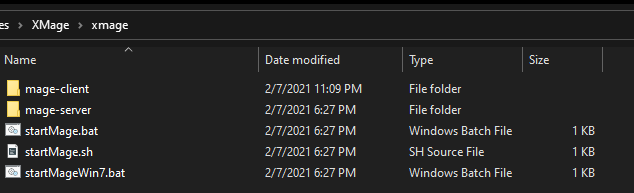
Now you will see a file called startClient.bat. Open it in some kind of editor like Notepad++.
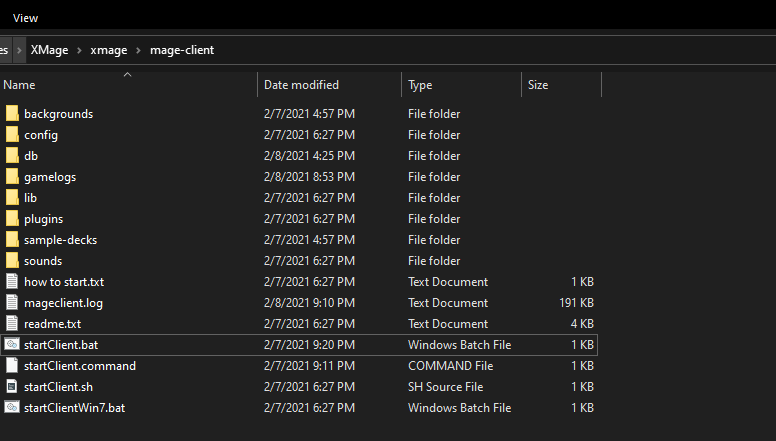
Look at the last line. In your file you should see it say something like -Xms512 -Xmx1024. This is not enough memory for the client and it is causing your issue. Change it to what I have in the below screenshot.
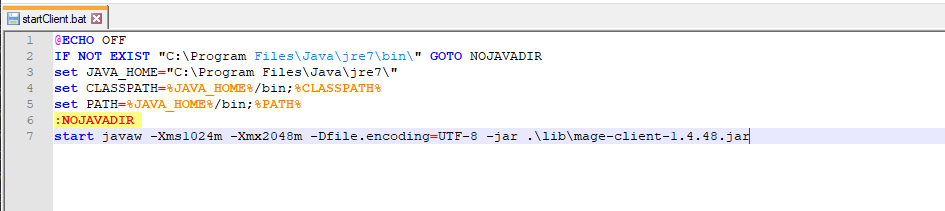
Now save and double-click startClient.bat to run the application with increased memory available. Your problem should be resolved.
RyanSwanson42
on 9 Feb 2021
Thank you so much. It worked!!!
Cmgeorge20
on 9 Feb 2021
Ryanswanson42's fix worked for me as well, thanks a ton!
VladdViever
on 9 Feb 2021
@RyanSwanson42: I've already did that. Like i said, for some reason the app will not work with anything over 519m for mine. I've tried reinstalling, I've tried increasing the memory.
KefflynMar
on 9 Feb 2021
@KefflynMar check your commands -- there are must be spaces between command line params.
JayDi85
on 9 Feb 2021
@JayDi85 There were spaces between. I'm currently trying to reinstall again.
KefflynMar
on 9 Feb 2021
@KefflynMar show your launcher settings screenshot if you run xmage from launcher and show bat-file if you run from command file. Also check startup logs on black screen --you can see error message on wrong startup command.
JayDi85
on 9 Feb 2021
@JayDi85 UPDATE: Just reinstalled. Went through the launcher and changed it to -Xms1024m -Xmx2048m . Yes with the double spacing. This Error pops up:
Error occurred during initialization of VM
Initial heap size set to a larger value than the maximum heap size
Java HotSpot(TM) 64-Bit Server VM warning: ignoring option MaxPermSize=384m; support was removed in 8.0
Picked up _JAVA_OPTIONS: -Xmx512M
KefflynMar
on 9 Feb 2021
-Xms1024m
You don't need xms param at all, just delete it.
Picked up _JAVA_OPTIONS: -Xmx512M
You must open environment variables and delete _JAVA_OPTIONS from it. If you on Windows then follow that instructions. Maybe computer restart needs (if it doesn't work after edit).
JayDi85
on 9 Feb 2021
@JayDi85: Okay, that fixed it. Lol Thanks and sorry for the hassle.
KefflynMar
on 9 Feb 2021
I would like to proffer that maybe the default after all these years should be raised to 2G.
 peter-thoenen
on 10 Feb 2021
peter-thoenen
on 10 Feb 2021
Hopefully it will... https://github.com/magefree/Launcher/pull/14#pullrequestreview-587650317
 ldeluigi
on 10 Feb 2021
ldeluigi
on 10 Feb 2021
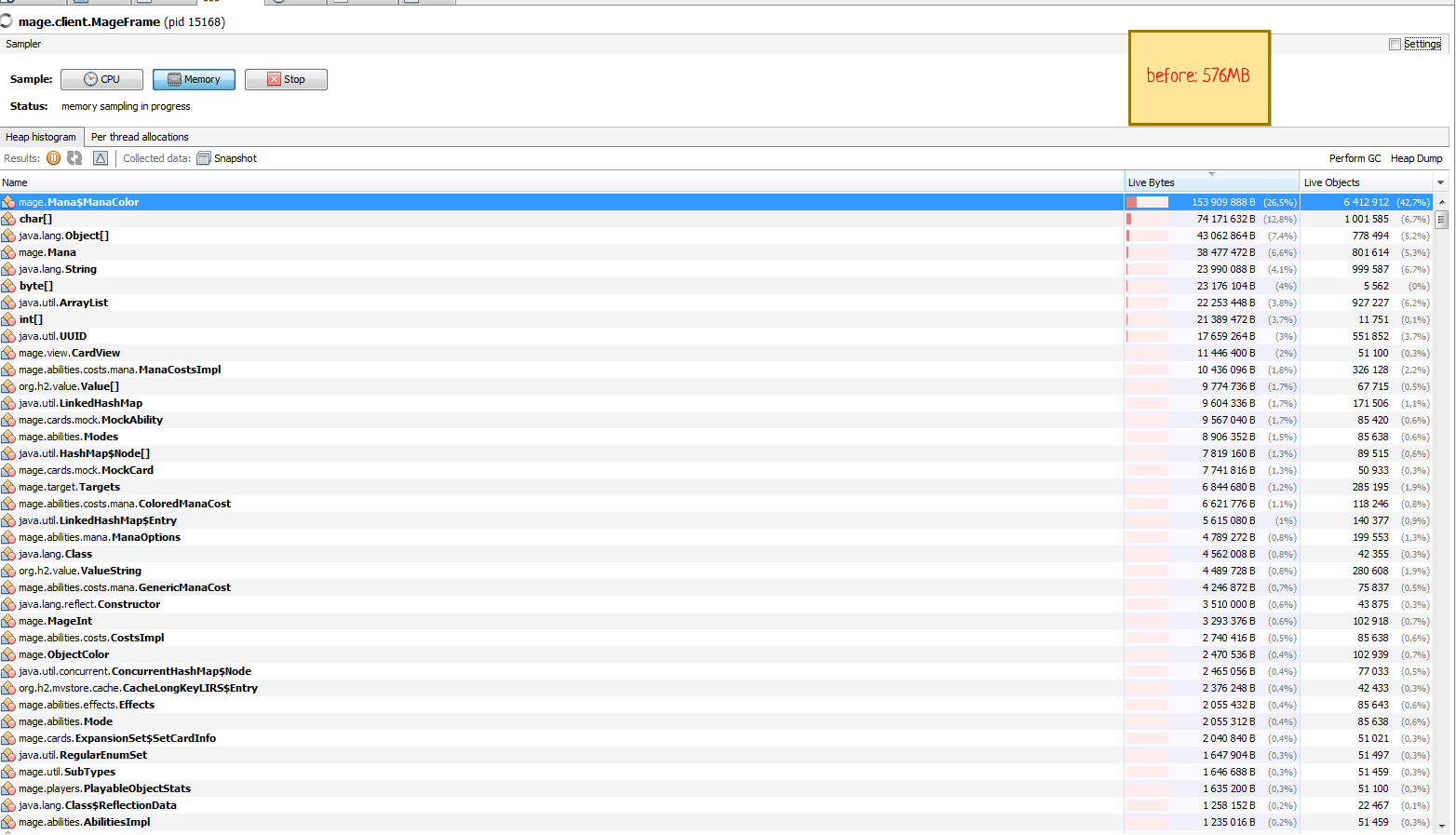
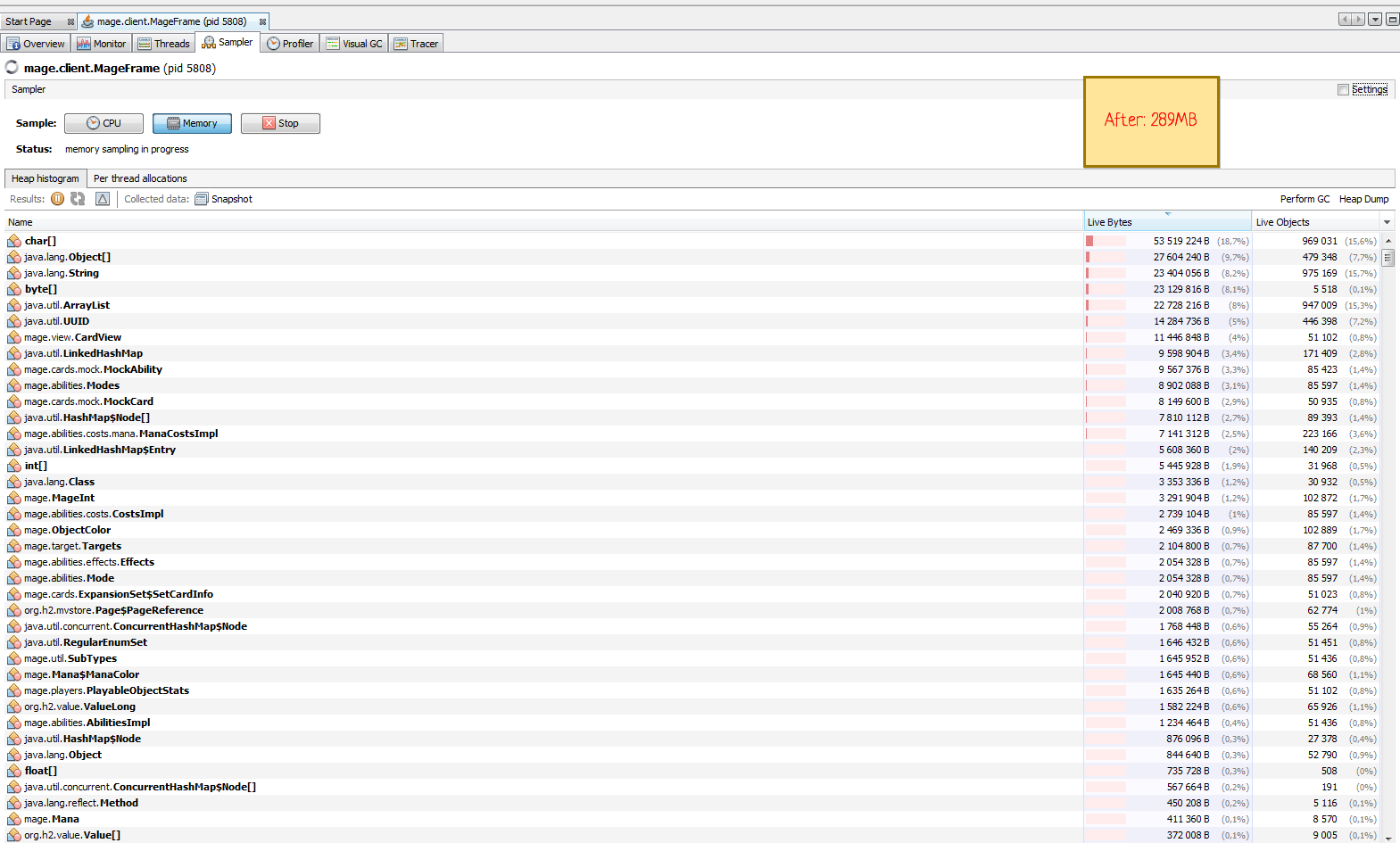
After memory profiling and debugging found a real reason of too much memory usage in deck editor: new ManaColor objects introduced in #7406 for snow mana abilities. It added millions of additional objects (cards -> mana costs -> mana color).
Memory usage by deck editor on first load and java's GC:
- old version 47V1: 410 MB;
- current version 48V0: 576 MB;
- current dev version: 289 MB.
Cards database also increased from last year almost 3x times (thanks to tens of thousands of new promo cards #6190), so it requires more memory too (+50-100 MB relative to very old versions).
What was done (275e996c08095011105647ac48466ed0db55475b, 10e557b873047127f65a388866c0a2b042edf7a6, c1dea5b21ed064cddcc708dd9048824406e7eb86):
- removed mana cost objects from the client side (all mana costs stores as strings now);
- fixed too much memory usage on the search (if you search second time then it require 2x memory, see #7177);
- low end computers can work with deck editor more smoothly (even better than previous versions).
Memory profile example. Before:
Current:
JayDi85
on 12 Feb 2021
Good that you caught and resolved the memory issue.
 sumsarz
on 12 Feb 2021
sumsarz
on 12 Feb 2021
So how much memory should be passed to -Xmx by default?
ldeluigi
on 12 Feb 2021
@ldeluigi 1000m for client and 500m for server.
JayDi85
on 12 Feb 2021
BTW, new version available on beta server
JayDi85
on 12 Feb 2021
@JayDi85 I think the new version isn't respecting semver standards nor previous format, because Launcher's version comparator doesn't trigger any update on the beta channel.
See:
XMage version installed:  1.4.48V0 (2021-02-07)
XMage version available:  1.4.48.dev_2021-02-12_19-51
Related issues
 fenhl
·
7Comments
fenhl
·
7Comments
 spjspj
·
11Comments
spjspj
·
11Comments
 drmDev
·
4Comments
drmDev
·
4Comments
 dosfod
·
7Comments
dosfod
·
7Comments
 ketsuban
·
3Comments
ketsuban
·
3Comments